Skip to Content

Six Useful Tips for New AirPods Owners

Just get a new set of AirPods for Christmas? If so, we've rounded up a handy list of tips, tricks, and features that you might not know about to get you acquainted with your new earbuds.
airpods 3 blue holiday 2

First, if you are new to AirPods entirely, we have a long list of basic tips on how to use your AirPods.

AirPods Basics

6 Useful AirPods Tips for New Owners

Beyond the basics, here are 6 more useful tips about your new AirPods:

1. Keep Your AirPods Safe With Find My

Apple's latest AirPods, including the AirPods 3 and AirPods Pro, feature Find My integration, so if they're stolen or misplaced, you can locate them with the Find My app. AirPods can take advantage of the ‌Find My‌ network so you can leverage the iPhones, iPads, and Macs of other people to track down a lost set of AirPods wherever they end up, so long as the battery holds out.
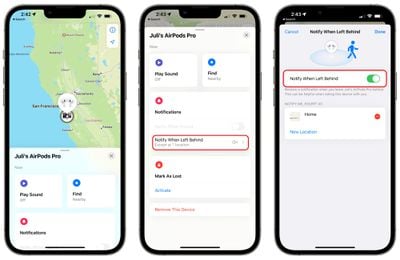
notify when left behind airpods
You'll also want to make sure you turn on "Notify When Left Behind" so you can get alerted right away if you're out and about and forget your AirPods somewhere. To turn it on, open up the ‌Find My‌ app, tap on your AirPods in the list, and toggle on the "Notify When Left Behind" option. These ‌Find My‌ features also work for the AirPods Max.

2. Activate or Deactivate Automatic Device Switching

Apple's AirPods have a feature that allows them to automatically connect to whatever device is in active use, so if you swap from your iPhone to your Mac, the AirPods connection is meant to transition from one device to another as you do.

Automatic Switching can be useful, but there are instances where you might not want it turned on if it's switching between devices inappropriately. You can manage it by following these steps:

  1. Connect your AirPods to your iPhone.
  2. Open up the Settings app.
  3. Tap on Bluetooth and then select the "i" next to your AirPods in the list. airpods bluetooth settings
  4. Tap on "Connect to This iPhone." automatic device switching airpods
  5. Choose "When Last Connected to This iPhone" to turn automatic switching off, and choose "Automatically" to turn it on.
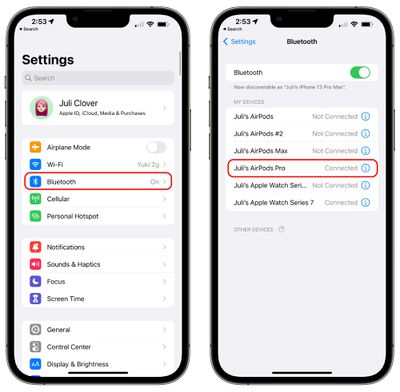
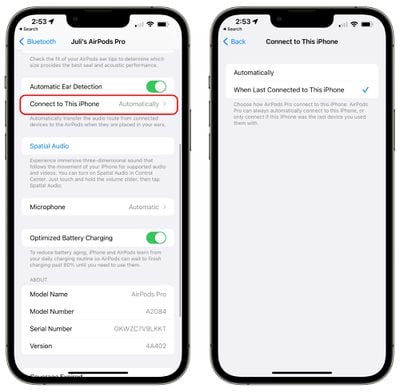
With "Automatically" turned on, your AirPods will connect to your iPhone when it's in active use and your AirPods are in your ears. With "When Last Connected to This iPhone" selected, AirPods will only connect to the last connected device rather than the device in active use. This feature also works with AirPods 2, AirPods 3, AirPods Pro, and AirPods Max.

Note that you will need to disable Automatic Switching for each device connected to your iCloud account if you're not a fan of the feature and want it off entirely. There's no master toggle, with Apple handling it on a per-device basis.

3. Turn on Announce Notifications

With Siri integration and the latest version of iOS (which is iOS 15), AirPods are able to announce all of your incoming notifications, including Messages.
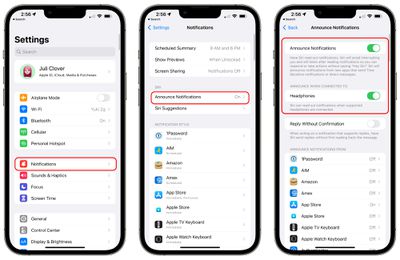
announce notifications airpods
Here's how to turn it on:

  1. Open up the Settings app.
  2. Tap on "Notifications."
  3. Tap on "Announce Notifications."
  4. Toggle on "Announce Notifications."
  5. Toggle on "Headphones."

With both Announce Notifications and Headphones toggled on, ‌Siri‌ will read out notifications from apps of your choice when you have the AirPods in, and will give you an opportunity to respond. So if you have an incoming text message, ‌Siri‌ will read it out and give you a chance to send out a reply, all hands-free.

You can select the apps that you want to use Announce Notifications with so you can get important readouts without having a deluge of notifications read to you by ‌Siri‌.

4. Check Your AirPods Battery Life

If you want to keep tabs on your AirPods battery life, there are multiple ways to do so. AirPods will tell you battery level when you connect them to a device, or you can use the "Battery" widget on an iPhone or an iPad.
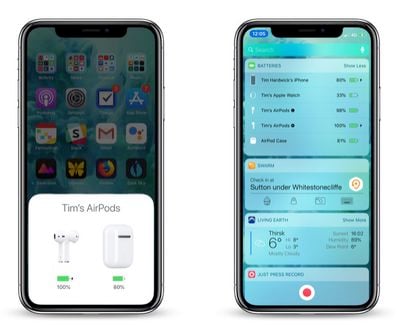
how to check AirPods battery life on iPhone
‌Siri‌ is also able to tell you your AirPods battery life, and if your AirPods are connected to your Apple Watch, the control center offers battery life information. For more on the different ways to check your AirPods battery life, we have a dedicated AirPods battery how-to.
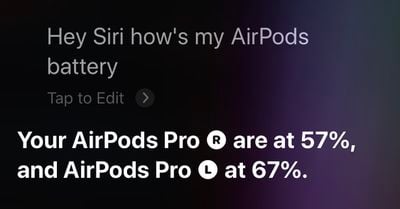
airpods pro ask siri battery

5. Use the Force Sensor to Control Playback

If you've upgraded to the AirPods 3 or AirPods Pro from the original AirPods or the AirPods 2, or if you're new to AirPods entirely, you might not be familiar with the physical controls.
airpods 3 vs airpods pro 5
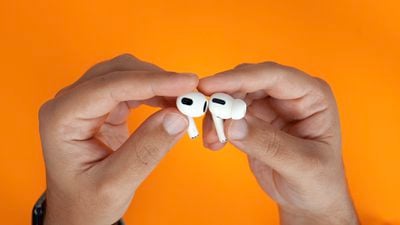
The AirPods 3 and AirPods Pro have a built-in force sensor in the stem. The force sensor can be used for controlling media playback with different presses.

  • Single press - Play/Pause audio
  • Double press - Skip forward
  • Triple press - Skip backward
  • Press when there's a call - Answer incoming call
  • Double press on a call - Hang up
  • Press and hold - Activate ‌Siri‌

On AirPods Pro, you can customize what the long press force sensor gesture does because it can be set to Noise Control or ‌Siri‌. The AirPods 3 do not have Active Noise Cancellation and are limited to ‌Siri‌ for the press-and-hold gesture.

6. Make Sure Spatial Audio is Activated

Spatial audio is a feature that offers immersive three-dimensional sound, and it is able to follow the movement of the iPhone with supported audio and video. Spatial audio can be toggled on or off using the Control Center, and it is available for AirPods 3, AirPods Pro, and AirPods Max.

  1. With your AirPods connected to your iPhone or ‌iPad‌, open up the Control Center. If you don't know how, we have a guide.
  2. On the volume slider, you should see a little icon that looks like the AirPods. If you don't see it, reconnect your AirPods.
  3. Long press on the volume slider.
  4. Tap on the "Spatial Audio" option. spatial audio activate
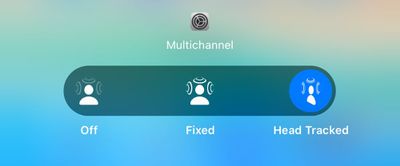
  5. Choose between Off, Fixed, or Head Tracked (on supported devices). spatial audio options
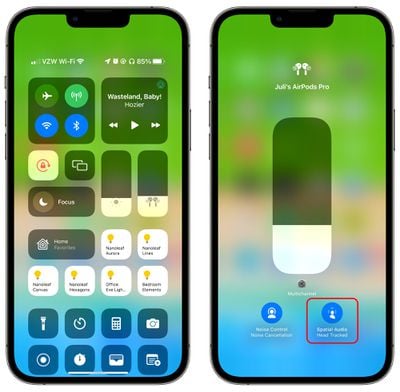
Off will turn spatial audio off entirely, while Fixed will allow spatial audio to be used, but without head-tracking functionality. Head Tracked enables the full spatial audio feature with head tracking included.

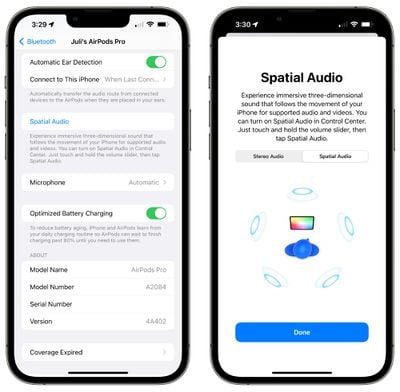
You can also preview what spatial audio sounds like by connecting your AirPods to your phone, selecting them in the Bluetooth section of the Settings app, and choosing the "Spatial Audio" option.
spatial audio test settings
Spatial audio works with the Apple TV app and Apple Music, but many third party apps also support it like Netflix, Disney+, HBO Max, YouTube, and more. We have a useful guide that outlines many popular third-party apps that support spatial audio.

Learn More

To learn more about your AirPods, we have a dedicated AirPods 3 roundup and a dedicated AirPods Pro roundup, both of which walk through all the different features and will come in handy as you learn to use your new earbuds.
Related Roundup: AirPods 5
Buyer's Guide: AirPods (Buy Now)
Related Forum: AirPods

Popular Stories

airpods 5 new blue

Apple Releases New AirPods Firmware

Tuesday November 10, 2026 12:11 pm PST by
Apple today released new firmware for the AirPods Pro 2, AirPods Pro 3, AirPods 4, AirPods 5, and AirPods Max 2. The firmware has a build number of 9B47, up from 9A348/9A350. Apple has been beta testing the new firmware for the last several weeks. In a support document, Apple merely mentioned the new firmware contains "bug fixes and other improvements." Firmware updates can be downloaded...
AirPods Pro Beta Firmware 2

Apple Releases New AirPods Beta Firmware

Tuesday November 3, 2026 11:29 am PST by
Apple today released new beta firmware for the AirPods Pro 2, AirPods Pro 3, AirPods 4, AirPods 5, and AirPods Max 2. The firmware has a build number of 9B5045a and is rolling out for developers and public beta testers. There's no word on what's included in the firmware update because Apple doesn't offer notes for AirPods beta releases. When the AirPods are connected to an iPhone, iPad,...
apple design award 2025

Apple Announces 2025 Design Award Winners Ahead of WWDC 2025

Tuesday June 3, 2025 10:14 am PDT by
As we wait for WWDC to kick off next Monday, Apple today announced the winners of its annual Apple Design Awards, recognizing apps and games for their innovation, ingenuity, and technical achievement. The 2025 Apple Design Award winners are listed below, with one app and one game selected per category: Delight and Fun - CapWords (App) and Balatro (Game) Innovation - Play (App) and PBJ -...

Top Rated Comments

TheYayAreaLiving 🎗️ Avatar
64 months ago
Nice tips.

Tip #7: You can pair them with non-Apple products, too

To start pairing to anything new, put the AirPods in their case, then flip the lid up and press and hold the small button on the rear of the charging case until the little LED light starts pulsing white. They should then show up in any Bluetooth-pairing settings on an Android phone, or computer, or TV.
Score: 4 Votes (Like | Disagree)
64 months ago

Does notifying when left behind work with the first generation AirPods? It doesn't work for me.
I have the AirPods Pro and am not seeing the "Notify When Left Behind" option in Find My. Maybe you have the same issue I do? I'm on an iPhone 8, so maybe that's why? Dunno.
Score: 2 Votes (Like | Disagree)
64 months ago
Very nice and detailed article.
Score: 2 Votes (Like | Disagree)
Joz3d Avatar
64 months ago
Was unable to recover and pay attention to rest of the video once I saw that Julie Clover has AOL Instant Messenger installed.
Score: 1 Votes (Like | Disagree)
contacos Avatar
64 months ago
Most useful tip: get AppleCare+ because those things last about a year* such a throw away product.

*yet I keep using them
Score: 1 Votes (Like | Disagree)
64 months ago

Did you know you can also spy on people using leaving the iPhone behind accidentally? Can be used to easily eavesdrop 👂 🎧

Further details are below.

https://www.cultofmac.com/761827/how-to-use-iphone-and-airpods-spy-on-people/?utm_campaign=The%20Weekender&utm_medium=email&utm_source=Revue%20newsletter
It should go without saying that this is unethical and in some states, territories, etc, it may also be illegal.
Score: 1 Votes (Like | Disagree)
Latest Stories
The 50+ Best Apple Black Friday Deals Still Available on AirPods, iPads, and More
2 hours ago
Here Are the Best Apple Black Friday Leftover Deals You Can Get Today
8 minutes ago
HomePod Mini 2 in (RED) Seemingly Spotted Ahead of Announcement
11 hours ago
Apple's M6 and PROLED MacBook Pro Reach New Low Prices for Black Friday
22 hours ago
The MacRumors Show: iPhone Air 2 and iPhone 18 Are Coming
22 hours ago
Apple Store in Brisbane Reopening Next Month With New Design
22 hours ago
The 60+ Best Black Friday Accessory Deals on iPhone Chargers, TVs, Headphones, and More
1 minute ago
GTA VI Now (Barely) Running on Apple Silicon Macs
23 hours ago
The Best Black Friday Streaming Deals on Apple TV, Disney+, and More
1 day ago
Apple TV's 'Carême' Wins International Emmy for Best Drama
1 day ago
iPhone 18 Production Delay Leaves Apple Little Time Before Launch
1 day ago
The Best Black Friday AirPods Deals Still Available
18 hours ago
The Best Black Friday Deals on Apple Home Products
1 day ago
The Best Black Friday iPhone Deals Still Available
18 hours ago
The Best Black Friday iPad Deals Still Available
18 hours ago
The Best Black Friday Apple Watch Deals Still Available
18 hours ago
The Best Black Friday AirTag Deals Still Available
18 hours ago
The Best Black Friday Mac Deals Still Available
18 hours ago
iPhone Share of US Smartphone Market Hits 57% as Rivals Slip
1 day ago
iPhone 20 Pro Rumored to Feature 3D-Printed Titanium Frame
1 day ago
Apple's Official 2026 Black Friday Offer Starts Rolling Out
2 days ago
Halide Adds Fill Light Feature for iPhone Duo
2 days ago
MacBook Air Black Friday Deals Now Live With Massive $399 Savings
2 days ago
Amazon Discounts All MacBook Neo Models by $99 for Black Friday
2 days ago
Kodak Launches Unique AirTag Rival With E-Ink Display
2 days ago
Here's Why the Apple Store is Going Down
2 days ago
Apple Still Working on Giant Foldable iPad That Could Cost $5,000
2 days ago
iPhones Dominate China's Weak Singles' Day Smartphone Sales
2 days ago
iPhone 20 Pro Could Feature Ceramic in Limited-Edition Model
2 days ago
Apple Faces Korean Regulator Review Over iPhone 16 AI Advertising
2 days ago
Related Apple News: Sport | Health | Iphone | Reviews | Politics