Skip to Content

How to Use and Customize Control Center in iOS

by

On iPhone and iPad, the Control Center provides quick access to a host of useful features in iOS, regardless of whether you have an app open or not, or even whether your device is locked or not. The Control Center is also highly customizable, so you can choose what gets to live there and what doesn't.


How to Access Control Center on iPhone and iPad

Accessing Control Center in iOS is designed to be easy. On an ‌iPad‌ with a Home button, simply double-tap the Home button; on iPhone 8 or earlier, swipe up from the bottom of the screen; and on a 2018 iPad Pro or ‌iPhone‌ X and later, swipe down from the upper right corner of the screen.
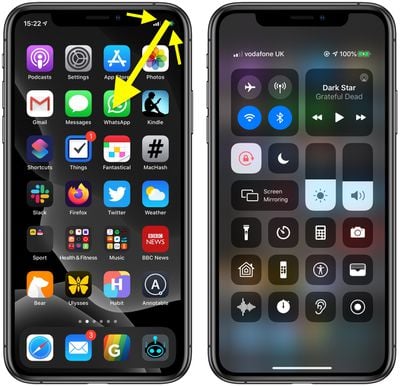
control center

Connectivity Controls

The Control Center is made up of several panels containing associated functions. The first pane on the left allows you to quickly enable or disable the wireless connectivity functions of your device, including Airplane mode, cellular data, Wi-Fi, and Bluetooth. Simply tap any of the buttons to enable or disable the related feature.
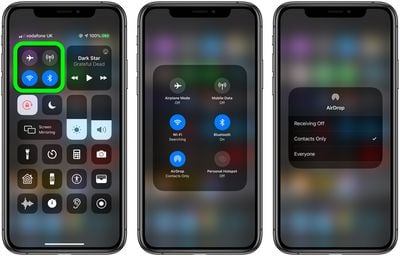
control center
If instead you press and hold on this panel, it will take over the screen and expand to reveal two more buttons: AirDrop and Personal Hotspot. From here, if you press and hold the AirDrop button you can opt to turn off AirDrop or set it to receive files either from Everyone or Contacts Only. Likewise, if you press and hold the Wi-Fi or Bluetooth buttons, you can access a list of available wireless networks and Bluetooth devices, respectively, any of which you can connect to with a tap.

Audio Playback

The second large panel at the top-right corner of the Control Center contains your media playback options, including the name of the currently selected track, album name, and buttons to play/pause and skip forward/go backward a track. There's also an AirPlay button in the top-right corner of the panel which can you can press and hold to expand.
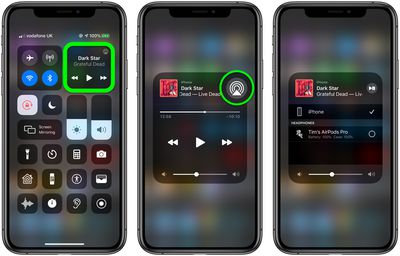
control center
In this expanded view you'll see a track scrubber that you can drag with your finger to advance the current track or return to an earlier point in it. If you press the larger AirPlay button, you can access a list of available AirPlay-compatible devices and top on one to connect to it.

Orientation Lock, Do Not Disturb, and Screen Mirroring

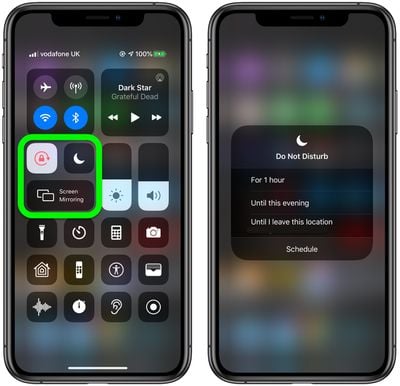
Below the two big panels in the Control Center are three options that always appear in the Control Center. The padlock button lets you enable/disable the Screen Orientation Lock, while the crescent moon turns Do Not Disturb on and off. You can also press and hold the Do Not Disturb button to schedule the mode for 1 hour, Until this evening, or Until I leave this location.
control center
The oblong Screen Mirroring button provides quick access to a list of devices on the same Wi-Fi network that support AirPlay video. Using this button, you can mirror the entire screen of your iOS device on an Apple TV or AirPlay 2-compatible smart TV, just by tapping it in the list.

Brightness and Volume Sliders

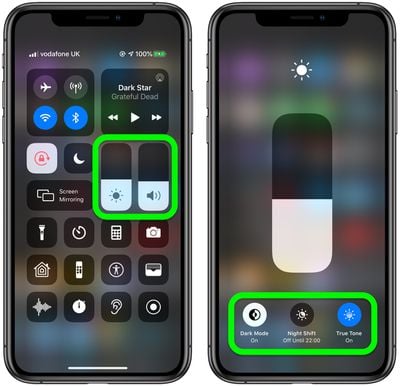
The Brightness and Volume sliders are more useful than they first appear. Aside from letting you set the screen brightness by dragging the level up and down, you can press and hold the Brightness slider to reveal more buttons that let you enable or disable Dark Mode, Night Shift, and True Tone.
control center
If you're listening to audio on your iOS device using Apple AirPods Pro, you can also press and hold the Volume slider to control Transparency and Noise Cancelation functions independently.

Customizing the Control Center

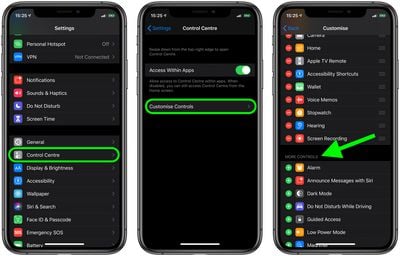
The buttons that appear in Control Center (below the ones we've already described) can vary, because you can add, remove, and organize them in the way you want through the Settings app. Simply follow these steps.

How to Add Controls to Control Center on iPhone and iPad

  1. Launch the Settings app.
  2. Tap Control Center.
  3. Tap Customize Controls.
  4. Scroll down to More Controls.
  5. Tap on the "+" sign to the left of a control to add it to Control Center.control center

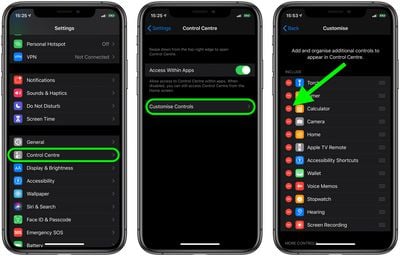
How to Remove Controls From Control Center on iPhone and iPad

  1. Launch the Settings app.
  2. Tap Control Center.

  3. Tap Customize Controls.
  4. Scroll down to the Include section.
  5. Tap the minus ("-") sign to the left of a control to remove it from Control Center.
    control center

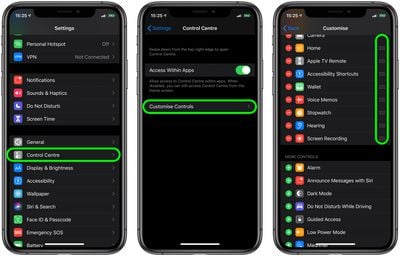
How to Organize Controls in Control Center on iPhone and iPad

  1. Launch the Settings app.
  2. Tap Control Center.
  3. Tap Customize Controls.
  4. Tap the three lines to the right of a control and drag its position up or down.
    control center

Note that the default controls in the upper portion of Control Center, such as the brightness and volume sliders, cannot be removed or reorganized.

List of Default Controls

  • AirDrop
  • Airplane Mode
  • Bluetooth
  • Cellular Data
  • Personal Hotspot
  • Wi-Fi
  • Music
  • Orientation Lock
  • Do Not Disturb
  • Brightness
  • Night Shift
  • Volume
  • AirPlay Mirroring

List of Customizable Controls

  • Accessibility Shortcuts
  • Alarm
  • Apple TV Remote
  • Calculator
  • Camera
  • Do Not Disturb While Driving
  • Flashlight
  • Guided Access
  • Home
  • Low Power Mode
  • Magnifier
  • Notes
  • Screen Recording
  • Stopwatch
  • Text Size
  • Timer
  • Voice Memos
  • Wallet

Once you've organized the buttons in the lower portion of the Control Center, try the same press-and-hold gesture on them and you'll typically be able to access more granular controls.

Press and hold the Camera button, for example, and you'll see options to Take Selfie, Record Video, Take Portrait, and Take Portrait Selfie. Similarly, press and hold the Wallet button to view a list of transactions for a particular Apple Pay card, or view your Last Transaction. And if you add the Notes button, you can even scan documents with your iPhone in three quick steps.


Top Rated Comments

120 months ago
Having the VPN button would be nice.
Score: 6 Votes (Like | Disagree)
soupcan Avatar
120 months ago
Logic would dictate that I'd now be able to move icons around the control centre like I move apps around my home pages putting things exactly where I want them. But apparently that thought didn't cross Apple's mind and now I have to guesstimate where my icons will end up because the thought of a live preview also didn't cross Apple's mind.

It's a step in the right direction with 3D touch and some form of customisability but it still needs some work.
Score: 5 Votes (Like | Disagree)
120 months ago
Found an explanation of the WiFi/Bluetooth control center changes:

https://support.apple.com/en-us/HT208086

Hmmm .... I kinda see where they were going with this, but this is a massive behavior change that hasn’t been publicized enough.

I like it more for WiFi than Bluetooth. I have to admit that most of the time when I disable WiFi it’s because a sticky “one bar” junk connection is giving me no service and I just want to get back to LTE. But then I forget to reenable it later and use up data in the meantime. The new logic solves that problem.

But that’s never the case for Bluetooth. If I’m turning off Bluetooth it’s explicitly because I want to save battery.

The solution seems simple enough: add force touch / long tap on the CC icons to fully turn off. Or revert behavior and use force touch for the new behavior.

MacRumors should make an article about this. If anyone is listening ...
Score: 4 Votes (Like | Disagree)
Weaselboy Avatar
120 months ago
What happened to night shift? Am I missing it or did it disappear from the new one?
Do 3D touch on the brightness and it will come up.
Score: 3 Votes (Like | Disagree)
jthesssin Avatar
120 months ago
I'm stoked that low power mode is quickly accessible now!
Score: 3 Votes (Like | Disagree)
Weaselboy Avatar
120 months ago
MacRumors should make an article about this. If anyone is listening ...
tips@macrumors.com

Send your suggestion to the editors at this email. They will even give you credit if they publish an article off your suggestion.
Score: 2 Votes (Like | Disagree)

Popular Stories

apple design award 2025

Apple Announces 2025 Design Award Winners Ahead of WWDC 2025

Tuesday June 3, 2025 10:14 am PDT by
As we wait for WWDC to kick off next Monday, Apple today announced the winners of its annual Apple Design Awards, recognizing apps and games for their innovation, ingenuity, and technical achievement. The 2025 Apple Design Award winners are listed below, with one app and one game selected per category: Delight and Fun - CapWords (App) and Balatro (Game) Innovation - Play (App) and PBJ -...
1password deal blue

1Password Security Breach: What Was Accessed and What Wasn't

Wednesday November 25, 2026 1:09 pm PST by
Popular password management app 1Password today said it experienced a security breach earlier this month. 1Password says some customer names and email addresses were accessed, but no customer vault contents were compromised. On November 19, 1Password saw indications that an employee's GitHub account had been breached and began investigating. The company says the breached GitHub account was...
apple store down feature

Here's Why the Apple Store is Going Down

Thursday November 26, 2026 5:49 am PST by
Apple's online store is going down for a few hours on a rolling country-by-country basis right now, but do not get your hopes up for new products. Apple takes its online store down for a few hours ahead of Black Friday every year to tease its annual gift card offer with the purchase of select products. The store is down in Australia, New Zealand, and Thailand, right now, and it will...
Latest Stories
The 50+ Best Apple Black Friday Deals on AirPods, iPads, MacBooks, and More
3 hours ago
Apple's M6 and PROLED MacBook Pro Reach New Low Prices for Black Friday
3 hours ago
The MacRumors Show: iPhone Air 2 and iPhone 18 Are Coming
3 hours ago
Apple Store in Brisbane Reopening Next Month With New Design
4 hours ago
The 60+ Best Black Friday Accessory Deals on iPhone Chargers, TVs, Headphones, and More
5 hours ago
GTA VI Now (Barely) Running on Apple Silicon Macs
5 hours ago
The Best Black Friday Streaming Deals on Apple TV, Disney+, and More
6 hours ago
Apple TV's 'Carême' Wins International Emmy for Best Drama
6 hours ago
iPhone 18 Production Delay Leaves Apple Little Time Before Launch
7 hours ago
The Best Black Friday AirPods Deals
8 hours ago
The Best Black Friday Deals on Apple Home Products
8 hours ago
The Best Black Friday iPhone Deals
8 hours ago
The Best Black Friday iPad Deals
8 hours ago
The Best Black Friday Apple Watch Deals
8 hours ago
The Best Black Friday AirTag Deals
8 hours ago
The Best Black Friday Mac Deals
8 hours ago
iPhone Share of US Smartphone Market Hits 57% as Rivals Slip
9 hours ago
iPhone 20 Pro Rumored to Feature 3D-Printed Titanium Frame
11 hours ago
Apple's Official 2026 Black Friday Offer Starts Rolling Out
1 day ago
Halide Adds Fill Light Feature for iPhone Duo
1 day ago
MacBook Air Black Friday Deals Now Live With Massive $399 Savings
1 day ago
Amazon Discounts All MacBook Neo Models by $99 for Black Friday
1 day ago
Kodak Launches Unique AirTag Rival With E-Ink Display
1 day ago
Here's Why the Apple Store is Going Down
1 day ago
Apple Still Working on Giant Foldable iPad That Could Cost $5,000
1 day ago
iPhones Dominate China's Weak Singles' Day Smartphone Sales
1 day ago
iPhone 20 Pro Could Feature Ceramic in Limited-Edition Model
1 day ago
Apple Faces Korean Regulator Review Over iPhone 16 AI Advertising
1 day ago
Apple Watch Ultra 4 Hits New Best-Ever Price of $649.99 for Black Friday
1 day ago
New Apple Store Opening in India, Download the Special Wallpaper Now
2 days ago
Related Apple News: World News | Technology | Ipad | Lifestyle | Iphone