Skip to Content

iOS 15 Siri Guide: On Device Offline Recognition and Updates

There are some major improvements to Siri in iOS 15, with Apple introducing features that iPhone users have long asked for. On devices with an A12 chip or later, ‌Siri‌ can do on-device processing and there's support for offline requests.
iOS 15 Siri Feature
This guide highlights all of the new ‌Siri‌ features that are available in iOS (and iPadOS) 15.

On-Device Speech Processing and Personalization

Starting in iOS 15, speech processing and personalization are done on-device. This makes ‌Siri‌ faster at processing requests, but also more secure. Most audio requests made of ‌Siri‌ are kept entirely on the iPhone and are no longer uploaded to Apple's servers for processing.

‌Siri‌'s speech recognition and understanding of commands improves as a device is used, with ‌Siri‌ learning the contacts most interacted with, new words typed, and topics preferred, with all of this information kept on device and private.

On-device speech processing and personalization is enabled through the Apple Neural Engine and it is available on iPhones and iPads that have an A12 Bionic chip or later.

On-device processing is available in German (Germany), English (Australia, Canada, India, UK, U.S.), Spanish (Spain, Mexico, U.S.), French (France), Japanese (Japan), Mandarin Chinese (China mainland), and Cantonese (Hong Kong).

Offline Support

With on-device processing now available, there are a wide range of ‌Siri‌ requests that can be handled offline. ‌Siri‌ can create (and disable) timers and alarms, launch apps, control audio playback, and access Settings options.

Apple says ‌Siri‌ can also process Messages, sharing, and Phone requests.

Sharing via Siri

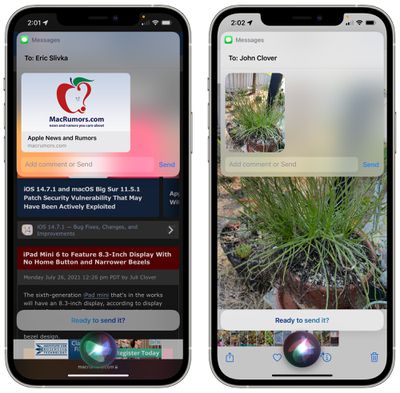
When you come across something that you want to share like a photo, web page, Apple Music song, or podcast, you can ask ‌Siri‌ to send it to a friend or family member and ‌Siri‌ will do so.

siri sharing ios 15
If it's something that can't be shared, like a Messages thread, ‌Siri‌ will make a screenshot and send that. All you have to do is say "Send this to [person]" and ‌Siri‌ will confirm the request and then send it along.
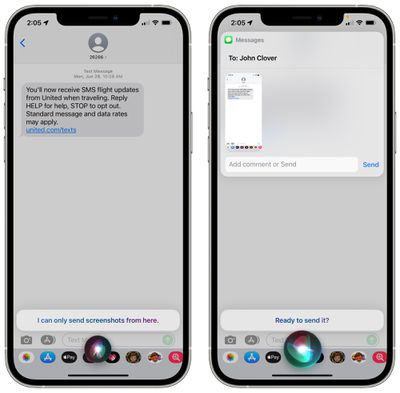
siri send screenshots 1
This feature works with ‌Apple Music‌, Apple Podcasts, Apple News, Maps, web pages, photos, Messages, and more.

Improved Context Between Requests

‌Siri‌ in iOS 15 can better maintain context between voice requests. So if you ask something like "How late is the Taco Bell open?" and then "How long does it take to get there?" ‌Siri‌ will understand that "there" is the Taco Bell from the previous request.
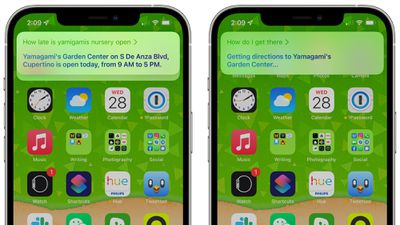
siri contextual requests
This tends to work only when there's a single option, because in a situation with multiple Taco Bells, ‌Siri‌ needs clarification. For that reason, the contextual improvements are limited.

Contacts

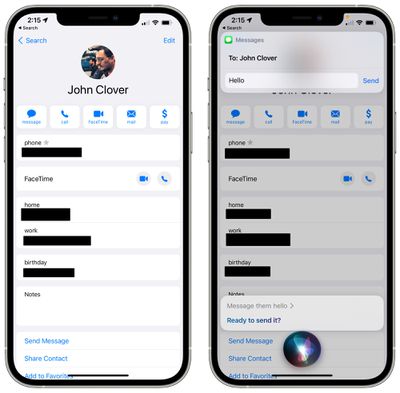
‌Siri‌ also understands that if there's a contact on the screen, that's the person that you want to talk to.

So if you have the contacts app open to a specific person, are chatting with someone in Messages, get a Message notification, or miss a call, you can say something like "Message them I'm on my way" and ‌Siri‌ will know to send it to the relevant contact that you've just interacted with or have open.
ios 15 contextual messaging

HomeKit Improvements

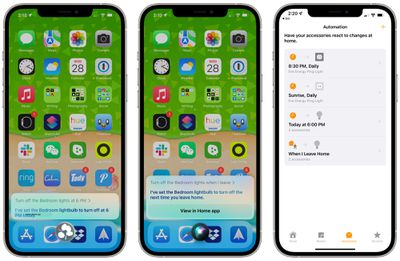
‌Siri‌ can now be used to control a HomeKit device at a specific time. So if you want your lights to turn off right when at 7, you can say something like "Hey ‌Siri‌, turn off the bedroom lights at 7.p.m." This command also works for geolocation, so you can say things like "Hey ‌Siri‌, turn off the air conditioning when I leave."
siri ios 15 timed homekit commands
When you ask ‌Siri‌ to control a ‌HomeKit‌ product this way, it creates an automation in the Home app under the "Automation" section. If you want to delete an Automation ‌Siri‌ has created, you can do so in the Home app.

‌HomeKit‌ developers can also add ‌Siri‌ support to their products in iOS 15, but using ‌Siri‌ commands with third-party devices does require the user to have a HomePod to route requests through. With ‌Siri‌ integration, customers will be able to use their ‌HomeKit‌ products for ‌Siri‌ commands like setting reminders, controlling devices, broadcasting messages, and more.

Announce Notifications

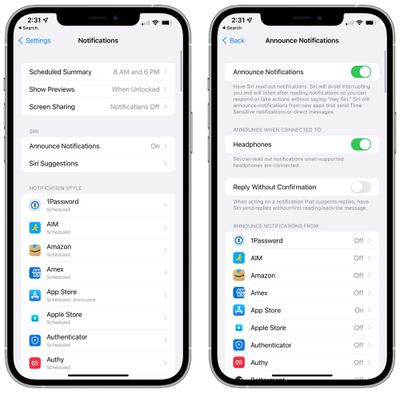
‌Siri‌ has been able to announce calls and incoming messages when using AirPods (or Beats headphones) for some time now, but in iOS 15, that feature is expanding to all notifications.
siri announce notifications ios 15
‌Siri‌ can automatically announce Time Sensitive notifications when AirPods are connected if you toggle the feature on in the Settings app (in either the ‌Siri‌ or Notifications sections), and there are also options to have ‌Siri‌ announce notifications on an app-by-app basis if you want to hear notifications from a particular app but those notifications aren't Time Sensitive.

Announce Messages in CarPlay

There's now a feature to have ‌Siri‌ announce your incoming messages when your iPhone is connected to a CarPlay setup.

There's an option to turn announcements on or off when a message is read, and ‌Siri‌ will remember your preference. This feature can also be toggled on or off using the Settings app.

Announce Reminders With AirPods

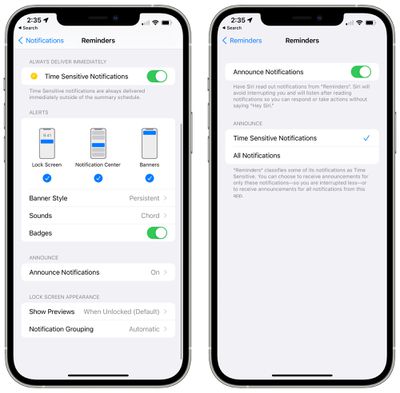
In addition to notifications, ‌Siri‌ can also announced reminders that come up when wearing AirPods or compatible Beats headphones.
siri announce reminders ios 15

Add Siri Suggestions to Safari Start Page

With Start Page customization in iOS 15, there is an option to add a section for ‌Siri‌ Suggestions for websites you might want to visit or content you might want to view.

Language Improvements

Neural text-to-speech voices have expanded to Swedish, Danish, Norwegian, and Finnish in iOS 15.

Apple has also added mixed English and Indic language support. ‌Siri‌ can process commands in a mix of Indian English and native languages, with support for Hindi, Telugu, Kannada, Marathi, Tamil, Bengali, Gujarati, Malayalam, and Punjabi.

Siri for Developers

Apple is tweaking its SiriKit interface and is eliminating some of the ‌Siri‌ commands that developers were able to use with third-party apps.

Starting with iOS 15, customers will no longer be able to use ‌Siri‌ in third-party apps to do things like book a ride with Uber, make a bill payment, or create new task lists in to-do apps. Many of these ‌Siri‌ functions may be replaced by Shortcut options that can be activated with ‌Siri‌ voice commands.

Guide Feedback

Have questions about ‌Siri‌ in iOS 15, know of a feature we left out, or want to offer feedback on this guide? Send us an email here.
Related Forum: iOS 15

Popular Stories

Siri AI Icon

Siri AI Settlement: Here's How Much Apple Will Pay You

Saturday November 21, 2026 9:08 am PST by
In May, Apple agreed to pay $250 million to settle a U.S. class action lawsuit over Siri AI's delayed launch, and there is one month remaining to submit a claim through the settlement website. In a court document earlier this week, lawyers said that claimants will likely receive at least $61 per eligible iPhone, based on early participation data so far. The exact payment amount per eligible ...
Siri AI Icon

iOS 27.3 Beta Adds Daily Siri AI Limits and iCloud+ Upgrades

Monday November 16, 2026 10:14 am PST by
With the latest iOS 27.3, iPadOS 27.3, and macOS 27.3 betas, Apple is starting to test limits and paid upgrades for Siri AI and Apple Intelligence features. Every Apple device gets a free daily access allowance for Siri AI and Apple Intelligence features that rely on server-side AI processing, such as Image Playground and Clean Up in Photos. When that limit is hit, there will be an option to ...
Apple TV 4K 4th Generation feature0

Apple Releases tvOS 27.2.1 With Siri AI for Older Apple TVs

Friday November 13, 2026 11:26 am PST by
Apple today released tvOS 27.2.1, an update to the tvOS 27 operating system that launched in September. tvOS 27.2.1 comes nearly three weeks after Apple released tvOS 27.2. tvOS 27.2.1 brings Siri AI support to the 2nd- and 3rd-generation Apple TV 4K models, but it is available for all Apple TV 4K models that support tvOS 27. Apple announced Siri AI for the Apple TV when debuting the...

Top Rated Comments

70 months ago
There's one suggestion I have made before and would love to see - seems easy. If I'm sending a text via Siri to a contact, and I mention that persons name in the text, it would be great if Siri relied on the spelling of the name from the contact. For example, if I'm texting someone named "Erik" and I want to text (via Siri), "Hey Erik, did you see that reveal on last night's show?"... Siri will spell out the text as "Hey Eric, did you see that reveal on last night's show?" Would be great since in this example I'm texting a contact named "Erik" if Siri had the logic to take the spelling from the contact.
Score: 15 Votes (Like | Disagree)
70 months ago

The other day I happened to watch the keynote when it was introduced back then.


It was actually really fun and surprising to watch, to see all it was able to do back then already, and how it... hasn't really evolved in a decade.
Wow, I think you're right. In fact, it's dumber than the original version of Siri.

I think they took out the wolfram alpha api. In the demo, Scott mentioned that you can ask it how many days until your birthday and when I tried that just now, it only tells me when my birthday is but not the number of days until my birthday.
Score: 15 Votes (Like | Disagree)
PsykX Avatar
70 months ago

For better or for worse, it will be a decade this year since Siri first launched on the iPhone.
The other day I happened to watch the keynote when it was introduced back then.


It was actually really fun and surprising to watch, to see all it was able to do back then already, and how it... hasn't really evolved in a decade.
Score: 15 Votes (Like | Disagree)
70 months ago
The weakest product/service in apples lineup by far.
Score: 12 Votes (Like | Disagree)
70 months ago
Honestly, this is one of the most exciting features in iOS 15. Offline Siri, improved context, and especially the "announce notifications" feature.
Score: 8 Votes (Like | Disagree)
contacos Avatar
70 months ago
Useless for me since Siri is still not able to handle more than one language at a time. You should hear my incoming messages in Spanish or English when my iPhone is set to German. It’s hilarious
Score: 6 Votes (Like | Disagree)
Latest Stories
The 50+ Best Apple Black Friday Deals on AirPods, iPads, MacBooks, and More
5 minutes ago
Apple's M6 and PROLED MacBook Pro Reach New Low Prices for Black Friday
9 minutes ago
The MacRumors Show: iPhone Air 2 and iPhone 18 Are Coming
15 minutes ago
Apple Store in Brisbane Reopening Next Month With New Design
43 minutes ago
The 60+ Best Black Friday Accessory Deals on iPhone Chargers, TVs, Headphones, and More
2 hours ago
GTA VI Now (Barely) Running on Apple Silicon Macs
2 hours ago
The Best Black Friday Streaming Deals on Apple TV, Disney+, and More
3 hours ago
Apple TV's 'Carême' Wins International Emmy for Best Drama
3 hours ago
iPhone 18 Production Delay Leaves Apple Little Time Before Launch
4 hours ago
The Best Black Friday AirPods Deals
4 hours ago
The Best Black Friday Deals on Apple Home Products
4 hours ago
The Best Black Friday iPhone Deals
5 hours ago
The Best Black Friday iPad Deals
5 hours ago
The Best Black Friday Apple Watch Deals
5 hours ago
The Best Black Friday AirTag Deals
5 hours ago
The Best Black Friday Mac Deals
5 hours ago
iPhone Share of US Smartphone Market Hits 57% as Rivals Slip
6 hours ago
iPhone 20 Pro Rumored to Feature 3D-Printed Titanium Frame
7 hours ago
Apple's Official 2026 Black Friday Offer Starts Rolling Out
1 day ago
Halide Adds Fill Light Feature for iPhone Duo
1 day ago
MacBook Air Black Friday Deals Now Live With Massive $399 Savings
1 day ago
Amazon Discounts All MacBook Neo Models by $99 for Black Friday
1 day ago
Kodak Launches Unique AirTag Rival With E-Ink Display
1 day ago
Here's Why the Apple Store is Going Down
1 day ago
Apple Still Working on Giant Foldable iPad That Could Cost $5,000
1 day ago
iPhones Dominate China's Weak Singles' Day Smartphone Sales
1 day ago
iPhone 20 Pro Could Feature Ceramic in Limited-Edition Model
1 day ago
Apple Faces Korean Regulator Review Over iPhone 16 AI Advertising
1 day ago
Apple Watch Ultra 4 Hits New Best-Ever Price of $649.99 for Black Friday
1 day ago
New Apple Store Opening in India, Download the Special Wallpaper Now
2 days ago
Related Apple News: Reviews | Buyers Guide | Lifestyle | South Africa | World News