Skip to Content

iOS 14's Compact Interface: Phone Calls, FaceTime, Siri and More

iOS 14 introduces several compact user interface elements that iPhone users have been requesting for years, such as a minimized phone call pop up that doesn't take over the entire screen and a smaller Siri window that doesn't dominate the display.
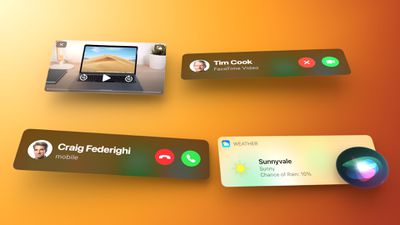
iOS 14 Compact 3d
This guide covers all of the new compact UI elements that Apple has added, but for more details on iOS 14 design changes, make sure to check out our Home Screen guide and our full iOS 14 roundup.

Phone Calls

When you're in the middle of using your iPhone and a phone call comes in, it's frustrating to have the incoming call take over the iPhone's display, especially if it's a spam call that you don't care about.
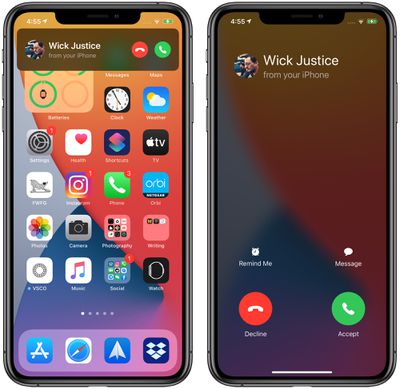
ios14incomingcallcollapsed
That's no longer a problem in iOS 14, because incoming phone calls are shown in a notification banner rather than a full incoming phone call display like in iOS 13.

Phone calls are only shown in banner format when your phone is unlocked and in use, so when your iPhone is locked, the Lock Screen interface where with the slide to unlock bar is still present.

You can tap on the decline button of incoming phone call banner to decline the call right away. Tapping on the accept button activates the call right in the banner interface, but if you tap outside of the accept/reject buttons the call opens in full screen as normal. If you swipe the banner away, you can continue to use your iPhone as normal while the phone rings in the background with a small icon shown over the time at the top left of the display.

If you tap a phone call banner and open the full display interface, you'll need to accept or decline the call to get out of the phone call view. If you've swiped the banner away, you can tap on the call icon in the upper left corner of the display to get to the call interface.
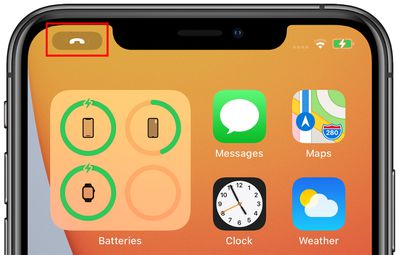
incomingcallcollapsedios14

FaceTime Calls

Incoming FaceTime calls in iOS 14 look the same as incoming phone calls when the iPhone is in use, showing up as a banner that can be swiped away or tapped to accept or decline a call. Note that ‌FaceTime‌ calls only show up in banner format when the iPhone is unlocked and in use. On the Lock Screen, ‌FaceTime‌ calls continue to take up the whole screen and will activate the camera.
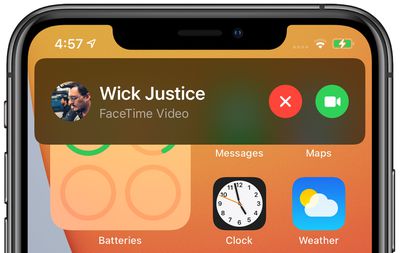
ios14facetime
Tapping on a ‌FaceTime‌ call banner will extend the ‌FaceTime‌ call interface to the entire display as it works in iOS 13, where you can either decide to accept or decline the call. Tapping right on the "X" button will automatically decline the call from the banner, however.

Swiping the ‌FaceTime‌ banner away allows the ‌FaceTime‌ call to continue ringing in the background without disturbing you. You'll see the ‌FaceTime‌ icon over the time in the upper left corner of the display, which you can tap to get back to the ‌FaceTime‌ interface if you want to accept or decline the call. Otherwise, it rings in the background for a few seconds until it registers that you're not picking up.
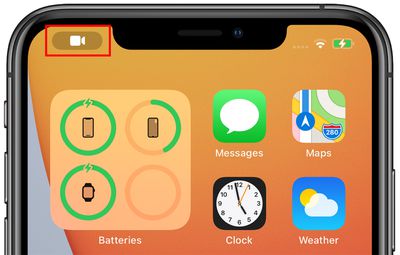
facetimecollapsediconios14
Once you've tapped on a ‌FaceTime‌ call banner or icon, the ‌FaceTime‌ call expands to the full display and the only way to get out of the interface is to accept or decline the ‌FaceTime‌ call.

Third-Party VOIP Calls

Apple created a new API for the collapsed call interface that will let developers incorporate the feature into third-party VOIP apps like Facebook Messenger, WhatsApp, Skype, and tons more.

App developers will need to implement this API into their apps before their apps will be shown with the updated call interface.

Picture in Picture

Apple considers the new Picture in Picture mode on iPhone to be part of the updated compact user interface in iOS 14. With Picture in Picture mode you can watch TV shows, movies, and videos from apps and the web while doing other things on your iPhone with the content shown in a windowed view.
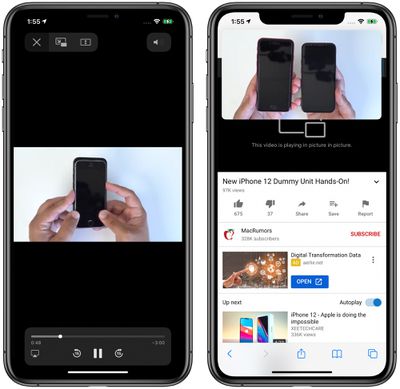
pictureinpicturesafari2
There's a ‌FaceTime‌ Picture in Picture feature that's even more useful because there's now a way to carry on a ‌FaceTime‌ conversation while also using your iPhone as normal. In iOS 13, exiting out of the ‌FaceTime‌ app pauses the ‌FaceTime‌ video for the person you're speaking with, but in iOS 14, exiting out of ‌FaceTime‌ collapses the video view into a small window so both parties can continue their discussion.

We have a Picture in Picture guide with complete details on how the feature works, so make sure to check that out for more info on the Picture in Picture feature.

Siri

‌Siri‌ requests in iOS 14 are also part of the compact interface, and activating ‌Siri‌ no longer takes over the entire iPhone. Instead, when you activate ‌Siri‌ through a "Hey ‌Siri‌" voice command or through a physical button, a circular, animated ‌Siri‌ icon pops up at the bottom of the iPhone's display.
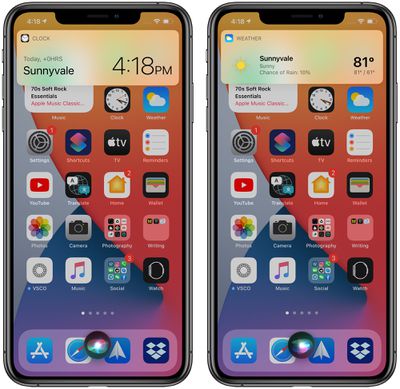
siriios14
The ‌Siri‌ icon moves as you speak to ‌Siri‌ so you can be sure the voice assistant is listening and picking up what you have to say. Queries are also displayed in a more compact view with information provided at the top in a banner format.

If, for example, you ask ‌Siri‌ the time or the weather, the information is shown in a banner-style popup at the top of the display.

Shorter information is shown in smaller banners, but longer questions may have banners that take up more space. This is especially true of results that involve web searches.
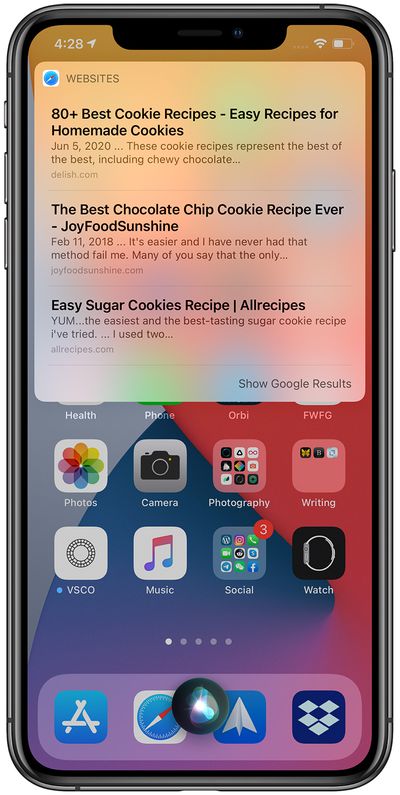
siriios14full
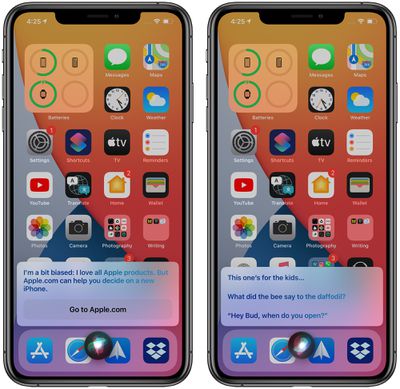
Certain requests, such as those that show off ‌Siri‌'s personality like jokes or product information requests, show the results right above the ‌Siri‌ icon.

sirijokesios14
Note that in iOS 14, ‌Siri‌ does not display the text of what you've spoken in order to keep the interface as small as possible, but if you enable the "Always Show Speech" feature, what you're speaking will show up in a small popup over the ‌Siri‌ icon. It's useful to see what ‌Siri‌ hears to make sure the voice assistant is properly interpreting commands.

Turn on "Always Show Speech" by opening up Settings, going to ‌Siri‌ & Search, tapping on ‌Siri‌ Feedback and then toggling on the speech option. You can also turn on captions, which will show captions for all spoken text.
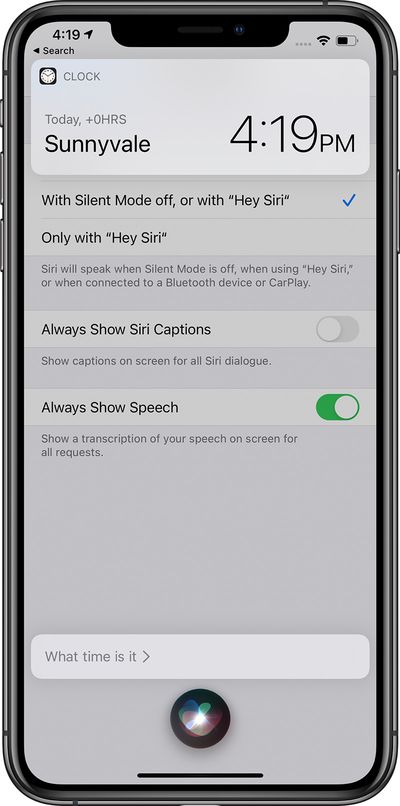
siricaptions
In any ‌Siri‌ result, while the ‌Siri‌ interface leaves the background of the iPhone visible so you can continue to see what you were doing prior to the ‌Siri‌ request, there is no option to interact with other apps while the ‌Siri‌ interface is open. Attempting to tap elsewhere on the display while ‌Siri‌ is active closes the ‌Siri‌ interface.

After activating ‌Siri‌ the first time with a voice command or a physical button, the ‌Siri‌ interface stays open until you tap out of it, so you can tap on the ‌Siri‌ icon to initiate another ‌Siri‌ request. With ‌Siri‌ results that are interactive like web search results or translations, you can tap in the ‌Siri‌ window to execute the search, hear the spoken translation, and more. All in all, ‌Siri‌ in iOS 14 works much the same as it does in iOS 13, but in a way that feels like it's less of an interruption to general iPhone and iPad usage.

Along with the redesign, ‌Siri‌ has a few other new features in iOS 14 such as support for sending audio messages, getting cycling directions, and sharing an Apple Maps ETA with a contact, with how tos covering these new features available below.

Guide Feedback

Have questions about the interface changes in iOS 14, know of a feature we left out, or want to offer feedback on this guide? Send us an email here. For more on everything new in iOS 14, make sure to check out our iOS 14 roundup and our other iOS 14 guides.


Related Forum: iOS 14

Popular Stories

apple design award 2025

Apple Announces 2025 Design Award Winners Ahead of WWDC 2025

Tuesday June 3, 2025 10:14 am PDT by
As we wait for WWDC to kick off next Monday, Apple today announced the winners of its annual Apple Design Awards, recognizing apps and games for their innovation, ingenuity, and technical achievement. The 2025 Apple Design Award winners are listed below, with one app and one game selected per category: Delight and Fun - CapWords (App) and Balatro (Game) Innovation - Play (App) and PBJ -...
1password deal blue

1Password Security Breach: What Was Accessed and What Wasn't

Wednesday November 25, 2026 1:09 pm PST by
Popular password management app 1Password today said it experienced a security breach earlier this month. 1Password says some customer names and email addresses were accessed, but no customer vault contents were compromised. On November 19, 1Password saw indications that an employee's GitHub account had been breached and began investigating. The company says the breached GitHub account was...
Apple 2026 Black Friday Event Hero

Apple's Official 2026 Black Friday Offer Starts Rolling Out

Thursday November 26, 2026 8:37 am PST by
Apple's annual four-day Black Friday through Cyber Monday shopping event is now live in Australia, New Zealand, and Thailand, and it will continue to roll out across Europe, the U.S., and Canada as the calendar turns to Friday, November 27 around the world. In the U.S., Apple's terms and conditions say the promotion begins on November 27 at 12 a.m. Pacific Time and ends on November 30 at...

Top Rated Comments

83 months ago

Phone calls need a ghost button. So, people don't get dumped straight to voicemail but the ringing and any notification goes away.


Swiping away the new incoming call notification/banner basically does that -- that's essentially one of the bigger changes that is in iOS 14 in regards to calls.

Score: 18 Votes (Like | Disagree)
AngerDanger Avatar
83 months ago

Wouldn’t those incoming call alerts be better placed at the bottom of the screen?

While the Siri results would be better placed at the top, since they don’t require interaction by touch.

I don't think so; imagine you're using the keyboard when you get a call and accidentally accept when you go to press a key.
Score: 18 Votes (Like | Disagree)
velocityg4 Avatar
83 months ago
Phone calls need a ghost button. So, people don't get dumped straight to voicemail but the ringing and any notification goes away.


Attachment Image
Score: 8 Votes (Like | Disagree)
simonmet Avatar
83 months ago
Wouldn’t those incoming call alerts be better placed at the bottom of the screen?

While the Siri results would be better placed at the top, since they don’t require interaction by touch.
Score: 8 Votes (Like | Disagree)
iDento Avatar
83 months ago

Okay, but can they give me an interface that answers a call the first time I swipe or press the green "answer" button rather than having to do it 5-10 times and sometimes having it never register?
It‘s a beta thing.
Score: 5 Votes (Like | Disagree)
daveedjackson Avatar
83 months ago
The biggest travesty of this whole update is the lack of thought for Siri. It looks like an afterthought. Just plonked in the bottom. Not really aligned. It’s odd. It looks like such an after thought, and it drives me bonkers. For a company so focused on design, I think they have slipped in their standards a lot recently.
Score: 4 Votes (Like | Disagree)
Latest Stories
The 50+ Best Apple Black Friday Deals Still Available on AirPods, iPads, and More
11 hours ago
HomePod Mini 2 in (RED) Seemingly Spotted Ahead of Announcement
8 hours ago
Apple's M6 and PROLED MacBook Pro Reach New Low Prices for Black Friday
18 hours ago
The MacRumors Show: iPhone Air 2 and iPhone 18 Are Coming
18 hours ago
Apple Store in Brisbane Reopening Next Month With New Design
19 hours ago
The 60+ Best Black Friday Accessory Deals on iPhone Chargers, TVs, Headphones, and More
19 hours ago
GTA VI Now (Barely) Running on Apple Silicon Macs
20 hours ago
The Best Black Friday Streaming Deals on Apple TV, Disney+, and More
20 hours ago
Apple TV's 'Carême' Wins International Emmy for Best Drama
21 hours ago
iPhone 18 Production Delay Leaves Apple Little Time Before Launch
22 hours ago
The Best Black Friday AirPods Deals Still Available
14 hours ago
The Best Black Friday Deals on Apple Home Products
22 hours ago
The Best Black Friday iPhone Deals Still Available
14 hours ago
The Best Black Friday iPad Deals Still Available
14 hours ago
The Best Black Friday Apple Watch Deals Still Available
14 hours ago
The Best Black Friday AirTag Deals Still Available
14 hours ago
The Best Black Friday Mac Deals Still Available
14 hours ago
iPhone Share of US Smartphone Market Hits 57% as Rivals Slip
1 day ago
iPhone 20 Pro Rumored to Feature 3D-Printed Titanium Frame
1 day ago
Apple's Official 2026 Black Friday Offer Starts Rolling Out
2 days ago
Halide Adds Fill Light Feature for iPhone Duo
2 days ago
MacBook Air Black Friday Deals Now Live With Massive $399 Savings
2 days ago
Amazon Discounts All MacBook Neo Models by $99 for Black Friday
2 days ago
Kodak Launches Unique AirTag Rival With E-Ink Display
2 days ago
Here's Why the Apple Store is Going Down
2 days ago
Apple Still Working on Giant Foldable iPad That Could Cost $5,000
2 days ago
iPhones Dominate China's Weak Singles' Day Smartphone Sales
2 days ago
iPhone 20 Pro Could Feature Ceramic in Limited-Edition Model
2 days ago
Apple Faces Korean Regulator Review Over iPhone 16 AI Advertising
2 days ago
Apple Watch Ultra 4 Hits New Best-Ever Price of $649.99 for Black Friday
2 days ago
Related Apple News: News | World News | Lifestyle | Sport | Culture