Skip to Content

iOS 26 Available Now With These 8 New Features

Following three months of beta testing, iOS 26 was released today, September 15. The update is compatible with the iPhone 11 series and newer, and it is available to install via the Settings app, under General → Software Update.

iOS 26 Feature
Below, we have highlighted eight new features included in iOS 26. Even more new features and changes are outlined in Apple's release notes for the update.

Some of the features are only available on newer iPhone models.

Liquid Glass
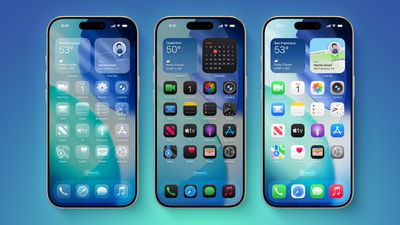
iOS 26 on Three iPhones
iOS 26 introduces an all-new Liquid Glass design with translucent menus, buttons, and icons.

Apple describes Liquid Glass as "a new translucent material that reflects and refracts its surroundings, bringing greater focus to content, and delivering a new level of vitality across controls, navigation, app icons, widgets, and more."

Lock Screen Enhancements
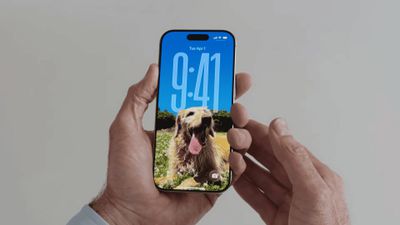
new iphone lockscreen ios 26
On iOS 26, the Lock Screen's clock automatically adapts to fill the empty space, and you can view full-screen animated album art for supported Apple Music songs.

New iMessage Features
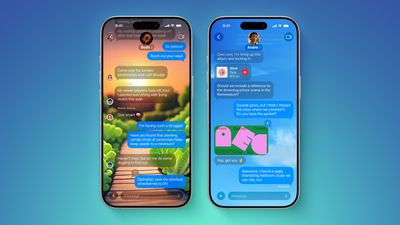
ten messages features
Here are some of the key new features and changes in the Messages app on iOS 26:

  • Backgrounds: You can now add a background to any conversation, and all participants will see it. You can choose from Apple's selection of backgrounds, or you can set any of your own photos as a background. You can turn off conversation backgrounds in the Settings app if desired.
  • Polls: You can now create polls in group chats, allowing people to vote on topics or questions, such as which restaurant to go to. Apple Intelligence can detect when a poll might come in handy and suggest one.
  • Apple Cash in group chats: You can now send and receive Apple Cash in group chats.
  • Typing indicators in group chats: You can now see who is typing in group chats.
  • "Add Contact" button in group chats: This button makes it easier to add people to the Contacts app in group chats.
  • "Select" option: When you tap and hold on a message bubble, a new "Select" option appears. Tapping on it allows you to select a portion of text in a message, whereas you could previously only copy an entire message.
  • Unknown sender screening: When turned on, this setting automatically moves messages from unknown senders to the Unknown Senders folder, and hides notifications for them until you accept them.

Call Screening and Hold Assist
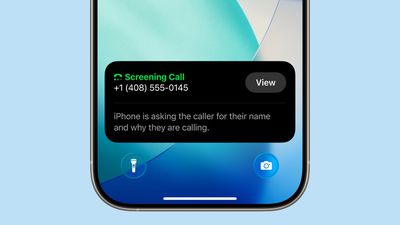
ios 26 phone app screening
iOS 26 adds a couple of useful features to the Phone app: Call Screening and Hold Assist.

Call Screening is an opt-in setting that asks unknown callers for their name, and the reason why they are calling. And with Hold Assist, your iPhone can automatically wait on hold for you during a call, and notify you when the agent on the other line is ready.

Adaptive Power Mode
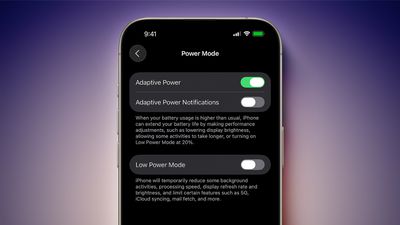
iOS 26 Adaptive Power Notifications
iOS 26 introduces an Adaptive Power Mode on the iPhone, alongside the existing Low Power Mode.

Apple says Adaptive Power Mode can make "performance adjustments" when necessary to extend an iPhone's battery life, including slightly lowering the display brightness, allowing some activities to "take longer," and automatically turning on Low Power Mode when the iPhone's remaining battery life reaches the 20% mark.

Adaptive Power Mode is only available on the iPhone 15 Pro models and newer. The setting can be turned on in the Settings app, under Battery → Power Mode.

AutoMix

apple music automix ios 26
A new AutoMix feature in the Apple Music app can seamlessly transition from one song to the next, like a DJ would. AutoMix replaces the previous Crossfade feature.

Preview App
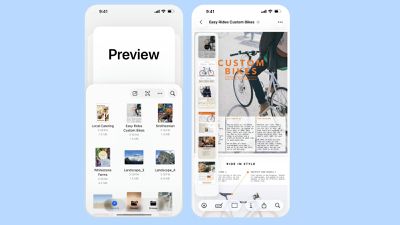
Apple Preview App iPhone
iOS 26 extends a version of the Apple's Preview app from the Mac to the iPhone, providing you with a built-in app to edit and mark up PDFs and images.

CarPlay Upgrades
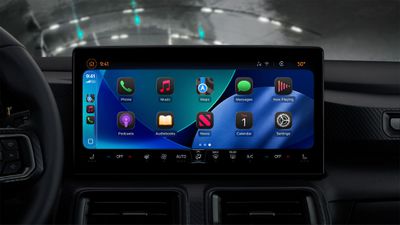
CarPlay Liquid Glass Dark
When you are using CarPlay with an iPhone running iOS 26, the new Liquid Glass design extends to the CarPlay interface. Like on the iPhone, the new look includes more shimmery app icons and translucent user interface elements.

Starting with iOS 26, you can respond to messages with standard Tapbacks like a heart, thumbs up, or exclamation marks directly through CarPlay.
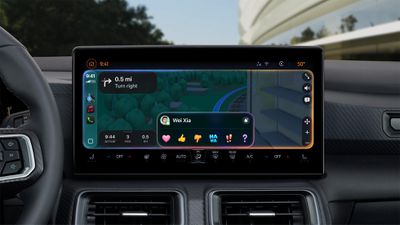
CarPlay Messages Tapbacks

You can now view your pinned conversations in the Messages app on CarPlay.
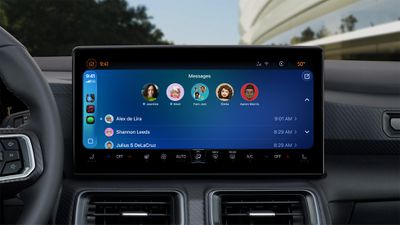
CarPlay Pinned Messages

CarPlay has a new compact view for incoming phone calls, so that you can still see other information on the screen, such as turn-by-turn directions.
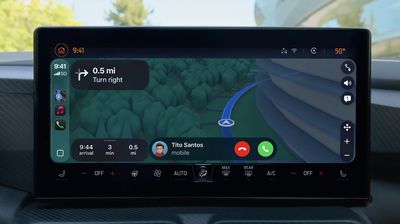
CarPlay Compact Phone Calls
CarPlay's Dashboard screen can now show Live Activities, letting you keep track of things like a flight's arrival time at a glance.
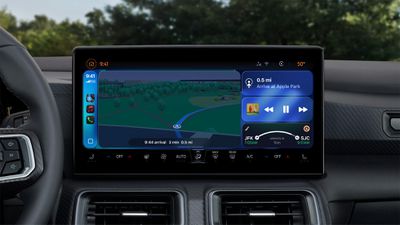
CarPlay Live Activities
The regular version of CarPlay now has a widgets screen, for things like calendar appointments and HomeKit accessory controls.
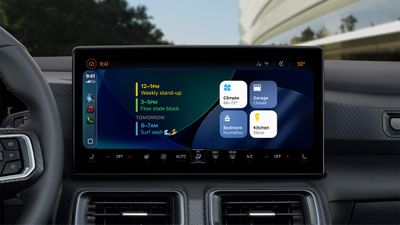
CarPlay Widgets
iPhone users will be able to wirelessly stream videos to the CarPlay screen using AirPlay, according to Apple. For safety reasons, video playback will only be available when the vehicle is parked, to prevent distracted driving. The connected iPhone will be able to detect when the vehicle is in motion and end playback.

Automakers need to add support for this feature, so it might be limited to newer vehicles and take some time to roll out.

More

Read our iOS 26 roundup linked below to learn more about the update.

Related Roundups: iOS 26, iPadOS 26
Related Forum: iOS 26

Popular Stories

apple design award 2025

Apple Announces 2025 Design Award Winners Ahead of WWDC 2025

Tuesday June 3, 2025 10:14 am PDT by
As we wait for WWDC to kick off next Monday, Apple today announced the winners of its annual Apple Design Awards, recognizing apps and games for their innovation, ingenuity, and technical achievement. The 2025 Apple Design Award winners are listed below, with one app and one game selected per category: Delight and Fun - CapWords (App) and Balatro (Game) Innovation - Play (App) and PBJ -...
1password deal blue

1Password Security Breach: What Was Accessed and What Wasn't

Wednesday November 25, 2026 1:09 pm PST by
Popular password management app 1Password today said it experienced a security breach earlier this month. 1Password says some customer names and email addresses were accessed, but no customer vault contents were compromised. On November 19, 1Password saw indications that an employee's GitHub account had been breached and began investigating. The company says the breached GitHub account was...
apple store down feature

Here's Why the Apple Store is Going Down

Thursday November 26, 2026 5:49 am PST by
Apple's online store is going down for a few hours on a rolling country-by-country basis right now, but do not get your hopes up for new products. Apple takes its online store down for a few hours ahead of Black Friday every year to tease its annual gift card offer with the purchase of select products. The store is down in Australia, New Zealand, and Thailand, right now, and it will...

Top Rated Comments

Porco Avatar
16 months ago
The public beta moves to the global beta. I’ll likely wait and see a bit longer, I don’t need surprises this week.
To all who install immediately: I thank you for your service.

Score: 32 Votes (Like | Disagree)
QuarterSwede Avatar
16 months ago

The public beta moves to the global beta. I’ll likely wait and see a bit longer, I don’t need surprises this week.

To all who install immediately: I thank you for your service.
There are some very minor bugs. Don’t listen to anyone here crying that it isn’t ready (when are updates really done anyway?). I wasn’t on the beta till the RC this year and I think its a pretty solid release in my personal as professional use over the last few days. After a day of settling down it runs smoother than 18 ever did. Icon caching took a few days to stop happening so that isn’t a long term issue. Now that could be because my 12 Pro Max has 6GB and it wouldn’t work well on the 4GB phones (12). No idea.

I personally like the fun and whimsy being brought back to a boring OS and the glass look is absolutely gorgeous in use. Much better than pictures try to convey. I’ve yet to run into any legibility problems. I’m not saying there won’t be any but don’t think actual usage is anything like it’s being portrayed as. Sad that the MR community is helping to spread this FUD.

I very much disagree with certain very vocal developers on how bad it is and how they can’t believe Apple is shipping it. That just isn’t what I’m experiencing on a 12 Pro Max (nothing new by any means). It’s fine and not even close to Apple’s worst .0 release. No, I don’t work for Apple and I never have. I also don’t own stock in them. This is just my personal experience and opinion. I like iOS 26. 🤷‍♂️
Score: 24 Votes (Like | Disagree)
Johnny907 Avatar
16 months ago
Yeah I wanted to mess with it over the weekend so already downloaded the RC.
Liquid Glass is trash. I’m 45, I don’t want all this bubbly bouncy nonsense. Spent an hour going back and forth between a couple Reddit subs and the settings/accessibility menus just turning most of it off.
While I like the rounding and softening of certain elements, it’s the transparency and goofy animations that are annoying. It’s like Apple turned iOS into a fidget spinner for the easily distracted. I’m sure there is a demo for that, but would really appreciate if Apple added a “Professional Adult” toggle to switch it all off instead of making us deep dive through pages of settings.
Score: 24 Votes (Like | Disagree)
vertsix Avatar
16 months ago
1. Bugs
Score: 20 Votes (Like | Disagree)
klasma Avatar
16 months ago
Time to update to iOS 18.
Score: 14 Votes (Like | Disagree)
jz0309 Avatar
16 months ago

Yeah I wanted to mess with it over the weekend so already downloaded the RC.
Liquid Glass is trash. I’m 45, I don’t want all this bubbly bouncy nonsense. Spent an hour going back and forth between a couple Reddit subs and the settings/accessibility menus just turning most of it off.
While I like the rounding and softening of certain elements, it’s the transparency and goofy animations that are annoying. It’s like Apple turned iOS into a fidget spinner for the easily distracted. I’m sure there is a demo for that, but would really appreciate if Apple added a “Professional Adult” toggle to switch it all off instead of making us deep dive through pages of settings.
I'm 66 and I quite like it, nothing really that bothers me ... guess we are all different
Score: 11 Votes (Like | Disagree)
Latest Stories
The 50+ Best Apple Black Friday Deals Still Available on AirPods, iPads, and More
8 hours ago
HomePod Mini 2 in (RED) Seemingly Spotted Ahead of Announcement
5 hours ago
Apple's M6 and PROLED MacBook Pro Reach New Low Prices for Black Friday
16 hours ago
The MacRumors Show: iPhone Air 2 and iPhone 18 Are Coming
16 hours ago
Apple Store in Brisbane Reopening Next Month With New Design
16 hours ago
The 60+ Best Black Friday Accessory Deals on iPhone Chargers, TVs, Headphones, and More
17 hours ago
GTA VI Now (Barely) Running on Apple Silicon Macs
18 hours ago
The Best Black Friday Streaming Deals on Apple TV, Disney+, and More
18 hours ago
Apple TV's 'Carême' Wins International Emmy for Best Drama
19 hours ago
iPhone 18 Production Delay Leaves Apple Little Time Before Launch
20 hours ago
The Best Black Friday AirPods Deals Still Available
12 hours ago
The Best Black Friday Deals on Apple Home Products
20 hours ago
The Best Black Friday iPhone Deals Still Available
12 hours ago
The Best Black Friday iPad Deals Still Available
12 hours ago
The Best Black Friday Apple Watch Deals Still Available
12 hours ago
The Best Black Friday AirTag Deals Still Available
12 hours ago
The Best Black Friday Mac Deals Still Available
12 hours ago
iPhone Share of US Smartphone Market Hits 57% as Rivals Slip
21 hours ago
iPhone 20 Pro Rumored to Feature 3D-Printed Titanium Frame
23 hours ago
Apple's Official 2026 Black Friday Offer Starts Rolling Out
2 days ago
Halide Adds Fill Light Feature for iPhone Duo
2 days ago
MacBook Air Black Friday Deals Now Live With Massive $399 Savings
2 days ago
Amazon Discounts All MacBook Neo Models by $99 for Black Friday
2 days ago
Kodak Launches Unique AirTag Rival With E-Ink Display
2 days ago
Here's Why the Apple Store is Going Down
2 days ago
Apple Still Working on Giant Foldable iPad That Could Cost $5,000
2 days ago
iPhones Dominate China's Weak Singles' Day Smartphone Sales
2 days ago
iPhone 20 Pro Could Feature Ceramic in Limited-Edition Model
2 days ago
Apple Faces Korean Regulator Review Over iPhone 16 AI Advertising
2 days ago
Apple Watch Ultra 4 Hits New Best-Ever Price of $649.99 for Black Friday
2 days ago
Related Apple News: Lifestyle | Iphone | Education | Sport | Business





























