Skip to Content

8 New Photo Features Coming to iPhone in iOS 17

Photography has become a staple use of the modern iPhone, and Apple isn't resting on its laurels in its efforts to advance what you can do with a photo in iOS 17.

8 New Photo Features Feature 1
Below we've listed eight new photo-related features and improvements coming with Apple's latest mobile operating system, which is expected to get its official release in the fall. Can't wait until then? The iOS 17 beta is available now.

1. Pet Recognition

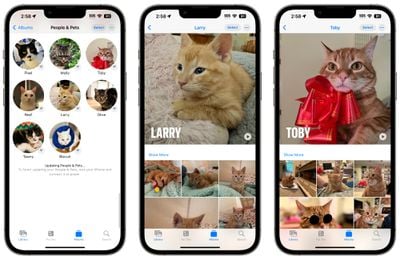
In iOS 17, Apple has improved the image recognition capabilities of the Photos app, which can now recognize not only your family and friends, but also your beloved pets.
ios 17 pets photos
The ‌‌Photos‌‌ app's ability to detect animals isn't new, but now it can identify animals that are important to you by taking into account the number of photos that you have of them. That's why the "People" album has become the "People and Pets" album, where you can add the names of your pets and confirm additional photos.

2. One-Tap Crop

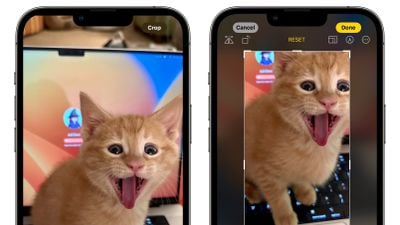
In iOS 16, cropping images in the ‌Photos‌ app involves tapping into the Edit interface, choosing the crop tool, and adjusting the crop from there with either pinch zoom gestures or by dragging the corners of the cropping tool.
ios 17 crop photos app
In iOS 17, Apple has made the process quicker and easier. Now when you zoom into an image, there's a new "Crop" button that appears in the upper right. Tapping it brings up the crop interface with the zoom level that you've selected, so you can crop into the part of the image that you prefer with just a couple of taps.

3. Turn Photos into Animated Stickers

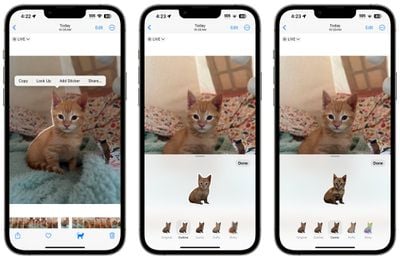
In iOS 16, Apple added a neat "remove subject from background" tool for plucking things out of images. In iOS 17, Apple has supercharged the feature, and now you can use it to make your own custom animated stickers for use in Messages.
ios 17 stickers create
When long-pressing a subject in a photo, the pop-up menu includes a new "Add Sticker" option that exports the selected subject into Messages' sticker interface. From there, you can add effects like a white sticker outline, a "puffy" sticker effect, a glittery effect, and more. Subjects pulled from Live Photos even have the option of animating.

4. Get Recipes for Food

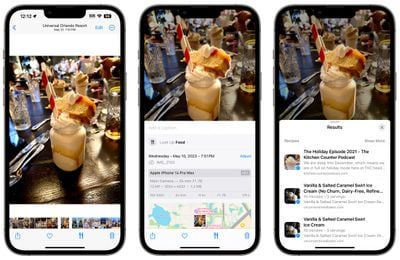
When viewing your photos, Apple has enhanced Visual Look Up in iOS 17 in a few ways, one being the ability to find recipes for similar dishes when meals are recognized in the picture.
visual lookup recipes
When an image of food is identified in the ‌Photos‌ app, a knife and fork icon appears at the bottom of the interface. The Look Up Food option gives you direct links to recipe websites, so now you can get inspiration about what to cook, without having to trawl the web yourself in Safari.

5. Straighten Your Shooting Angle

For the last few years, the Camera app's Grid mode has included a somewhat-hidden leveling feature for top-down photos, popping up a floating crosshair to help make sure you're lined up properly above your subject.
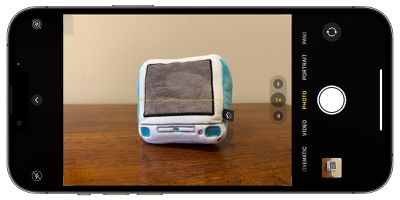
ios 17 camera level
In iOS 17, Apple has enhanced the camera leveling functionality, separating it out from the Grid mode to its own option and expanding it to include a horizontal level for more traditional straight-on photos.

The Level option displays a broken horizontal line on the screen when your iPhone senses you're lining up for a straight-on shot and you tilt your device slightly out of horizontal. The line appears white while your phone is out of level and then turns yellow once you achieve a level orientation to indicate success.

6. Look Up What You Just Lifted

In iOS 17, when you use the "remove subject from background" tool, you can now look up information about the subject in question, thanks to a new option in the popup menu.

lookup lifted subject
Not only that, the ‌Photos‌ app now also offers the ability to pause video on any frame and look up information on a subject.

7. Visual Look Up for Auto Symbols

Apple hasn't publicly promoted this feature, but Reddit users digging into the iOS 17 beta have discovered that Visual Look Up can now detect car symbols on vehicle dashboards.
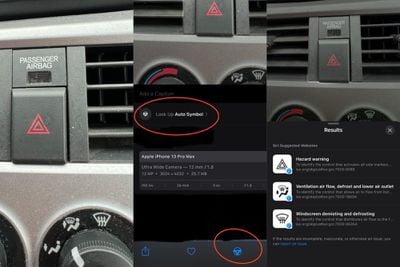
lookup auto symbols

Image credit: yahlover

When the ‌Photos‌ app identifies one or more symbols in an image, iOS 17 presents the name of the icon and a short description of its meaning, and offers up links to learn more about each symbol in Safari.

8. Tweaked Editing Tools Interface

Lastly, Apple in iOS 17 has made some quality of life improvements to the ‌Photos‌ app editing interface to make it a little more intuitive. The Cancel and Done buttons have been moved from the bottom of the screen to the top, and the tool icons have been given text descriptions to make their function clearer.
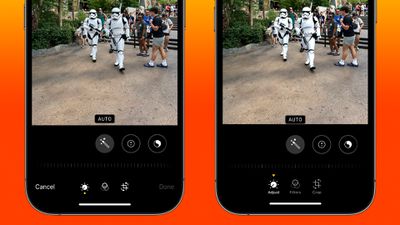
photos ui comparison

‌Photos‌ app editing UI in iOS 16 (left) vs iOS 17

In order to make it more obvious whether Adjust, Filters, or Crop is currently selected, Apple has also changed the indicator from a yellow circle beneath the active icon, to a triangle pointing down at it from above.


Related Forums: iOS 17, iPadOS 17

Popular Stories

apple design award 2025

Apple Announces 2025 Design Award Winners Ahead of WWDC 2025

Tuesday June 3, 2025 10:14 am PDT by
As we wait for WWDC to kick off next Monday, Apple today announced the winners of its annual Apple Design Awards, recognizing apps and games for their innovation, ingenuity, and technical achievement. The 2025 Apple Design Award winners are listed below, with one app and one game selected per category: Delight and Fun - CapWords (App) and Balatro (Game) Innovation - Play (App) and PBJ -...
1password deal blue

1Password Security Breach: What Was Accessed and What Wasn't

Wednesday November 25, 2026 1:09 pm PST by
Popular password management app 1Password today said it experienced a security breach earlier this month. 1Password says some customer names and email addresses were accessed, but no customer vault contents were compromised. On November 19, 1Password saw indications that an employee's GitHub account had been breached and began investigating. The company says the breached GitHub account was...
apple store down feature

Here's Why the Apple Store is Going Down

Thursday November 26, 2026 5:49 am PST by
Apple's online store is going down for a few hours on a rolling country-by-country basis right now, but do not get your hopes up for new products. Apple takes its online store down for a few hours ahead of Black Friday every year to tease its annual gift card offer with the purchase of select products. The store is down in Australia, New Zealand, and Thailand, right now, and it will...

Top Rated Comments

contacos Avatar
45 months ago
How about finally showing us which photos have already been sorted into Albums and also show WHICH Album in the photo details? It’s a mess if you do not sort them right away (I am trying to do it monthly for this reason). Often I am like „hmmm where did I leave off?!?“ hmmm did I sort those already?

On android I have a little indicator on the thumbnail in my „all photos“ feed to show me that those photos are already sorted
Score: 13 Votes (Like | Disagree)
johnmarki Avatar
45 months ago
Keep the updates to Photos coming Apple! No complaints here.

Score: 8 Votes (Like | Disagree)
StellarVixen Avatar
45 months ago
Where’s the retouch brush? Mac Photos has had it for years now
Score: 5 Votes (Like | Disagree)
Ch3ckM4te Avatar
45 months ago
Hope it recognizes all my Pet Rocks…
Score: 5 Votes (Like | Disagree)
45 months ago

How about finally showing us which photos have already been sorted into Albums and also show WHICH Album in the photo details? It’s a mess if you do not sort them right away (I am trying to do it monthly for this reason). Often I am like „hmmm where did I leave off?!?“ hmmm did I sort those already?

On android I have a little indicator on the thumbnail in my „all photos“ feed to show me that those photos are already sorted
You can create a smart album that filters those images for you that are not part of any album yet. Please see attached!

Attachment Image
Score: 4 Votes (Like | Disagree)
matrix07 Avatar
45 months ago
No 4 will be huge.
Score: 4 Votes (Like | Disagree)
Latest Stories
The 50+ Best Apple Black Friday Deals Still Available on AirPods, iPads, and More
1 hour ago
Apple's M6 and PROLED MacBook Pro Reach New Low Prices for Black Friday
5 hours ago
The MacRumors Show: iPhone Air 2 and iPhone 18 Are Coming
5 hours ago
Apple Store in Brisbane Reopening Next Month With New Design
6 hours ago
The 60+ Best Black Friday Accessory Deals on iPhone Chargers, TVs, Headphones, and More
7 hours ago
GTA VI Now (Barely) Running on Apple Silicon Macs
7 hours ago
The Best Black Friday Streaming Deals on Apple TV, Disney+, and More
8 hours ago
Apple TV's 'Carême' Wins International Emmy for Best Drama
8 hours ago
iPhone 18 Production Delay Leaves Apple Little Time Before Launch
9 hours ago
The Best Black Friday AirPods Deals Still Available
1 hour ago
The Best Black Friday Deals on Apple Home Products
10 hours ago
The Best Black Friday iPhone Deals Still Available
1 hour ago
The Best Black Friday iPad Deals Still Available
1 hour ago
The Best Black Friday Apple Watch Deals Still Available
1 hour ago
The Best Black Friday AirTag Deals Still Available
1 hour ago
The Best Black Friday Mac Deals Still Available
1 hour ago
iPhone Share of US Smartphone Market Hits 57% as Rivals Slip
11 hours ago
iPhone 20 Pro Rumored to Feature 3D-Printed Titanium Frame
12 hours ago
Apple's Official 2026 Black Friday Offer Starts Rolling Out
1 day ago
Halide Adds Fill Light Feature for iPhone Duo
1 day ago
MacBook Air Black Friday Deals Now Live With Massive $399 Savings
1 day ago
Amazon Discounts All MacBook Neo Models by $99 for Black Friday
1 day ago
Kodak Launches Unique AirTag Rival With E-Ink Display
1 day ago
Here's Why the Apple Store is Going Down
1 day ago
Apple Still Working on Giant Foldable iPad That Could Cost $5,000
1 day ago
iPhones Dominate China's Weak Singles' Day Smartphone Sales
1 day ago
iPhone 20 Pro Could Feature Ceramic in Limited-Edition Model
1 day ago
Apple Faces Korean Regulator Review Over iPhone 16 AI Advertising
1 day ago
Apple Watch Ultra 4 Hits New Best-Ever Price of $649.99 for Black Friday
2 days ago
New Apple Store Opening in India, Download the Special Wallpaper Now
2 days ago
Related Apple News: Local News | Education | Health | Entertainment | World News