Skip to Content

How to Install iOS 17 Beta Software Updates on Your iPhone

by

When Apple released the first iOS 17 beta to developers, for the first time it gave non-developers the opportunity to download beta software updates on their iPhones for free. Keep reading to learn how it's done.
General iOS 17 Feature Blue Green
In years past when Apple has announced a major new operating system update, the first wave of betas has officially only been available to download if you are a paying subscriber to Apple's Developer Program, which costs $99 a year. Public betas then become available to users enrolled in Apple's Public Beta Software Program after a delay of a few days or weeks after the developer beta has been released. However, since iOS 17, iPhone users no longer have to wait for a publicly released beta to test what's new.

In an unexpected change for 2023, anyone who signs in to Apple's developer account website with their Apple ID gets access to developer beta releases as well, even if they are not a paying member of Apple's Developer Program. This means anyone with an Apple ID can download and install the iOS 17, iPadOS 17, and macOS Sonoma betas without waiting for the public betas to launch.

Is My iPhone Compatible With iOS 17?

Note that iOS 17 is compatible with the iPhone XS and newer, meaning that support has been dropped for the iPhone 8, iPhone 8 Plus, and iPhone X. For a full list, iOS 17 supports the following iPhone models:

  • iPhone 14
  • iPhone 14 Plus
  • iPhone 14 Pro
  • iPhone 14 Pro Max
  • iPhone 13
  • iPhone 13 mini
  • iPhone 13 Pro
  • iPhone 13 Pro Max
  • iPhone 12
  • iPhone 12 mini
  • iPhone 12 Pro
  • iPhone 12 Pro Max
  • iPhone 11
  • iPhone 11 Pro
  • iPhone 11 Pro Max
  • iPhone XS
  • iPhone XS Max
  • iPhone XR
  • iPhone SE (2nd generation or later)

Should I Install iOS 17 Developer Beta?

Before downloading the update, it's worth noting that Apple does not recommend installing iOS 17 beta updates on your main iPhone, so if you have a secondary device, use that. This is beta software, which means there are often bugs and issues that pop up that can prevent software from working properly or cause other problems.

Make an Archived Backup of Your Device First

Before installing the beta, make sure to back up your iOS device before installing the software using the following method, otherwise you won't be able to revert back to iOS 16 if things go wrong.

  1. Plug your iPhone into your Mac using the supplied cable.
  2. Allow the accessory to connect by clicking Allow in the dialog prompt.
  3. Open a Finder window by clicking the Finder icon in the Dock.
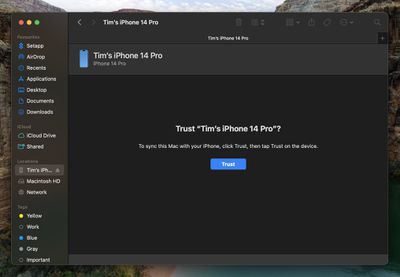
  4. Click your iOS device's name in the sidebar.
    finder

  5. If this is the first time connecting your device to your Mac, click Trust in the Finder window.
    finder

  6. Tap Trust on your device when prompted, then enter your passcode to confirm.
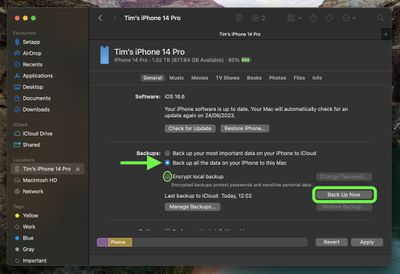
  7. In the General tab, click the circle next to where it says Back up all of the data on your iPad to this Mac.
  8. If you want to encrypt the backup, check the box next to Encrypt local backup, then enter a password to protect your data.
  9. If you don't want to create an encrypted backup, or you've already set up encrypted backups, click Back Up Now.
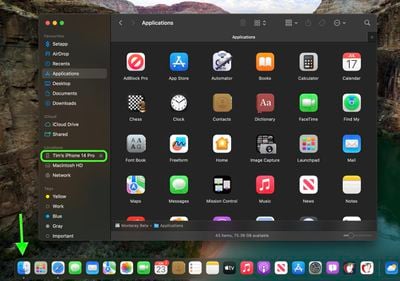
    finder

When the backup is finished, you can find the date and time of the last backup in the General tab, just above the Manage Backups button. Remember that this backup will not be overwritten when you manually or automatically back up your iPhone in the future, so you can restore it at any time by using the Restore Backup... option in the same Finder screen.

How to Download iOS 17 Developer Betas

As of writing, the option to download and install the iOS 17 Developer Beta is also available for users who have previously enrolled on Apple's Beta Software Program, and yet the program is officially only supposed to be for Public Betas. This suggests the option is a bug and Apple will likely remove it. But until that happens, if you're currently enrolled to receive Public Betas, you can skip to step 6.

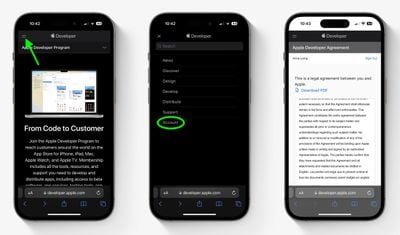
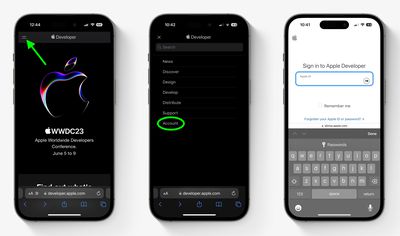
  1. Open Safari on your iPhone and visit developer.apple.com.
  2. Tap the menu icon in the top-left corner of the page, then tap Account.
  3. Under "Sign in to Apple Developer," enter and submit your Apple ID and password using the arrow buttons, then enter the two-factor authentication code sent to your devices.
    developer program

  4. Tap the top-left menu icon again, then tap Account.
  5. Accept the legal terms of the Apple Developer Agreement by scrolling down the page, checking the box, and tapping I Agree.
    dev program

  6. Make sure your iPhone is running iOS 16.4 or later by going to Settings -> General -> Software Update. If it is, and you have just completed steps 1-5 to register a developer account, restart your iPhone. If it isn't, download and install the latest update to your device, then wait for it to restart.
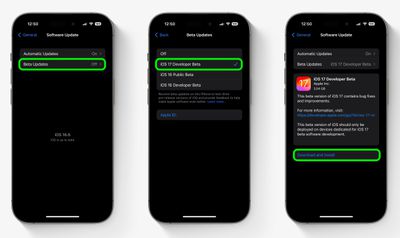
  7. Now go back to Settings -> General -> Software Update.
  8. Tap Beta Updates. If you don't see the option, try switching off Download iOS Updates (Automatic Updates -> Download iOS Updates), then tap Back and it should appear.
  9. Select iOS 17 Developer Beta in the list, then tap Back.
  10. Wait for the Software Update screen to check Apple's servers. When the iOS 17 Developer Beta appears, tap Download and Install, then follow the instructions and wait for installation to complete.
    software update

iOS 17 Features

‌iOS 17‌ is a major update that introduces a customized look for each person that calls, with the person who places the call able to customize their look. With StandBy, an iPhone placed horizontally turns into a little home hub that displays information like the calendar, time, home controls, and more, and Live Activities can be displayed in full screen too.

Widgets on the Home Screen are interactive, so you can do things like check off an item on a to-do list or turn off the lights without having to open an app. AirDrop has been improved and there's a NameDrop function for sharing contacts quickly, plus you can hold two iPhones together to start a SharePlay session. SharePlay also now works with CarPlay so passengers can play their music in the car too.

Other new features include a journaling app coming later this year, AirPlay in select hotel rooms, improvements to AirPods Pro 2 thanks to a new Adaptive Audio feature, offline Maps, Siri that does not require the "Hey" activation, and improvements to search and spotlight.

Related Forums: iOS 17, iPadOS 17

Top Rated Comments

45 months ago

If you need instructions to install a beta release then it’s likely you are not competent to do so.
That's awfully harsh. I like having the instructions. Not because I'm incompetent but because it gives me a guide to follow. I'm not going to install the beta software on my phone but that's not because I couldn't manage it. I do a lot of Terminal work for my research. I look up how to do things all the time, even if I've done them for years. It's not because of incompetence, it's because I want to make sure I do everything correctly.

Surgeons use checklists (which are essentially instructions), not because they are incompetent but because they want to make sure they get everything right.

People need to understand there are risks with beta software but if someone installs it and it breaks something, it's an opportunity for that person to learn.
Score: 17 Votes (Like | Disagree)
45 months ago
If you need instructions to install a beta release then it’s likely you are not competent to do so. There are posts after posts from users who’ve been hosed by a beta, lost data and don’t know what to do.

In my very personal opinion I think it’s a disservice to publish such instructions knowing it will cause untold misery to large numbers of unskilled users, many of which are doing it not to actually test and report issues, but to have bragging rights. But this is just me.
Score: 11 Votes (Like | Disagree)
45 months ago
I am enrolled on beta.apple.com since a few years now and I didn't have to go to developer.apple.com to accept the legal terms - I just tapped Beta Updates and all three Beta versions were there to choose from.

Attachment Image
Score: 7 Votes (Like | Disagree)
UltimateSyn Avatar
45 months ago

If you need instructions to install a beta release then it’s likely you are not competent to do so. There are posts after posts from users who’ve been hosed by a beta, lost data and don’t know what to do.

In my very personal opinion I think it’s a disservice to publish such instructions knowing it will cause untold misery to large numbers of unskilled users, many of which are doing it not to actually test and report issues, but to have bragging rights. But this is just me.
The method has changed - knowing the new method is not information that any of us were communicated telepathically. It’s good to have instructions.
Score: 4 Votes (Like | Disagree)
bLackjackj Avatar
45 months ago

In my very personal opinion I think it’s a disservice to publish such instructions knowing it will cause untold misery to large numbers of unskilled users, many of which are doing it not to actually test and report issues, but to have bragging rights.
There is absolutely nothing wrong with installing this beta. I have and it's absolutely fantastic. Feels a lot snappier! If your skilled enough to use an iPhone, your skilled enough to install this update 🤦‍♂️
Score: 3 Votes (Like | Disagree)
blodyholy Avatar
45 months ago
I'm still in the group who thinks this was an error on Apples part, going back to 16.5 (no mention from Apple about this then). Given Apples sizeable userbase of arguably non-tech people who may for whatever reason (curiosity, accidentally, etc) install this, it just doesn't make sense. Why have a Dev and Public release?
Score: 3 Votes (Like | Disagree)

Popular Stories

Liquid Glass App Store Feature

Apple Requiring Developers to Disclose Location Sharing and Dating Features in Apps

Monday November 2, 2026 4:43 pm PST by
Starting November 16, Apple will require developers to disclose whether their apps include real-world location sharing or dating features so age ratings can be assigned appropriately. Apple says the Dating and Relationships disclosure is required for apps that allow dating or relationship connections, regardless of whether that's with a real person or a virtual companion that engages in...
apple design award 2025

Apple Announces 2025 Design Award Winners Ahead of WWDC 2025

Tuesday June 3, 2025 10:14 am PDT by
As we wait for WWDC to kick off next Monday, Apple today announced the winners of its annual Apple Design Awards, recognizing apps and games for their innovation, ingenuity, and technical achievement. The 2025 Apple Design Award winners are listed below, with one app and one game selected per category: Delight and Fun - CapWords (App) and Balatro (Game) Innovation - Play (App) and PBJ -...
Apple 2026 Black Friday Event Hero

Apple's Official 2026 Black Friday Offer Starts Rolling Out

Thursday November 26, 2026 8:37 am PST by
Apple's annual four-day Black Friday through Cyber Monday shopping event is now live in Australia, New Zealand, and Thailand, and it will continue to roll out across Europe, the U.S., and Canada as the calendar turns to Friday, November 27 around the world. In the U.S., Apple's terms and conditions say the promotion begins on November 27 at 12 a.m. Pacific Time and ends on November 30 at...
Latest Stories
The 50+ Best Apple Black Friday Deals Still Available on AirPods, iPads, and More
27 minutes ago
HomePod Mini 2 in (RED) Seemingly Spotted Ahead of Announcement
10 hours ago
Apple's M6 and PROLED MacBook Pro Reach New Low Prices for Black Friday
21 hours ago
The MacRumors Show: iPhone Air 2 and iPhone 18 Are Coming
21 hours ago
Apple Store in Brisbane Reopening Next Month With New Design
21 hours ago
The 60+ Best Black Friday Accessory Deals on iPhone Chargers, TVs, Headphones, and More
22 hours ago
GTA VI Now (Barely) Running on Apple Silicon Macs
22 hours ago
The Best Black Friday Streaming Deals on Apple TV, Disney+, and More
23 hours ago
Apple TV's 'Carême' Wins International Emmy for Best Drama
1 day ago
iPhone 18 Production Delay Leaves Apple Little Time Before Launch
1 day ago
The Best Black Friday AirPods Deals Still Available
16 hours ago
The Best Black Friday Deals on Apple Home Products
1 day ago
The Best Black Friday iPhone Deals Still Available
16 hours ago
The Best Black Friday iPad Deals Still Available
16 hours ago
The Best Black Friday Apple Watch Deals Still Available
16 hours ago
The Best Black Friday AirTag Deals Still Available
16 hours ago
The Best Black Friday Mac Deals Still Available
16 hours ago
iPhone Share of US Smartphone Market Hits 57% as Rivals Slip
1 day ago
iPhone 20 Pro Rumored to Feature 3D-Printed Titanium Frame
1 day ago
Apple's Official 2026 Black Friday Offer Starts Rolling Out
2 days ago
Halide Adds Fill Light Feature for iPhone Duo
2 days ago
MacBook Air Black Friday Deals Now Live With Massive $399 Savings
2 days ago
Amazon Discounts All MacBook Neo Models by $99 for Black Friday
2 days ago
Kodak Launches Unique AirTag Rival With E-Ink Display
2 days ago
Here's Why the Apple Store is Going Down
2 days ago
Apple Still Working on Giant Foldable iPad That Could Cost $5,000
2 days ago
iPhones Dominate China's Weak Singles' Day Smartphone Sales
2 days ago
iPhone 20 Pro Could Feature Ceramic in Limited-Edition Model
2 days ago
Apple Faces Korean Regulator Review Over iPhone 16 AI Advertising
2 days ago
Apple Watch Ultra 4 Hits New Best-Ever Price of $649.99 for Black Friday
2 days ago
Related Apple News: Opinion | South Africa | Politics | Motoring | Iphone