Skip to Content

Making Lion Act More Like Snow Leopard

by

Since Lion's release, we've been collecting tips on reverting changes found in Lion back to behavior found in Snow Leopard. Now some might argue its better to get used to the stock installation, but if that's not you, here are the tips we've seen.
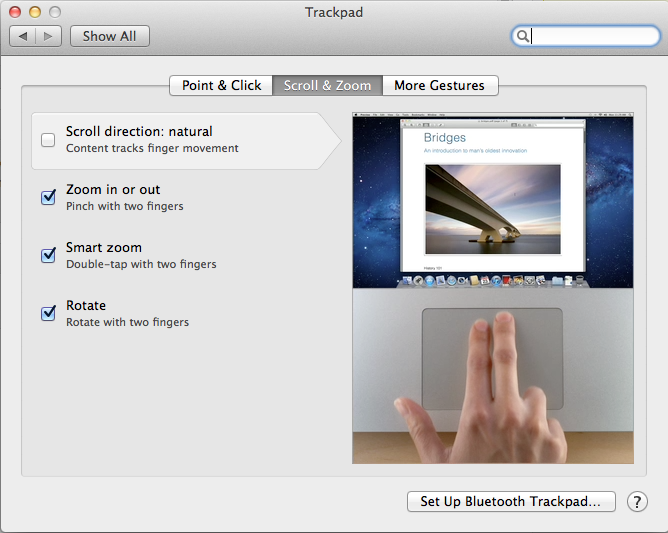
scroll1
• Natural Scroll: This change seems to have generated the most outcry. In Lion, Apple has reversed the normal scrolling direction for trackpads and scroll wheels. In the past, the metaphor has been that swiping down has caused the page to scroll up. Now, swiping down means scrolling down. It takes a few days to get used to, but if you can't there's an option to revert back.

• Key Repeat: @mikeindustries (requires Terminal):

To turn off Lion's stupid ban on key repeating, quit apps and type "defaults write -g ApplePressAndHoldEnabled -bool false" in Terminal.

• New Window Animations: @tomasf (requires Terminal):

Want to turn off window opening animations in Lion? defaults write NSGlobalDomain NSAutomaticWindowAnimationsEnabled -bool NO

• Don't Save: @tomasf (requires Terminal):

Restore ⌘D to mean "Don't Save" in Lion! defaults write NSGlobalDomain NSSavePanelStandardDesktopShortcutOnly -bool YES

• Resume: Disable resume in Lion.

• Spaces: Assigning apps to one space or all spaces.
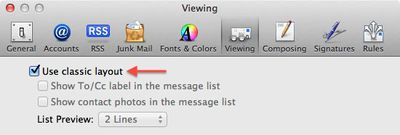
classic mail
• Classic Mail: Lion's Mail takes on a distinct iOS look, but the classic Mac OS X Mail look is available through a checkbox preference in Mail.

• Front Row: Mad Hatter has instructions on how to re-enable FrontRow on Lion, though we've heard some mixed results about it working. - Use at your own risk, we've heard it has caused problems.

• LimeiBook86 posts some instructions which duplicate ones we have shown here, but also includes restoring Finder Window's Path and Status Bar as well as turning off Dashboard as a space.


Top Rated Comments

200 months ago
Anyone figure out how to make the mouse wake the computer from sleep? This is a major annoyance for me.

Just requires a click instead of mouse movement for me, IMO this is much better as it greatly reduces the chance of accidentally waking your Mac up.
Score: 23 Votes (Like | Disagree)
200 months ago
The most stupidest things that i ever hear is articles "how make new thing work like old". Apple always was company with advanced technology. If Apple change something they always know why and because.

The most stupidest things that i ever hear is people who blindly accept everything Apple does as the best way.

Just because Apple "know why and because" they've made a change, doesn't make it right. And certainly not right for everyone.

Check your EULA. There is no condition of owning Apple products that you must agree with and like everything Apple does.
Score: 19 Votes (Like | Disagree)
200 months ago
"Turn off Lion's stupid ban on key repeating"?? I you kidding me?? :eek: This is the one of the small and useful function, than F.. Windows will never had.

It's a reasonable thing that people would want to turn again.

"Disable resume in Lion"! :eek: Sure! Thank Steve, that you add disable function for your new great OS, now all people around the world can turn it off!! Btw who can tell me how to disable stupidest touchscreen on my iPad?

Resume might be useful to some, but I don't want my last used things to reappear when I re-open that app. Might have personal stuff there, or open a document that you don't want to work on, so you end up having to close it anyway.

So, dear Mac users, if you are true :apple: user remember - all new functions is always look strange (because they new), but after some time, you will accustomed and THIS new functions became a great canyon between your Mac and others pfsht.

I'm not a 'true' Apple user by your definition, but I'm a power user. And small changes like ones described here can really interrupt my workflow. Whether I have to "re-learn" isn't always the case, I've got my workflow adapted to how previous OS X versions worked. Lion has changed a lot of that, some for the better, some of the worse.
Score: 17 Votes (Like | Disagree)
GSPice Avatar
200 months ago
Here's an idea, rather than make Lion act like Snow Leopard. Stick to Snow Leopard.
Answers like this don't require any critical thinking or intellectual honesty. It's the kind of stuff people skip over in google's search results.
Score: 14 Votes (Like | Disagree)
AAPLaday Avatar
200 months ago
Some people really don't like change, now do they?

Only if its for the better ;)
Score: 13 Votes (Like | Disagree)
John.B Avatar
200 months ago
If you have slow Mac don't install Lion! Or upgrade the Mac
Maybe you didn't get the memo, but there are seriously cool security enhancements in Lion as well as that whole iCloud thing coming in iOS 5 in September, not to mention document revisions and a very cool new implementation of FileVault. Just to name a few.

I'll never understand people who insist on dictating how others should use their computers... :rolleyes:
Score: 12 Votes (Like | Disagree)

Popular Stories

1password deal blue

1Password Security Breach: What Was Accessed and What Wasn't

Wednesday November 25, 2026 1:09 pm PST by
Popular password management app 1Password today said it experienced a security breach earlier this month. 1Password says some customer names and email addresses were accessed, but no customer vault contents were compromised. On November 19, 1Password saw indications that an employee's GitHub account had been breached and began investigating. The company says the breached GitHub account was...
apple design award 2025

Apple Announces 2025 Design Award Winners Ahead of WWDC 2025

Tuesday June 3, 2025 10:14 am PDT by
As we wait for WWDC to kick off next Monday, Apple today announced the winners of its annual Apple Design Awards, recognizing apps and games for their innovation, ingenuity, and technical achievement. The 2025 Apple Design Award winners are listed below, with one app and one game selected per category: Delight and Fun - CapWords (App) and Balatro (Game) Innovation - Play (App) and PBJ -...
ipad pro prime

Apple Has iPads Running macOS Internally, Says Gurman

Wednesday November 25, 2026 4:55 am PST by
Apple has iPads running macOS internally and has had them "for some time," according to Bloomberg's Mark Gurman, although he says no work is currently being done to bring the Mac operating system to iPads. Speaking on his latest Power On podcast, Gurman said there is "no work being done to consumerize macOS on the iPad." Rather, Apple will continue to bring Mac features and apps like Final Cut ...
Latest Stories
The 50+ Best Apple Black Friday Deals on AirPods, iPads, MacBooks, and More
25 minutes ago
Apple's M6 and PROLED MacBook Pro Reach New Low Prices for Black Friday
29 minutes ago
The MacRumors Show: iPhone Air 2 and iPhone 18 Are Coming
35 minutes ago
Apple Store in Brisbane Reopening Next Month With New Design
1 hour ago
The 60+ Best Black Friday Accessory Deals on iPhone Chargers, TVs, Headphones, and More
2 hours ago
GTA VI Now (Barely) Running on Apple Silicon Macs
2 hours ago
The Best Black Friday Streaming Deals on Apple TV, Disney+, and More
3 hours ago
Apple TV's 'Carême' Wins International Emmy for Best Drama
3 hours ago
iPhone 18 Production Delay Leaves Apple Little Time Before Launch
4 hours ago
The Best Black Friday AirPods Deals
5 hours ago
The Best Black Friday Deals on Apple Home Products
5 hours ago
The Best Black Friday iPhone Deals
5 hours ago
The Best Black Friday iPad Deals
5 hours ago
The Best Black Friday Apple Watch Deals
5 hours ago
The Best Black Friday AirTag Deals
5 hours ago
The Best Black Friday Mac Deals
5 hours ago
iPhone Share of US Smartphone Market Hits 57% as Rivals Slip
6 hours ago
iPhone 20 Pro Rumored to Feature 3D-Printed Titanium Frame
8 hours ago
Apple's Official 2026 Black Friday Offer Starts Rolling Out
1 day ago
Halide Adds Fill Light Feature for iPhone Duo
1 day ago
MacBook Air Black Friday Deals Now Live With Massive $399 Savings
1 day ago
Amazon Discounts All MacBook Neo Models by $99 for Black Friday
1 day ago
Kodak Launches Unique AirTag Rival With E-Ink Display
1 day ago
Here's Why the Apple Store is Going Down
1 day ago
Apple Still Working on Giant Foldable iPad That Could Cost $5,000
1 day ago
iPhones Dominate China's Weak Singles' Day Smartphone Sales
1 day ago
iPhone 20 Pro Could Feature Ceramic in Limited-Edition Model
1 day ago
Apple Faces Korean Regulator Review Over iPhone 16 AI Advertising
1 day ago
Apple Watch Ultra 4 Hits New Best-Ever Price of $649.99 for Black Friday
1 day ago
New Apple Store Opening in India, Download the Special Wallpaper Now
2 days ago
Related Apple News: World News | Motoring | Iphone | Technology | Reviews






























