Skip to Content

Lion: Assigning Apps to All Desktops in Mission Control

by

alldesktops
With the introduction of Lion, Apple moved -- or removed entirely -- numerous options and settings.

For more advanced users, the old Expose & Spaces preference panel included controls to adjust what "Spaces" -- now called Desktops -- apps would appear in. For example, I had my Mail program set to display in Space 2, while iTunes would only appear in Space 4. With Expose & Spaces gone, it was tricky to figure out how to adjust where apps would appear.

It's easy, once you know where to look.

Update: Make sure you have multiple desktops open before doing this or else you won't see anything. Enter Mission Control. In the top-right of the screen is a button to create a new desktop. Click that button and create as many desktops as you wish. To delete a desktop space, option-click one of the desktops.

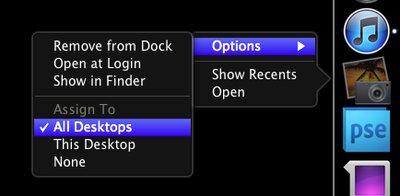
Now, simply right-click (control-click, two-finger-click) on an application icon in the Dock. In the Options menu, you'll see three choices related to Spaces:

- Assign To All Desktops
- This Desktop
- None

Play around with the choices until you get a feel for how they work. I put my instant messaging program into "All Desktops" so I can chat from wherever I'm working at the moment. Safari goes in the first desktop and my RSS reader stays in the second. With the advent of full-screen apps, I no longer need dedicated spaces for Mail and iTunes. They simply go full-screen and it accomplishes the same task.

Thanks Kbmb for the tip about needing multiple desktops!

Top Rated Comments

HackerJL Avatar
200 months ago
I used spaces with my mac pro and 4 Monitors. Now, since full screen apps dont allow for multiple monitors, ill never use that feature. The entire full-screen system is broken and not well though out in regards to more than one monitor. I understand the awesomeness of it if you just have one monitor, but with 2 or 4, a full screen app is a waste. Hope they fix that.

</oldnews>
Score: 4 Votes (Like | Disagree)
bushido Avatar
200 months ago
why can't we just simply drag and drop the desktops in mission control to rearrange them, is it too much to ask or am i missing something. do we really have to close all the apps if we want to get them in a different order?

like ... lets say i have safari open on my main desktop, i open iMail and it moves to the 2nd, itunes moves to the 3rd but now i open safari in fullscreen mode and it jumps behind the other two. in order to get it right after my main desktop i have to close iMail and iTunes in order for Safari to move to the 2nd spot???
Score: 3 Votes (Like | Disagree)
200 months ago
As a real Professional Mac user since 1987 it pisses me off that Apple is only thinking of the consumer market and forgetting some of us are Pro's.
After upgrading (Really?) to Lion, I open Illustrator CS5 and it keeps crashing. What does a Power User do? Look for the com.adobe.illustrator preference in the Home folder... But where the hell is it? Like a consumer is going to mess with the folder and screw up the whole OS... Yeah, right... :roll eyes:

As a "real professional Mac user since 1987" you should have known better than to upgrade to a dot-zero OS on release day when you rely on third party applications to get your job done. There are always compatibility issues with pro apps after a major OS upgrade, there is no reason this should have been a surprise for you.

It bothers me that some features are set by default. Like the stupid move content in the direction of the finger... Apple ass-umes that you have a mac book and a track pad or a magic mouse. I don't... Luckily I was able to turn the thing off...

I'm sure they'll remember to bury new features where no one can find them in the next OS upgrade. It really makes no sense to make them accessible by default. There might be someone out there using old equipment who could be grievously inconvenienced by having to make 4 clicks on their mouse.

I also have 2 monitors. Most things are designed for just one. Again, thinking of iMacs and Mac Books but then they want to sell u an overpriced Mac Display but the dual monitor support is crippled.

I use two monitors as well (non-Apple monitors on a Mac Mini), I also have a MacBook Pro that I use on its own. Full screen apps are awesome on the MacBook Pro. Swiping back and forth from one app to another is remarkably efficient on a laptop, no doubt about it.

On my desktop, with dual monitors, I don't use the full screen app feature. It doesn't make sense in that scenario. Instead, I open up Mission Control and assign multiple desktops. Each desktop supports both monitors. I can then swipe back and forth between desktops running multiple apps on my trackpad.

This is again, remarkably efficient. Anyone who uses their dual screen Mac for multitasking between apps will love it. Yes, it is designed with the trackpad in mind--which is available for your desktop, and will work alongside your mouse. The preference for multitouch trackpads was made quite evident in all of the pre-launch publicity. If you refuse to use one, then you won't see these benefits. That's your decision to make.

I was really looking forward to AutoSave. Great, but it only works with Apple Apps. Doesn't work with any Adobe or non-Apple stuff... Bad, and sort of false advertising.

False advertising? When did Apple make the claim that autosave would work out of the "box" with anything other than their apps? The API's were made available for all developers to use. If Adobe or others haven't taken advantage of that yet, you surely can't blame Apple. Considering that Adobe hasn't yet updated their very popular (on the Mac) pro apps to support Lion at all, this shouldn't be much of a surprise. Adobe is a software company. It's their job to write and update their applications as needed, which they have apparently not done yet.

I like some of the features but others are just useless for people like me, who use the computer to work... :confused:

None of the features are "useless" for people who use their computer to work. There are lots of different ways to do work on computers, and lots of different computers to do work on. You are simply frustrated because you updated your OS before your work apps were updated and are venting that frustration in the wrong direction.

For your workflow, using dual screens, you're right that full-screen apps don't do much of anything for you. Instead of trying to shoe-horn that feature into your workflow (which it was clearly not designed for) try taking advantage of some of the other new things. Multiple desktops in Mission Control is phenomenal. Yes, you'll need a trackpad to really benefit from it, but I promise--once you try it, you'll never go back.

I'm personally frustrated right now because we use Pro Tools on our studio Mac Pro. There's no way it's ready to work with Lion yet. Being able to swipe from one desktop running PT to another running our email, calendars and web browser, to another running our iWork apps will be a huge help for us. Being able to Airdrop files to artists MacBooks in the studio will be a huge help as well. Unfortunately, we have to wait to use Lion at work. Fortunately I don't have those issues for my home office setup or my laptop.
Score: 2 Votes (Like | Disagree)
InnerSongs Avatar
200 months ago
I find it annoying that you lost the functionality of dragging windows to the edge of the desktop to change which space they were in. That was a nice feature.

Also, if you close desktops in mission control to "clean up" you lose the settings you have assigned to apps. In other words, it won't open a non existent desktop for your app.

You can do that in the following way:

On your current screen have the App or Window you want to move.
Go to Mission Control mode.
Select and hold on the App or Window you want to move and drag it to the Desktop of choice.
Score: 2 Votes (Like | Disagree)
200 months ago
I find it annoying that you lost the functionality of dragging windows to the edge of the desktop to change which space they were in. That was a nice feature.

Also, if you close desktops in mission control to "clean up" you lose the settings you have assigned to apps. In other words, it won't open a non existent desktop for your app.
Score: 2 Votes (Like | Disagree)
200 months ago
You have to have the desktops already open before you can add anything to it. Go create a desktop, THEN follow these steps.
Score: 2 Votes (Like | Disagree)

Popular Stories

apple design award 2025

Apple Announces 2025 Design Award Winners Ahead of WWDC 2025

Tuesday June 3, 2025 10:14 am PDT by
As we wait for WWDC to kick off next Monday, Apple today announced the winners of its annual Apple Design Awards, recognizing apps and games for their innovation, ingenuity, and technical achievement. The 2025 Apple Design Award winners are listed below, with one app and one game selected per category: Delight and Fun - CapWords (App) and Balatro (Game) Innovation - Play (App) and PBJ -...
Apple 2026 Black Friday Event Hero

Apple's Official 2026 Black Friday Offer Starts Rolling Out

Thursday November 26, 2026 8:37 am PST by
Apple's annual four-day Black Friday through Cyber Monday shopping event is now live in Australia, New Zealand, and Thailand, and it will continue to roll out across Europe, the U.S., and Canada as the calendar turns to Friday, November 27 around the world. In the U.S., Apple's terms and conditions say the promotion begins on November 27 at 12 a.m. Pacific Time and ends on November 30 at...
1password deal blue

1Password Security Breach: What Was Accessed and What Wasn't

Wednesday November 25, 2026 1:09 pm PST by
Popular password management app 1Password today said it experienced a security breach earlier this month. 1Password says some customer names and email addresses were accessed, but no customer vault contents were compromised. On November 19, 1Password saw indications that an employee's GitHub account had been breached and began investigating. The company says the breached GitHub account was...
Latest Stories
The 50+ Best Apple Black Friday Deals Still Available on AirPods, iPads, and More
5 hours ago
Here Are the Best Apple Black Friday Leftover Deals You Can Get Today
3 hours ago
HomePod Mini 2 in (RED) Seemingly Spotted Ahead of Announcement
14 hours ago
Apple's M6 and PROLED MacBook Pro Reach New Low Prices for Black Friday
1 day ago
The MacRumors Show: iPhone Air 2 and iPhone 18 Are Coming
1 day ago
Apple Store in Brisbane Reopening Next Month With New Design
1 day ago
The 60+ Best Black Friday Accessory Deals on iPhone Chargers, TVs, Headphones, and More
3 hours ago
GTA VI Now (Barely) Running on Apple Silicon Macs
1 day ago
The Best Black Friday Streaming Deals on Apple TV, Disney+, and More
1 day ago
Apple TV's 'Carême' Wins International Emmy for Best Drama
1 day ago
iPhone 18 Production Delay Leaves Apple Little Time Before Launch
1 day ago
The Best Black Friday AirPods Deals Still Available
21 hours ago
The Best Black Friday Deals on Apple Home Products
1 day ago
The Best Black Friday iPhone Deals Still Available
21 hours ago
The Best Black Friday iPad Deals Still Available
21 hours ago
The Best Black Friday Apple Watch Deals Still Available
21 hours ago
The Best Black Friday AirTag Deals Still Available
21 hours ago
The Best Black Friday Mac Deals Still Available
21 hours ago
iPhone Share of US Smartphone Market Hits 57% as Rivals Slip
1 day ago
iPhone 20 Pro Rumored to Feature 3D-Printed Titanium Frame
1 day ago
Apple's Official 2026 Black Friday Offer Starts Rolling Out
2 days ago
Halide Adds Fill Light Feature for iPhone Duo
2 days ago
MacBook Air Black Friday Deals Now Live With Massive $399 Savings
2 days ago
Amazon Discounts All MacBook Neo Models by $99 for Black Friday
2 days ago
Kodak Launches Unique AirTag Rival With E-Ink Display
2 days ago
Here's Why the Apple Store is Going Down
2 days ago
Apple Still Working on Giant Foldable iPad That Could Cost $5,000
2 days ago
iPhones Dominate China's Weak Singles' Day Smartphone Sales
2 days ago
iPhone 20 Pro Could Feature Ceramic in Limited-Edition Model
2 days ago
Apple Faces Korean Regulator Review Over iPhone 16 AI Advertising
2 days ago
Related Apple News: Culture | Iphone | Opinion | Entertainment | News































