Skip to Content

Review: Yubico's 5C NFC YubiKey Works Well With Apple's Security Keys Feature

by

With the launch of iOS 16.3 and macOS 13.2 Ventura, Apple added Security Keys for the Apple ID, offering a more robust way to protect your Apple account and everything associated with your Apple account.
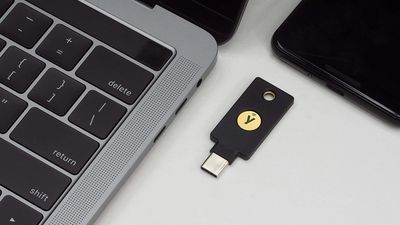
yubico 5c nfc
A Security Key is a physical device that works with two-factor authentication. Instead of using a code generated by a secondary Apple device for authentication, when you log into your ‌Apple ID‌ on another device after setting up Security Keys, you need to authenticate through a physical key that's actually plugged in to your device.

You can use any FIDO Certified security key to activate the feature, and Apple recommends the YubiKey 5C NFC and the YubiKey 5Ci, two devices sold by Yubico. Yubico sent me a pair of its security keys so that I could try them out with Apple's Security Key function.
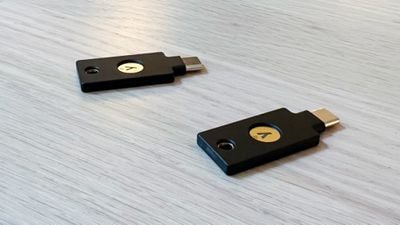
yubikey close up
The YubiKey 5Ci has a USB-C connector and a Lightning connector so that it can be plugged into iPhones, iPads, Macs, and other devices that use these connectors, while the YubiKey 5C NFC has a USB-C connector and the ability to interface with NFC-enabled devices.

With Apple eliminating the Lightning port in the iPhone this year and because I don't own any devices without NFC, I opted for the YubiKey 5C NFC for futureproofing, but if you plan to have an iPhone or an iPad with a Lightning port for an extended period of time, the 5Ci might be the better option if you're interested in using Security Keys.
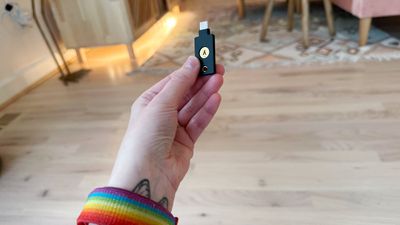
yubikey in hand size
Security Keys can be set up on the iPhone, ‌iPad‌, or Mac. Note that whatever security key product you pick, you have to have two, not just one. Apple requires dual security keys for redundancy purposes, and Yubico recommends a pair as well. The reason for this is because if you lose your physical security key, if you don't have another in a safe place, you're going to lose access to your ‌Apple ID‌. You're going to want to store the Security Keys in two separate locations.

On an iOS device or Mac, Security Keys can be enabled through the Password and Security section of the Settings app. Before you can add a Security Key, you need to sign out of all inactive devices, which includes devices that you have not used in the last 90 days. Older devices won't support Security Keys at all.

I had to go through this process, and I want to note that it didn't quite work properly (which is not the YubiKey's fault). Apple's process signed me out of the unsupported devices or devices I had not logged into, but then the Security Keys setup would not progress. I swapped over to the Mac to continue, and had better luck.

yubico 5c nfc
The setup process required me to connect the security key, which I did using USB-C, and then I had to press on the key to get the Mac to recognize it. Apple had me give it a name, and then repeat the process to add the second security key.
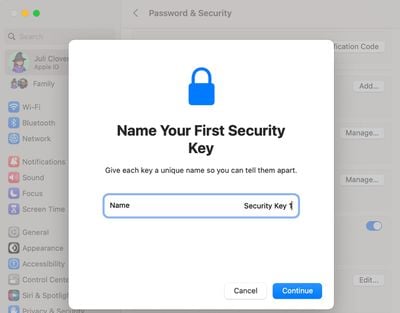
mac security key setup
After that, I was instructed to review my list of active devices and choose whether to sign out of any of them. There was an option to stay signed in to everything, which is what I selected. Following the setup process, Apple instructed me to store the keys separately and in a safe place, and clarified that I can add additional keys in the future.
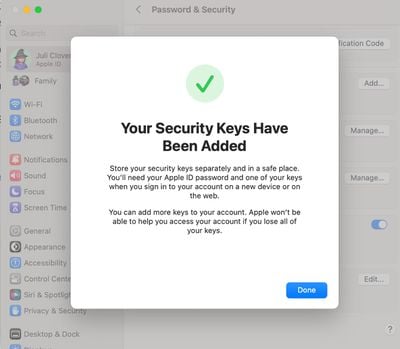
apple security keys added mac
There's also a single line on the bottom of the setup screen that makes it clear Apple has no way to help access an account that is tied to a security key if both keys are lost, a warning that should probably be in bolder text. Apple sends an email about the Security Key setup process, and in both Mac and iOS settings, I can view my connected Security Keys and remove them.
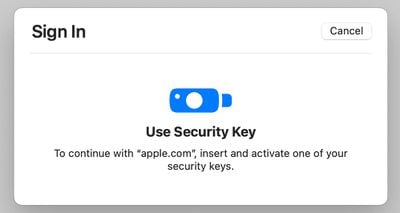
apple security key login process mac
When I attempt to sign into my ‌Apple ID‌ on a device on the Mac, I'm instructed to insert and activate one of my security keys. This process requires inserting the key into a USB-C port and pressing on it to activate it. I receive notifications across all of my devices when a login attempt is made.
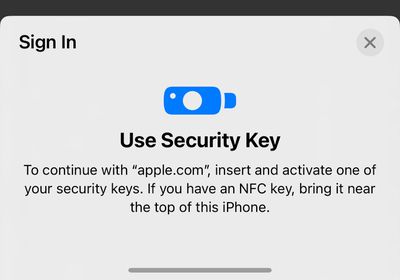
security key login apple id
On an iPhone, the login process is similar, but the YubiKey needs to be held near the iPhone's NFC reader (the top of the device) and activated for authentication. In general, it's a simple process on every Mac, iPhone, and ‌iPad‌ I've tested it with. All of my devices are running iOS 16.3 or later or macOS Ventura 13.2 or later, and they all support USB-C or NFC. On devices that are not updated or do not support USB-C/NFC, the process might not be as seamless and could require adapters.
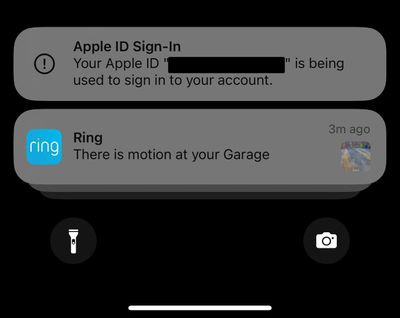
apple id login warning
My major worry activating Security Keys is that I'm going to lose one. YubiKeys and other security keys are small, unobtrusive, and easy to lose since they're designed to be kept secret and hidden. The YubiKey has a hole at the top for a keyring, so I'm going to add a keyring to one that will remain in a secure place in my office, and the second will go somewhere safer.

Two-factor authentication with a physical security key is more secure than authentication with a digital code, according to Apple, but it's a little riskier. I can't track my YubiKeys if they're lost, but I can track down all my secondary Apple devices if I should lose one and need it for a code. That said, the authentication process is super easy, and it's even quicker than getting a code from another Apple device.
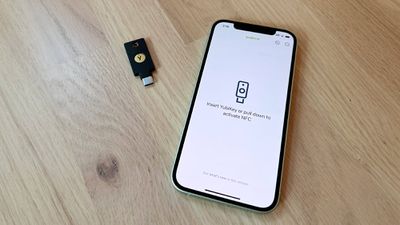
yubikey authenticator app
YubiKeys don't need to charge and seem to be durable so far based on anecdotal reports from YubiKey users, which is good because I'm also worried about breaking one. Ultimately, I think I may add a third key to my account just for another layer of protection, since there's little chance I'll lose or break three at one time. There's an IP68 water resistance rating so it can hold up to liquid immersion, and it has a storage temperature of -4 °F to 185 °F.

You won't need an app to use a YubiKey for some services (like with an ‌Apple ID‌ or Twitter), but for others, the Yubico Authenticator will need to be installed. The Yubico Authenticator is like Google Authenticator or Authy, generating a code that uses the YubiKey.
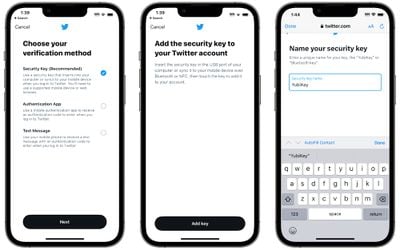
twitter security keys
I was not able to set up the YubiKey with Instagram because Instagram's authentication process plus the Yubico app simply would not work. The app would not recognize the key, so be aware that there may be some troubleshooting involved. There are limitations with the YubiKey in terms of supported accounts. It can store up to 25 FIDO2 credentials for password-free logins, two OTP credentials, 32 OATH credentials for one-time passwords (when paired with the Yubico Authenticator), and an unlimited number of U2F credentials. If you have more than 32 accounts where you need one-time passwords, the YubiKey might not be the best solution because it only works with 32 logins.
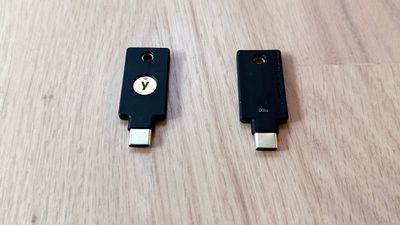
yubikey front and back
In addition to an ‌Apple ID‌, the YubiKey works with other websites and services with two-factor authentication. Google, Microsoft, 1Password, LastPass, Facebook, Twitter, Instagram, bitcoin wallets, government accounts, and a bunch more are all supported.

Bottom Line

If you're aiming to better secure your ‌Apple ID‌ through physical authentication using the Security Keys feature, the YubiKey series is worth looking at. It offers better protection than you'll get through digital codes, but it is expensive and there are some limitations to be aware of if you want a multi-purpose physical authenticator.

How to Buy

The YubiKey 5C NFC that I used in this review is priced at $55, and it can be purchased from the Yubico website. The YubiKey 5Ci with Lightning connector and USB-C connector is priced at $75.


Top Rated Comments

48 months ago
Recently got on the YubiKey train and they work great. One thing that continues to be a disappointment regarding Apple is how easy it is change your Apple ID password. While the physical hardware key keeps other people from logging into your account, it does not actually protect changing your Apple ID password on your actual device. All you need is your pin, and frankly that is not enough. I wish they would require at least your full Apple ID password or a 2nd factor like a YubiKey in order to change.
Score: 15 Votes (Like | Disagree)
48 months ago
Why not attach AirTags to the keys
Score: 14 Votes (Like | Disagree)
48 months ago

What is this stupid obsession apple users have with not wanting to carry stuff? You really want to get rid of all your physical things and trade it for software based crap so that way apple can come along a few years down the road and monetize your access with yet another subscription. You know they will try at some point too!
Even setting aside the apparent preference for a George Costanza wallet, an iPhone or Apple Watch is a multi-purpose device that is locked with biometric authentication or wrist monitoring (with a very strong passcode) and can be remotely disabled or wiped if lost or stolen. A Yubikey is an additional item that does not have any built-in protection against use by unauthorized parties, visually announces that it is a key guarding something valuable, and is still dependent on software/services which could decide to introduce usage fees. In my view, having my existing devices act as 2FA for each other still wins out over adding a Yubikey to the mix, just as having my password manager app generate time-dependent passcodes is preferable to bringing back the old SecurID keychain fobs.
Score: 10 Votes (Like | Disagree)
48 months ago
I tried the same yubikeys and went back to the old way of Apple’s 2FA. I kept getting prompted for a security key that was stashed in another part of the house. I don’t want to carry—and guard—yet another device when I travel. iPhone failure on the road? You’re going to need a key with you to activate a replacement iPhone. I’m sure keys are the best choice for Apple to control access to its intellectual property, but for average users I wouldn’t recommend.
Score: 10 Votes (Like | Disagree)
48 months ago

Apple is trying to get rid of your wallet and keyring. These keys seem like a step backwards.
What is this stupid obsession apple users have with not wanting to carry stuff? You really want to get rid of all your physical things and trade it for software based crap so that way apple can come along a few years down the road and monetize your access with yet another subscription. You know they will try at some point too!
Score: 9 Votes (Like | Disagree)
Cristim74 Avatar
48 months ago

I had been considering getting a couple of these, but didn’t realise that they only work on the very latest macOS. I still have a 2025 12” MacBook that I use occasionally.
You have the future 2025 12" MacBook? :)
Score: 8 Votes (Like | Disagree)

Popular Stories

apple design award 2025

Apple Announces 2025 Design Award Winners Ahead of WWDC 2025

Tuesday June 3, 2025 10:14 am PDT by
As we wait for WWDC to kick off next Monday, Apple today announced the winners of its annual Apple Design Awards, recognizing apps and games for their innovation, ingenuity, and technical achievement. The 2025 Apple Design Award winners are listed below, with one app and one game selected per category: Delight and Fun - CapWords (App) and Balatro (Game) Innovation - Play (App) and PBJ -...
1password deal blue

1Password Security Breach: What Was Accessed and What Wasn't

Wednesday November 25, 2026 1:09 pm PST by
Popular password management app 1Password today said it experienced a security breach earlier this month. 1Password says some customer names and email addresses were accessed, but no customer vault contents were compromised. On November 19, 1Password saw indications that an employee's GitHub account had been breached and began investigating. The company says the breached GitHub account was...
apple store down feature

Here's Why the Apple Store is Going Down

Thursday November 26, 2026 5:49 am PST by
Apple's online store is going down for a few hours on a rolling country-by-country basis right now, but do not get your hopes up for new products. Apple takes its online store down for a few hours ahead of Black Friday every year to tease its annual gift card offer with the purchase of select products. The store is down in Australia, New Zealand, and Thailand, right now, and it will...
Latest Stories
The 50+ Best Apple Black Friday Deals Still Available on AirPods, iPads, and More
3 hours ago
HomePod Mini 2 in (RED) Seemingly Spotted Ahead of Announcement
2 minutes ago
Apple's M6 and PROLED MacBook Pro Reach New Low Prices for Black Friday
10 hours ago
The MacRumors Show: iPhone Air 2 and iPhone 18 Are Coming
11 hours ago
Apple Store in Brisbane Reopening Next Month With New Design
11 hours ago
The 60+ Best Black Friday Accessory Deals on iPhone Chargers, TVs, Headphones, and More
12 hours ago
GTA VI Now (Barely) Running on Apple Silicon Macs
12 hours ago
The Best Black Friday Streaming Deals on Apple TV, Disney+, and More
13 hours ago
Apple TV's 'Carême' Wins International Emmy for Best Drama
13 hours ago
iPhone 18 Production Delay Leaves Apple Little Time Before Launch
14 hours ago
The Best Black Friday AirPods Deals Still Available
6 hours ago
The Best Black Friday Deals on Apple Home Products
15 hours ago
The Best Black Friday iPhone Deals Still Available
6 hours ago
The Best Black Friday iPad Deals Still Available
6 hours ago
The Best Black Friday Apple Watch Deals Still Available
6 hours ago
The Best Black Friday AirTag Deals Still Available
6 hours ago
The Best Black Friday Mac Deals Still Available
6 hours ago
iPhone Share of US Smartphone Market Hits 57% as Rivals Slip
16 hours ago
iPhone 20 Pro Rumored to Feature 3D-Printed Titanium Frame
18 hours ago
Apple's Official 2026 Black Friday Offer Starts Rolling Out
1 day ago
Halide Adds Fill Light Feature for iPhone Duo
2 days ago
MacBook Air Black Friday Deals Now Live With Massive $399 Savings
2 days ago
Amazon Discounts All MacBook Neo Models by $99 for Black Friday
2 days ago
Kodak Launches Unique AirTag Rival With E-Ink Display
2 days ago
Here's Why the Apple Store is Going Down
2 days ago
Apple Still Working on Giant Foldable iPad That Could Cost $5,000
2 days ago
iPhones Dominate China's Weak Singles' Day Smartphone Sales
2 days ago
iPhone 20 Pro Could Feature Ceramic in Limited-Edition Model
2 days ago
Apple Faces Korean Regulator Review Over iPhone 16 AI Advertising
2 days ago
Apple Watch Ultra 4 Hits New Best-Ever Price of $649.99 for Black Friday
2 days ago
Related Apple News: Opinion | News | Iphone | Iphone | Mac






























