

Smart locks are one of the more popular types of HomeKit accessories, and Yale's Assure Lock SL deadbolt announced last October is one of the more interesting options on the market today. It's available in Polished Brass, Oil Rubbed Bronze, and Satin Nickel, and I've been using the Oil Rubbed Bronze for the past few months.
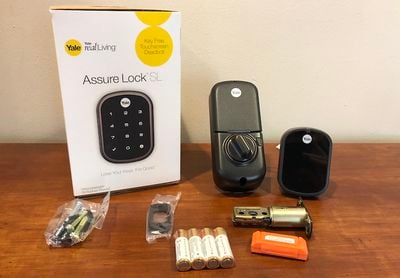
With the Assure Lock SL, Yale has pursued an interesting strategy of offering a $169 basic keyless entry deadbolt that can also accommodate one of several optional $50 hardware modules that add support for HomeKit, Z-Wave, or Zigbee smart home integration.
Locking Overview and Design
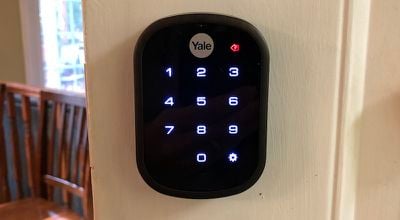
While most smart deadbolts allow users to lock and unlock from the outside with both a keypad code and a standard key, the Assure Lock SL foregoes support for a standard key entirely. As a result, it allows for a much cleaner look from the outside with only a small keypad visible, and it obviously also prevents the lock from being manually picked.
It sounds like a dangerous design decision that could easily leave you locked out if your batteries run out, but Yale has a solution to that dilemma – touching a standard 9V battery to a pair of terminals on the bottom of the lock will provide enough power to allow you to enter your code and unlock the door. Other manufacturers like Schlage and Kwikset are also hopping on this bandwagon as a solution toward eliminating keys entirely, so it's likely to become even more popular in the future.
Now, I don't know anyone who carries a 9V battery everywhere they go, so it means if your lock loses power while you're gone you'll need to run to the store, borrow one from a neighbor, or maybe even keep one hidden outside your door. It's obviously more work than just unlocking with a key, but part of the appeal of smart locks is that you don't need to carry keys with you. Hiding a key outside your door has some risk because anyone who finds it can unlock your door, but a hidden 9V battery is useless unless the person also knows your unlock code for the keypad.
While the decision to omit support for a traditional key makes for a very clean look from the outside, unfortunately the same isn't as true for the inside. As with most smart locks, the interior component is a relatively bulky affair, needing room for manual deadbolt control, electronics, and space for 4 AA batteries to power the unit. In addition, there needs to be room for the network module to add support for HomeKit, Z-Wave, or Zigbee.
Hardware Installation
Installation is straightforward and will be generally familiar to anyone who has installed even a traditional deadbolt. After your old deadbolt has been removed, you pretty much just repeat the process in reverse, inserting the latch through the edge of the door and then sandwiching it with the exterior touchscreen assembly on one side and an interior mounting plate on the other side, being careful that the posts on the mounting plate line up with the proper holes on the exterior and that the cable from the exterior touchscreen is fed through to the inside of the lock.
Yale provides three pairs of bolts in different lengths to secure the two sides together, depending on the thickness of your door. Just make sure you have everything lined up and level before you tighten them down. A rubber gasket around the edge of the exterior escutcheon helps provide a solid level of weather protection.
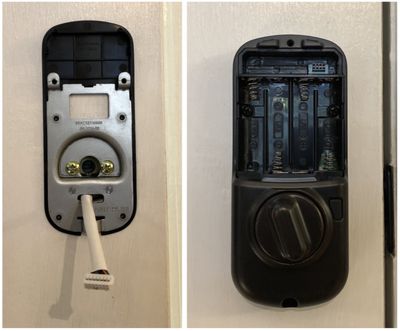
From there it's a matter of connecting the cable to the interior assembly, feeding the cable past a guide to secure it so that it doesn't get pinched when everything is assembled, and using three short screws to attach the interior escutcheon to the mounting plate. Install the matching strike plate on the door frame opposite the latch if you wish, and your lock is ready to be tested for manual operation to make sure everything is properly aligned.
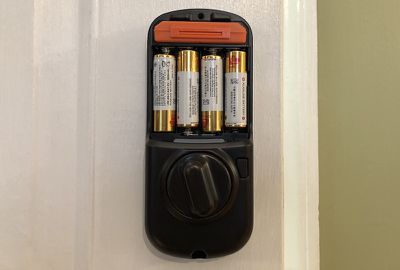
Once everything looks good, you're ready to install the four AA batteries and screw on the battery compartment cover, and the lock will power up with verbal cues to help walk you through the programming process. The verbal cues are a nice addition beyond the normal beeps that provide feedback on most other locks.
Programming
Programming is fairly simple, with the lock itself offering voice guidance starting with the creation of a Master PIN code that allows for changing settings, and then up to 25 user codes to provide door access. From there, you're good to go if you're happy with the factory settings, but you can also customize a fair number of options, including whether the lock should automatically re-lock 30 seconds after opening, whether an interior indicator light should come on to confirm locked status, one-touch locking so you can lock your door without having to enter a user code, and more.
There's also a Privacy option that lets you use a button on the inside of the lock to enter a "do not disturb" mode that temporarily disables all user codes to keep even authorized users from entering.
I found it was easiest to complete the traditional setup process before moving on to adding in the HomeKit compatibility, so once the initial programming was done, I unscrewed the battery compartment cover, removed the batteries, and inserted the iM1 network module into the slot. Reinstalling the batteries and battery cover starts the system back up, and you use the Master PIN code to enroll the module.
Once that's done, you can use the Yale Secure iOS app to get the lock online via Bluetooth and synced up with your HomeKit data. Installing a network module also increases the number of user codes you can store for the lock from 25 to 250.
General Operation
While smart features handled through an app or HomeKit are nice, a smart lock also needs to work well in manual operation, and the Yale Assure Lock SL handles that well. It offers a sleek, unobtrusive look from the outside, and with a touchscreen interface, aside from a Yale logo it's completely blank until you activate it. Once you touch the screen, it lights up brightly to make it easy to see in the dark, and the backlit numbers won't wear off like on some other keypad locks.
Compared to other locks that can only communicate with simple beeps, the Assure Lock SL includes a small speaker that lets it emit not only several different tones to help convey information, but also provide voice guidance during setup in three languages: English, Spanish, and French. The voice guidance can also provide information during normal operation, such as alerting someone trying to enter that Privacy mode has been turned on or if they've taken too long between entering digits of the PIN code and their time has expired.
Overall operation is smooth, with the keypad accurately registering presses even with gloves on. After entering a PIN code when unlocking the door, you do have to press the checkmark key to confirm your entry, which feels like an unnecessary extra keypress, but that's a minor quibble.
Yale Secure App
The Yale Secure app for managing lock functions from your phone is a simple app, but it offers a clean look based on a black, yellow, and white color scheme. It supports multiple homes and displays all of your compatible Yale locks that are online, making it easy to lock and unlock with a tap.
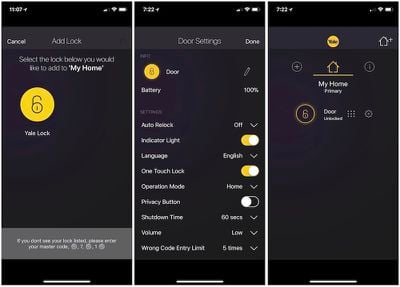
It also lets you manage assigned user codes, monitor battery level, and adjust all of the settings you'd otherwise need to manage in a bit more cumbersome manner directly from the lock's touchscreen. User codes can be easily added and deleted as needed, but it would be nice if codes could be set to automatically expire after a period of time or only allow entry at certain times.
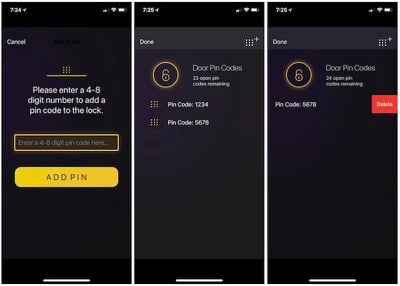
Finally, the app keeps an eye out for firmware updates for your lock and applies them when they're available. This isn't a full HomeKit app, so you won't be able to use Yale Secure to see the status of other HomeKit devices or set up automation with multiple devices here.
HomeKit Operation
As with other HomeKit-enabled smart locks, the Yale Assure SL can be controlled via Siri or Apple's Home app for iOS, and it can be integrated with other HomeKit products through automation routines to activate based on groupings into rooms or scenes, or with triggers where an event on one HomeKit device causes another device to be activated.
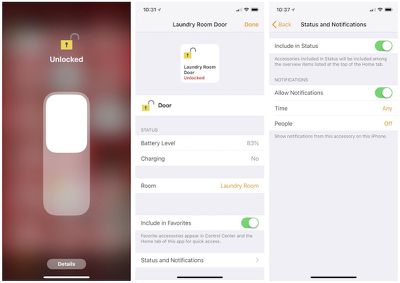
Throughout my testing, the lock was responsive to HomeKit commands, with its status showing up quickly in the Home app and quickly locking or unlocking from either Siri commands or the Home app, regardless of whether I was home or away. With a range of HomeKit devices around the house, setting up a "Good Night" scene makes it easy to ensure all lights are turned off, doors are locked, and the garage door is closed before heading off to bed.
Battery Backup
As I outlined above, there's no physical cylinder for unlocking the Assure Lock SL with a key, so if the batteries in the lock die, Yale's backup solution is to touch a 9V battery to terminals on the bottom of the lock to give it enough power to open up. If you can get your hands on a 9V battery easily enough, it's pretty nice solution, and hopefully you won't ever have to use it if you heed low-battery warnings and make sure your lock's batteries don't run out.
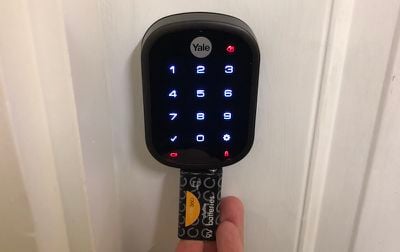
I tested out the 9V battery backup method several times, and while it's a little finicky getting a good connection to the terminals and holding the battery steady, once you've got everything in place the lock powers up just fine and lets you lock and unlock normally.
After three months of occasional use, the Yale Secure app is still reporting 83 percent battery life remaining on the set of AA batteries that came with the lock. If this is indeed accurate and a relatively linear measure of battery life, battery changes should be few and far between, further limiting the potential need to use the 9V battery backup solution.
Wrap-up
The Yale Assure Lock SL is a very nice smart lock. It performs well in all three aspects of operation: direct interaction with the lock, app management, and HomeKit integration. It's proven reliable with solid battery life, and the 9V battery backup system is an innovative method for eliminating the need for keys entirely.
At $169 plus an additional $50 for the HomeKit module, the Assure Lock SL is fairly pricey, but not completely out of range compared to competing products. On the one hand, the separate network modules make it easy to add support for a smart home system after purchase and you only have to pay for it if you want it, but on the other hand, $50 feels a bit high and it only lets you work with your choice of a single smart home protocol.
The Yale Assure Lock SL with included iM1 HomeKit module is available for $219.99 in Satin Nickel, Polished Brass, and Oil Rubbed Bronze from a variety of retailers such as Best Buy (Satin Nickel/Polished Brass) and Amazon (Satin Nickel/Polished Brass). Amazon also has the lock/module package in Oil Rubbed Bronze, but is charging $249.99 for some reason.
Note: Yale/Assa Abloy provided the Assure Lock SL to MacRumors free of charge for the purposes of this review. No other compensation was received. MacRumors is an affiliate partner with Best Buy and Amazon and may earn commissions on purchases made through links in this article.


































Top Rated Comments
Maybe I shouldn’t name the front door, ‘front door,’ but something more fancy, perhaps.
“Hey Siri, open the gates to heaven.”