

Introduced earlier this year, the Bamboo Sketch is Wacom's latest precision stylus designed to work with the iPhone and the iPad over Bluetooth. It's meant to mimic the feel of traditional pen-and-paper writing and drawing with interchangeable pen nibs and customizable shortcut buttons.
Priced at $80, Wacom's new stylus isn't a better option than the Apple Pencil for iPad Pro users, but for the iPhone and other iPad models, it's worth checking out.

Design
The all-black Bamboo Sketch looks sleek and stylish. It's made from a textured plastic that's super grippy, so it's easy to hold and feels comfortable when writing.
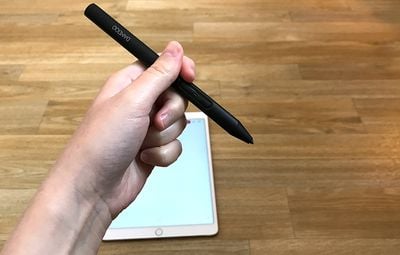
It's both thicker and heavier than a regular pen, and while it is well-balanced in the hand, my hand did get tired while writing after about 15 to 20 minutes because of its weight and diameter. Size wise, it measures in at 142mm long (about the size of your average pen) and it is 10mm in diameter. Its official weight is 18 grams, which is actually lighter than the Apple Pencil.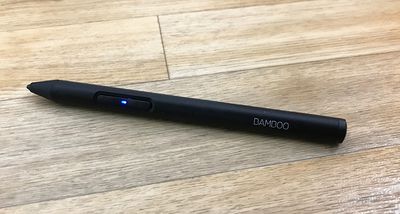
Design wise, the Bamboo Sketch features two shortcut buttons at the top that are customizable with different functions, and a spot where the charger connects at the bottom. Aside from those design elements, this a standard pen-like stylus.
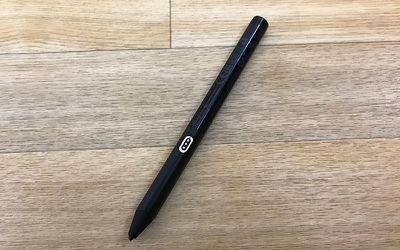
The Bamboo Sketch features a unique swappable tip, with 1.9mm firm and soft pen nibs included in the packaging for a custom feel when writing. I didn't notice much difference between the two different tips, but mostly stuck with the soft one because it felt a bit smoother.
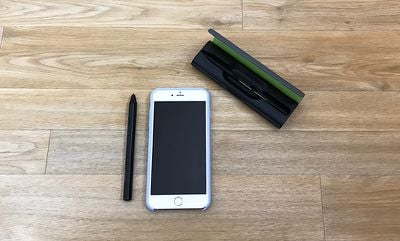
Wacom ships the Bamboo Sketch in a high-quality carrying case that houses the stylus, extra tips, and the USB charger. When I opened the package, I thought the case also doubled as a way to charge the Sketch, but that's not how it works.
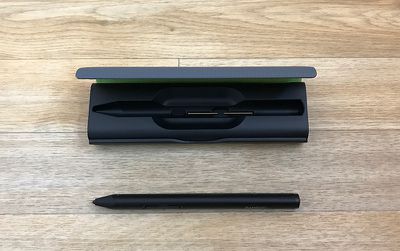
The Bamboo Sketch attaches magnetically to an included USB charger, which then can be plugged into a computer or a standard USB outlet. The charging dongle is tiny (about the size of a small flash drive) and feels like something I'm bound to lose at some point, so that's a negative, but at least it can be stored in the carrying case when not in use.
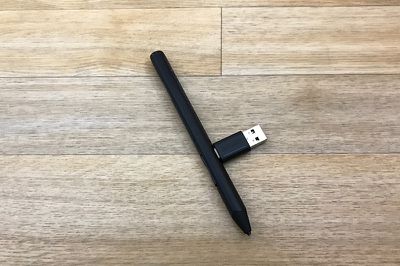
Charging through the case would have been a lot more convenient because attaching a stylus to my computer is somewhat awkward, but it's superior to a wired solution. The Bamboo Sketch's battery should last for about 16 hours. In my experience, that was enough for about two weeks of use for approximately 30 to 45 minutes a day.
The case also includes a hole that's used for swapping out the aforementioned interchangeable nibs. Stick the Sketch into the side of the case and tilt it to pull out the existing tip, pop a new tip out of its slot inside the case, and press it into the top of the stylus. It's a simple, hassle-free process and I appreciate how easy Wacom made it to swap tips.
Features and Writing Experience
Wacom says the Sketch has a natural, precise feel that's similar to a pen on paper. It doesn't feel like writing on paper, of course, but it was smooth and comfortable to write with, and as precise as you'd expect a Bluetooth-connected stylus with a fine tip to be. It's about as close to a pen and paper experience as you can get on a tablet or a phone screen.
The Bamboo Sketch connects to the iPad using Bluetooth. Once charged, pressing one of the buttons on the stylus activates Bluetooth, and it can be connected to an iPad or iPhone using one of Wacom's apps, or through the Bluetooth section of the Settings app on the device.
While in use with an iPad, the Bamboo Sketch requires you to disable multitasking gestures to enable palm rejection features within apps. That means no using four and five finger gestures to do things like pinch to the Home screen or swipe between apps.
If you're someone who often uses those gestures, turning the feature off will be a hassle because it'll need to be toggled off every time you want to use the stylus and then on again when you're done.
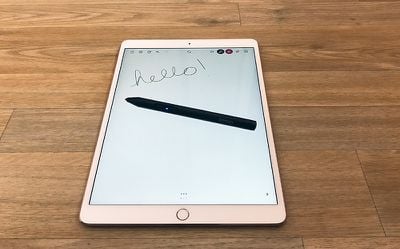
The Bamboo Sketch is able to work systemwide on the iPhone or the iPad, so it can be used as a finger replacement. Within select apps, it also has additional features like pressure sensitivity and palm rejection.
Support for the Bamboo Sketch has to be enabled through software, so the experience is simply not as good as an Apple Pencil on an iPad Pro, especially the newest iPad Pro models with ProMotion display technology.
Palm rejection worked poorly for me regardless of which app I was using and whether I was using my iPhone or my iPad. It kept detecting small movements from my hand, leaving marks on the page and interrupting what I was writing or sketching.
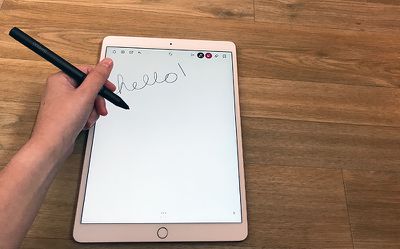
I much preferred to just not touch my palm to the display than to deal with the spotty palm rejection features while writing. Unfortunately, holding my palm up isn't always comfortable.
Palm rejection with the Apple Pencil works much better because with the Pencil connected, it rejects all touch when the Apple Pencil's tip is on the screen of the iPad Pro. It's hard to compete with that.
On non iPad Pro devices, spotty palm rejection is about as good as it gets. Some apps do it better than others, but it's never going to be perfect. It helps a lot to start writing before you put your palm down, but it isn't foolproof.
As for pressure sensitivity, the Bamboo Sketch was as natural and fluid to use as the Apple Pencil. Pressure sensitivity worked well -- a light press gave me a thin line, and as I pressed down harder, the line got thicker. Bamboo Sketch has 2,048 levels of pressure sensitivity.
Pressure sensitivity matched the Apple Pencil, but on iPad Pro models, the Bamboo Sketch can't compete when it comes to latency. When you write or draw with the Apple Pencil on one of the new iPad Pro models, the line is right at the tip of the stylus and it stays there as the Apple Pencil moves. With the Bamboo Sketch, it's offset and noticeably slower at tracking. It's also not able to do the side of the pencil shading that's possible with the Apple Pencil.
These features only apply to the iPad Pro -- if you don't have an iPad Pro, the Bamboo Sketch works as well or better than any other connected stylus I've tried (I'd say better on the whole, given its ergonomics, grip, and pressure sensitivity).
The Bamboo Sketch has one edge over the Apple Pencil -- two shortcut buttons. In select apps, shortcuts can be assigned to the two buttons on the stylus. For example, in Wacom's Bamboo Paper app, the buttons can be set to do things like erase, undo, redo, or open full screen mode.
Supported Apps and Devices
There are a good number of apps that support the Bamboo Sketch and all of its available features. ArtRage, Astropad, AutoDesk SketchBook, Bamboo Paper, Concepts, Good Notes, IbisPaint, MediBang, Notes Plus, Procreate, Sketch Club, Tayasui Sketch, Zen Brush 2, and Zoom Notes all support pressure sensitivity and shortcut functionality.
All of the above listed apps aside from ArtRage and Procreate support palm rejection.
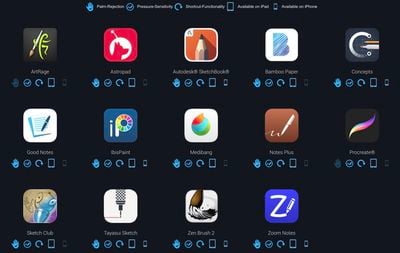
According to Wacom, the Bamboo Sketch works with previous iPad generations that feature Bluetooth connectivity and the iPhone 6 and above. I tested it on a previous-generation 12.9-inch iPad Pro, a current-generation 10.5-inch iPad Pro, and an iPhone 7 Plus.
Bottom Line
For iPad Pro owners, the Apple Pencil is the best stylus on the market and it's not really worth considering any alternatives, including the Bamboo Sketch. There's no comparison, especially with iOS 11 improvements that allow the Apple Pencil to be used system-wide.
If you have the money to spend on a high-end stylus and have an iPad Pro, buy the Apple Pencil. If you don't have an iPad Pro and need a stylus that offers enough precision for note taking and fine sketching, the Bamboo Sketch is a great option.
How to Buy
The Bamboo Sketch can be purchased from the Wacom website for $79.95.
Note: Wacom provided a Bamboo Sketch to MacRumors for the purpose of this review. No other compensation was received.


































Top Rated Comments
In sum, if you own any other active styluses with two buttons, save your cash for a truly worthy stylus. This latest stylus marginally improved upon previous generations and Wacom's marketing is simply deceptive. I lost my faith in this company as far as iOS active styluses go.
Apple and other manufacturers deserve all the flack for building phones that are so thin they have small batteries and camera bumps for no good reason. After a certain point thinness does not improve the experience.
What baffles me is that almost every pen stylus device, even the old Wacom tablet ones, are a bit too thick even in the best cases and that makes them more tiring to use for extended time. I don't see why they could not be designed to be slimmer at the areas where you would normally grip a pen.
I think it has less to do with an obsession of thickness on their part and more to do with Apple's obsession with thinness. People like to berate Apple for continually making products thinner, but the experience gained from things like that has enabled them to make things like the AirPods and Apple Pencil which pack a lot of wireless tech into a thin and light package.
As for me, I'm just glad Apple finally came out with a drawing tool for the iPad. I had tried Adonit's Adobe Ink device and it was garbage. I'm reminded of the difference between my Motorola ROKR with "iTunes" in 2005 and my iPhone in 2007.