Skip to Content

Review: Ten One Design's Mountie+ Turns Your iPad Into a Second Screen Attached to Your Mac

by

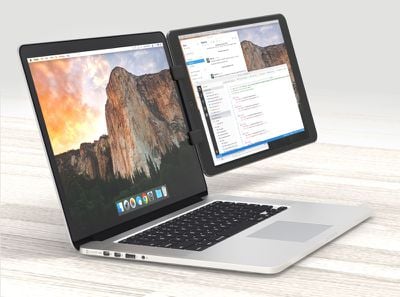
Ten One Design's new Mountie+ is an update to its existing Mountie, a device that's designed to allow you to attach an iPad or iPhone to your laptop for use as a second display. The Mountie+, which I've been using for the last few weeks, was created for Apple's larger 10.5 and 12.9-inch iPad models.

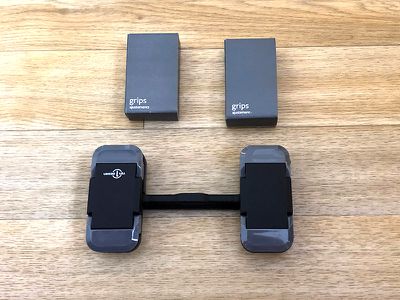
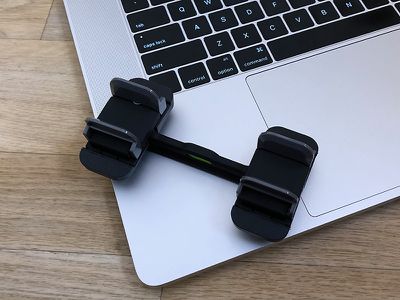
With the Mountie+, I can attach an iPad to the left side, right side, or top of my MacBook Pro using a simple double clamp mechanism. Made from plastic, one side of the clamp buckles onto my MacBook Pro, while the other side is meant to hold the iPad. I had to take my iPad Pro's Smart Cover off to use Mountie+, but it will work with slim cases attached.
mountie2
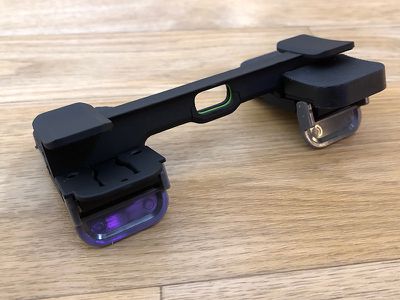
The clamp works using soft pieces of grippy rubber to grasp both the display of the MacBook Pro and the iPad Pro, and there are different sized rubber inserts to fit different devices. The grip is super tight and fitted to both devices, so the iPad Pro is going absolutely nowhere while in the Mountie+. There is absolutely no slippage, and even when I pull on my iPad with a good amount of force, it does not budge.
mountiecloseddesign
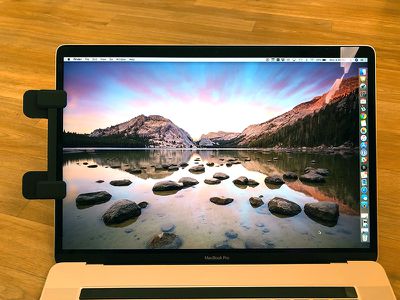
The first Mountie+ I had actually gripped my MacBook Pro too tight and caused visible distortion to the display even with the correct inserts. I was concerned about long term damage, so Ten One Design sent a replacement. The second Mountie+ had no issues with fit and did not cause prolonged screen distortion when I clamped it shut.
mountiemacbookprofront
For the record, if you have one that fits a little tight like I did, Ten One Design will swap it out for you. To be honest, I'm still mildly concerned about the pressure the mount exerts on my MacBook Pro, but the original Mountie has been around for quite awhile and it's not an issue that's been raised, so it appears to be safe.

For my setup, the Mountie+ worked right out of the box, but some people may need to make component swaps. In that situation, I think it's a little unclear how the Mountie+ works and which components are needed -- I felt like Ten One Design needed to include clearer instructions. It's not immediately clear which side of the clamp goes where, nor how you're supposed to position it.
mountiepadsandnopads
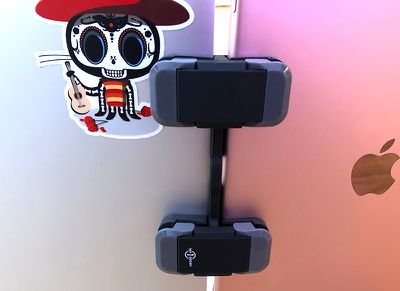
Here's how it works: Open up the buckles on the Mountie+, put the thinner side on the MacBook Pro with the smaller tabs facing the display side, and then put the thicker side on the iPad Pro. Line everything up and then close the buckle to clamp it all down tight.

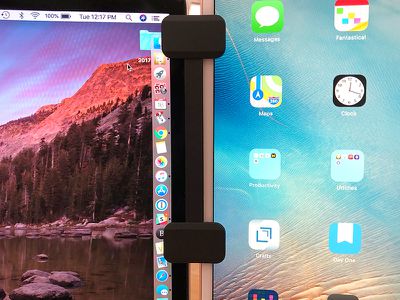
Fit wise, the Mountie+ cuts into the display of my MacBook Pro and blocks a small bit of the display, and the same goes for my iPad. It's distracting at first, but I positioned it in an area where there's nothing that I need to see (my dock), so it's less bothersome.
mountiefrontcloseup
It's absolutely something to be aware of, though, if you have a 2016 or 2017 MacBook Pro with the slimmer bezels. On older models, there's no obstruction because the bezels of the device are thicker. I can charge an iPad while it's attached to my MacBook Pro because the Mountie+ leaves the Lightning port accessible.
mountieback
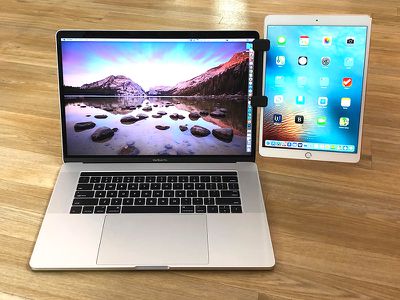
I primarily tested the Mountie+ with my 10.5-inch iPad Pro, which I positioned in portrait mode to the right of my display where I could access it easily with my right hand for touch gestures. I used the iPad for things like Twitter, watching videos, and keeping an eye on the news while I worked during the day, and it was super handy to have an extra display right there within eye view.
mountiefront
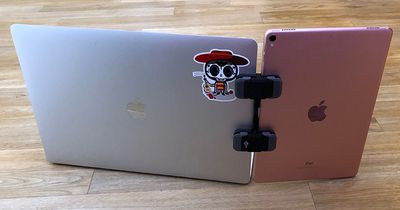
If you pair this with screen mirroring software like Duet Display, it can serve as a full secondary display for your Mac. Though I had mine in portrait mode on the right side, the Mountie+ can be used anywhere on the MacBook and with your iPad in portrait or landscape orientation.
mountieipadbackfull
I did use the Mountie+ with my 12.9-inch iPad Pro, but it felt too heavy and unstable. Even with the 10.5-inch iPad Pro attached to my MacBook Pro, I was worried about its top heaviness and the extra weight pressure on the hinge of my machine. Ten One Design recommends making sure heavier tablets paired with lighter laptops are positioned with the bottom of the tablet resting on a desk, which does help take the pressure off of the MacBook.

Mounting the 10.5-inch iPad Pro on the left and right sides of my MacBook Pro worked well, but on the top, it was too much weight and I couldn't reliably keep it stable. You could use the Mountie+ at the top of the display with a smaller iPad like the iPad mini, or an iPhone, but it doesn't work well with a top-mounted iPad Pro.
mountiedesign
While I liked having my iPad Pro positioned right next to my MacBook Pro, I did find myself wishing there was a way to tilt it towards myself just a bit for a better viewing angle, but that's not really something that's possible. It mounts straight to the side and since the clamps are straight, there's no adjustment possible.

Bottom Line

The Mountie+ is an interesting solution for adding a secondary display to your MacBook Pro using equipment you've already got on hand. It works with all of Apple's laptops and all recent iPad models (iPad Pro, iPad Air, iPad mini, etc), and because it has several rubber pad options for different fits, it also works with non-Apple devices.

I don't recommend the Mountie+ for the 12.9-inch iPad Pro unless you're going to be using it on a flat surface, but it works well with the 10.5-inch models on down. I do wish there was an option to tilt the iPad to get a better viewing angle, but that's a minor complaint.

I think the Mountie+ will be of particular interest to those who already use the iPad as a secondary screen with software like Duet Display, but it's also handy if you want to do things like keep an eye on your Twitter feed or watch YouTube videos while using your Mac for other purposes.

Because I've only had an opportunity to use the Mountie+ for a few weeks, I don't personally know if it's going to have any longterm effect on the hinge or the display of a MacBook, but Mountie's website suggests it should not be a problem because the weight of the device is evenly distributed along the length of the Mountie+ to avoid subjecting the hinges to undue stress. Still, I'd recommend using with caution, i.e., don't leave your iPad attached to your MacBook Pro all the time.

At $35, it's not overly expensive and it's a neat little accessory to have on hand whenever you need a second display in a pinch.

How to Buy

Mountie+ can be purchased from the Ten One Design website or Amazon.com for $34.95.

Note: Ten One Design provided MacRumors with a Mountie+ for the purpose of this review. No other compensation was received.


Top Rated Comments

116 months ago
If it was mounted along the back of the bezel too, maybe it wouldn’t have to grip so tightly onto the screen.
Knowing the lamination issues in the point of attachment and propensity of LCD displays to pressure damage I’d have to say no to this.
Score: 5 Votes (Like | Disagree)
grayskyz Avatar
116 months ago
I can't be the only one who thinks this is a terrible idea right? I mean, clip the retina screen and add the weight of an iPad on it? This is good? Someone in R&D okayed this?
Score: 5 Votes (Like | Disagree)
DanGoh Avatar
116 months ago
Can't be good for the hinges. People who want this are better off just buying a small stand and placing it next to the Mac.
Score: 4 Votes (Like | Disagree)
116 months ago
Ummmm. Let me check if AppleCare covers screen damage from this.........
Score: 3 Votes (Like | Disagree)
116 months ago
Looks like it could of been from a early 70’s Ron Popeil Ronco product commercial.

Except it would have been $9.99

Guess today’s equivalent would be “As Shown on TV” section of a *-Mart type store.

Shameful.
Score: 2 Votes (Like | Disagree)
116 months ago
Ummmm. Let me check if AppleCare covers screen damage from this.........
I can't be the only one who thinks this is a terrible idea right? I mean, clip the retina screen and add the weight of an iPad on it? This is good? Someone in R&D okayed this?
Agreed. Unfortunately, I can’t see my iPad Pro 12.9 attached on my MacBook Air. Terrible idea!
Score: 2 Votes (Like | Disagree)

Popular Stories

apple design award 2025

Apple Announces 2025 Design Award Winners Ahead of WWDC 2025

Tuesday June 3, 2025 10:14 am PDT by
As we wait for WWDC to kick off next Monday, Apple today announced the winners of its annual Apple Design Awards, recognizing apps and games for their innovation, ingenuity, and technical achievement. The 2025 Apple Design Award winners are listed below, with one app and one game selected per category: Delight and Fun - CapWords (App) and Balatro (Game) Innovation - Play (App) and PBJ -...
1password deal blue

1Password Security Breach: What Was Accessed and What Wasn't

Wednesday November 25, 2026 1:09 pm PST by
Popular password management app 1Password today said it experienced a security breach earlier this month. 1Password says some customer names and email addresses were accessed, but no customer vault contents were compromised. On November 19, 1Password saw indications that an employee's GitHub account had been breached and began investigating. The company says the breached GitHub account was...
apple store down feature

Here's Why the Apple Store is Going Down

Thursday November 26, 2026 5:49 am PST by
Apple's online store is going down for a few hours on a rolling country-by-country basis right now, but do not get your hopes up for new products. Apple takes its online store down for a few hours ahead of Black Friday every year to tease its annual gift card offer with the purchase of select products. The store is down in Australia, New Zealand, and Thailand, right now, and it will...
Latest Stories
The 50+ Best Apple Black Friday Deals Still Available on AirPods, iPads, and More
2 hours ago
Apple's M6 and PROLED MacBook Pro Reach New Low Prices for Black Friday
6 hours ago
The MacRumors Show: iPhone Air 2 and iPhone 18 Are Coming
6 hours ago
Apple Store in Brisbane Reopening Next Month With New Design
7 hours ago
The 60+ Best Black Friday Accessory Deals on iPhone Chargers, TVs, Headphones, and More
7 hours ago
GTA VI Now (Barely) Running on Apple Silicon Macs
8 hours ago
The Best Black Friday Streaming Deals on Apple TV, Disney+, and More
8 hours ago
Apple TV's 'Carême' Wins International Emmy for Best Drama
9 hours ago
iPhone 18 Production Delay Leaves Apple Little Time Before Launch
10 hours ago
The Best Black Friday AirPods Deals Still Available
2 hours ago
The Best Black Friday Deals on Apple Home Products
10 hours ago
The Best Black Friday iPhone Deals Still Available
2 hours ago
The Best Black Friday iPad Deals Still Available
2 hours ago
The Best Black Friday Apple Watch Deals Still Available
2 hours ago
The Best Black Friday AirTag Deals Still Available
2 hours ago
The Best Black Friday Mac Deals Still Available
2 hours ago
iPhone Share of US Smartphone Market Hits 57% as Rivals Slip
12 hours ago
iPhone 20 Pro Rumored to Feature 3D-Printed Titanium Frame
13 hours ago
Apple's Official 2026 Black Friday Offer Starts Rolling Out
1 day ago
Halide Adds Fill Light Feature for iPhone Duo
1 day ago
MacBook Air Black Friday Deals Now Live With Massive $399 Savings
1 day ago
Amazon Discounts All MacBook Neo Models by $99 for Black Friday
1 day ago
Kodak Launches Unique AirTag Rival With E-Ink Display
1 day ago
Here's Why the Apple Store is Going Down
1 day ago
Apple Still Working on Giant Foldable iPad That Could Cost $5,000
1 day ago
iPhones Dominate China's Weak Singles' Day Smartphone Sales
1 day ago
iPhone 20 Pro Could Feature Ceramic in Limited-Edition Model
1 day ago
Apple Faces Korean Regulator Review Over iPhone 16 AI Advertising
2 days ago
Apple Watch Ultra 4 Hits New Best-Ever Price of $649.99 for Black Friday
2 days ago
New Apple Store Opening in India, Download the Special Wallpaper Now
2 days ago
Related Apple News: Mac | Entertainment | News | Ipad | Reviews






























