

Earlier this year, popular smart doorbell and home security company Ring debuted its Video Doorbell 2, equipped with a motion sensing 1080p camera, a removable battery, and two-way audio capabilities. Integration with Ring's mobile app lets you see activity at your door from anywhere, and even communicate with visitors.
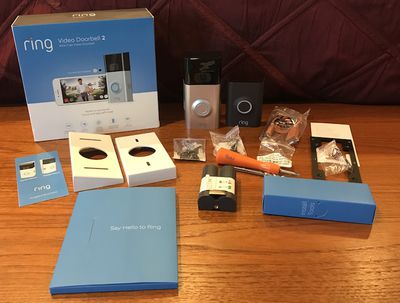
The Video Doorbell 2 is priced at $199 and can either replace an existing wired doorbell or be freshly installed in either a wired or a battery-powered configuration.
We've been testing one out over the past month to see how it works on a standalone basis and in conjunction with the Floodlight Cam and Chime Pro accessory we reviewed a couple of months ago, so read on to see what we thought of it.
Installation and Setup
While Ring's Video Doorbell 2 can be hardwired to replace an existing wired doorbell, the inclusion of a removable battery was perhaps the most exciting addition to the new model for me as my house does not have an existing wired doorbell. The original Ring Video Doorbell required that the entire doorbell be removed for battery recharging.
With the battery-operated Video Doorbell 2, I can easily mount the doorbell and receive a video feed from it without needing to run any wiring.
Placement was a little tricky for my front door, as I have a full-length sidelight along the knob side of my door. That configuration meant mounting the Video Doorbell 2 either on the trim separating the sidelight from the door or on the other side of the sidelight. No location was perfect, as the doorbell is wider than the trim between the sidelight and the door, the trim outside the sidelight doesn't provide a flat surface for installation, and moving even further out onto the siding simply felt too far away from the door.
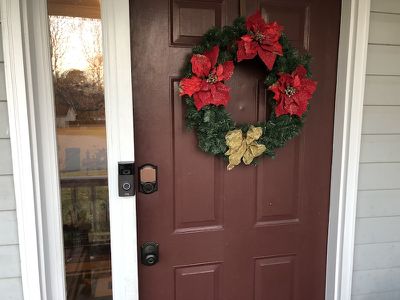
I ultimately settled on installing the doorbell on the trim between the sidelight and the door. It overhangs a bit toward the sidelight, but its proximity to the door provides a good view for the camera and ensures the doorbell is prominently visible to those approaching the door.
The actual installation process is quite simple, particularly if you're using it on battery and don't need to hook up any wiring. The first thing to do is charge the battery up completely using the included micro-USB cable, insert the battery into the doorbell, and use the Ring app to walk through the setup process. The app, which unfortunately hasn't been updated for the iPhone X as of this writing, lets you specify the product you're setting up, a name for it, and your address.
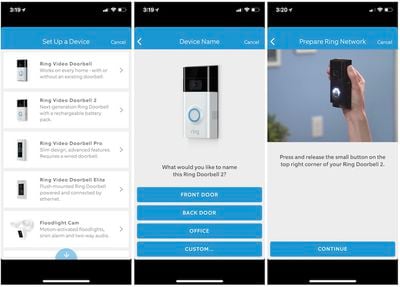
If you have an existing Chime Pro registered in the app, which lets you get audio alerts inside the home (and really a necessity for me since I didn't have an existing doorbell), it'll offer to connect the doorbell to the Chime Pro, simplifying setup and ensuring good wireless connectivity.
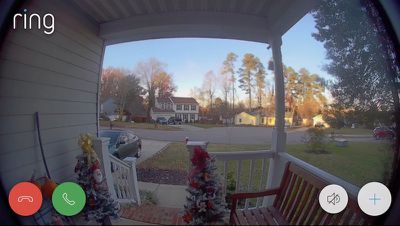
Once that's done, the Video Doorbell 2 is operational and you can view a live feed from the camera on your phone, which is helpful in deciding on placement. Ring recommends the doorbell be placed about four feet off the ground, and a couple of paintable plastic wedges are included if you need to angle the doorbell up, down, or to the side for a better camera view. The wedges can be used individually or together if needed.
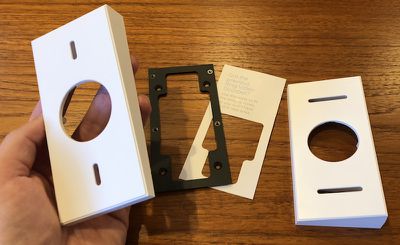
If you already have a wired doorbell, the decision on where to install should be pretty easy, as you'll want to reuse the existing wiring so you don't have to worry about batteries. A small diode is included with the Video Doorbell 2 in case you have a digital doorbell that plays a synthesized melody, and it's simple to install with a pair of screws. If you have a mechanical doorbell chime, do not install the diode. If you have a first-generation Ring Video Doorbell, an adapter plate is also included so you can reuse the existing holes at your mounting location.
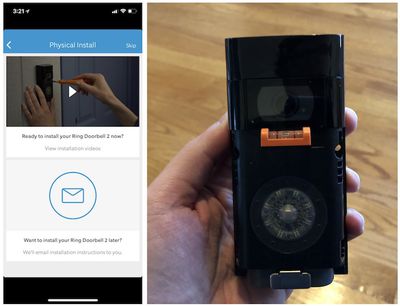
From there, you can pop in the included mini-level to make sure the doorbell is lined up properly, and mark the holes where you'll need to drill. If you're installing on wood, you can drill straight into it, but if you're installing into stucco, brick, or concrete you'll need to use included wall anchors, and Ring even includes a masonry drill bit in the package.
Then it's just a matter of hooking up the doorbell wiring (if using it wired), screwing the doorbell to the mounting location, and attaching the faceplate by slotting it in and adding a security screw to limit potential for tampering. Ring also includes a screwdriver with reversible bit that includes both the small star-shaped driver for the security screw and a Phillips driver for mounting the doorbell.
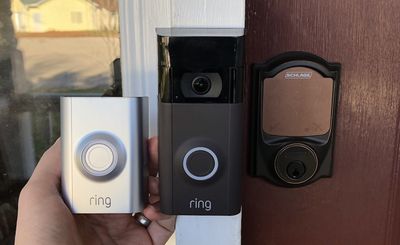
The Video Doorbell 2 comes with two faceplate covers in Satin Nickel and Venetian, which is a dark bronze color. I opted to use the Venetian faceplate, as my doorknob and Schlage Sense deadbolt are Aged Bronze in color.
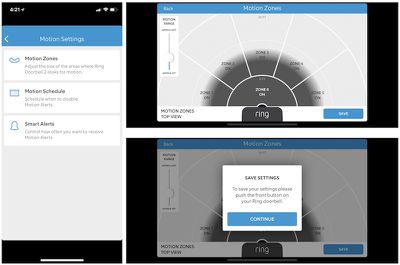
Once that's all done, you can head back into the Ring app and finish customizing your settings, setting up zones and distance range for motion detection, scheduling certain times of day to disable motion alerts, and customizing the frequency of alerts you wish to receive when there's frequent or continuous motion. Motion and doorbell ring alerts can be configured independently.
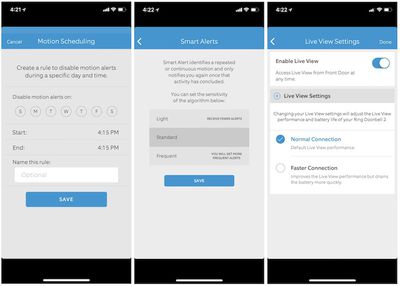
You can also customize your settings for Live View, which is the feature that lets you view the doorbell's video feed from anywhere at any time. You can turn Live View on or off entirely, and also customize the performance level of the video feed between normal and fast connections. The faster connection setting will offer better video feed performance, but it'll also burn through your battery more quickly if you're powering the doorbell that way.
Ring says an upload speed of 1 Mbps is required for live video, while at least 2 Mbps is preferred for optimal performance.
Battery
Ring estimates you'll get about six months of use or about 1,000 notifications out of each battery charge. You'll receive a notification from the Ring app when the battery starts to run low, and you can check the battery level at any time from the Device Health section in the app. My battery ran down by about 30 percent in three weeks of use, so it looks like my real-world usage may come out to be somewhat less than Ring's estimates, although it remains to be seen if the reported battery levels decline relatively linearly or not. I also may have experienced heavier than normal usage as part of my testing.
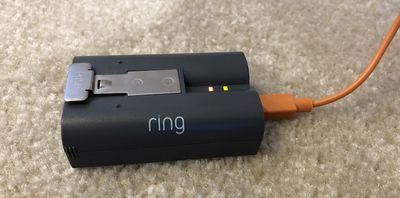
When it's time to recharge the battery, you'll need to remove the security screw in the bottom of the doorbell, pop off the faceplate, and push a release to slide the battery pack out. It takes 5–10 hours to recharge the battery depending on whether you're plugged into a wall adapter or a computer USB port, which is a fair amount of downtime unless you plan to do it when you're not expecting visitors such as overnight.
Another solution is to purchase an extra battery pack so you always have one charged and ready. Extra battery packs are priced at $29.00.
Answering the Door
When a visitor rings your doorbell, the doorbell button flashes blue and the doorbell itself emits a tone (volume is customizable or can be muted entirely). On the inside, your interior doorbell chime will ring if you're wired up to one, a connected Chime Pro can be set to ring, and your phone will receive a notification.
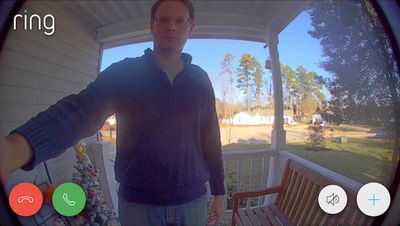
From the app notification, you can jump directly to a live video feed to see who is at your door and you can initiate two-way voice communication to speak with the visitor, all while watching the video feed. Onscreen controls let you mute your microphone and incoming audio from the video feed if necessary. Infrared capabilities let you see what's going on even in dim light.
Video Recording
As with the Floodlight Cam we reviewed earlier, the Video Doorbell 2 comes with a 30-day free trial of video recording, which gives you on-demand access to stored videos in the cloud from within the Ring app or from a web browser. Any time a motion event is detected or a visitor rings your doorbell, a video clip is recorded.
Once your 30-day trial runs out, you'll need to subscribe to one of Ring's recording plans if you wish to continue saving and viewing recordings. The Ring Protect Basic plan is priced at $30 per year or $3 per month and covers only one camera or doorbell, so if you have multiple devices you'll need to pay separately for each of them. The Ring Protect Plus plan is priced at $100 per year or $10 month and covers an unlimited number of cameras and doorbells at one location, as well as monitoring for the recently announced Ring Protect home security system.
Without a cloud recording subscription, you'll only be able to check in on live video views. That's enough to be able to respond to doorbell rings from your phone if you're immediately available, but you won't be able to view missed events. Saved recordings are also valuable evidence to provide to authorities in the event of a crime.
Performance
Overall, I found the Video Doorbell 2 performance to be satisfactory, although video quality wasn't quite as good as I was hoping for, as there was a bit of choppiness and an occasional multi-second freeze in both live views and recorded videos. The choppiness isn't really a dealbreaker for me, however, as it worked well enough to be able to see visitors to my door and other motion events.
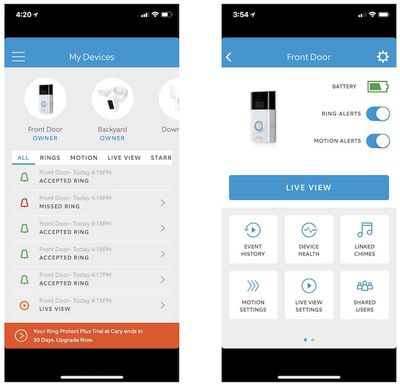
My home internet has upload speed in the 20 Mbps range and I tried connecting the doorbell both directly to my home network and through a Chime Pro located on the same level of my house and with nearly line of sight to the doorbell. When connected directly to my home network, the doorbell reported Good signal strength in the Device Health settings, while connecting via the Chime Pro gave me Good signal strength for the Chime Pro and varied between and Good and OK signal strength for the doorbell itself. In practice, I didn't notice much difference in performance between the two setups.
Two-way audio communication generally worked well, although there is a little bit of a delay that doesn't really hinder communication. Motion and doorbell alerts were consistently delivered in a timely fashion to both the Chime Pro and my phone.
Other than showing up in the same app, there's little direct integration between Ring's products, as Ring has elected to pass that off to other ecosystems like Wink, Wemo, Kevo, and others. On the downside, it adds a few more steps in the setup and management process and makes integration not as neat as a native version, but on the upside it allows Ring's products to work with compatible smart products from many other vendors.
Neighborhoods
Ring Neighborhoods is an optional community watch feature where you can set up a radius around your home to define your neighborhood and view videos shared publicly to Ring Neighborhoods by other Ring users within that radius. You can also share videos from your Ring device to your neighborhood.
The feature lets users share videos of suspicious people or vehicles, or other incidents of concern. Other Ring users can comment on videos to share information, and web links for videos can be re-shared to other social networks and social messaging platforms.
HomeKit (or Lack Thereof)
The Video Doorbell 2 does not support HomeKit, and Ring has not announced any intentions to make it compatible. In mid-2016, the company announced plans to bring HomeKit to its original Ring Pro doorbell, and a similar announcement was made at the introduction of the Floodlight Cam earlier this year. Unfortunately neither one has materialized. It's very common for HomeKit support to launch later than companies' initial announcements, likely due in part to Apple's strict standards, but it's discouraging to see Ring's products still unable to work with the HomeKit ecosystem.
Doorbells in general are not yet a major part of the HomeKit ecosystem. The only one listed on Apple's accessory page is the August Doorbell Cam, which is listed as "announced." The August Doorbell Cam launched in 2016 and never did receive HomeKit support. It's since been supplanted by the Doorbell Cam Pro, which does not support HomeKit and August has not promised future support for it.
Wrap-up
Video doorbells are an interesting product category, offering convenience and security in the ability to see who is at your door and communicate with them in situations where you don't want to answer your door or maybe even are not home. And with the increasing prevalence of package theft as Amazon and other online shopping outlets become more and more popular, a video camera and motion sensor on your front porch can provide valuable alerts and evidence.
Initially focused on doorbells, Ring's expansion into exterior lights and now home security systems offers the opportunity for much greater product integration throughout the ecosystem, and that's something I'd like to see improved going forward. HomeKit support is another feature that would be nice to see, but given previous announcements from not only Ring but other companies like August that have not yet come to fruition, I'm not terribly optimistic we'll be seeing such integration anytime soon.
All of that said, Ring's Video Doorbell 2 is a handy product in its own right, and I do appreciate the ability to see what's going on outside my front door. The fact that it's battery powered is fantastic for me, given the lack of existing doorbell wiring at my front door. Running on battery power also makes installation extremely simple, and even installing it in a wired setup isn't much of a challenge. It's terrific that Ring includes nearly all of the tools you need right in the box, so even novice do-it-yourselfers can tackle installation.
The Ring Video Doorbell 2 is priced at $199 from Ring and other retailers. Third-party Amazon fulfillment sellers will sometimes offer a small discount, although availability looks rather spotty at the moment.
Ring's Chime Pro accessory that offers Wi-Fi extender functionality and can serve as an interior doorbell chime if you're not hooking up to an existing chime is priced at $49 from Ring and most other retailers, although you can occasionally save a few dollars such as Target's current $47.99 pricing.
Note: Ring provided the Video Doorbell 2 to MacRumors free of charge for the purposes of this review. No other compensation was received. MacRumors is an affiliate partner with Amazon and Target and may earn commissions on purchases made through links in this article.


































Top Rated Comments
Same deal with smart thermostats, locks, etc... They ALL depend on the company's servers.
It makes you wonder what these companies are doing with your data. Why would they spend money running these servers if they weren't getting something out of it?
Fast forward to July 2017 and here I am in Baltimore, MD. The motion detection was a must, because safety. As before, one notification a minute for a car passing by the road. At least the video was now crystal clear, with a true high speed Internet service. I contacted Ring and, long story short, we managed to replace the unit by the Ring Pro. Nothing wrong with the hardware, it was a product limitation.
The difference was night and day. The Pro has features found in other more common security cameras, like the ability to create a movement map area, but in what we bought the product for, we are finally able to use it as intended. While the Pro is only hardwired to your chime (for power), it has 2.4 and 5Ghz support, but it is thinner than the regular Ring, and to the reviewed product, 1080p as well. Yes, we rely on the company not going bankrupt. Yes, we pay extra (although $30 a year is not bad) to have the recorded videos streamed and stored in the cloud. But all in all, it is a good investment and it has saved us with a few damaged parcels with couriers and trouble with insurance - not to mention we can, as advertised, be “always home”, answering the doorbell even while traveling outside the country as if we were at home.
[EDIT] Another very handy feature of the Ring system is the ability to share videos anonymously within your area, and to receive notifications from other users around your area, if they see something going on at their places. Word is that some persons have been identified and jailed because of these surveillance systems.[/EDIT]
It all goes down to what you need and what you are willing to afford. When integrated with other devices like the Kwikset door locker, it makes a good set of devices to protect your home. Even without HomeKit support, it is worth its premium price.
I am not associated with the company, but I had pleasure to interact with the company owner/CEO Jamie S. in a few occasions, and all his “promises” were fulfilled by the company.
Bottom line, yes, I would recommend one. Just plan before you buy it: if your door is facing the street, you might find hard to unable to configure the motion detection properly with the Ring Doorbell, but it should work just fine with the Ring Pro.
It’s only compatible with a 2.4 network and not 5.
Video is very choppy and I have gigabit Ethernet.
I set up a nest cam in the exact same spot and video was flawless so it’s not my WiFi.
The motion alerts go off and 30% of the time, it records no video because of the WiFi issues.