

Traditional mechanical keyboards have made a comeback in recent years. Generally known for being more hardy than today's more dominant membrane and scissor-switch keyboards, mechanical keys typically offer users faster, more satisfying feedback thanks to the highly detectable actuation and signature clicking sound.
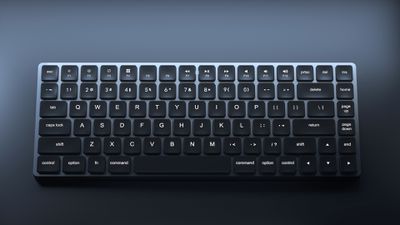
However, mechanical keyboards are also often bigger, louder, and more tiring to type on, which is why their attraction has been limited to gamers and nostalgia-seekers. In an attempt to disrupt the market, however, US-based accessories maker Vissles set out to correct these disadvantages by offering the tactility and performance of a mechanical keyboard in a compact and less finger-fatiguing low-profile design.
Enter the LP85 Optical-Mechanical Keyboard, "crafted for speed, precision, and comfort." Except instead of mechanical switches, the LP85 uses optical switches, which break a beam of infrared light to activate the key press and are meant to reduce long-term wear. Can the technology faithfully recreate the feel and responsiveness offered by mechanical input? I spent a few weeks with the company's latest keyboard to find out.
Design and Features
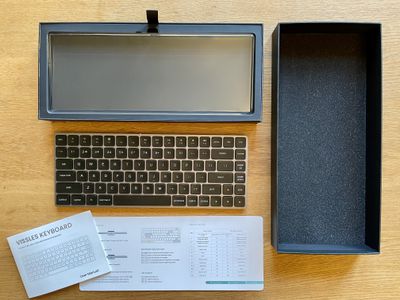
The Mac version of the Vissles LP85 I received came nicely packaged in a black box containing a keyboard with black keys, and a gun-metal gray chassis that's closer in shade to the iMac Pro Magic Keyboard than a space gray MacBook Pro. Also included was a USB-C to USB-A charging cable, user manual, quick start guide with a map of key functions, and some Vissles stickers.
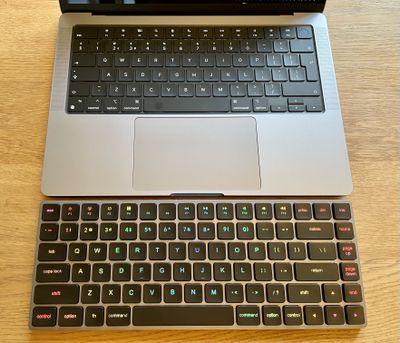
Upon handling the keyboard, the first thing I noticed about the LP85 is its heft. At 547 grams, it's over twice as heavy as Apple's Magic Keyboard (243 grams) and it's easy to see why. The extra weight is due to the chunky anodized chassis, a slab of aluminum that's 12mm high at its thickest point, which is almost equivalent to the raised level of the built-in keyboard on a 14-inch MacBook Pro. That makes it just 1mm higher than Apple's standalone Magic keyboard at the thicker end, and, combined with the weight, helps it feel extremely sturdy and stable, while two grippy silicone anti-slip strips underneath ensure it's going nowhere on your desk.
The chassis is nicely rounded at the corners and has an almost-flat two-degree angle that slopes down to 7.1mm at its thinnest section, which gives the 85 optical keys on the low-profile board a comfortable base to rest your wrists in front of. On the top edge of the chassis is a USB-C port for charging and wired connections, and a small round metal switch to swap between Bluetooth and wired. Between the two is an indicator light that displays the charge status of the built-in 2000mAh rechargeable battery with a red or green light.
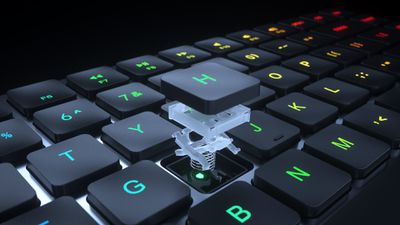
Instead of using a membrane mechanism, Vissles has opted for X-Optical switches that deliver a light beam of 0.2ms, with a pre-travel actuation distance of 1.2mm, which is shorter than a regular mechanical keyboard, and 2.5mm total travel, which is similar to a membrane keyboard.
The Mac-style 85-key ANSI layout includes a top row of function keys with the expected macOS functions like Mission Control, LaunchPad, media, volume, and LED backlighting controls. It also fits in an additional Control key on the right of the spacebar and a column of home, end, and page up/down keys to the right of the Return key, which adds an extra inch to the layout compared to Apple's compact Magic Keyboard.
The keyboard supports Bluetooth pairing with up to three devices, and in terms of switching between them, device 1 is mapped to the Q key by default, while the second and third devices are mapped to W and E, respectively. There are also key combinations for backlight adjustment (more on that later).
Performance
I had no trouble pairing the keyboard with my 14-inch MacBook Pro, iPad Pro, and iPhone 13, and I didn't experience any dropouts when testing the keyboard within a reasonable range of these devices. Initial pairing to the first device involved a long press of the Fn and P keys for five seconds, after which macOS discovered the Bluetooth connection. Pressing Fn and W/E and then Fn and P pairs a second/third device. Switching between them was fast, ensuring responsiveness to initial keyboard input was almost immediate.
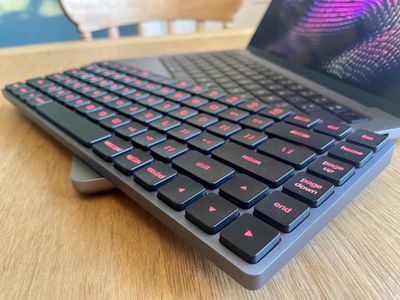
Despite being an 85-key layout, the individual keys are well spaced apart in a manner almost identical to a native Apple keyboard, which makes the keys under your fingers the ones you'd expect to find there, ensuring speed and accuracy of typing isn't an issue.
This performance is consolidated by the X-Optical mechanical switches, which, thanks to their unique pre-travel distance, feel highly responsive and emit a beautifully crisp clicky sound that's similar to Gateron blue switches but not as loud.
As a result, each key provides reassuring tactile feedback rather than the more muted spongy feel of typical low-profile keyboards. Typing on the LP85 is basically like using a much more durable and ergonomic version of a regular mechanical keyboard. Even after several hours of use, my fingers felt no more tired than usual, which is testament to Vissels' decision to use premium optical switches.
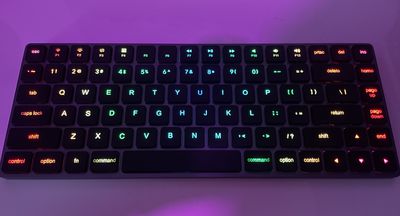
I also found the LP85's backlighting modes easy to use. The legend on each keycap is transparent so that the LED light shines through, making the keyboard great for typing in darker environments, and there's no potentially distracting light bleed around the keys like on some other backlit keyboards.
Pressing the Fn and Delete keys together cycles through 19 vibrant-looking dynamic backlighting effects, which really have to be seen to be fully appreciated. I had a lot of fun using the Fn+arrow keys to try out the various animated rainbow-color combinations, eight color monochrome modes, and adjustable directional "lightning" effects.
Rainbow backlight keyboard for #Mac 🌈🖥🤩 pic.twitter.com/KDHVe1aC8Z — Tim Hardwick (@waxeditorial) October 23, 2021
If the backlighting is too glaring you can dial down the intensity by choosing from three levels of brightness, or simply switch off the backlight altogether. To save battery, the light sleeps if you don't use the keyboard for five minutes, but they snap back on just as quickly with a tap. After 30 minutes of inactivity, the keyboard goes into hibernation mode.
The only problem I had with the LP85 during use was that it would occasionally fail to register a keystroke, but this turned out to be Bluetooth interference from a wireless TeckNet mouse. Removing the mouse solved the issue, but it's something to consider if you have lots of Bluetooth devices in your setup.
Wrap Up and How to Buy
Vissels' LP85 Optical-Mechanical keyboard is a unique wireless input device in its own right, thanks to the optical switches that Vissles has chosen to use, which have allowed it to successfully achieve the feel of mechanical input in the kind of low-profile design that's usually associated with a membrane keyboard.
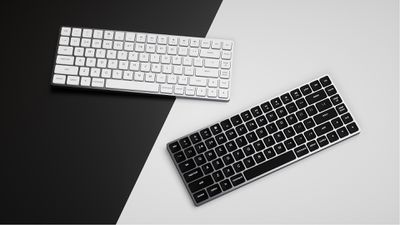
For that reason alone, the LP85 is recommended for anyone looking for a compact key layout that's responsive, highly tactile, and very well built. Costing $99, it's a fine alternative to Apple's similarly priced Magic Keyboard, but with the variety of colorful backlit RGB modes available, it's decidedly more fun.
The LP85 keyboard is available in black or white. Pre-orders can be placed on the Vissels LP85 Optical-Mechanical Keyboard Kickstarter page, with shipping scheduled for late January 2022.
Note: Vissles supplied the keyboard to MacRumors for the purposes of this review. No other compensation was received.


































Top Rated Comments
So annoying that I have to look at products like this to get it.
And I find RGB lighting more useful than just gaming. Being able to choose a color that's comfortable for my lighting situation is nicer than not having it.