Skip to Content

Review: Promise's $249 TD-300 Thunderbolt 3 Dock Offers Lots of USB Ports and an SD Card Reader

by

Thunderbolt 3 docks continue to hit the market, and today we're taking a look a recent entrant from popular data storage company Promise Technology, the TD-300 Thunderbolt 3 Dock.
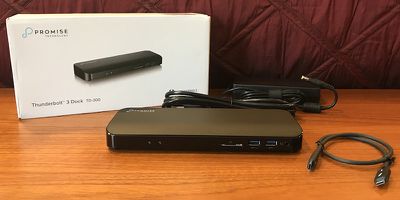
promise tb3 dock
I've tested quite a few Thunderbolt 3 docks over the past year, and the TD-300 ranks right up with the best I've seen due to standout features like five USB 3.0 ports and an SD 3.0 card reader. At $249, it's also priced very competitively against other full-featured Thunderbolt 3 docks.

Design

In the box, you'll find the typical contents for a dock of this type, including the dock itself, an external power brick, and a 0.5-meter Thunderbolt 3 cable. Any other cables such as for USB devices or an HDMI display need to be provided separately, although they frequently come with the devices you'd be connecting.

The TD-300 comes in a horizontal form factor similar to many others on the market, and it sits nicely under an external display. It measures just over 9 inches wide, 3.5 inches deep and a little over an inch tall, and weighs just about a pound, so it's a pretty typical Thunderbolt 3 dock from a size perspective.
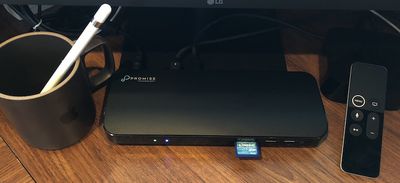
promise tb3 dock lights sd
The enclosure is made of black plastic, matte on the top and glossy around the sides, which sets it apart from the silver and gray finishes seen on most of the other docks I've tested. There's a fairly small Promise Technology logo in the rear left corner of the dock's top, but it's not terribly obtrusive, and the top tapers slightly toward the front of the dock.
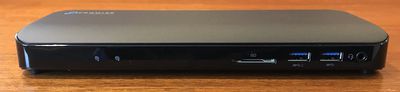
promise tb3 dock front
The front of the dock includes a pair of status lights, a green one letting you know there's power to the dock and a blue one signifying an active connection to a computer. The lights are fairly bright and can be distracting in a dark room. You'll also find the handy SD card slot, a pair of USB Type-A 3.0 ports (the left of which supports higher-power 5W/1.5A charging) and an audio in/out port.
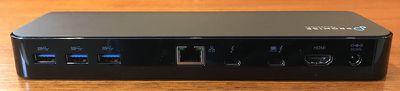
promise tb3 dock rear
On the rear, you'll find three more USB Type-A 3.0 ports, a Gigabit Ethernet port, two Thunderbolt 3 ports, an HDMI 2.0 port, and the DC-in connection for power.

USB Ports

With all five USB ports being USB 3.0, they support 5 Gbps connections, which isn't the fastest standard but is typical for Thunderbolt 3 docks where bandwidth is frequently shared among a host of peripherals. Most other docks on the market offer only three USB ports, so the inclusion of five here offers some nice expandability, and with two of them on the front there's easy access for USB accessories that only need to be attached occasionally.

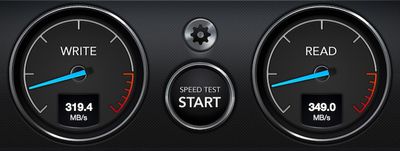
Testing transfer speeds using a 10 Gbps USB 3.1 Gen 2 CalDigit Tuff external SSD and Blackmagic's disk speed testing software, I saw speeds around 350 MB/s read and 320 MB/s write through the Type-A USB 3.0 ports, which is typical for docks like this.
promise dock speed usb a

USB-A CalDigit Tuff speeds

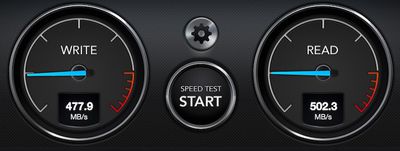
If you want better transfer speeds and don't need the second Thunderbolt 3 port on the dock for a display, you can hook up a USB-C external drive that way, where I saw speeds in excess of 500 MB/s read and 475 MB/s write with the CalDigit Tuff.
promise dock speed usb c

USB-C CalDigit Tuff speeds over Thunderbolt 3 port

With a top-of-the-line Thunderbolt 3 drive like the new ThunderBlade V4 from OWC, I saw read and write speeds approaching 1900 MB/s, pretty close to what I previously saw with a direct connection to my MacBook Pro. Obviously if you start tacking other high-bandwidth peripherals like a 4K HDMI display on to other ports on the dock, the SSD speeds will drop.

SD Card Slot

The TD-300's SD 3.0 card reader on the front of the dock is a great feature that's missing on most other Thunderbolt 3 docks released so far. If you've got photos or other data stored on an SD card, it's great to be able to just pop the card into the front of the dock and have it show up on your computer without needing to connect a separate card reader over USB.

Displays

In line with other Thunderbolt 3 docks, Promise's dock can support either a single 5K display attached to the downstream Thunderbolt 3 port, or a pair of 4K displays attached through the Thunderbolt 3 port and the HDMI port. I tested extensively with an LG UltraFine 5K display hooked up via Thunderbolt 3 and it ran at the full 60 Hz refresh rate with no problems. The usual macOS System Preferences let you manage the monitors in terms of mirroring/extending and arrangement.

Charging

The TD-300 offers up to 60 watts of charging power over its Thunderbolt 3 connection to a computer, which is enough for a 13-inch MacBook Pro but falls short of what a 15-inch model might be able to draw at maximum load. In reality, 60 watts is often enough to keep even a 15-inch MacBook Pro charged up under normal use, but if you're doing a lot of heavy lifting with your machine it might not be able to quite keep up. Recharging a depleted battery via the TD-300 will also be a bit slower than from an 85-watt dock or the 87-watt power adapter that comes with the MacBook Pro.

Most Thunderbolt 3 docks seem to be going with the 60-watt power delivery, so the TD-300 is by no means unique in this limitation, but there are 85-watt ones on the market if that's a necessity for you.

Wrap-up

The Promise TD-300 Thunderbolt 3 Dock offers a solid set of features at a very competitive price point compared to similar docks. It doesn't have FireWire or eSATA ports like a few competitors have, but with those ports becoming less and less popular it makes sense for Promise to put its focus on the flexibility of USB while also including a built-in SD card reader.

Full 85-watt charging support would have been nice to see, so if you're a 15-inch MacBook Pro owner you'll need to decide if that's a dealbreaker based on whether you push your machine hard enough to need the full power, and if so, whether you're okay with using the standard MacBook Pro power adapter alongside the dock.

But overall, the TD-300 stacks up very well against the competition and is worth a close look. The Promise TD-300 is priced at $249 and is available from a variety of retailers including B&H Photo and Amazon.

Note: Promise Technology provided the TD-300 to MacRumors free of charge for the purposes of this review. No other compensation was received. MacRumors is an affiliate partner with B&H Photo and Amazon and may earn commissions on purchases made through links in this article.


Top Rated Comments

115 months ago
Nice to see adapters are still outrageously priced.

Sounds like an okay product but not at that price.
Score: 5 Votes (Like | Disagree)
camelia Avatar
115 months ago
Nice to see adapters are still outrageously priced.

Sounds like an okay product but not at that price.
It looks nice, but very expensive for me :oops:
Score: 3 Votes (Like | Disagree)
115 months ago
It seems like ports in a box should be $49. I
They are - they're called USB hubs, docks, or similar. They share the capabilities of a single USB port amongst several other ports. Even with USB-C, that consists of either (a) one 5Gbps USB-3 channel and 2 DisplayPort lanes (standard res only) or (b) 4 DisplayPort lanes (needed for 4k @ 60Hz, still no 5k) but leaving only one USB 2.0 channel.

If you can live with those limitations then you don't need to fork out for a Thunderbolt 3 dock.

A TB3 dock has two 20Gbps links to the host, carrying a flexible mix of PCIe and DisplayPort, and contains extra controllers for USB and Ethernet that act as though they were connected to the computer's PCIe bus. A TB3 hub can handle far more throughput than a cheaper USB-based device.

(Side note - when people review these docks it would be great to run System Report or other diagnostics and figure out whether, e.g. all the USB 3 ports run directly from a controller, whether the ethernet controller is on PCIe or USB3 etc. I'm betting that the sound and SD slot are almost always on USB...)

And yet, as always, only one thunderbolt 3 in and one out. No more USB-C on this type of device... I wonder why. Is this how we supposedly have to buy USB-C or thunderbolt 3 devices? We have no ports!
So why there are USB-A hubs and there are not USB-C hubs?
Because (a) implementing a mutifunction 'smart' port like USB-C is more difficult and expensive than implementing an old fangled USB-A port, and largely pointless because...

(b) currently, people have lots of USB-A devices to connect and the majority of USB-C devices on the market are only USB3.1gen1 and don't gain anything from being connected via USB-A rather than C... Then, if you do have an actual 10Gbps device, its probably something performance-critical like a superfast NvME SSD or RAID array and you're probably going to want it connected directly to the host, not contending for other devices for bandwidth. Ditto for TB3 devices - plus, TB is a bus architecture designed to daisy-chain, rather than a hub-based "star" architecture like USB.

Put simply, in early 2018 it makes more sense to get a hub with enough USB-A ports for your existing devices, and only worry about adapters for the few USB-C devices you have that you can't connected directly to the host (and if they're not sold by Apple they probably came with a C-to-A cable in the box - then there's all those double ended USB-C/USB-A flash drives).

Come 2020, the balance may have changed - plus, hopefully, we'll have USB3.2 (two USB 3.1 channels per USB-C port) and DisplayPort 1.4/HDMI version whatever so you'll be able to mix 4k and USB 3 on the same port.
Score: 2 Votes (Like | Disagree)
115 months ago
I like it. I won't pay that money for a set of ports! Its outrageous. I guess First-To-Market are trying to see what the market will pay. NOT THIS!
Score: 2 Votes (Like | Disagree)
djbuddha Avatar
115 months ago
So why there are USB-A hubs and there are not USB-C hubs? I don't understand... If I make the transition to all USB-C, then I'm stuck with the 2 ports of the MacBook pro?
USB back in the day wasn't meant for passing video and these other high bandwidth applications until USB 3.0 came out. (Which is why I also believe that USB 3.0 hubs were useless because you faced the pains of losing bandwidth every time a port was split from the computer in question).

In regards to your question, welcome to the painful cost of new port adoption. It sucks, I agree with you there.
[doublepost=1517218757][/doublepost]
I have the OWC 13 port Thunderbolt 3 dock. And let me be clear, for my 2017 15" MacBook pro doing rendering and heavy CPU tasks, it charges slow but it charges. 60W is not ideal but it IS enough unless you need to charge your laptop at the fastest possible rate.

Additionally the OWC dock is horrible, stay away from it. It takes me 10 minutes of unplugging and plugging in and switching ports and messing around to get the monitors to all come on and work. I want to throw it out the window, so I'm on the hunt for a new dock.
Same dock here. Same issue. I wish OWC would update the firmware to fix this. I like to render stuff with my monitor off. My solution (albeit annoying) has seemed to work recently.

I use an LG 27UD88 USB-C monitor. I never sleep my MacBook (just hate how certain apps behave after sleeping) so this worked for me.

I made a hot corner to sleep my monitor and just move my mouse there. The monitor goes into low power mode and is basically off. When I come back to it, I click the power button, and the shake my mouse (or hit a key) and it comes back to life.

Now- I agree, this isn't the best solution, but it works until OWC or Apple (whoever is guilty) finds a solution. I will say that besides this, the dock runs flawlessly for me. And when I was using an older DVI monitor with a DVI to Mini DisplayPort cable, it worked perfectly with the dock. (Sleep/ wake / power off without sleeping the Mac).
[doublepost=1517218978][/doublepost]
Besides, to me it's somewhat obvious that Apple designs their chargers to be not only capable of providing all the necessary power to power the laptop running at full-tilt, but also to charge the batteries at the normal speed. I'd assume that the battery would charge slower with a 60 watt charger, if you're doing intensive tasks, but I can't imagine it wouldn't charge at all. It isn't enough of a drop.
Exactly.
Score: 1 Votes (Like | Disagree)
Markoth Avatar
115 months ago
I read this everywhere ....

I have a max spec 2017 15" MacBook Pro and I spend a lot of time (probably 70% of the time) exporting Prores 4444 video through Final Cut X.

My battery remains at 100 always through my OWC dock at 60 watts.

It's been the same behaviour since September. My CPU AND GPU usage are through the roof during these processes. (As seen with istatmenu).

Also, I've seen my MacBook charge from 20% to 100 while doing these processes. So again, not sure why this is a rumour.
Besides, to me it's somewhat obvious that Apple designs their chargers to be not only capable of providing all the necessary power to power the laptop running at full-tilt, but also to charge the batteries at the normal speed. I'd assume that the battery would charge slower with a 60 watt charger, if you're doing intensive tasks, but I can't imagine it wouldn't charge at all. It isn't enough of a drop.
Score: 1 Votes (Like | Disagree)

Popular Stories

apple design award 2025

Apple Announces 2025 Design Award Winners Ahead of WWDC 2025

Tuesday June 3, 2025 10:14 am PDT by
As we wait for WWDC to kick off next Monday, Apple today announced the winners of its annual Apple Design Awards, recognizing apps and games for their innovation, ingenuity, and technical achievement. The 2025 Apple Design Award winners are listed below, with one app and one game selected per category: Delight and Fun - CapWords (App) and Balatro (Game) Innovation - Play (App) and PBJ -...
1password deal blue

1Password Security Breach: What Was Accessed and What Wasn't

Wednesday November 25, 2026 1:09 pm PST by
Popular password management app 1Password today said it experienced a security breach earlier this month. 1Password says some customer names and email addresses were accessed, but no customer vault contents were compromised. On November 19, 1Password saw indications that an employee's GitHub account had been breached and began investigating. The company says the breached GitHub account was...
apple store down feature

Here's Why the Apple Store is Going Down

Thursday November 26, 2026 5:49 am PST by
Apple's online store is going down for a few hours on a rolling country-by-country basis right now, but do not get your hopes up for new products. Apple takes its online store down for a few hours ahead of Black Friday every year to tease its annual gift card offer with the purchase of select products. The store is down in Australia, New Zealand, and Thailand, right now, and it will...
Latest Stories
The 50+ Best Apple Black Friday Deals Still Available on AirPods, iPads, and More
3 hours ago
HomePod Mini 2 in (RED) Seemingly Spotted Ahead of Announcement
3 minutes ago
Apple's M6 and PROLED MacBook Pro Reach New Low Prices for Black Friday
10 hours ago
The MacRumors Show: iPhone Air 2 and iPhone 18 Are Coming
11 hours ago
Apple Store in Brisbane Reopening Next Month With New Design
11 hours ago
The 60+ Best Black Friday Accessory Deals on iPhone Chargers, TVs, Headphones, and More
12 hours ago
GTA VI Now (Barely) Running on Apple Silicon Macs
12 hours ago
The Best Black Friday Streaming Deals on Apple TV, Disney+, and More
13 hours ago
Apple TV's 'Carême' Wins International Emmy for Best Drama
13 hours ago
iPhone 18 Production Delay Leaves Apple Little Time Before Launch
14 hours ago
The Best Black Friday AirPods Deals Still Available
6 hours ago
The Best Black Friday Deals on Apple Home Products
15 hours ago
The Best Black Friday iPhone Deals Still Available
6 hours ago
The Best Black Friday iPad Deals Still Available
6 hours ago
The Best Black Friday Apple Watch Deals Still Available
6 hours ago
The Best Black Friday AirTag Deals Still Available
6 hours ago
The Best Black Friday Mac Deals Still Available
6 hours ago
iPhone Share of US Smartphone Market Hits 57% as Rivals Slip
16 hours ago
iPhone 20 Pro Rumored to Feature 3D-Printed Titanium Frame
18 hours ago
Apple's Official 2026 Black Friday Offer Starts Rolling Out
1 day ago
Halide Adds Fill Light Feature for iPhone Duo
2 days ago
MacBook Air Black Friday Deals Now Live With Massive $399 Savings
2 days ago
Amazon Discounts All MacBook Neo Models by $99 for Black Friday
2 days ago
Kodak Launches Unique AirTag Rival With E-Ink Display
2 days ago
Here's Why the Apple Store is Going Down
2 days ago
Apple Still Working on Giant Foldable iPad That Could Cost $5,000
2 days ago
iPhones Dominate China's Weak Singles' Day Smartphone Sales
2 days ago
iPhone 20 Pro Could Feature Ceramic in Limited-Edition Model
2 days ago
Apple Faces Korean Regulator Review Over iPhone 16 AI Advertising
2 days ago
Apple Watch Ultra 4 Hits New Best-Ever Price of $649.99 for Black Friday
2 days ago
Related Apple News: Reviews | Ipad | Buyers Guide | Technology | Iphone






























