

With the ThunderBay 8, OWC expands its vast range of professional-grade Thunderbolt accessories, offering an ultra high-capacity storage solution with eight hot-swappable universal bays for 3.5- or 2.5-inch hard drives or SSDs.
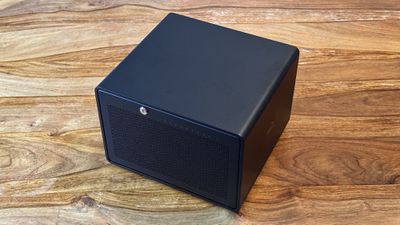
The ThunderBay 8 can serve as a high-performance personal data center with multiple configuration options to suit ever-growing storage requirements. It can accommodate the needs of individuals with data-intensive video editing, high-resolution image, and VR workflows, who need abundant drive space to store large format files, as well as fast data transfer speeds to ensure that they remain workable.
The ThunderBay 8 offers up to 160TB of storage depending on the configuration you choose, with additional options for standard and enterprise drives, pushing beyond the limits of more common four-bay storage solutions.
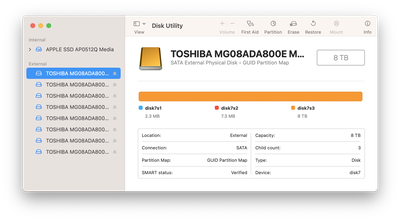
Having eight drive bays allows for greater flexibility and customization in terms of drive configuration and RAID options. Users can choose to arrange the drives in various RAID modes to optimize performance, data redundancy, or a balance of both. For example, users can choose RAID 0 for maximum performance, RAID 5 for data redundancy, or RAID 10 for a balance of both.
An enclosure with eight drive bays also cuts down on unnecessary cables and power wastage compared to single or dual drive solutions, and offers massive, highly flexible storage potential that users can scale over time.

The ThunderBay 8 arrived very well packed for transit, generously using high-density foam buffers, air bags, and thick cardboard – a key consideration for transporting a large number of fairly delicate drives. The enclosure itself came in a blue woven nylon bag to help lift it out of the box, which was a much welcome aid considering it weighs almost 20 pounds. This is relatively heavy compared to some other external storage solutions, which may mean it isn't ideal for users who need good portability, even for a drive array of this size. The sturdy bag is worth definitely keeping around to help move the ThunderBay around in the future.
Design
The ThunderBay 8's enclosure is made of thick aluminium with a matte black anodized finish. The device is very well built and clearly designed for durability and heat dissipation, with plenty of opportunity to last through changes to your setup and multiple drives.
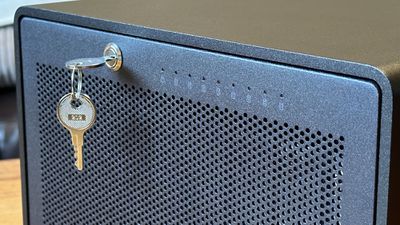
The ThunderBay comes with two keys to unlock the perforated panel at the front that leads to the hard drives. Once unlocked, you simply pull the cover up and off to get access inside.
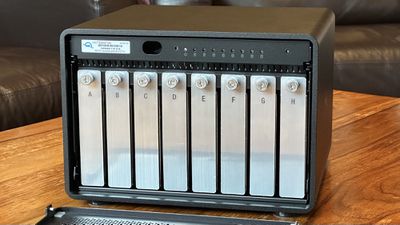
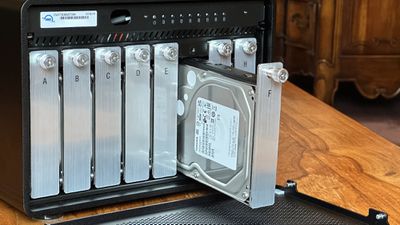
Each drive is stored in a tray, labeled A to H, that can be easily released with a thumb screw. The drives are a little difficult to remove even after they have been released, requiring quite a bit of force to come loose. Since OWC offers additional drive trays, it's possible to keep some extra drives nearby so they are ready to swap in if necessary. This could be particularly useful for repairing a RAID-5 array with minimal inconvenience.
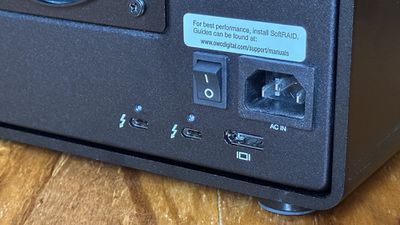
The rear of the enclosure features a Kensington lock, two Thunderbolt 3 ports, and a DisplayPort 1.2 port for connecting a display with a resolution up to 4K. Each drive has an indicator light, as do the rear ports, clearly showing when a drive or wired connection is in use. A single large fan at the back pulls in cool air.
The bottom of the ThunderBay has four rubber feet to keep it secure on a surface, but also offers the opportunity to stack several ThunderBay enclosures on top of each other if you require. The power supply is integrated and there is no need for an external transformer on the power cable, which cuts down on cable mess compared to some other devices in this class.
Noise
While the OWC ThunderBay 8 is designed to be relatively quiet, some users may find that the noise level is noticeable, especially if they work in a quiet environment. It mainly comes from the fan that helps cool the drives inside the enclosure.
The fan is large and spins at a low speed, which helps reduce high-frequency noise, but it can still produce a low-frequency hum that may be noticeable in quiet environments. The fan also seems to take quite some time to turn off when the ThunderBay is idle, which some users may find a little bit annoying.
That being said, it is inevitable that eight high-capacity drives and the cooling they require will produce a certain amount of noise. The sound level is also highly dependent on the type of drives that have been installed, with faster and higher-capacity drives typically producing more noise than slower and lower-capacity drives.
While OWC has done a relatively good job at minimizing the noise the ThunderBay 8 makes, I still thought the ThunderBay was quite loud compared to other similar devices. It is easily loud enough to fill a room and even be heard in adjacent rooms – which could be a problem if you work with audio or sleep near your workstation. For this reason, some users may find it unsuitable as a desktop storage solution, especially if you think the constant clicking of the drives could irrirate you or impede your work. OWC supplies a 0.5 meter Thunderbolt 3 cable with the ThunderBay 8, which requires placing the unit quite close to the computer. It may be better to utilize a 2m Thunderbolt cable and tuck the enclosure more out of the way, if possible.
Set Up
The ThunderBay 8 is not a hardware RAID system, so it relies on SoftRAID to create, monitor, and manage RAID sets. The software allows users to configure and manage RAID arrays with ease, providing advanced features and performance enhancements over Apple's Disk Utility.
SoftRAID is theoretically not a necessity for using the ThunderBay unless you want to use the drives individually, but you will need to use it if you want to use RAID.
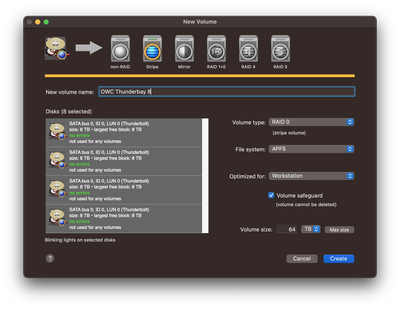
One of the key advantages of SoftRAID is performance. According to OWC, it uses advanced algorithms to optimize disk performance and provides faster data transfer rates compared to traditional hardware RAID solutions. This is particularly important for users who work with large files and high-resolution media content, as it can significantly reduce the time required to transfer and process data.
Another advantage is its ease of use. The software provides a relatively simple interface for configuring and managing RAID arrays, allowing users to create, delete, and modify arrays, with a minimal level of experience. SoftRAID also includes features like disk health monitoring, email notifications, and SMART data analysis to detect potential drive failures before they occur.
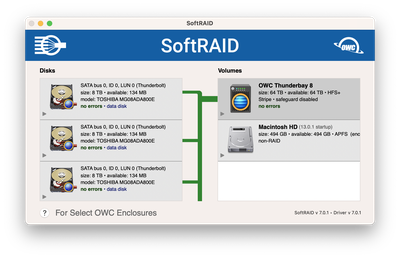
The enclosure contains a printed license number for SoftRaid XT, and it was fairly easy to install and get running, but you will need to restart and enter recovery mode to enable full disk access. My experience with SoftRAID was fairly robust, but I thought the printed instructions could have been a little more detailed and I think a newcomer could struggle a little bit with the process.
Upon connecting the ThunderBay 8 to a Mac via Thunderbolt and with SoftRAID XT installed, a RAID 5 array formatted in HFS+ appears on the desktop and is ready to use. You can then split the disks up into new RAID 0, 1, 4, 5, and 10 arrays however you see fit, and reformat as you wish.
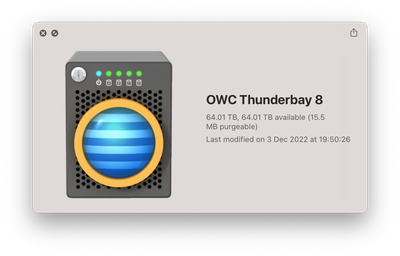
It's worth noting that the drives are not clearly labeled in SoftRAID, meaning that the only way to identify a particular drive is via the LED indicator. SoftRAID's design also feels a little bit outdated, but this could, of course, be improved via future software updates. The most important thing is that it works very reliably.
Performance
With eight bays, the ThunderBay 8 can reach up to 2,586 MB/s, according to OWC. In my series of tests, the ThunderBay 8 performed extremely well – surpassing SSD speeds via USB. With only HDDs, I achieved speeds of around 1,460 MB/s write and 1,900 MB/s read in RAID 0, which should be more than sufficient for even the most demanding professional workflows.
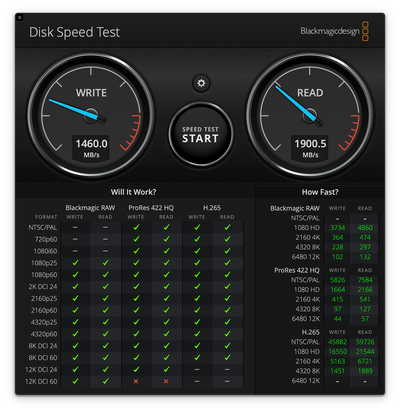
In RAID 5, this barely slowed to read and write speeds of around 1,200 MB/s and 1,150 MB/s, respectively, which is still impressive considering the added data redundancy provided by this configuration. Its fast transfer speeds and high-capacity also make it an ideal machine for Time Machine backups, although SoftRAID does not support encryption of APFS formatted arrays at this time.
Overall, this level of performance is ideal for users who work with high-resolution media content, such as 4K and 8K video, allowing for smooth playback and editing of large files. The ThunderBay 8's performance results in Blackmagic speed tests are on par with other high-performance storage solutions on the market, making it a reliable choice for professional content creators and power users who demand top-tier performance from their storage devices.
Since the ThunderBay 8 has two Thunderbolt ports, it's possible to daisy-chain other USB and Thunderbolt devices from it. I tried this with a Thunderbolt 3 SSD as well as standard USB hard drives and it worked extremely well, though I did have to remember to eject these drives before turning the ThunderBay off.
Bottom Line
Overall, the OWC ThunderBay 8 is an excellent professional-grade storage solution that works very well with the Mac, offering high-volume, high-performance storage to meet a broad range of intense demands. Across multiple RAID arrays, the device manages large libraries of video and audio production files, as well as concurrent backups, oustandingly well after months of constant use.
The ThunderBay 8 is a premium storage solution that comes at a premium price, but its features and performance justify its cost, especially for professionals who require reliable storage for their workflows. Moreover, its modular design allows for easy upgrades and maintenance, making it a long-term investment that can scale with your storage needs.
The ThunderBay 8 also comes with OWC's five-year limited warranty and customer support. If you don't need as much space as the ThunderBay 8 can provide, OWC also offers a four-bay version with the ThunderBay 4.
How to Buy
The ThunderBay 8 is available from OWC's website for a starting price of $779.00. The 16TB ThunderBay 8, which includes SoftRAID XT, starts at $1,479.00.
Note: OWC provided MacRumors with a 64TB ThunderBay 8 with SoftRAID XT for the purpose of this review. No other compensation was received.


































Top Rated Comments
I recommend OpenZFS over SoftRAID, because every ZFS read is checksummed. You're not waiting for a whole sector to fail or the next mirror integrity check as when using standard RAID (or SoftRAID). ZFS checksumming helps identify RAID0 issues early, too. ZFS informs of "bit rot" immediately, whereas bit rot occurs silently with RAID. And if a ZFS drive fails, re-mirroring only involves the part of the drive that contains data, not the whole drive, so it usually completes much faster. OpenZFS is also free and cross-platform with Linux.
I wish the Thunderbay was a tool-less design, but once a drive configuration is settled on, this isn't often an issue. The fan is only mildly annoying--my units are in another room, so not an issue at all.
Oh, and I have a third Thunderbay 8 with 8 SSDs in RAID0 hanging off a Linux box. >2GB/s. It's been running 24x7 for almost 3 years.
https://openzfsonosx.org