

Logitech's Create Keyboard Case for the iPad Pro was one of the first third-party keyboards available for the device, because Logitech created it with help from Apple. Because Logitech partnered with Apple for the accessory, it's also the only third-party keyboard that's currently able to take advantage of the Smart Connector on the iPad Pro, meaning it doesn't need to connect to the iPad over Bluetooth or use its own power source.
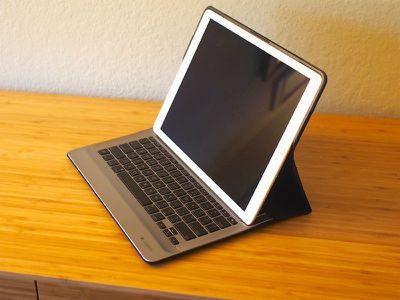
We went hands-on with Logitech's Create Keyboard case to see how it measures up to Apple's own hard-to-find Smart Keyboard and the few other iPad Pro third-party keyboards on the market.
Design
Logitech designed the Create to transform the iPad Pro into a laptop clone, producing a keyboard that is close in design and feel to a traditional laptop keyboard. The case itself is made from a rigid material covered with a ballistic nylon fabric, while the keyboard is constructed from aluminum with plastic keys. Design wise, the Create is available in three colors - black, navy, and red - to match the Space Gray, Silver, and Gold iPads.
You can mix and match colors, but based on marketing materials, the black model is meant to match the Space Gray iPad, the navy model is meant for the Silver iPad, and the red version is designed to match the Gold iPad. Each model's outer cover is designed to be resistant to liquid, keeping the iPad Pro safe from small spills, drips, and light rain.
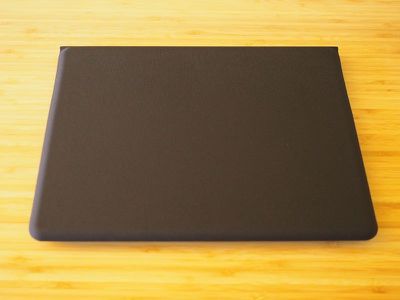
The Create Keyboard has two main parts: the keyboard portion of the case and a rigid backplate that fits over the iPad Pro. The shell of the case fits over the top half of the iPad Pro in landscape mode, aligning with the camera. There's a crease in the middle of the backplate that allows it to flex to fit the iPad Pro into the Smart Connector built into the case.
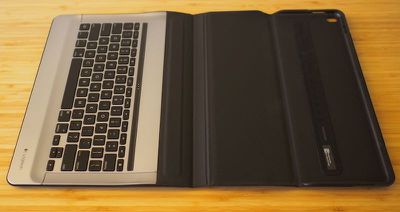
Only half of the iPad Pro is fitted securely in the case because of the need for that connection, and on multiple occasions, my iPad Pro popped out of the shell. This never happened in an area where I could potentially drop the iPad Pro, but it was a definite concern of mine. Having the iPad Pro pop out of the case at the wrong time could be a potential disaster, but at the same time, the bottom of the iPad Pro has to be free to fit properly.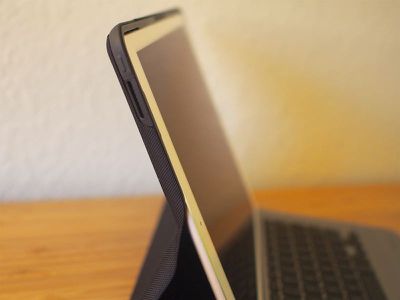
Even though the iPad Pro is only in the case halfway and can pop out if not seated properly, it is difficult to get it out of the case. When snapped in all the way, it takes some grip and twisting to get it out, which is a downside if you want to use the iPad Pro sans keyboard. I know it sounds odd to say the iPad Pro is difficult to get out of the case just after complaining that it has the potential to snap out, but that's how it works - it needs to be seated in the exact right way or you're going to have trouble with the alignment of the cutouts and the volume buttons.
The Create Keyboard case leaves all ports accessible, with cutouts for the Lightning port and the rear camera. There are protruding buttons over the volume and sleep/wake controls, both of which are easy to press to control volume or turn the tablet on or off. The case also has sleep/wake functionality built in, so the iPad will go to sleep or wake up as the case is closed or opened.
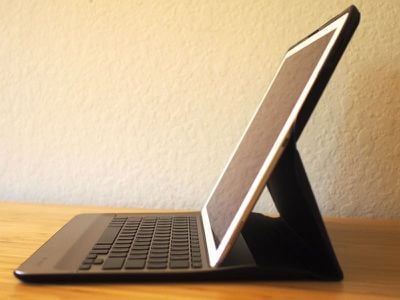
When using the keyboard, the iPad Pro is angled forward in the case and snaps magnetically to a slot above the keyboard where the Smart Connector is housed. It has a single angle that's usable while typing and it only works in landscape mode. A lot of third-party keyboards for other iPads like the iPad Air 2 have multiple viewing angles and support both orientations, but "Smart" accessories for the iPad Pro are going to be more limited because of that physical connection between the keyboard and the tablet.
When the keyboard is not in use, it can be folded underneath the iPad Pro for watching videos or using the web, and it serves as complete protection for the tablet during travel. It closes up clamshell style, with the rear shell protecting the back of the iPad Pro and the keyboard protecting its screen.
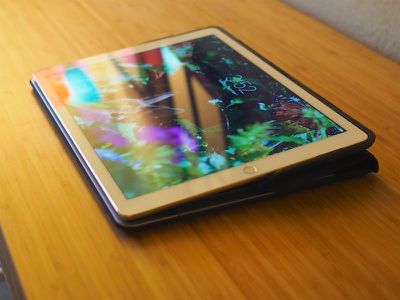
Compared to Apple's Smart Cover, which is thin and light, the Logitech Create Keyboard is undeniably bulky. It weighs in at 1.5 pounds, doubling the weight of the iPad Pro, which also weighs 1.5 pounds. At more than three pounds in total, that's heavier than the 11 and 13-inch MacBook Air and the 12-inch Retina MacBook.
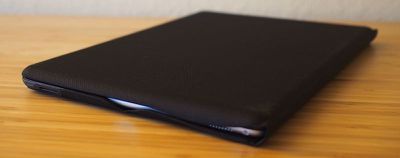
It's also adding quite a bit of thickness to the iPad Pro, so while the keyboard does turn the iPad Pro into a much more capable MacBook-style machine, it's adding some serious weight and bulk, which will be a turnoff for some potential buyers.
Smart Connector
The Logitech Create is the only third-party keyboard that's currently able to take advantage of the Smart Connector on the iPad Pro. By connecting to the iPad Pro through the Smart Connector, the keyboard draws its power from the iPad. It never needs to be charged and because it's connecting directly to the iPad Pro, there's no need for Bluetooth.
This means there's zero setup involved - simply stick the iPad Pro in the case and it works right away. There's never any loss of connection unless the iPad Pro becomes unseated from the case, and there's zero lag. Overall, the Smart Connector is a slight improvement over Bluetooth solutions, both in its simplicity and its convenience. Bluetooth is generally lag free with few connection problems and it's rare to need to charge a third-party keyboard more than once a month, but the Smart Connector eliminates these small pain points.
The only downside to the Smart Connector is that it's a little finicky at times. If you've got the Logitech Create on a lap and shift the wrong way, it can momentarily disconnect and interrupt what you're doing.
Keys
Logitech's Create keyboard case is inferior to Apple's own Smart Keyboard when it comes to size and bulk, but for many users, its keyboard is a clear winner over the Smart Keyboard. The Logitech Create has full-spaced keys that feel fantastic under the fingers due to their high travel, especially in comparison to the Smart Keyboard.
Apple's kept the Smart Keyboard thin by cutting down on the travel of the keys, so it's not going to feel as familiar as the Logitech Create to people who are coming from a MacBook Air or a Retina MacBook Pro. If you have a MacBook, the Smart Keyboard keys and the MacBook keys feel similar.
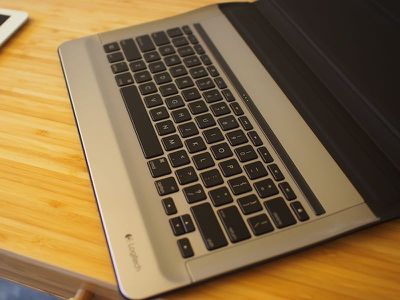
Transitioning from a Retina MacBook Pro to the Logitech Create was seamless for me. I was able to start typing on the Create right away with zero typos and no reduction in my typing speed. The same isn't true of the Smart Keyboard - it's a definite adjustment for me. As someone who prefers the feel of a keyboard with a good amount of travel, I thought the Logitech Create was a far superior typing experience.
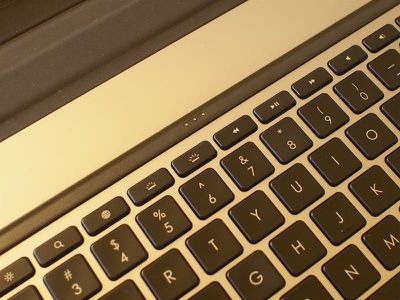
As with most third-party keyboards, the Logitech Create has a row of keys dedicated to iOS shortcuts on the iPad Pro. There's a button for bringing up the home screen, accessing search, locking the iPad, switching keyboards (aka accessing emoji or special characters), controlling volume, adjusting screen brightness, controlling media playback, and adjusting the backlighting of the keys.
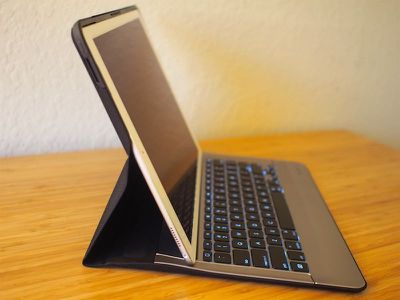
A major benefit of the Logitech Create over the Smart Keyboard is the backlighting. The Logitech Create has an auto backlighting feature built in that works really well. The keys will light up as soon as the keyboard is plugged in and they'll brighten whenever they're pressed. To save power, if you go a few seconds without touching a key, the backlighting automatically turns off. It's done well and useful if you're typing in a room without a lot of light, and it's also adjustable to three levels on the keyboard itself.
Bottom Line
Both the Logitech Create keyboard and Apple's own Smart Keyboard have appealing features and drawbacks. The Logitech Create keyboard is much heavier and bulkier than the Apple Smart Keyboard, but it's also cheaper and has traditional MacBook Pro-style keys with a good amount of travel and a fantastic backlighting feature.
Choosing between the Logitech Create and the Smart Keyboard is going to come down to whether you prefer a more functional keyboard that feels like a MacBook Pro/Air keyboard or if you want portability and light weight. It's not hard to adjust to the Smart Keyboard, but for a lot of users, it's not going to provide the pleasant typing experience as the Logitech Create offers.
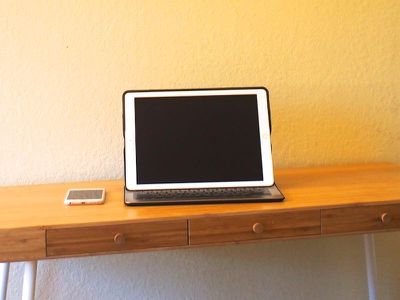
Along with better keys, you're also getting more protection with the Logitech Create. The iPad Pro seems fragile because it's so large - there's a lot of surface there to break if its dropped or banged against something. The Logitech Create offers full front and back protection while the Smart Keyboard is only going to protect the screen.
In the future, there may be additional keyboard options on the market, but at the current time, there are few iPad Pro-specific products and only two that use the Smart Connector: the Logitech Create or the Smart Keyboard. Right now, it's a matter of deciding between a lot of bulk or keys that don't quite measure up if you want something that takes advantage of the newest technology.
As someone who owns and uses an iPad Pro on a daily basis, I would not choose the Logitech Create over the Smart Keyboard. It is too bulky and heavy and I am not a fan of the awkward and hard to use rear shell design. When it comes down to it, my fingers can adjust to keys with less travel better than my back can adjust to an additional 1.5 pounds of weight.
Of course, if you're on a budget, there's no need to go with either of these options. The iPad Pro still works with Bluetooth, so a standalone Bluetooth keyboard with an iPad Pro Smart Cover is going to be a perfectly useable option.
Pros:
- Excellent keys
- Smart Connector
- Backlighting
- Shortcut keys
Cons:
- iPad Pro fit can be unstable
- Rear shell design makes proper alignment difficult
- Bulky
- Heavy
- Limited viewing angles
How to Buy
The Logitech Create iPad Pro Keyboard Case can be purchased from Apple.com or Apple retail stores for $149.99. It's also available directly from the Logitech website and from Amazon.com.


































Top Rated Comments
Other than those things, it was a nice case. It did protect well and I had no issues whatsoever with the iPad falling out of the case. As mentioned in the review here, it was very difficult and somewhat disconcerting when attempting to get the iPad out of the case as it seemed like you were putting an enormous amount of stress on the iPad itself. Also, I never ran into any problems setting the iPad onto the connector, it always went right into the depression in the keyboard designed to mate up with the edge of the iPad. I never had it disconnect, either, but didn't use it in my lap very much. I also found that I never used the backlight for the keys. The row of function keys were nice to have and I do miss them a bit, but for me, they were not worth the price of entry.
I finally got my Smart Keyboard from Apple on the Friday after Thanksgiving and have been pretty happy with it. Combined with Apple's silicone back case, I feel that my iPad Pro is protected well enough and is considerably lighter now and remains quite thin. I also have a Retina MacBook, so I'm already used to the shorter key travel and do not find it to be an issue. The biggest issue with the Smart Keyboard is definitely its set up and unfolding/refolding. I am now very familiar with how to do it, but it is still rather awkward to perform and requires quite a bit of real estate to open it on a table or desktop. If you don't have the space, you have to hold the iPad up in the air and unfold the keyboard and let it dangle below and then refold it into the stand before setting it down. Either way it looks a bit goofy when you do it.
The one thing that I really like about it, however, is that when I just want a tablet, it comes right off very easily and even if I don't take it off, it does fold neatly behind the screen and is comfortable to hold as opposed to gripping on a bunch of keys as on the Create.
As with just about everything, it seems, there is no perfect choice out there, so it's a matter of which tradeoffs you can live with. For me, the Smart Keyboard was ultimately the right choice, but the Create is certainly a good option to have available.
I travel a lot and I'm trying to lighten my load not pile it on. If I'm going to tip the scales at 3 pounds + - I'll drag along my MacBook Air. Light, airy, stick it in my bag - bring a single device - leave the Mac at home.
As I read more about this I am asking myself "what in God's holy name were these folks thinking?"
Flop of the year - but that's just my opinion, YMMV.
Had a quick go on the Apple keyboard but wasnt wild about the keys and really disliked the lack of a cover for the back of the iPad - I'm sure in Apple-world people use their devices all the time without getting them scratched but I do like an all-round cover.
The keyboard is great to use - feels very natural - in fact the only real issue was in the first few days when I found myself reaching for a non-existant track pad.