

Dock accessory company iVANKY recently launched its most powerful Thunderbolt dock yet, the FusionDock Max 1, which takes advantage of dual Thunderbolt chips and connections to offer the greatest amount of versatility I've seen in a Mac-focused dock. I've spent some time testing out the FusionDock Max 1 in my daily workflow, and I think I've found my new daily driver.
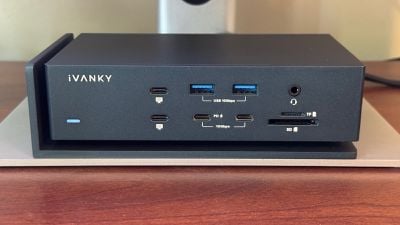
What sets the FusionDock Max 1 apart from other Thunderbolt docks on the market is the inclusion of dual Thunderbolt 4 chips, which essentially doubles the capacity of the dock, allowing you to run all sorts of displays and other peripherals at maximum speed. We'll dig into what that means for connectivity in just a minute, but let's start with an overview of the design and setup. Note that the FusionDock Max 1 is only compatible with Apple silicon Macs, so it won't work with older Intel Macs, Windows PCs, or Chromebooks.
The FusionDock Max 1 offers an eye-catching design in something of a midnight-colored aluminum housing. Rather than just featuring a simple brick shape, the FusionDock Max 1 has a unique "floating" design with a thin metal frame on the left side and bottom of the dock and the main body of the dock elevated on small legs. The design might help ensure some airflow around the dock, though I'm not sure just how much it actually assists in that regard. The dock can definitely get fairly warm during use, but I've never found it to get so hot that it's uncomfortable to leave a hand on it.
Similar to the Satechi USB-C Dual Dock Stand that I recently reviewed, the FusionDock Max 1 uses a dual-cable connection to your Mac, but this is Thunderbolt rather than the slower USB, so the greater bandwidth opens up a lot more possibilities for connectivity. The custom cable includes rather bulky housing on each end with a fixed arrangement of the two Thunderbolt connectors to match the port spacing on the dock and Apple's laptops. This makes it super easy to plug in and unplug the cable in one motion with very little fiddling required to get the connectors lined up properly.
The dock measures in at around 6.7 inches (17 cm) wide, 3.7 inches (9.4 cm) deep, and a little under 2 inches (5 cm) high, and there's a separate 180-watt power brick. The brick does have a fairly bright green light on it that could be distracting in dark rooms, but most users should be able to tuck it away on the floor or elsewhere where it won't be bothersome.
The dock itself has smooth surfaces on all sides, and it can tend to slide around on surfaces if it's bumped or even just under any sort of tension from the attached cables. Fortunately, iVANKY includes some sticky rubber pads you can install for either horizontal or vertical orientation of your dock, and those go a long way toward making sure the dock stays where you want it.
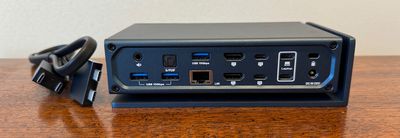
The dock's 20 ports are clearly labeled, which is great simply because there are so many that it's tricky to keep track of all of them. Aside from the DC-in barrel plug connection for power, everything is driven through a pair of 40 Gbps Thunderbolt USB-C ports stacked vertically on the rear on panel of the dock. iVANKY provides a custom cable with a vertically arranged dual connector on one end to fit these ports and a horizontally arranged dual connector on the other end to fit the exact spacing of adjacent Thunderbolt ports on your Mac.
Once you've hooked the dock up to power and your computer, your Mac will recognize the dock and you'll need to grant a couple privacy-related permissions, and then you'll be ready to go. The dock can deliver up to 96 watts of power to a connected computer, so you won't need a separate power connection for your Mac.
In addition to the DC-in and upstream Thunderbolt ports, the rear of the dock features two additional 40 Gbps USB-C ports that can drive up to 6K displays at 60Hz, and they can each provide up to 15 watts of power. For other types of displays, there are two HDMI ports supporting up to 4K displays at 60Hz, and while the ports officially support HDMI 2.1, iVANKY is only advertising them as supporting HDMI 2.0 due to Apple's limitations on docking stations connecting over USB-C/Thunderbolt. There are also three 10 Gbps USB-A ports delivering up to 7.5 watts of power each, a 2.5 Gb Ethernet port, a 3.5 mm audio out port, and a Toslink optical audio out port. A Kensington lock slot is also included to help physically secure the dock if desired.
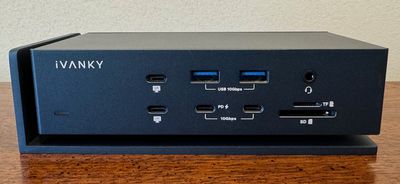
On the front of the dock, you'll find another pair of 40 Gbps Thunderbolt USB-C ports capable of driving up to 6K displays at 60Hz, a pair of 10 Gbps USB-C ports (one with 20-watt Power Delivery capabilities and one offering 7.5 watts), another pair of 10 Gbps USB-A ports with 7.5 watts of power, plus a 3.5 mm combo headphone/mic audio port and SD and TF/microSD slots supporting the UHS-II standard. There is a white LED on the front to indicate whether the dock has power, but it's dim enough that it's not bothersome in a dark room.
With this array of ports, the FusionDock Max 1 can support up to four external displays, but it depends on which Mac you have, as that's where the graphics horsepower is ultimately coming from. If you've got a Mac with the base M1, or M2 chip such as a MacBook Air, Mac mini, or entry-level MacBook Pro, you can only drive a single external display at up to 6K resolution. M3-based machines like the latest MacBook Air and entry-level MacBook Pro models should be able to drive a pair of displays as long as your Mac is in clamshell mode with the display off.
If you've got a Mac with an M1 Pro, M2 Pro, or M3 Pro chip such as a higher-end Mac mini or a mid-level MacBook Pro, you'll be able to drive dual displays at up to 6K via the dock in additional to an internal display for the MacBook Pro, and if you've got a Max or Ultra chip from any of those families, you can drive a total of four external displays at up to 6K resolution.
It's important to keep in mind that only the USB-C ports support 6K resolution, but there are four downstream ones available for display connections, two on the front and two on the back. The HDMI ports on the back can only support a maximum of 4K resolution.
I don't have any machines in my possession equipped with Max-level chips, so I wasn't able to push the FusionDock Max 1 to its limit when it comes to displays, but it had no trouble driving a pair of 5K displays from my 16-inch MacBook Pro with an M1 Pro chip. I tried several other combinations of displays over Thunderbolt/USB and HDMI, including Alogic's 32-inch 4K display with touchscreen support, and everything worked without a hitch.
Other peripherals also worked well with the dock, from my USB-A Stream Deck to a fast external SSD that was able to achieve speeds of up to 2,800 MB/s read and 1,950 MB/s write when connected to one of the 40 Gbps USB-C ports. Connecting that drive directly to my MacBook Pro yields read speeds of around 3,000 MB/s and write speeds of around 3,100 MB/s, so there's only a small penalty to read speeds for going through the dock, while write speeds take a bit bigger hit but remain speedy. Read and write speeds will ultimately depend on what else is connected to the dock and thus what that SSD is sharing its connection with.
SD card speeds came in at around 90 MB/s read and 90–160 MB/s write depending on file size for the reasonably fast card I had available for testing, which is below both the theoretical specs of the card and the up to ~200 MB/s speeds I see in some testing when inserting it directly into my MacBook Pro, but still satisfactory in my opinion.
Wrap-up
I've been a loyal CalDigit TS3 Plus user for many years, but the iVANKY FusionDock Max 1 is likely to take its place in my permanent desk setup. With a single-cable connection (yes, it has dual connectors, but just one thing to plug and unplug), it's the most convenient way to quickly and easily convert my MacBook Pro from a large desk setup to a convenient on-the-go machine.
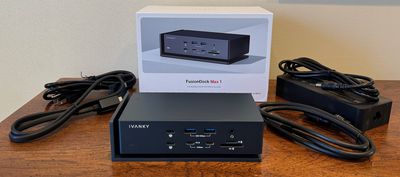
With the FusionDock Max 1's vast array of ports, everything from my dual 5K displays to external drives, a Stream Deck, and more can all be connected and disconnected with almost no effort, and there's essentially no compromise in performance or speed.
All of this convenience and technology packed into the FusionDock Max 1 doesn't come cheap, however, as it carries a normal price of $549.99, so this dock definitely won't be everyone, but for power users this may be well worth the price tag. Fortunately, iVANKY is currently offering $150 off when you use our exclusive promo code MACRUMOURS on iVANKY's site, bringing the price to $399.99.
Note: iVANKY provided MacRumors with the FusionDock Max 1 for the purposes of this review. No other compensation was received. MacRumors is an affiliate partner with iVANKY. When you click a link and make a purchase, we may receive a small payment, which helps us keep the site running.


































Top Rated Comments
This was an upgrade compared to my previous setup:
1. Doubled my ethernet connection speed (ports on the XDR displays capped me at 500 mb/s). I could get this if I hooked it directly into MacBook, but my ports were fully utilized to power the XDRs already.
2. Enabled the ability to hook an Apple Studio display. Somehow the iVanky dock can enable the studio display at 5k, even though Apple advertises that M1Max can only support a fourth 4k monitor.
3. Freed up a USB-C port on the right.
4. Revived a malfunctioning XDR display.
Reviving the malfunctioning display was huge. After 4 years of ownership, one of my XDRs failed to boot up ('https://forums.macrumors.com/threads/pro-display-xdr-repair.2400078/?post=32432947#post-32432947'). The issue seems to have to do with the fact that MacBooks draw power from the display, and that interfered with the connection? (The faulty XDR works fine with my Mac Studio).
It is working fine with the iVanky dock, presumably because the dock doesn't draw power from the display.
I will say that the dock runs pretty hot. Hope that doesn't harm the lifespan of the dock. Overall very pleased