

The Philips Hue line of lights have been controllable via an indoor motion sensor for some time, but Signify is today introducing an Outdoor Motion Sensor that's designed to control the range of outdoor Hue lights that are now available for purchase.
The Outdoor Motion Sensor works just like the indoor Smart Motion Sensor, automating your lights and other HomeKit products to come on when motion is detected and turn off when there's no motion detected, all on an automatic basis.
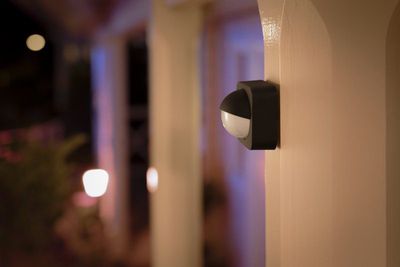
As with all Hue products, the Outdoor Motion Sensor is designed to work with a hub, so a Hue hub and Hue lights are required to use the product, even though it can interface with other HomeKit devices.
Design
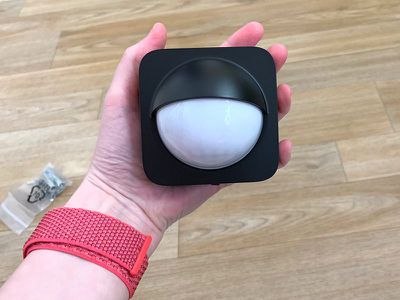
The Outdoor Motion Sensor is small and relatively unobtrusive, but it does have a design that stands out somewhat, so it's not entirely unnoticeable. It features a square-shaped plastic housing with a protruding white circle where daylight and motion sensors are built in.
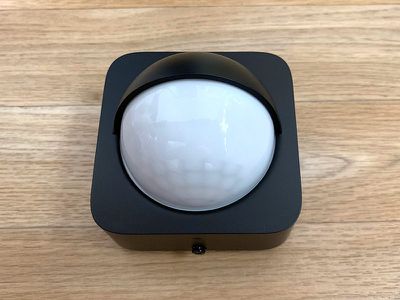
At the back, Outdoor Motion Sensor features a mounting plate and a variety of mounting options so you can put it wherever it works best. There's an option for a flat wall or mounting it at a corner, which would allow for maximum view of a driveway, lawn, or entryway.
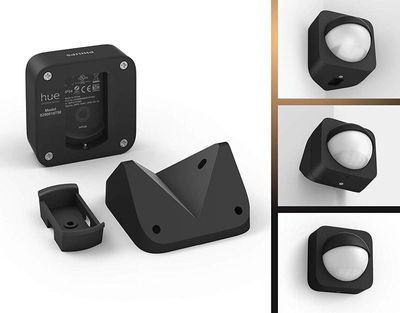
I live in an apartment so I'm not able to do wall mounting, but I'm including this image of the Outdoor Motion Sensor from Amazon to show the different ways that it can be mounted -- flat, on an inward corner, or on an outwards-facing corner. For testing purposes, I have tall shelves outdoors where I keep plants, which is what I used, so it also doesn't necessarily need to be permanently mounted to work well.
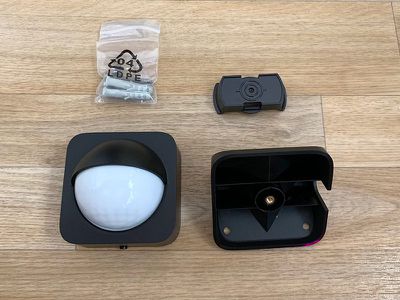
You can screw the Outdoor Motion Sensor into the wall outside, and the hardware that you need is included (wall brackets, screws, and screw plugs), making it simple to get up and running. There is a built-in battery inside the Outdoor Motion Sensor that's supposed to last for about two years, so you don't need to worry about charging it. It's using AA batteries, so when the included batteries are exhausted, it won't be a hassle to get a replacement.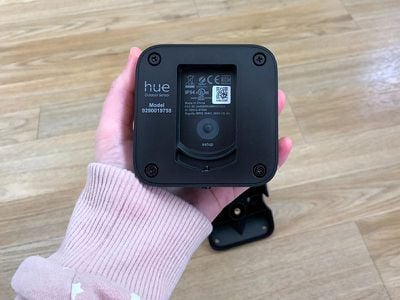
The casing of the Outdoor Motion Sensor is IP54 water resistant, so it can hold up to rain, snow, and other bad weather, though you won't want to submerge it.
Functionality
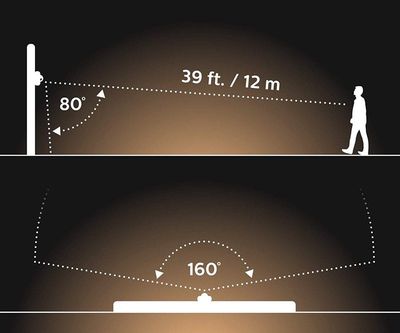
The motion sensing feature in the Outdoor Motion Sensor can detect movement from up to 39 feet away, which is a longer range than the indoor sensor. I wasn't able to test the full range, but set up and tested both indoors and in my backyard, it was able to reliably detect my movement close up and as far away as 25 feet.
The Outdoor Motion Sensor's lens features a 160 degree field of view, which is similar to something like a fisheye lens, meaning it can take in quite a lot of the landscape in front of it. The lens has also been designed to detect movement directly below it with an 80 degree vertical view, limiting blind spots.
You need to connect the Outdoor Motion Sensor to a Philips Hue hub and Philips Hue lights, so while it works from 39 feet away, it needs to be close enough to the hub or a Hue light to function.
The Outdoor Motion Sensor can work with indoor or outdoor lights from Hue (and with other HomeKit lights). It's useful for lighting up the outdoor area when motion is detected, but it's also handy for turning on the lights inside when you get home from work or when someone approaches. If you're not home and have the lights inside come on automatically with motion detection, it has the potential to be a good theft deterrent.
There are actually a few different sensors built into the device. It can detect motion, obviously, but it also has a daylight sensor inside so it can tell the difference between day and night. This allows you to customize the actions that happen based on the amount of light the sensor is detecting. It's also able to detect the ambient temperature, which is a nice bonus feature.
App and HomeKit
The Hue Outdoor Motion Sensor can be viewed and managed either by the Hue app or with the Home app, and which you choose will depend on how you want to use it. If you want to use it exclusively with Hue products, the Hue app works well, but if you want to use it with other HomeKit devices, the Home app is the better choice.
In the Hue app, you can choose the Motion Sensor's behavior by day, by night, and set what should be done when it either detects motion or does not detect motion.
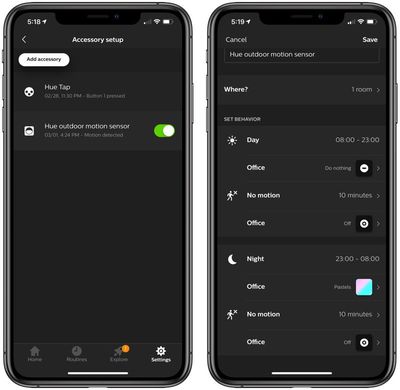
For example, you can turn the Outdoor Motion Sensor off entirely during the day and then after sunset, set it to turn on the lights whenever motion is detected, which is probably behavior most people will use it for.
You can also have the lights turn off after a set period of time when no motion is detected, so the lights can come on for anywhere between 1 and 60 minutes when motion is detected and then turn off afterwards automatically.
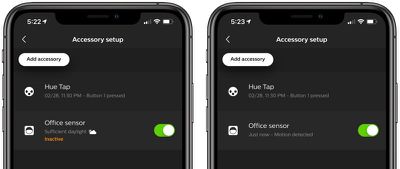
The Outdoor Motion Sensor is ideal for automating your outdoor lights to make sure there's always light when you're outside in the evening and to potentially scare off burglars or other malicious people who might be near your house. You can also set the Outdoor Motion Sensor to control the indoor lights, so you can, for example, have it turn on the inside lights as you approach the house if you don't have outdoor Hue lights for it to work with.
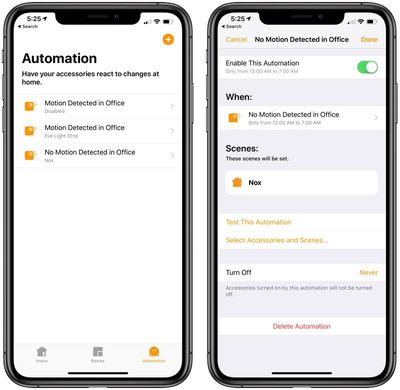
In the Home app, you can use the Outdoor Motion Sensor in HomeKit Automations as a trigger, which allows it to work with non-Hue HomeKit devices as well as Hue devices. This is the only way to set up automations that involve other HomeKit products as the Hue app limits you to control with Hue lighting scenes.
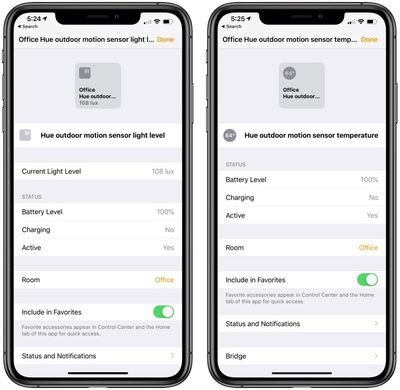
You can also view the Outdoor Motion Sensor in the Home app, where it displays the current brightness of the room in lux and the temperature as add-on features. Both of these readings can be seen in the Home app exclusively and are not available in the Hue app.
I prefer using the Home app to manage the Outdoor Motion Sensor because what it's doing is a bit more clear and I can create more specific Automations. For example, between 5pm and 6pm, I can have the Outdoor Motion Sensor turn on both my indoor and outdoor lights when it detects motion, activating the indoor lights at the specific moment when I get home at night. A separate Automation can be set for the night time that will turn off the lights when no motion is detected or turn on the lights when it is detected.
Between both of the apps, there's quite a lot of granular control over how the Outdoor Motion Sensor works, so it should fit almost any use case. I suspect most people will want to use it specifically to control outdoor lights without complicated Automation setups because indoor lighting can be controlled via indoor motion sensing options.
You will want to pick one app or the other to use so there aren't conflicting and confusing automated options set up. Writing about it makes it sound complicated, but in reality, automating the Outdoor Motion Sensor's behavior takes just a few minutes once you know just what you want it to control.
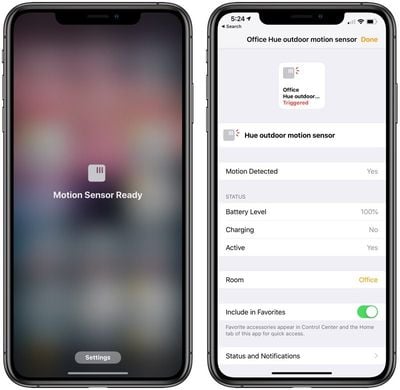
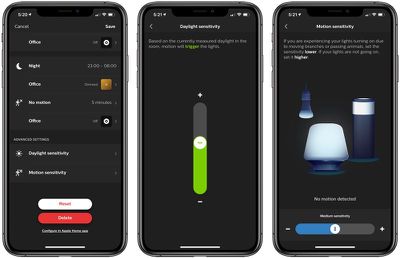
If you don't want the Outdoor Motion Sensor to control your lights at any time, it can be disabled within the Hue app. The Hue app also has options for adjusting the sensitivity of daylight and motion detection to fine tune how and when it's activating your lights. You can, for example, turn down the motion detection sensitivity if it's often activating due to moving tree branches or animals passing by, or turn it up if your lights aren't coming on when motion is detected.
As for Siri, you can ask questions about motion detection, light level, and temperature. Other than that, there's not a lot that can be done with the Outdoor Motion Sensor using voice, because it's mostly meant to be used for automation rather than interaction.
You're also able to set up notifications that will let you know if and when motion is detected using the Home app so you can get alerts when you're away from home.
Bottom Line
If you need a HomeKit-enabled motion sensor that's going to be able to stand up to being outside, the new Hue Outdoor Motion Sensor is an excellent choice.
It's not overly expensive, the motion sensing and daylight detection features work reliably, and it gives you a quick, easy way to automate your outdoor (or indoor) lights so you don't have to think about them.
Sensors are a great addition to HomeKit and the Hue Outdoor Motion Sensor can mimic the behavior of traditional outdoor lights that have motion-based activation features.
How to Buy
The Hue Outdoor Motion Sensor can be purchased from Amazon.com or from the Hue website for $49.95.


































Top Rated Comments
For example if you want motion to trigger only during certain hours AND only if there is no other scene active, you can’t. It’s worthless to me without powerful customizability.
Nope... both Hue indoor and outdoor sensors have a light sensor which can be read by HomeKit. Unfortunately there's a catch, the lux value from the Hue sensor can used for conditions, but you cannot set a working trigger for it. At least that is the case with my Hue / HomeKit setup.
What I've found out is that the Hue bridge (hw2.1) with software up to version 1.42.1942135050 all Hue motion sensors only trigger HomeKit when motion is detected. So any HomeKit rule that waits for some temperature or light value won't be triggered unless motion is detected as well. This is probably intended behaviour to conserve the sensor's battery power, but is a bit annoying in this case.
To work around this behaviour, I created a repeating timer in the Eve HomeKit app that also uses the light and temperature sensor as a condition. Every 5 minutes all outdoor sensor data is read by this rule and controls blinds and lights accordingly during daytime. Now during daytime the shades will activate when its a warm day with lots of sunshine, livingroom lights will turn on when it's a dark day.
So far, I've combined HomeKit devices (with rules) and Hue devices (with routines) in one setup and it works great.
The few things that are missing for me in the current software versions is indeed light and temperature triggers from Hue, setting a transition rate for Hue lights in a HomeKit scene/rule and triggering specific Hue Scenes/Effects from HomeKit.
Some of this functionality can also be enabled via third party software like HomeBridge or HomeAssistant but I would like it to be more integrated in HomeKit.
The second hand market here in the US is flooded with these because it’s almost universally cheaper to buy a kit of bulbs including the bridge for “free” rather than buy the bulbs/bridges separately. The price is about $25 for a new bridge on the second hand market.