

Govee makes just about every kind of light you can think of, and many of those are Matter-capable and able to connect to HomeKit. Earlier this year, Govee came out with a series of Matter star projectors, which you can hook up to your Apple Home setup.
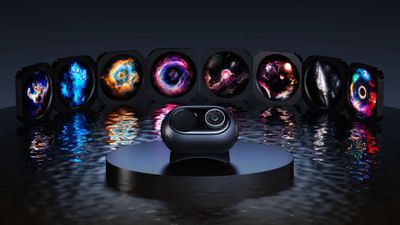
There are three new projectors, including the Star Light Projector Nebula, the Star Light Projector Ocean Wave, and the higher-end Galaxy Light Projector 2 Pro. I was intrigued by the idea of HomeKit-connected light projectors, so I tested two of the three products.
Star Light Projector (Ocean Wave)
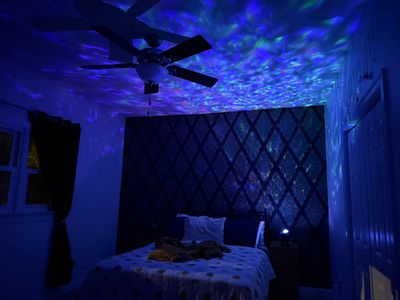
There are two variants of the Star Light Projector, the Nebula that mimics the night sky, and the Ocean Wave that has more of an oceanic vibe. The Ocean Wave Star Light Projector is one of Govee's more affordable projectors at $50 on sale, and it's a fun nightlight experience, especially for children.
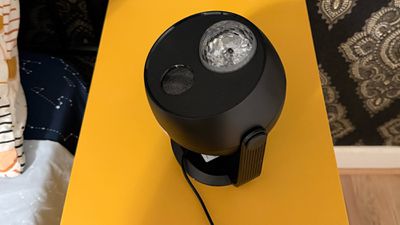
The projector is on a rotating base that can be adjusted as needed for the space that it's in, and it covers up to 540 square feet. It's more than big enough to bathe the entire ceiling of your average bedroom in soft, shifting light. It's about eight inches tall and six inches long, so it can tuck right on a bedside table or dresser to light the room.
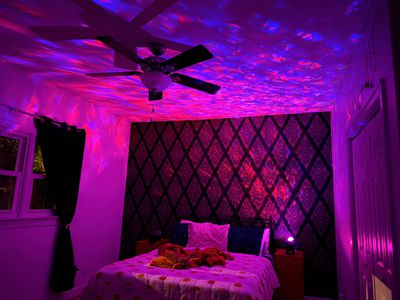
There is a textured lens that covers four RGBW lamp beads, and together, that setup allows for a water-like ripple pattern. I didn't think it necessarily looked quite like I was underwater, but some colors were more convincing than others.
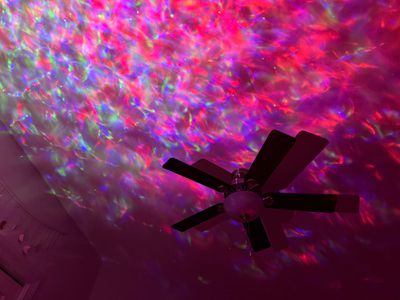
Along with the light under the lens, there's a laser module that projects pinpoints of light meant to be stars. The laser light looks like stars, and that was somewhat confusing with the water aesthetic. I ended up with mesmerizing light effects, but not a lighting experience that made me feel like I was under the sea or looking at the sky. It's a chaotic mix that doesn't quite work.
While the lighting effects produced by the projector feature multiple colors and patterns that can be adjusted in the app, the laser is a static green color and it can't be changed. If the laser light is on, it's green, and that didn't look great with some of the other colors. You need a fairly dark room for the projector to work as intended. It needs to be the only light that's on, and it needs to be dark outside.
There is an included speaker and you can turn on white noise options to add to the oceanic effect, but the speaker quality was just okay. I am someone that sleeps with white noise, and I would not pick the projector over another noise machine. For a child that doesn't know much of a difference, the sounds would likely be plenty soothing, and it might also work well for meditation. My cat was enthralled with it, so pets can enjoy the lighting effects too. If you don't like the white noise options, you can connect to it via Bluetooth and play music from an iPhone. There is a subtle noise from the projector, but I'm not sure you would hear it unless you were right next to it.
The laser can be turned off, and the light can be dimmed for sleep, plus there are options to set timers. This would make for a great nightlight/sound machine in a child's room, and all the different settings and light patterns are fun to play with. The app has quite a few presets to choose from, some of which have an accompanying sound and some of which don't, but you can also create your own. I liked the amount of control I had and all of the patterns available with this model, because surprisingly, the more expensive model is a bit more limited in scope because of its specialization.
This model does not come with a power adapter, so you'll need to supply your own, but it does come with a USB-C to USB-A cable. The USB-A side plugs into the power adapter, and I would have much preferred a USB-C to USB-C cable so I didn't have to hunt down a USB-A power adapter, which I have been ridding my house of.
Govee Galaxy Light Projector 2 Pro
The Galaxy Light Projector 2 Pro is Govee's higher-end projector option, and it's quite a bit different from the more affordable Star Projector variants. I don't have much experience with projectors, so this review ended up sending me down a rabbit hole.
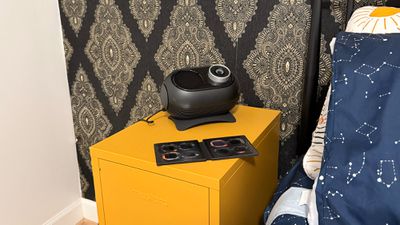
Why would someone pay $160+ for this projector when there are options with more customizability at a lower price? The answer is resolution and the ultimate feel of the lighting effect. The Projector 2 Pro doesn't use different colored lights and textured lenses, instead passing light through high-resolution film discs.
There are eight film discs to select from, and the image on the film is projected onto the ceiling or the wall. The discs have good variation in color and effect, but I was disappointed to learn that there are no additional discs I can buy. These are also proprietary, so you can't exactly buy discs somewhere else and pop them into the projector.
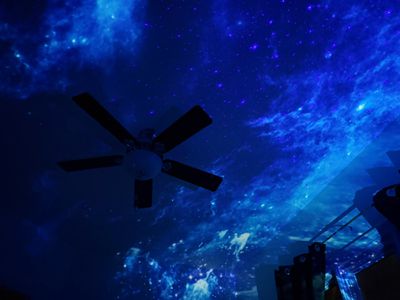
There's a 4-megapixel lens and a 230 lux light, and the combination produces vivid colors and a realistic effect that feels like you're immersed in space. Govee says that you don't need total darkness for the projector to work, but that's not really true. It looks a lot better when the room is completely dark.
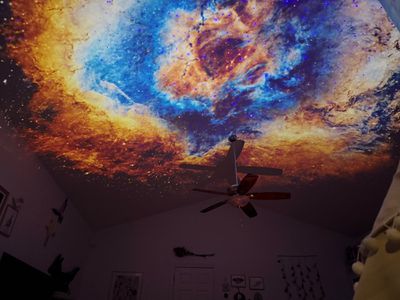
You can leave a nightlight on or have a lamp on in the room, but it really fades the effect. Even a TV washes it out too much. You also need to make sure to adjust the focus after you get the light positioned where you want it to project, otherwise it will look blurry. If you don't have a dark enough room and don't adjust the focus, it's going to look washed out. You also need to ensure you have good placement in a room and the right angle. There is soft motor sound when the projector is turned on, and occasionally, I noticed some minor jumps in rotation. I am sound sensitive and the noise didn't bother me, but if it's right next to your head and you want total silence, it could be an irritation.
The Light Projector 2 Pro covers up to 300 square feet with a 90 degree projection, which is ideal for bedrooms. I found it to be a little too small for the living room, and it does look best when it can cover an entire ceiling. I have vaulted ceilings in most rooms. In rooms with higher vaulted ceilings, the projector didn't look the best, perhaps because the distance was just too far. Lower ceilings looked better, and on Amazon, Govee actually recommends using the star projector within a distance of 3.28 feet to 9.84 feet, ruling out taller ceilings.
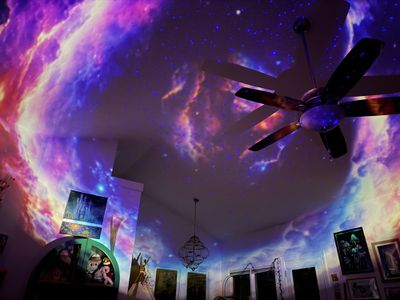
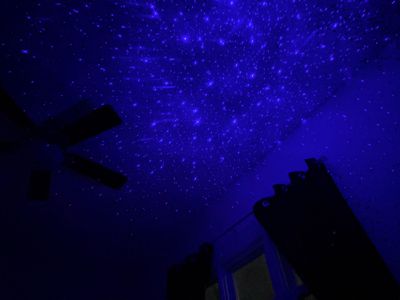
The projected scenes rotate to provide movement, and a laser that provides moving stars adds to the effect. The laser is blue, which means the stars are always blue. Blue works well with most scenes, but with both of the light projectors I tested, I wanted to be able to change star color. Laser color is static, though, and there aren't multiple options, which is a major downside. The laser stars have two different movement patterns, including diffuse or gather, both of which created unique effects with each film disc. Star speed can be adjusted, and the stars can also be turned off entirely.
There are preset scene options to choose from, some of which are tied to white noise, but even with the more expensive Light Projector 2 Pro, I didn't like the white noise quality. The speaker is just okay and doesn't sound like it has any depth. I would not get this for the white noise function.
The projector has a separate, rubberized base, and the shape of the projector allows it to be positioned anywhere on the base, so it's easy to adjust the angle to get the light in the right spot. There's a 90-degree projection angle to work with. The device is nine inches long and six inches wide, so it's a little bigger than the more affordable models.
The Galaxy Light Projector 2 Pro does provide a realistic night sky effect that's immersive and pretty to look at, but you are limited to the eight different discs. Star patterns and scenes mix things up a bit, but it can get boring looking at the same pattern night after night. I think this projector looks great, but it needs more scene options and I hope Govee sells additional discs in the future.
There is nowhere on the projector to store discs, so it's easy to misplace them. Govee does give you a little book to store them in, but just one sleepy night of not putting a disc away has the potential to result in a lost one. I also can't seem to take the discs out of the projector or put them in without touching the film, which is frustrating.
Govee App
The projectors connect to Wi-Fi and can be controlled with the Govee app. The app has a main view where you can see each Govee product, and you can tap on one to get to the different options.
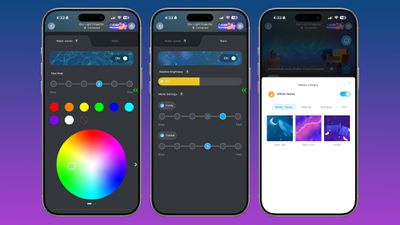
The Govee app is fine for the most part. It works and does what I expect, but it's also messy. There are ads for other products in several places, and controls that are offered without explanation. It's definitely an app that has the potential to be confusing.
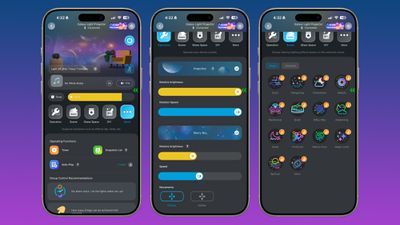
For the Ocean Wave projector, you can control the speed of the light and to some extent, the color, but colors are dictated by the bulbs inside. They aren't multi-color LED bulbs, so you can't set it to any color that you want. Changing wave speed also doesn't make that much of a difference, so there is a limited amount of customization. You can turn off the wave effect or the stars and enable preset scenes, some of which have accompanying sounds.
The Galaxy Light Projector 2 Pro has fewer settings because there are no colors. You can change the speed of image rotation, change the speed of the stars, and turn those features on or off. You can also adjust the direction of the stars and activate scenes that have accompanying music. The preset scenes were a disappointment for the most part because almost all of them turn off the projection and rely just on a star pattern.
There are features in the app that seem unnecessary, like AI for describing scenes (mostly because there are so few actual options that make a visual difference), and a community feature that shows videos of scenes other people have created. There are some practical options for the two projectors, like controlling the timer, setting times for the projector to turn on, and grouping devices together for multi-device control.
HomeKit
You can bind the Govee projectors to HomeKit using Matter, as long as you have a Matter hub. In the Apple ecosystem, HomePods and Apple TVs serve as hubs.
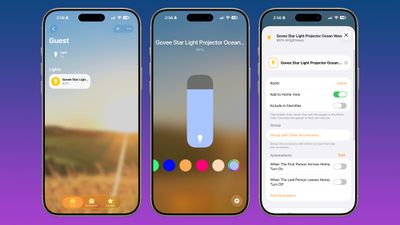
There's a limited amount that you can do with HomeKit, and it doesn't offer the full suite of customizations that are available in the Govee app. You can turn the light on or off and include it in scenes and automations along with other HomeKit products.
It supports changing the light color as with any HomeKit light, but this feature doesn't work in practice because the Home app offers color options that are not supported by the projector. You can also use Siri to turn the projector off and on, which can be useful, and you can change the brightness.
Bottom Line
Both projectors are fun nighttime accessories, but I can only recommend the Star Light Projector Ocean Wave. It doesn't have discs to fuss with, there are multiple color options to play with, and it's not too expensive.
The Galaxy Light Projector 2 Pro looks awesome, but there are too many caveats. The room has to be entirely dark, the ceiling height has to be right, the angle has to be right, and you have to adjust the focus just right. Even meeting those parameters, you get a limited number of scenes with no option to purchase additional discs. If it were priced closer the Ocean Wave and Nebula projectors, that might make it more worthwhile, but this doesn't feel like a $180 device.
I wouldn't recommend buying either of these projectors at full price, but there are often sales you can catch.
How to Buy
The Star Light Projector Ocean Wave is priced at $50 from Amazon, and the Galaxy Light Projector 2 Pro is available for $160 from Amazon.
Note: Govee provided MacRumors with an Ocean Wave Light Projector and Galaxy Light Projector 2 Pro Projector for the purpose of this review. No other compensation was received.


































Top Rated Comments
Govee UI/UX is a MESS! The hardware is OK but the software SUCKS!
Let us know when they figure out how to do software….
A well priced, HomeKit compatible projector that does space (or other) scenes (that are not over the top, fake looking wallpaper images) would really sell.
No.. they make a lot of cool effect lights. But hardly any useful lights.