

On a recent trip to Europe, I had a chance to try out GigSky's new pay-as-you-go cellular data plan that's available through via eSIM on the iPhone XR, XS, and XS Max.
I used GigSky's service across four countries, testing out the ease of use, the coverage, the setup process, and what it's like to use the eSIM to get cellular connectivity in another country.
Setup
Setting up the GigSky service was simple, and much more convenient than having to source a physical SIM to go along with a cellular service that uses a standard SIM. I downloaded the GigSky app, opened it up and selected the country I was visiting.
GigSky recommended that I purchase a plan once I arrived in my destination country (Czech Republic), which I did, and after the purchase was made and the payment confirmed, I was set up and ready to go.
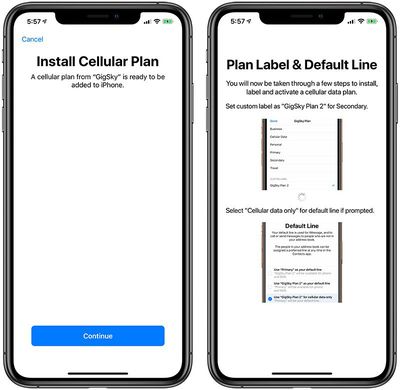
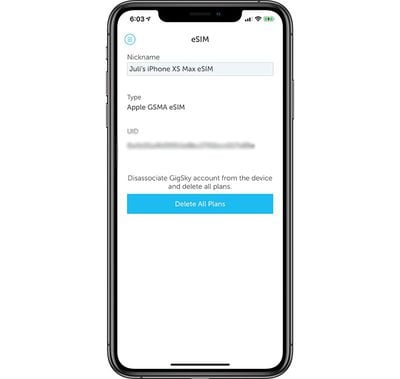
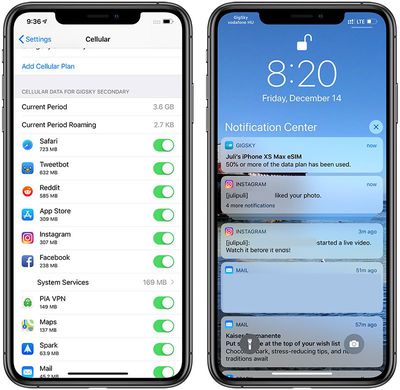
The app downloaded the eSIM on my phone, and I was able to select it as a secondary cellular option using the Cellular section of the Settings app on the iPhone.
Service Requirements
Using GigSky's eSIM service requires an iPhone that is both unlocked and that supports eSIM, so the iPhone XS, XS Max, and XR. My carrier is Verizon and I purchased my iPhone outright, so it came unlocked by default and there was nothing else I needed to do. The GigSky eSIM just worked.
Potential customers on other carriers may need to make sure their iPhone has been unlocked before the GigSky service will work. It is not available on a device that is locked.
eSIM Usage
I activated the GigSky eSIM after arriving in the Czech Republic, and from there, I didn't need to do anything when traveling between country borders. The data plan was active no matter which European country I was in, and I didn't see anything more than a momentary lapse in service crossing borders.
When first using the eSIM, I did run into a bit of trouble. GigSky's eSIM is data only, which means there's no phone number associated with it, and I didn't think there was enough instruction on how this worked.
I initially wanted to disable my Verizon SIM to make sure I didn't actually use any Verizon data or place Verizon calls/texts, but that got me into quite a bit of trouble in practice. After turning off my Verizon number on the first day in the Czech Republic, I got separated from the people I was with.
As it turns out, disabling the primary number with no secondary number turns iMessage and FaceTime off, and I couldn't get any texts, messages, or calls to go through so I was thoroughly disconnected. There are probably similar issues when changing your main iMessage number, so when using a secondary SIM, whether it's data only or a different phone number, make sure to leave the primary enabled so iMessage continues to work.
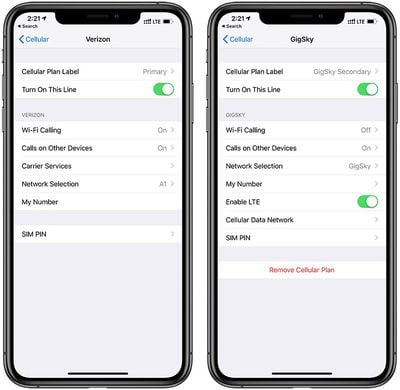
After that little setup snafu, I re-enabled my Verizon number, set GigSky as the primary data source, and left Verizon as the secondary data source.
I'm not entirely sure how it works with other carriers, but with Verizon, TravelPass service isn't activated unless I place a phone call or send an SMS message. Because I couldn't turn it off entirely, there was one time where I pocket dialed someone and got myself a $10 daily data charge, but that was my fault.
For the majority of the trip, once I had the settings properly established, the GigSky data worked without a hitch and I didn't need to activate my Verizon travel plan.
Coverage
I tested GigSky's service across four countries in Europe: Germany, Austria, Czech Republic, and Hungary. In most of these locations, except when I was in more rural places, I had reliable, fast LTE service that led me use social networks, check mail, and watch videos with no problems.
In Hungary, specifically in Budapest, my service switched between 3G and LTE, but I was never left without any connection at all with the exception of remote areas. In the major cities, and even smaller cities, my cellular connection worked well.
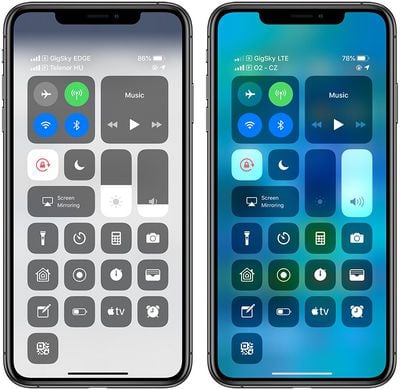
GigSky's service also worked in the Bay Area of California and Washington DC, two other areas where I was able to test its reliability.
Connection is, of course, going to vary by country and this isn't a reliable metric for service in other areas, but based on this sample, in urban areas, GigSky's service is decent and comparable to LTE from a standard carrier.
Costs
In Europe, and several other countries including the United States, GigSky's service is priced starting at $10 and is available in several high speed (LTE where available) data allotments that last for varying amounts of time, so you can purchase just the data that you might need.
300MB of data is available for $10, and that data pot lasts for just a day.
You can get 500MB of data for $15, 1GB of data for $20, and 2GB of data for $30, with all of these data pots available for 15 days.
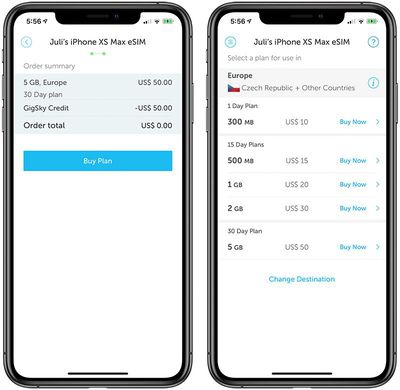
GigSky's most expensive plan is its 5GB data plan, which costs $50 and lasts for 30 days. I picked this latter option, and I used just about 5GB of data over the course of my trip. I wasn't doing anything particularly data heavy, but I was browsing the internet, checking social media, uploading images to social media, and checking and responding to emails.
Price wise, I think GigSky's options are fairly expensive, but my own carrier wasn't offering anything better. I have Verizon coverage in the United States, and Verizon's travel plan is $10 per day for 0.5GB of data and unlimited 2G data after that, which is little high speed data for a high price tag.
Some carriers have better deals, but most limit LTE access or charge quite a bit for data. T-Mobile has free unlimited 2G speeds when traveling or charges $5 per day for 0.5GB of high speed data, Sprint offers free 2G data when traveling or offers high speed data passes for $5 day ($25 per week), and AT&T charges $10 per day with LTE speeds limited to your normal data plan allotment.
It would have cost me upwards of $100 to have limited high speed data available on Verizon during my trip, so GigSky was definitely the better option. Getting SIM cards in each country or signing up for a European data plan probably would have been the most price efficient, but GigSky was the simpler option that was still better than what my carrier was offering.
App
Beyond setting up the GigSky eSIM service and activating it, the GigSky app can be used for troubleshooting and to answer commonly asked questions through a Support section. There's also an account settings option, an inbox for communicating with GigSky if there are customer support questions, and a refer a friend section for referring friends for free credit.
While using the GigSky service, I didn't really open up the app at all because many of the settings are handled through the "Cellular" section of the main Apple Settings app.
Available Countries
GigSky's data service works in more than 190 countries around the world, with a coverage map available here. All North American and nearly all European and South American countries support the GigSky service, as do many Caribbean Islands.
Service is more limited in Asia Pacific, Africa, and the Middle East, but there are a few countries where it works.
Bottom Line
After overcoming a few hiccups that come with using a data-only service as a secondary option on an iPhone, I thought GigSky was simple to use, offered great coverage that rarely left me sans cellular connection, and ultimately, convenient.
Getting a second SIM or an eSIM plan in the country that you're traveling to is an option and is potentially more affordable than GigSky, but that can be a hassle if you're visiting multiple countries.
$50 for 5GB isn't the best data deal, but I found that data pot lasted me for nearly two weeks with regular use - uploading photos to Instagram, checking my email, responding to messages, using maps, and browsing the internet - though I did connect to WiFi where available, such as in hotels.
The GigSky service worked seamlessly even as I crossed country borders in Europe, and I didn't have to hassle with swapping out SIM cards, changing my phone number and fussing with iMessage, or finding different plans in countries where I don't speak the language.
GigSky was much more affordable than the plans offered via my own carrier here in the United States (Verizon charges $10/day for 0.5GB and then unlimited 2G) and I wouldn't hesitate to use it again on another multi-country trip. I might choose something more affordable if I were going to a single country, but you can't beat the convenience of a cell phone plan you can purchase and get going right on your device.
How to Buy
To use GigSky's service through the eSIM on a compatible iPhone XR, XS, or XS Max, you'll need to download the GigSky World Mobile Data app from the App Store. From there, plans are purchased within the app at prices starting at $10.
Note: GigSky provided MacRumors with a $100 data credit for the purpose of this review. No other compensation was received.

































Top Rated Comments
The convenience of having your phone number for sms and voice calls and using this worldwide data only services is priceless. It’s the reason why I upgraded from the X to XS.
It could have been a bug, or an early implementation issue because GigSky is data only with no associated number (which I suspect was the problem), or something that I did with the setup process. I don't know that everyone will run into this issue, but there are always going to be problems when changing or disabling the number associated with iMessage. I just wanted to make sure people are aware that things need to be set up carefully to avoid iMessage/FaceTime activation issues.
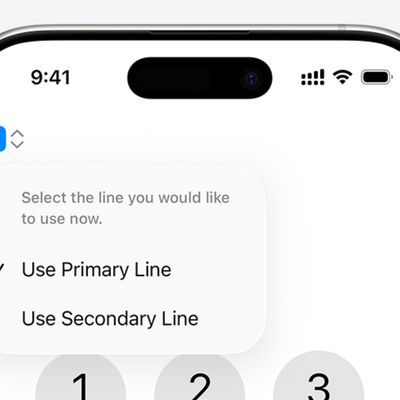
You can indeed use two numbers that can be responded to at any time while using just one for data if you set your Cellular Data setting to use the "Secondary" number while leaving the Voice line as the primary number and the iMessage line as the "Primary" number.
[doublepost=1546477510][/doublepost]In this situation, there was no kiosk at the airport terminal where I arrived in the Czech Republic, I did not speak the language, and I did not have an opportunity to visit a cellular service store because of planned activities, so eSIM was simpler for me.
A local SIM you can swap in is DEFINITELY a better deal than eSIM at this point, but I do think eSIM is simpler than having to physically swap a SIM, though. Hopefully prices are going to drop as more and more carriers implement eSIM support and the technology matures.