Skip to Content

Review: Eve Button Offers Quick Physical Controls for Activating Your Favorite HomeKit Scenes

by

Elgato has been making HomeKit-enabled "Eve" Bluetooth accessories for several years now, and the company now boasts an impressive lineup that includes a range of sensors, switches and smart plugs, and motion detectors.

Eve Button, Elgato's newest product, is a simple little three-gesture switch that's designed to control all of your other HomeKit products, activating scenes, turning lights on and off, and more.

Design

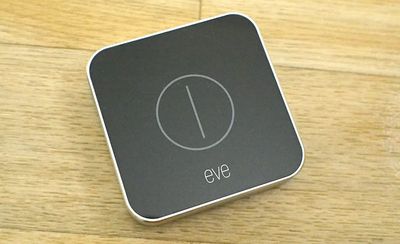
The Eve Button has a simple, clean design with a silver aluminum shell and a black plastic front plate with a smooth, circular button outline that doesn't protrude at all.

It's using the same design introduced in the Eve Degree, so if you already have an Eve Degree, the Eve Button will complement it nicely.
evebuttondesign
While there is no visible button protrusion, if you press on the button outline in the middle of the accessory, it will depress and activate the Eve Button's gestures. Pressing at the sides does not cause the front plate to depress, so the pressing motion is limited to the center, which is a clever design.

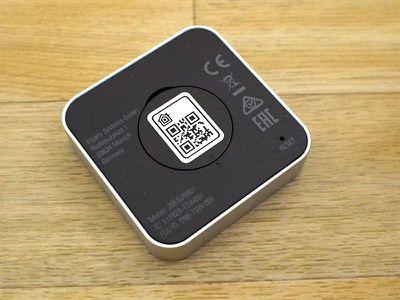
The back of the Eve Button is where the battery compartment is located, which can be opened with a coin. The Eve Button uses a CR2032 replaceable watch battery that can be purchased from a local store or Amazon.com for just a couple of dollars. You can check battery level in the Home app.
evebuttonback
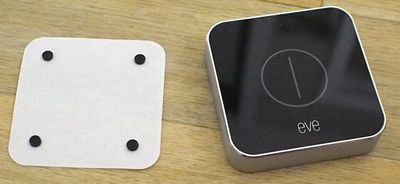
Elgato included four little rubber feet for the Eve Button so you can set it flat on a surface and it won't slip around, but curiously, there's no included adhesive strip or mounting option. The Eve Button is the kind of accessory I'd like to be able to attach to the wall near my light switch, but that's not an option.

With other switches and buttons, like the Hue Tap, there's an included mounting solution so it can go on the wall or be used anywhere, so this is a bit of a disappointing oversight with the Eve Button. Portability is, of course, the preferred functionality because not everyone is going to use this as a light switch, but it would be nice if mounting was an option. It's certainly light enough that I could pick up a 3M Command Strip on my own to stick it to the wall.
evebuttonfeet
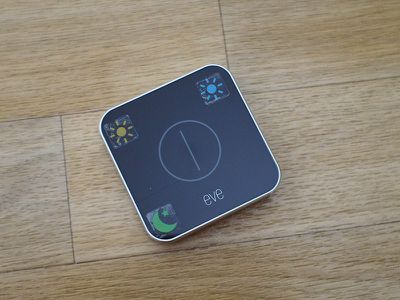
In addition to the four little feet, Elgato also included a whole slew of HomeKit stickers you can place on the Eve to remind you which gesture does what, which is a nice addition. Hue Tap and other competing button-like devices don't have that option, and it can be difficult to remember what's what, especially when there are multiple family members using the device.
evebuttonstickers

Functionality

There are three gestures available on the Eve Button, which can be tied to three of your HomeKit scenes: a single press, a double press, and a long press.

All of these gestures are simple to execute, and the Eve Button does a good job telling them apart. I didn't have much trouble with it mistaking one gesture for another, and it takes just a few seconds (sometimes even less) from when I press the button to when the scene assigned to the button activates. You might think Bluetooth is slow, but it's not, even when I'm in a different room.
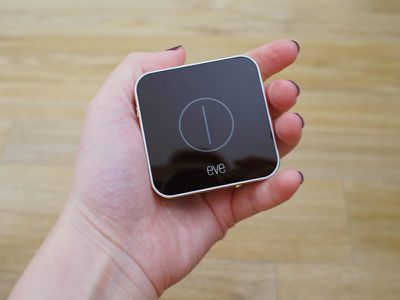
evebuttonsize
I have noticed once or twice that the Eve Button refuses to respond to a gesture, causing me to repeat it, but it hasn't happened often in the two weeks I've been testing it. For the record, I sometimes have the same issue with other accessories of this type. It's irritating, but not a dealbreaker.

It can get a little confused if you're pressing the button to activate different scenes that control the same accessory in rapid succession, but that's not a normal use case and something I did just for testing.

Scenes are the only thing that can be associated with the Eve Button, but Scenes can incorporate as many HomeKit devices as you'd like. You can, for example, set something like a "Goodnight" scene that locks the doors, turns off the lights, turns down the thermostat, and turns on a night light, depending on which HomeKit products you own.
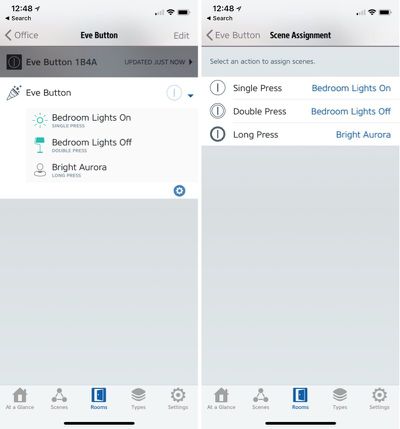
evebuttonapp
A "Wake Up" scene could do things like turn on the lights, start the coffee pot, warm up the house, and open the blinds. You can also use simpler scenes if you want the Eve Button to control a single device, like a light. Each gesture can also be tied to multiple scenes, which is handy if you want to keep your scenes separate for voice commands but combine them for the Eve Button.

I have the Eve Button set to turn the bedroom lights on with a single press, off with a double press, and then I have a long press set to activate a scene with my Nanoleaf Aurora for a kind of relaxing lighting scene that incorporates many of my Hue lights.

You'll note that I am using two of the three button presses for an on/off state, because devices like these don't naturally have on/off functionality. There is a way around this, though, as HomeKit scenes can be set to "Turn Off" after a set period of time in the Home app. So you could potentially set the Eve Button to turn the lights on in a room like a bathroom, and then set a timer to have them turn off again after 10 minutes without the need to use up a second button slot.
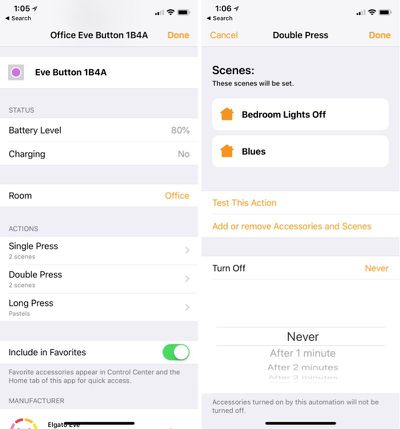
evebuttonhomekit
You can also add Conditions to Scenes that are tied to the Eve Button, such as allowing a Scene to be activated by the button only after 6pm or when the temperature is below a certain threshold, but I don't think these are going to be commonly used with the accessory.

You can, of course, activate scenes without the Eve Button at all through the Home app, another HomeKit app, or through Siri voice commands, but sometimes it's just easier to press a button. It's hard to transition entirely away from light switches, especially when there are multiple people in the house, and these kinds of HomeKit buttons and switches are useful replacements, I've found.

Setting up the Eve Button, is, of course, as simple as any other HomeKit product and it takes just a few seconds. Open up the box, fire up the Home app or the Eve app, add an accessory, scan the code, assign scenes, and that's it.

Bottom Line

Elgato's HomeKit products are some of my favorite. When HomeKit was new, Bluetooth HomeKit devices didn't work well, but with the myriad HomeKit improvements introduced over the years, Bluetooth HomeKit accessories like the Eve Button work flawlessly.

I am happy with all of the Elgato HomeKit devices that I use, and Elgato has one of the best product-based HomeKit apps out there. I often use the Elgato app to tweak my scenes and my non-Elgato HomeKit devices. I'm also a fan of the design of the Eve Button (and the Eve Degree), and I'm glad to see Elgato appears to be adopting it across the HomeKit lineup. It's a big improvement over previous Eve accessories that were a plain white plastic.
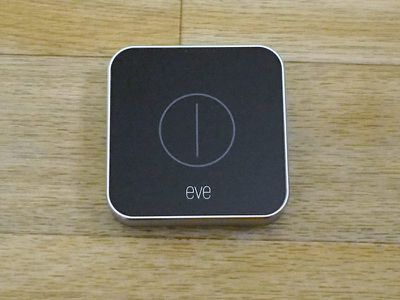
evebutton
If you're new to HomeKit, you might think that it's silly to go to the trouble of automating your smart home devices and then adding in a physical switch, but accessories like the Eve Button are useful and eliminate annoyances that come with not having an immediately accessible physical control for your devices. I've had a Hue Tap for quite some time and it's one of my most used accessories just because it's sometimes easier to tap a button than it is to ask my phone to do something for me.

Button accessories also come in handy in multi-person households and when you have guests who might need to control devices like lights.

I do wish the Eve Button had a few more gestures available because $50 is quite a bit to pay for just three, but you can tie each one to your most used scenes to get a lot of value it. I also wish Elgato had included a mounting solution, but you can fix that with a cheap adhesive strip if you really want it on the wall.

How to Buy

Eve Button can be purchased from the Elgato website or from Amazon.com for $49.95.

Note: Elgato provided MacRumors with an Eve Button for the purpose of this review. No other compensation was received.


Top Rated Comments

tallyho Avatar
114 months ago
It looks quite nice but as someone who has three Eve Power sockets I have to say they’re really awful to use.
First, the use of Bluetooth is a poor choice, both in terms of speed of response (despite Elgato saying they would fix this with firmware updates to take advantage of iOS11) and range (in my case distance from the ATV I’m using as a HomeKit Hub). Secondly HomeKit-only is a real limitation given that you might want to use other Smart Home controllers simultaneously. Everything else I own in the way of smart home devices can be controlled by either Alexa or Siri depending on what Wake Word I say (Alexa is always much more responsive though...)

it takes just a few seconds (sometimes even less) from when I press the button to when the scene assigned to the button activates. You might think Bluetooth is slow, but it's not
A few seconds is slow.

Now that Hue Dimmers are visible to HomeKit, why would anyone with an existing Hue installation spend more than twice the price for the Eve button?
Score: 2 Votes (Like | Disagree)
Michael Scrip Avatar
114 months ago
First we had regular ol' light switches and you had to use your hands. Barbaric.

Then we got fancy smart lights that we could control with our voice. Progressive.

Now we get a button to push to control our smart lights? :p

Oh I see the benefits... but it still seems funny.

I'm waiting for... "Hey Siri... light my oil lamp..." :)
Score: 1 Votes (Like | Disagree)
114 months ago
The price does not warrant the limited use, what I mean is that if you click once the bulb should go on, press another single time and it should turn off, this would get you to control 3 devices, now you can control only 1 ½ which means just one device, a shame really.
Setting a timer to 10 minutes (or a different time) as mentioned above is not a solution.
I almost bought one, but glad I didn't once it is so limited.
Can a Hue dimmer for $25 control my LIFX through home kit and my eve power be controlled by homekit?
You can use an App called Home (confusingly not the Apple one) to program conditions so that for example for a single press If a light/s are off turn on, if the light/s are on turn off.
Score: 1 Votes (Like | Disagree)
114 months ago
Or if you are already invested in Philips Hue ecosystem and has a HomeKit hub (Apple TV, iPad, HomePod), get a Hue Dimmer ($25). It comes with wall installation bracket (either with built-in sticker or against magnet-friendly wall, such as against a stud) for more permanent home.

It also has 4 buttons, where the first button can be programmed with 5 functions (1 click, 2 clicks, etc.) for whopping 8 different gestures.

It uses Zigbee, which IMO is more reliable than Bluetooth. It's not 100% full proof like Lutron, however.
+1 on the Hue Dimmer

Can you program the double-click through Homekit, or just Hue app? Haven't seen that before.
Score: 1 Votes (Like | Disagree)
jclo Avatar
114 months ago
It looks quite nice but as someone who has three Eve Power sockets I have to say they’re really awful to use.
First, the use of Bluetooth is a poor choice, both in terms of speed of response (despite Elgato saying they would fix this with firmware updates to take advantage of iOS11) and range (in my case distance from the ATV I’m using as a HomeKit Hub). Secondly HomeKit-only is a real limitation given that you might want to use other Smart Home controllers simultaneously. Everything else I own in the way of smart home devices can be controlled by either Alexa or Siri depending on what Wake Word I say (Alexa is always much more responsive though...)

A few seconds is slow.

Now that Hue Dimmers are visible to HomeKit, why would anyone with an existing Hue installation spend more than twice the price for the Eve button?
In most cases when I'm using the Eve Button, it's pretty close to instant, honestly. I actually find my Eve devices to be very responsive, but I don't have an Eve Power so it might be a slower accessory. I do have some HomeKit-enabled WiFi power outlets that aren't instantaneous either, though.

For someone with an extensive Hue setup, the Hue solutions are probably a better choice, but not everyone uses Hue.
Score: 1 Votes (Like | Disagree)
nutmac Avatar
114 months ago
Or if you are already invested in Philips Hue ecosystem and has a HomeKit hub (Apple TV, iPad, HomePod), get a Hue Dimmer ($25). It comes with wall installation bracket (either with built-in sticker or against magnet-friendly wall, such as against a stud) for more permanent home.

It also has 4 buttons, where the first button can be programmed with 5 functions (1 click, 2 clicks, etc.) for whopping 8 different gestures.

It uses Zigbee, which IMO is more reliable than Bluetooth. It's not 100% full proof like Lutron, however.
Score: 1 Votes (Like | Disagree)

Popular Stories

apple design award 2025

Apple Announces 2025 Design Award Winners Ahead of WWDC 2025

Tuesday June 3, 2025 10:14 am PDT by
As we wait for WWDC to kick off next Monday, Apple today announced the winners of its annual Apple Design Awards, recognizing apps and games for their innovation, ingenuity, and technical achievement. The 2025 Apple Design Award winners are listed below, with one app and one game selected per category: Delight and Fun - CapWords (App) and Balatro (Game) Innovation - Play (App) and PBJ -...
1password deal blue

1Password Security Breach: What Was Accessed and What Wasn't

Wednesday November 25, 2026 1:09 pm PST by
Popular password management app 1Password today said it experienced a security breach earlier this month. 1Password says some customer names and email addresses were accessed, but no customer vault contents were compromised. On November 19, 1Password saw indications that an employee's GitHub account had been breached and began investigating. The company says the breached GitHub account was...
Apple 2026 Black Friday Event Hero

Apple's Official 2026 Black Friday Offer Starts Rolling Out

Thursday November 26, 2026 8:37 am PST by
Apple's annual four-day Black Friday through Cyber Monday shopping event is now live in Australia, New Zealand, and Thailand, and it will continue to roll out across Europe, the U.S., and Canada as the calendar turns to Friday, November 27 around the world. In the U.S., Apple's terms and conditions say the promotion begins on November 27 at 12 a.m. Pacific Time and ends on November 30 at...
Latest Stories
The 50+ Best Apple Black Friday Deals Still Available on AirPods, iPads, and More
10 hours ago
HomePod Mini 2 in (RED) Seemingly Spotted Ahead of Announcement
7 hours ago
Apple's M6 and PROLED MacBook Pro Reach New Low Prices for Black Friday
17 hours ago
The MacRumors Show: iPhone Air 2 and iPhone 18 Are Coming
17 hours ago
Apple Store in Brisbane Reopening Next Month With New Design
18 hours ago
The 60+ Best Black Friday Accessory Deals on iPhone Chargers, TVs, Headphones, and More
19 hours ago
GTA VI Now (Barely) Running on Apple Silicon Macs
19 hours ago
The Best Black Friday Streaming Deals on Apple TV, Disney+, and More
20 hours ago
Apple TV's 'Carême' Wins International Emmy for Best Drama
20 hours ago
iPhone 18 Production Delay Leaves Apple Little Time Before Launch
21 hours ago
The Best Black Friday AirPods Deals Still Available
13 hours ago
The Best Black Friday Deals on Apple Home Products
22 hours ago
The Best Black Friday iPhone Deals Still Available
13 hours ago
The Best Black Friday iPad Deals Still Available
13 hours ago
The Best Black Friday Apple Watch Deals Still Available
13 hours ago
The Best Black Friday AirTag Deals Still Available
13 hours ago
The Best Black Friday Mac Deals Still Available
13 hours ago
iPhone Share of US Smartphone Market Hits 57% as Rivals Slip
23 hours ago
iPhone 20 Pro Rumored to Feature 3D-Printed Titanium Frame
1 day ago
Apple's Official 2026 Black Friday Offer Starts Rolling Out
2 days ago
Halide Adds Fill Light Feature for iPhone Duo
2 days ago
MacBook Air Black Friday Deals Now Live With Massive $399 Savings
2 days ago
Amazon Discounts All MacBook Neo Models by $99 for Black Friday
2 days ago
Kodak Launches Unique AirTag Rival With E-Ink Display
2 days ago
Here's Why the Apple Store is Going Down
2 days ago
Apple Still Working on Giant Foldable iPad That Could Cost $5,000
2 days ago
iPhones Dominate China's Weak Singles' Day Smartphone Sales
2 days ago
iPhone 20 Pro Could Feature Ceramic in Limited-Edition Model
2 days ago
Apple Faces Korean Regulator Review Over iPhone 16 AI Advertising
2 days ago
Apple Watch Ultra 4 Hits New Best-Ever Price of $649.99 for Black Friday
2 days ago
Related Apple News: Apple Ai Strategy 2024 | South Korea | Mac | Airpods Max | Opinion






























