

CalDigit recently launched its AV Pro 2 storage hub, a USB-C accessory that serves not only as an external drive with up to 8 TB of storage, but also acts a peripheral hub with two additional Type-A USB 3.0 ports and can charge a connected computer at up to 30 watts.
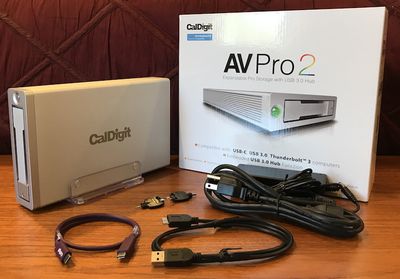
The AV Pro 2 is available in a range of capacities in both traditional 7200 rpm hard drive and solid-state drive models, ranging from 3 TB to 8 TB for the HDD models and coming in at 1 TB or 2 TB for the SSD models. I've been able to spend time with a 3 TB HDD model, and I've come away impressed with its capabilities. Stepping up to an SSD model would offer even more performance, although at substantially higher cost and lower capacities.
Overview
The AV Pro 2 can be oriented either vertically or horizontally, with small cushioning pads provided on one of the large faces for horizontal placement. For vertical placement, CalDigit includes a clear plastic stand, also equipped with cushioning pads, to provide stability.
A large green LED power button is located on the front of the AV Pro 2, making it easy to turn the drive on and off. The LED shines steady when there is an active connection, flashes while the drive is being accessed, and turns off when the drive goes to sleep, keeping you informed of its status and helping protect against data loss. As always, you should eject the drive from your system before physically disconnecting it, and you can use either the built-in eject function in macOS or a dedicated menu bar utility from CalDigit.
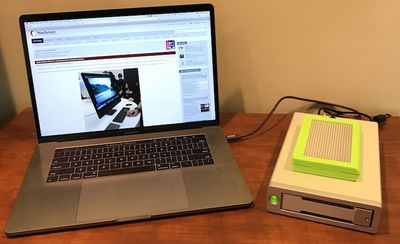
CalDigit is still in the process of finalizing the utility software for the AV Pro 2 and it should be available as a download from the company's support site "in a few weeks," although I was able to use CalDigit's existing menu bar utility for other docking stations and it worked fine with the AV Pro 2.
The AV Pro 2 itself measures 9.5 inches deep by 5.8 inches wide by 1.8 inches tall (in horizontal orientation), and weighs approximately 4.37 pounds. It's not light, as there is quite a bit of aluminum making up the enclosure and the drive module, plus the drive itself and the electronics inside the enclosure.
It certainly has a hefty feel, so this is something you're going to want to leave on a desk rather than take with you unless absolutely necessary. The enclosure is made of a silver brushed aluminum that matches Apple's Mac finishes, with aluminum ribbing along the narrow sides.
Storage Drive
One of the great features of the AV Pro 2 is the removable drive module, which is compatible with both traditional hard drives and solid-state drives in 3.5-inch form factors. The removable module, which is fairly rare in a single-drive system, offers flexibility for easily moving the drive to and from other enclosures or managing multiple drives, and is fully compatible with some of CalDigit's other storage products such as the T4 RAID array line.
Traditional hard drive options for the AV Pro 2 include 3 TB, 4 TB, 5 TB, 6 TB, and 8 TB capacities, and CalDigit advertises speeds up to 200 MB/s for these models. In my testing, the HDD model came close to that 200 MB/s mark for both read and write. CalDigit says the 1 TB and 2 TB solid-state drive models max out at 430 MB/s.
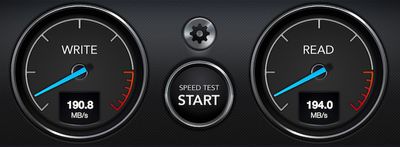
The AV Pro 2 includes support for USB attached SCSI protocol (UASP), which can improve single-drive storage device performance by allowing for simultaneous bidirectional commands and thus faster transfers.
The drives arrive pre-formatted for Mac in HFS+ format, although they can obviously be re-formatted as needed.
Swapping out the drive module is a simple two-step process involving a pair of keys provided in the box. The first step is to use the larger drive key to gently twist a drive module lock counterclockwise to unlock it, and then inserting the smaller drive pin into the release hole to release a large spring-loaded lever on the front of the module that can then be easily grasped to pull the module out.
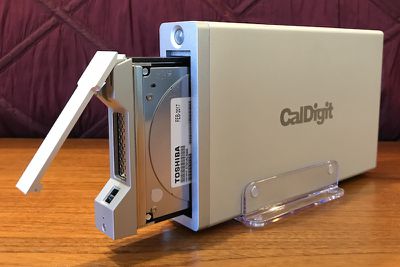
Installing a drive module is even simpler, only requiring you to slide the module in while making sure the lever catches the rim of the enclosure opening and then snapping the lever closed. A quick twist on the module lock with the drive key secures it.
With a spinning hard drive and a small fan inside the AV Pro 2, there is a little bit of noise while the disk is active, but it's not overly distracting. When the disk goes to sleep, the AV Pro 2 is silent.
Ports
The AV Pro 2 includes a USB-C port and a USB Micro B port, both on the 5 Gbps USB 3.1 Gen 1 standard, and CalDigit includes a 0.5-meter USB-C to USB-C cable and a 1-meter USB Micro B to USB-A cable in the box to allow you to connect to both the latest USB-C/Thunderbolt 3 computers and older computers offering only legacy USB-A ports.
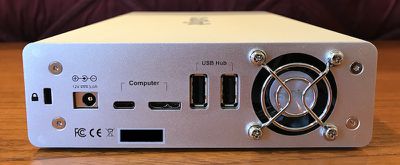
The AV Pro 2 also includes a mini USB hub built into it, consisting of a pair of USB 3.0 Type-A ports on the rear of the enclosure. The Type-A ports can be used to connect peripherals such as mice and keyboards, add additional hard drives, or even daisy chain more AV Pro 2 units. The USB ports also include support for Apple's external SuperDrive, and they can provide up to 1.5A/7.5W of standalone charging, so you can recharge an iPhone or other device even if the AV Pro 2 isn't connected to a computer.
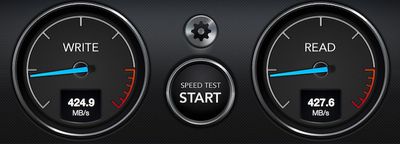
I tested CalDigit's fast Tuff external SSD hooked up to one of the AV Pro 2's rear USB ports, and I saw speedy data transfers from my MacBook Pro in the range of 425 MB/s read and write. That performance is actually surprisingly fast considering the connection is only 5 Gbps USB 3.0 and has the AV Pro 2 between the Tuff and the computer.
Beyond its various USB ports, the rear of the AV Pro 2 also includes a DC-in port for the power supply connection, a vent for the small fan to keep things cool, and a Kensington lock slot if you wish to secure the AV Pro 2.
USB-C Power
While MacBook owners will appreciate the 30 watts of power the AV Pro 2 can supply to their computers over a USB-C connection, MacBook Pro owners may find it coming up a bit short depending on their usage patterns, as the 13-inch MacBook Pro can draw up to 60 watts while the 15-inch model can draw up to 87 watts at peak demand.
I did test the charging capabilities of the AV Pro 2 with a Late 2016 15-inch MacBook Pro, and over the course of a workday the AV Pro 2 was able to keep my Mac topped off at 100 percent charge. Granted, I wasn't doing any heavy lifting like video processing with my Mac, but for moderate uses the AV Pro 2 can actually keep up with or at the very least significantly slow the rate of battery discharge.
I asked CalDigit why the AV Pro 2 is limited to 30 watts of charging power, and a representative told me it was a combination of factors. For many users like myself, 30 watts is actually enough. Boosting power output to 60 or 85 watts would require a much larger power supply, and given the relatively small size of the AV Pro 2 as a single-drive storage device, a larger power supply would be an extra cost and a bit of an inconvenience. The AV Pro 2 already includes a 60-watt power adapter, with 30 watts going to the drive itself and 30 watts able to be passed through to a connected computer.
From a more general perspective, CalDigit views storage as being the primary function of the AV Pro 2, with the charging capabilities being a bonus. Under many circumstances, 30 watts will be enough to keep even a MacBook Pro topped off, but if you're putting your machine under heavy loads or need to recharge a depleted battery quickly, you'll want to use a higher-powered charger.
A customer will get the convenience of single cable charging but if they're in a rush they'll need to connect the factory charger. It's really only for instances when someone needs to charge quickly before they go somewhere. When working with the files on the AV Pro 2 or overnight charging they won't see much difference.
While tradeoffs in size and component costs are understandable, it's still a bit disappointing that the AV Pro 2 can't fully support charging a MacBook Pro over a single USB-C connection. It seems that it would likely be sufficient as an everyday power source for my needs, even with a 15-inch MacBook Pro, but it definitely wouldn't be for users with heavier workloads, and for many users it could be hard to tell until they really spend some time with it.
Wrap-up
Pricing on the AV Pro 2 starts at $249.99 for a 3 TB HDD model, with higher-capacity options available at 4 TB ($299.99), 5 TB ($349.99), 6 TB ($399.99) and 8 TB ($449.99). If you're looking for faster speeds but with lower capacities, CalDigit offers the 1 TB SSD model for $549.99 while the 2 TB SSD model costs $849.99. All models come with a one-year warranty.
CalDigit is currently offering a 15 percent discount on all capacities through November 6 simply for signing up for the company's newsletter through a pop-over on the AV Pro 2 product page.
Amazon is currently knocking $50 off of several of the lower-capacity models including 3 TB, 4 TB, and 5 TB HDD options for an even better deal, although stock is quite limited.
CalDigit also offers extra drive modules bundled with HDDs ranging from 1 TB ($109.99) to 6 TB ($349.99). Standalone SSD modules will be available in 1 TB ($449.99) and 2 TB ($749.99) capacities, and they should be added to CalDigit's site in the very near future. Each package also includes an archive box for storing and organizing extra modules.
Note: CalDigit provided the AV Pro 2 to MacRumors free of charge for the purposes of this review. No other compensation was received. MacRumors is an affiliate partner with Amazon and may earn commissions on purchases made through links in this article.


































Top Rated Comments
Technically doesn't say that it _uses_ Thunderbolt, but I'll bet 99% of people won't realize that. It's an issue with other products too. Apple or Intel needs to release some official icon that indicates actual TB3 support since it's confusing with multiple protocols over one connector.