

Last year, accessory company Alogic launched its 27-inch "Clarity" display, offering a 4K experience with 90 watts of power delivery to charge a connected computer, an array of connectivity options, and hub functionality for connecting peripheral devices.
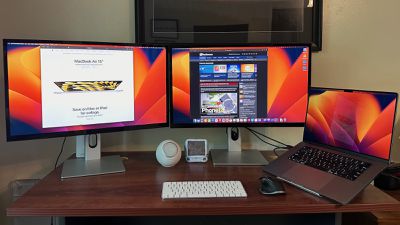
With an IPS display for viewing across a wide range of angles, 97% coverage of DCI-P3 color, HDR 400 support, and the ability to quickly transition between landscape and portrait orientations, the Clarity display offers a solid set of features, but Alogic is now tacking on some extra features with its just-launched Clarity Pro and Clarity Pro Touch models.
I've been testing out the two new models for a few weeks, and I've found the clever new features included on them to be interesting additions that give buyers some nice options to consider depending on their needs.
All three models use the same basic display and design, and I've found them to be bright with vivid colors for a high-quality viewing experience, thanks in part to the quatum dot (QD) backlighting that offers good contrast and supports over a billion colors.
I've been using a pair of LG UltraFine 5K displays for a number of years now, and I was pleased to find that I didn't really notice any difference in the day-to-day experience when running these 4K displays at a scaled 2560 x 1440 resolution to match the desktop size of my previous 27-inch 5K displays, even though the Alogic displays aren't running at exact retina scaling in this scenario.
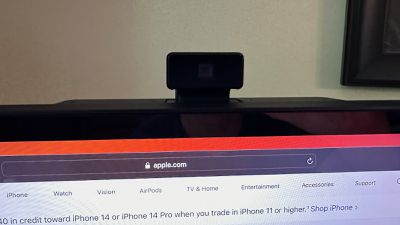
What the Clarity Pro adds beyond the standard Clarity display is an integrated webcam, which has a clever privacy-related feature in that it automatically tucks itself away behind the display while not in use, ensuring that the camera can't be surreptitiously accessed by malware or other attacks without your knowledge. If the camera is up, it's active, and if it's down, it can't see anything except the inside of the display housing even if video capture were to be activated without your knowledge.


The camera does make some noise as it moves up and down, which reminds of the potential for motorized parts like this to break over time, but I appreciate the automated privacy aspect of it. I also like the small adjustment wheel that allows for the camera's field of view to be moved up or down to better frame the subject. It doesn't offer as much flexibility as a standalone webcam accessory might, but it's better than a fixed camera integrated into a display bezel, for example.
The 8-megapixel webcam offers solid video quality compared to many other options built into Apple's notebooks or external displays, although the Continuity Camera feature recently added to macOS and iOS means you could do even better by using your iPhone as your Mac's webcam.
I did run into one camera bug with Zoom while trying to use a pair of these displays, as the app would only recognize one of the webcams regardless of which of the identically named Alogic display cameras I selected in video settings. Alogic says this is a known issue without a resolution yet, but I didn't have the same issue with other apps I tested including Skype, FaceTime, and Teams, so it appears to be something specific to Zoom.
Stepping up to the Clarity Pro Touch adds one additional major feature compared to the Clarity Pro, and that's touchscreen support. While macOS doesn't offer as much support for touch functionality as Windows, some drivers and a configuration app from Alogic help provide a decent amount of functionality on macOS. With touchscreen support, you can use either your fingers or a capacitive stylus (Apple Pencil not supported) to interact with onscreen content.
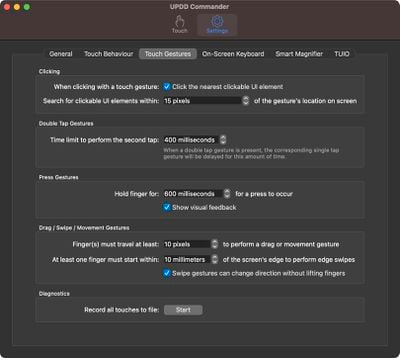
With the UPDD Commander app, you can customize a fairly significant list of touch gestures involving one, two, three, or five fingers with taps, swipes, and drags in various locations on the screen. For instance, a one-finger tap can register as a traditional mouse click, while a two-finger tap can register as a right click and you can even customize which of the two fingers should be considered as the location of the tap.
A swipe up from the bottom of the screen can be configured to show/hide the dock, while other combinations of fingers and gestures can do things like invoke Mission Control, hide or quit apps, minimize windows, and much more. Two-finger rotating and pinching motions can also be recognized, allowing for basic direct manipulation of images for rotation and zoom.
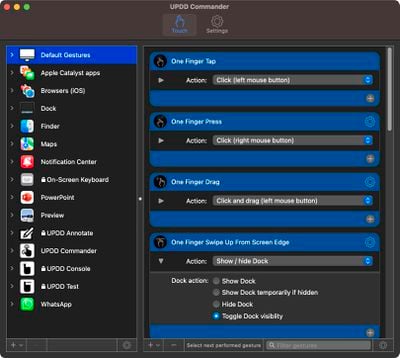
Beyond a series of default gestures, you can also configure gestures on a per-app basis with a number of Mac apps like Finder, Maps, and Preview automatically preconfigured upon installation of Alogic's drivers and apps. But you're free to further customize any of these and add additional apps to the list however you see fit. It took me a little bit of poking around to get everything set up, but once that was done I found the touch functionality to work well and feel pretty natural.
While I still prefer to use a mouse for most things, I have found some utility to the touchscreen functionality on the Clarity Pro Touch. I've settled into a setup with it in portrait orientation off to my left with email, Twitter, and Slack set up on sort of a status screen, and it's handy to be able to reach over and tap into emails or scroll my feeds by touch rather than moving my mouse over from another screen.
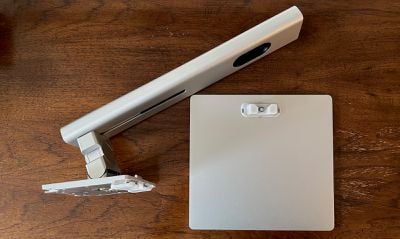
All three displays feature a high-quality design with a solid two-piece aluminum stand with height, swivel, and tilt adjustments plus a cable management passthrough in the vertical support. The stand has really nice heft and keeps the display very stable with no wobbling as I type on the same support surface.
The displays also support 100x100 VESA attachments if you prefer other mounting solutions, and Alogic sells an optional Clarity Fold stand that puts the display in a more ergonomic configuration. That's specifically for the Clarity Pro Touch when used for drawing, for example, though the limited Mac support for this functionality makes that setup less appealing for users in the Apple ecosystem.
An assortment of cables in the box including 1-meter USB-C to USB-C (3.2 Gen 1), 1.5-meter USB-A to USB-B, 1.5-meter DisplayPort to DisplayPort, and 1.5-meter HDMI to HDMI options should work with almost any setup.
The displays are on the glossy side, but I didn't find a huge amount of glare in my setup. Black bezels measure approximately 1 cm around the top and sides, and around 2 cm along the bottom. These aren't the thinnest bezels on the market and the thicker bottom bezel looks a little out of place, but I've definitely seen worse and at least the displays and bezels are flat under a continuous sheet of glass except for very thin edges.
Both the Clarity Pro and the Clarity Pro Touch include a four-microphone array for the webcam, and the audio quality was solid in my testing. Less impressive are the onboard dual 5-watt speakers which sound quite hollow compared to the speakers in my MacBook Pro or even the ones in my usual LG UltraFine displays.
Speaker volume and display brightness on Alogic's displays also don't natively respond to the Mac's media keys, even when connected via USB-C. I tried a couple of third-party apps that try to add this functionality, but they yielded only partial success.
I know I've been spoiled by my LG displays that had the benefit of Apple's input to allow those functions to work pretty seamlessly, but the step down for me in audio management on Alogic's displays was still a bit of a disappointment. Volume and brightness can still be managed via button controls on the bottom edge of the display, but nothing beats having everything integrated with macOS for adjustments right from my menu bar or keyboard.
One downgrade for the Clarity Pro and Clarity Pro Touch compared to the original Clarity display is that USB-C passthrough charging is limited to 65 watts instead of 90 watts. This is due to the addition of the built-in webcam, with 25 watts of power reserved for running that.
I do wish Alogic had opted for a higher-wattage power brick on these Pro models to preserve 90-watt computer charging rather than using a 150-watt brick, but given the efficiency of Apple's latest notebooks, 65W will probably be enough to keep even a 16-inch MacBook Pro topped off unless you're performing particularly demanding tasks. It's certainly been sufficient for me, but if you find it's not, you can easily connect another charging source like the MagSafe power adapter.
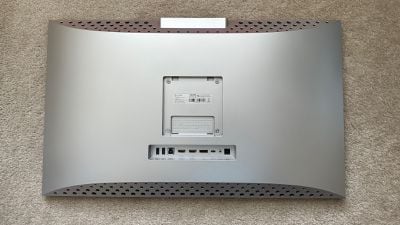
Alogic displays include some USB hub functionality, though it's important to note that this is pretty limited as it includes just two USB-A ports on the rear of the display and a 3.5mm jack for audio. If your display is connected via USB-C, those USB-A ports will run at USB 2.0 speeds, which is fine for a wired keyboard or mouse, but likely too slow for most users' needs if they're trying to connect external storage.
If you connect the USB-B port on the display to your computer, those USB-A ports can run at USB 3.0 speeds, which is significantly better but still far slower than many other connectivity options. Regardless of the connections, these are still USB-A ports in an age where peripherals are increasingly using USB-C.
For example, connecting a modest USB-C SSD external drive to the display via USB-A over the USB 2.0 speed yielded transfer rates of just 38 MB/s, around 20x slower than a direct connection to my computer via USB-C. But for lower-bandwidth connectivity needs, it'll do just fine.
The original Clarity display carries a regular price of $799.99, while the new Clarity Pro with the webcam functionality comes in a $999.99 and the Clarity Pro Touch is a further $200 upgrade to $1,199.99. That's on the fairly pricey side for 27-inch 4K 60Hz displays, though they do come with a pretty robust set of features.
Alogic is also currently running a 20% off promotion with code ALG20 that brings the prices down to a more palatable $640.00, $799.20, and $959.20 respectively, so this is a nice opportunity to pick up the new displays if they appeal to you.
Note: Alogic provided MacRumors with the Clarity Pro and Clarity Pro Touch displays for the purpose of this review. No other compensation was received. MacRumors is an affiliate partner with Alogic. When you click a link and make a purchase, we may receive a small payment, which helps us keep the site running.


































Top Rated Comments
I will say that finding a monitor with nice build quality with respectable specs has a rather limited pool. I mean, after coming from a 27" iMac (granted, it was only 1440p but... it was a VERY nice 1440p panel that still rivals a lot of 1440p 60Hz screens today) it wasn't as easy to find a really nice industrial designed monitor that was Apple-like in quality. I didn't want a plasticky LG or Samsung or MSI or something of that nature. The similar spec Dell (IPS Black) had worse #'s in color accuracy (you'd actually need an even more expensive calibrator to get it to better match the Corsair and ViewSonic options) and it cost more with speakers and the webcam (around $1,300) for the 4K version. The 6K is even more expensive (though a rather unique offering).
I narrowed mine down to the Corsair Xeneon 32" 4k option and the fairly similar ViewSonic Elite 32" 4K display. Both have rather nice aluminum stands (they're not Apple aesthetic designs but they're still elegant in their own way). The Xeneon has dual HDMI 2.1 ports (though I have mine hooked up via USB-C/Thunderbolt to take advantage of using iCue for controls) whereas the ViewSonic only has 1 HDMI 2.1 and one standard fare 2.0 port. Both can run at 144hz (faster than the Alogic monitor). Both basically have a built-in KVM so you can actually use them with multiple machines using one keyboard and mouse (assuming you don't have your mouse set as Bluetooth -- I've got an older WASD Code [eventually will likely upgrade to a Keychron] and a Mac version of the Logitech MX Master -- regret not buying the PC version as it didn't come with the 2.4 Ghz dongle that the PC version comes with). Eventually I'll buy the dongle (as I'm thinking of hooking up a PC and/or older Mac to one of the video ports) but it's kind of ridiculous as the Mac version of the mouse actually costs exactly the same but omits the dongle (though it still supports it). I love the mouse but... yeah, trying to support a Mac-specific version bit me in the butt. LoL. Thanks Logitech!
The Xeneon lacks a webcam (it has a mount though you can mount various camera options on - with Corsair buying Elgato the monitor is actually positioned towards gamers and creators and there's a ton of accessories you can buy to help with streaming) and speakers.
The ViewSonic comes with speakers, no cam though.
I will say you can opt to go with a humongous 4K OLED TV but I don't really need a 40+ monitor on my desk. I find that 27-32" is the sweet spot for me and my needs and in reality... that's where the OLED options don't really fall. Sure you can get better contrast overall with an OLED... but you're not buying an OLED 4K monitor at 32" for less than like $2k. Because of the volume sales of TV's... 40"+ OLED's are available in the $1k range if not cheaper. So keep in mind at the moment if you buy a monitor you're going to pay a premium in this space.
The only real options in OLED's on the desktop are 1440p and not 4K displays. Examples that come to mind are Samsung and Alienware's QD-OLED ultra wides (highly recommend the Alienware even if it loses Tizen in the process, it at least doesn't come with fragile micro sized ports for DisplayPort and HDMI). That said, I will say that macOS on a 4k panel that isn't Apple supplied (i.e. their 5k Studio option as an example) isn't quite as nice as it could be. Every icon on screen and the menubar are absolutely tiny and the options to fix it are frustrating to say the least. This is one area I hope Apple improves as when you buy a 4K display you'd love to operate at 4K and not have everything need to be altered on an incremental basis to display nicely on a higher resolution display that you in the end cut down to a smaller resolution by default.
As far as those questioning why you'd pay the costs of the Alogic (or similar pricing for the Corsair and ViewSonic Elite options)? It's pretty simple. If you do any level of design work you'd want a display that's an IPS (or IPS Black) panel with high levels of DCI-P3, sRGB and AdobeRGB accuracy. Both the ViewSonic and Corsair are considered reference-level displays in terms of out of the box accuracy. I'm not sure on the Alogic but it sounds like it's similar specs in terms of panel to both of the Corsair and ViewSonic panels and a few other displays in the market (I'm guessing they might all be 4K panels sourced from LG). The fact that all of the aforementioned Corsair, ViewSonic and Alogic monitors are Quantum Dot with HDR400? Sounds pretty similar. Shocked though that the Alogic doesn't drive more than 60Hz? That's a pretty big downer for the price. I'm running at 144Hz as we speak.
I'm pretty happy with the Corsair FWIW. iCue is still coming along in terms of build but so far it's pretty full-featured. It does have issues with not using the media keys for brightness like the Alogic ran into in the MacRumors review above. Hopefully Corsair can do some upgrades eventually that allow it to tap into those keys. They've been pretty good so far with firmware and software updates (just had an update I installed a few minutes ago).