Skip to Content

How to Install Windows 10 on Your Mac Using Boot Camp Assistant

by

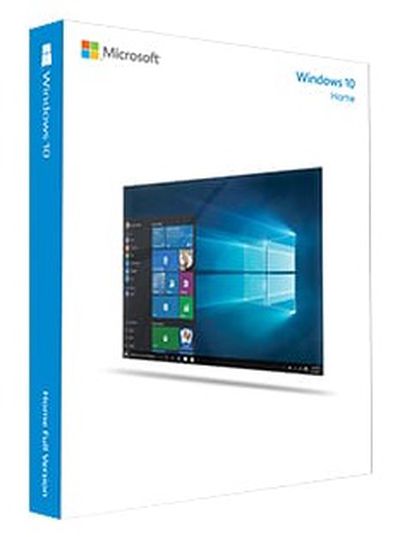
windows_10_boxFollowing the launch of Windows 10, Apple updated Boot Camp to support the latest Windows operating system on select Mac computers from 2012 and newer. If you've always wanted to try Windows on your Mac and think that now is the time to finally take the plunge, we can help you get through the basics with our how-to guide for installing Windows 10 on your Mac using Apple's Boot Camp Assistant.

This guide assumes you are installing Windows on your computer for the first time.

What You Need

You will, of course, need Windows 10, which can be purchased from Microsoft for $119. Older Mac computers support older versions of Windows, but won't work with Windows 10.

Make sure to check the system requirements for the version of Windows you want to install to ensure your Mac meets or exceeds them. You can find out the system specs for your Mac using System Information, accessible by typing "System Information" into a Spotlight search or using the Apple menu to go to About This Mac --> System Report.

To install Windows 10 (or Windows 7 or 8 for that matter) you will need at least 30 GB of free space on your startup drive and you'll need a keyboard and a mouse or trackpad to use with your computer.

If you're running OS X El Capitan and have an 11- or 13-inch MacBook Air, a 13- or 15-inch MacBook Pro or the Mac Pro, there's no need for a USB drive. If you're running a different version of OS X or have an older Mac, you'll need a 16 GB flash drive that doesn't have anything you don't want erased on it (Boot Camp Assistant automatically reformats the flash drive).

Creating a Disk Image File

On supported Macs running OS X El Capitan, Boot Camp comes with a modified interface that places the ISO image selector and partitioning on a single screen, allowing a user to easily select an ISO image and partition their hard drive before installing Windows. Once Boot Camp Assistant completes its tasks, the computer restarts with the normal Windows installation processes.

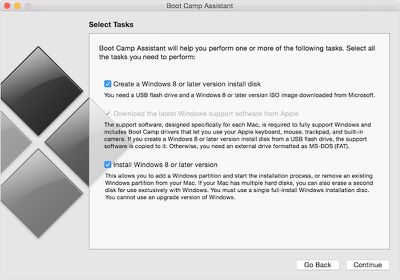
However, if you are not running El Capitan on a supported Mac, or are still running OS X Yosemite, Boot Camp Assistant requires a disk image file of Windows (not on DVD or a flash drive). The easiest method is to purchase the Windows ISO instead of the DVD version. However, if you don’t have a disk image file, create one by following the steps below.
yosemite-boot_camp_asst

  1. Insert the DVD or USB flash drive into your Mac.
  2. After the media appears in Finder, open Disk Utility and select the install file in the pop up window.
  3. Click the New Image icon at the top of the window.
  4. When the dropdown window appears, select DVD/CD master under Image Format and choose "none" from the Encryption option.
  5. Name the file and click Save. Wait for the program to create an image file.
  6. When the image file has been created, safely eject your DVD or USB flash drive.
  7. Find the newly created disk image file and select it. Then press Enter or Return on your keyboard to rename the file extension from .cdr to .iso. Select "Use .iso" to verify the change.

Set Up a Windows Partition

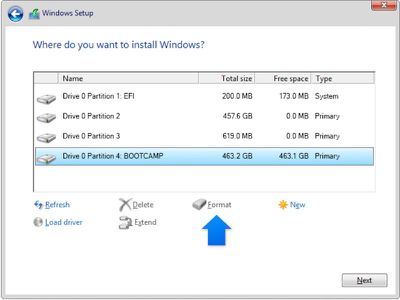
Before you install Windows on your Mac, you will need to create and format a partition. Use Boot Camp Assistant to create the partition and Windows installer to format it.
Windows Install

  1. Open Boot Camp Assistant to have the program automatically create the partition for you. It can be found in the Utilities folder of your Applications folder. Or, search for Boot Camp Assistant in Spotlight. Remember that the partition must have at least 30 GB of space.
  2. Format the partition using Windows. After Boot Camp Assistant creates the partition on your Mac, when you are asked where you want to install Windows, select BOOTCAMP. Then, click Format. Windows will automatically format the partition.

Install and Restart

The final step is to install Windows on your computer following the on-screen prompts. Then, restart your computer. You can switch between OS X and Windows using the Startup Manager. While your computer is restarting, immediately press and hold the Option key. After a few seconds, you should be able to choose which operating system you wish to use (either Macintosh HD or Boot Camp).

If you are in Windows and want to switch back to OS X, use the Boot Camp system tray. Click the Boot Camp icon in the system tray and then select "Restart in OS X" from the dropdown menu.

Uninstall Windows 10

If you change your mind, or realize that the 30 GB of space can be better utilized for some other purpose, you can uninstall Windows 10 and restore your disk to a single partition.

  1. Start your Mac in OS X. Quit all apps and log out any other users.
  2. Open Boot Camp Assistant and click Continue
  3. Select "Remove Windows 7 or later version" and click Continue.
  4. Click restore.

Top Rated Comments

144 months ago
I tried to run bootcamp a while back but have never been able to as I always get an error when it's running the partitioning part.
I also get errors when trying to partition but I found I need to disconnect any thunderbolt drives prior to booting into the Windows install from Boot Camp. This may also be the same for USB drives etc.
Score: 3 Votes (Like | Disagree)
satcomer Avatar
144 months ago
Every Windows 10 user should read the blog post Guide: How to Disable Data Logging in Windows 10 (https://www.reddit.com/r/Windows10/comments/3f38ed/guide_how_to_disable_data_logging_in_w10) if you want to save your data and protect your privacy!
Score: 3 Votes (Like | Disagree)
desmond2046 Avatar
144 months ago
Windows 10 is pretty good for me! May be because I have suffered from windows 8 for too long...
Score: 1 Votes (Like | Disagree)
144 months ago
I keep hearing the accusation that the Bootcamp drivers suck. Any truth to this, or is this Windows propaganda?
Windows propaganda, as long as you've got a reasonably powered Mac, Windows 10 runs like a dream.
Score: 1 Votes (Like | Disagree)
John Mcgregor Avatar
144 months ago
And you know this how?
Because i wasted 4 hours finding out.
Score: 1 Votes (Like | Disagree)
CylonGlitch Avatar
144 months ago
Every Windows 10 user should read the blog post Guide: How to Disable Data Logging in Windows 10 ('https://www.reddit.com/r/Windows10/comments/3f38ed/guide_how_to_disable_data_logging_in_w10') if you want to save your data and protect your privacy!
Sadly though, they say that even these things doesn't stop them. They continue to collect the information and will continue to do so. Now Windows 10 isn't horrible; generally it is OK, but in some cases it is a mess. Don't bother with parental controls, those are gone. Non-administrator account; talk about painful. I still like it better than Windows 8, but I prefer to stick to Windows 7.
Score: 1 Votes (Like | Disagree)

Popular Stories

1password deal blue

1Password Security Breach: What Was Accessed and What Wasn't

Wednesday November 25, 2026 1:09 pm PST by
Popular password management app 1Password today said it experienced a security breach earlier this month. 1Password says some customer names and email addresses were accessed, but no customer vault contents were compromised. On November 19, 1Password saw indications that an employee's GitHub account had been breached and began investigating. The company says the breached GitHub account was...
apple design award 2025

Apple Announces 2025 Design Award Winners Ahead of WWDC 2025

Tuesday June 3, 2025 10:14 am PDT by
As we wait for WWDC to kick off next Monday, Apple today announced the winners of its annual Apple Design Awards, recognizing apps and games for their innovation, ingenuity, and technical achievement. The 2025 Apple Design Award winners are listed below, with one app and one game selected per category: Delight and Fun - CapWords (App) and Balatro (Game) Innovation - Play (App) and PBJ -...
ipad pro prime

Apple Has iPads Running macOS Internally, Says Gurman

Wednesday November 25, 2026 4:55 am PST by
Apple has iPads running macOS internally and has had them "for some time," according to Bloomberg's Mark Gurman, although he says no work is currently being done to bring the Mac operating system to iPads. Speaking on his latest Power On podcast, Gurman said there is "no work being done to consumerize macOS on the iPad." Rather, Apple will continue to bring Mac features and apps like Final Cut ...
Latest Stories
The 50+ Best Apple Black Friday Deals on AirPods, iPads, MacBooks, and More
2 hours ago
Apple's M6 and PROLED MacBook Pro Reach New Low Prices for Black Friday
2 hours ago
The MacRumors Show: iPhone Air 2 and iPhone 18 Are Coming
3 hours ago
Apple Store in Brisbane Reopening Next Month With New Design
3 hours ago
The 60+ Best Black Friday Accessory Deals on iPhone Chargers, TVs, Headphones, and More
4 hours ago
GTA VI Now (Barely) Running on Apple Silicon Macs
4 hours ago
The Best Black Friday Streaming Deals on Apple TV, Disney+, and More
5 hours ago
Apple TV's 'Carême' Wins International Emmy for Best Drama
5 hours ago
iPhone 18 Production Delay Leaves Apple Little Time Before Launch
6 hours ago
The Best Black Friday AirPods Deals
7 hours ago
The Best Black Friday Deals on Apple Home Products
7 hours ago
The Best Black Friday iPhone Deals
7 hours ago
The Best Black Friday iPad Deals
7 hours ago
The Best Black Friday Apple Watch Deals
7 hours ago
The Best Black Friday AirTag Deals
7 hours ago
The Best Black Friday Mac Deals
7 hours ago
iPhone Share of US Smartphone Market Hits 57% as Rivals Slip
8 hours ago
iPhone 20 Pro Rumored to Feature 3D-Printed Titanium Frame
10 hours ago
Apple's Official 2026 Black Friday Offer Starts Rolling Out
1 day ago
Halide Adds Fill Light Feature for iPhone Duo
1 day ago
MacBook Air Black Friday Deals Now Live With Massive $399 Savings
1 day ago
Amazon Discounts All MacBook Neo Models by $99 for Black Friday
1 day ago
Kodak Launches Unique AirTag Rival With E-Ink Display
1 day ago
Here's Why the Apple Store is Going Down
1 day ago
Apple Still Working on Giant Foldable iPad That Could Cost $5,000
1 day ago
iPhones Dominate China's Weak Singles' Day Smartphone Sales
1 day ago
iPhone 20 Pro Could Feature Ceramic in Limited-Edition Model
1 day ago
Apple Faces Korean Regulator Review Over iPhone 16 AI Advertising
1 day ago
Apple Watch Ultra 4 Hits New Best-Ever Price of $649.99 for Black Friday
1 day ago
New Apple Store Opening in India, Download the Special Wallpaper Now
2 days ago
Related Apple News: South Africa | Health | Education | Entertainment | Culture































