Skip to Content

watchOS 3: How to Share Activity With Your Friends

by

When watchOS 3 launched alongside iOS 10, it brought a handful of feature additions and speed improvements to the Apple Watch. One of the new social features is a way for users to share their Activity Rings with friends and family through "Activity Sharing."

Mainly focused in iOS 10's Activity app, the ability to share workout data nevertheless requires an Apple Watch updated to watchOS 3, and for you to be comfortable with certain people receiving live updates on your fitness activity. When you're ready to start sharing your Activity Rings, and you've updated to both iOS 10 and watchOS 3, follow these steps:

Activity Sharing on iPhone
activity-how-to-3

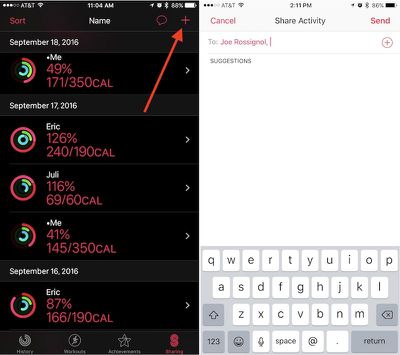
  1. Open "Activity" on your iPhone.
  2. Navigate to the "Sharing" tab on the bottom right.
  3. Tap the "+" icon in the top right corner to add a friend.
  4. The app will offer suggestions from your contacts of users who may own an Apple Watch, so you can tap one of those or type in someone specific in the text box.
  5. You can include multiple invitations at one time, and once you have everyone included in the "To" box, tap "Send."

From there, simply wait for your friend to accept the invitation. Afterwards, you'll begin to see one another's Calorie, Workout, and Standing rings in the same Sharing tab you sent the invite from. Once you amass a group of friends and family members, you can also sort the data in helpful partitions depending on what you'd like to see. Simply tap "Sort" in the top left corner of the Sharing tab and choose from Name, Move, Exercise, Steps, and Workouts as the primary focus.

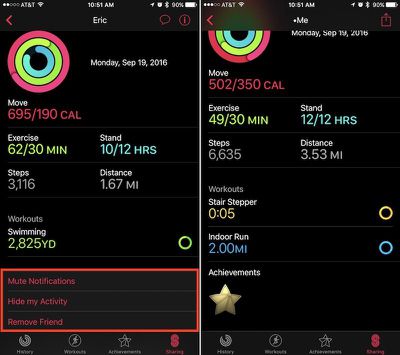
Tapping on anyone in the list will bring you into a deeper menu about that individual's Activity that day. The app will break down each ring, as well as showcase a step count, distance walked, and list any completed workouts or earned achievements. At the very bottom, there's a few options to mute a friend's notifications, hide your Activity from them, or delete them as a friend. Within your main friends list you will see your own Activity as well.
activity-how-to-2

An example of a friend's Sharing card (left), and your own (right)

Activity Sharing on Apple Watch

Although Activity Sharing is more in-depth within Activity on iOS, most of the interactivity of the new social feature takes place on the Apple Watch. Whenever friends begin closing their Activity Rings, completing workouts, and earning achievements, you'll get push notifications about each accomplishment. From these pop-ups, you can send friendly encouragements (or sly digs) about their hard work.
activity-how-to-5

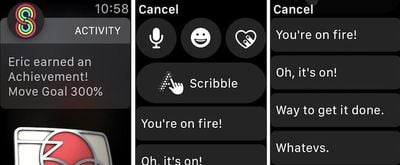
  1. When you receive an Activity notification from a friend on your Apple Watch, scroll down.
  2. Tap "Reply."
  3. You can choose from the traditional speech-to-text, emoji, Digital Touch, and Scribble options, or scroll more for some of Apple's stock Activity responses.
  4. Tap on any phrase to send it.

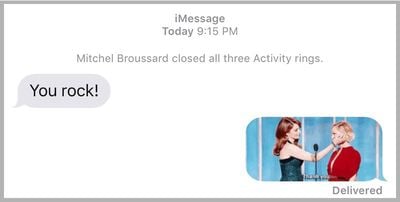
These responses are integrated directly into Messages in iOS 10, so if you sent "You're on fire!" for example, Messages would provide slight context above the message with "Mitchel completed a workout." Until they otherwise mute you for the day, or turn off your notifications completely within Activity on iPhone, each of your friends will receive a notification upon the completion of every workout and earning of every achievement.
activity-how-to-7
If you visit the Activity app on Apple Watch, you can scroll down to get more detailed readouts of each Activity Ring. Swiping right-to-left shows the new Sharing tab, similar to the one on iPhone. You can scroll to see each friend, tap on them for an individualized view, and send a message through a button at the bottom of their profile.

It should be noted that Apple's stock fitness-related phrases will only appear following a Sharing notification from a friend, and then only on Apple Watch. Any other Messages-related prompt outside of a notification from a friend will simply guide you over to Messages with all of the expected features introduced in the app in iOS 10.

There are plenty of other interesting and notable features to discover in watchOS 3, so be sure to check out the MacRumors roundups for both watchOS 3 and Apple Watch Series 2 to find out more information on each.


Related Roundup: Apple Watch 12
Buyer's Guide: Apple Watch (Buy Now)
Related Forum: Apple Watch

Top Rated Comments

Phogro Avatar
133 months ago
How to use the most useless feature ever
^ how to be a shortsighted fool.
Score: 2 Votes (Like | Disagree)
Watabou Avatar
133 months ago
How to use the most useless feature ever
I think it's pretty fun, myself. I get to see how my friends and family are doing with their activity, and if they beat me on a day, it really motivates me to do better. But we do have a competitive side so that also helps.

Just because you think it's useless, doesn't make it so.
Score: 2 Votes (Like | Disagree)
133 months ago
How to use the most useless feature ever
You must not have any friends to share your activity with. I feel sorry for you.
Score: 2 Votes (Like | Disagree)
tliede20 Avatar
133 months ago
I'm curious to hear if this works for anyone. I've been trying to connect my activity account with my wife's for like 4 days now. We can get to the "accept" prompt to accept the invite, but after that it's just infinite spinning "thinking" icon. Have rescinded the invite and resent several times, trying both directions.
You're not going to like my answer.... but I had to RESTORE my iPhone to make that work, I've seen this 3 times now. That seems to be the ONLY solution. Apple Support had me try the following which didn't work...

- Unpair / Repair watch
- Restore Watch

Checked diagnostics on both and they were clear.

Restoring the phone and THEN repairing the watch worked.

Good Luck!
Score: 2 Votes (Like | Disagree)
133 months ago
I'm curious to hear if this works for anyone. I've been trying to connect my activity account with my wife's for like 4 days now. We can get to the "accept" prompt to accept the invite, but after that it's just infinite spinning "thinking" icon. Have rescinded the invite and resent several times, trying both directions.
Score: 2 Votes (Like | Disagree)
chitoac Avatar
133 months ago
I'm curious to hear if this works for anyone. I've been trying to connect my activity account with my wife's for like 4 days now. We can get to the "accept" prompt to accept the invite, but after that it's just infinite spinning "thinking" icon. Have rescinded the invite and resent several times, trying both directions.
its working for me. only problem i got was that my gf didnt update her watch, but after both have ios 10 and watch os 3 its working. sometimes it takes a little long to load.
but im loving it! specially the days i beat my her LOL
Score: 1 Votes (Like | Disagree)

Popular Stories

apple watch series 3 design

Apple Offers Steps to Fix Daylight Saving Time Bug on Apple Watch

Sunday November 1, 2026 3:34 am PST by
Apple has published a support document describing what to do if your Apple Watch continues to show time that's off by one hour after daylight savings time changes. "This incorrect time appears only on the Always On display when your wrist is down," says Apple. "When you activate the display by tapping it or raising your wrist, the time changes to the correct hour." To fix the issue, Apple says ...
muse apple watch app

Meta's Muse AI Agent Comes to Apple Watch

Monday November 9, 2026 1:55 pm PST by
Meta today updated the Muse app for iOS to add Apple Watch support, which means Muse users can access the proactive AI agent from the watch. The app adds the Muse character to the watch with an option to text it, dictate text to it, or call it. There's also a Muse complication for quick access. Muse is Meta's personal AI agent that can complete tasks for users. It is available as a...
siri recap live rewind

watchOS 27.3 Brings Live Rewind and Siri Recap to Apple Watch

Tuesday November 3, 2026 10:35 am PST by
With the first beta of watchOS 27.3, Apple is introducing new Audio Intelligence features it previewed for the Apple Watch Series 12 and Ultra 4 earlier this year. Powered by the S11 chip, Audio Intelligence includes Live Rewind, Siri Recap, Sound Recognition, and Shazam Music Recognition. Sound Recognition and Shazam are already on the watch, but Live Rewind and Siri Recap are now available ...
Latest Stories
The 50+ Best Apple Black Friday Deals Still Available on AirPods, iPads, and More
1 hour ago
Apple's M6 and PROLED MacBook Pro Reach New Low Prices for Black Friday
9 hours ago
The MacRumors Show: iPhone Air 2 and iPhone 18 Are Coming
9 hours ago
Apple Store in Brisbane Reopening Next Month With New Design
9 hours ago
The 60+ Best Black Friday Accessory Deals on iPhone Chargers, TVs, Headphones, and More
10 hours ago
GTA VI Now (Barely) Running on Apple Silicon Macs
10 hours ago
The Best Black Friday Streaming Deals on Apple TV, Disney+, and More
11 hours ago
Apple TV's 'Carême' Wins International Emmy for Best Drama
12 hours ago
iPhone 18 Production Delay Leaves Apple Little Time Before Launch
12 hours ago
The Best Black Friday AirPods Deals Still Available
4 hours ago
The Best Black Friday Deals on Apple Home Products
13 hours ago
The Best Black Friday iPhone Deals Still Available
4 hours ago
The Best Black Friday iPad Deals Still Available
4 hours ago
The Best Black Friday Apple Watch Deals Still Available
4 hours ago
The Best Black Friday AirTag Deals Still Available
4 hours ago
The Best Black Friday Mac Deals Still Available
4 hours ago
iPhone Share of US Smartphone Market Hits 57% as Rivals Slip
14 hours ago
iPhone 20 Pro Rumored to Feature 3D-Printed Titanium Frame
16 hours ago
Apple's Official 2026 Black Friday Offer Starts Rolling Out
1 day ago
Halide Adds Fill Light Feature for iPhone Duo
1 day ago
MacBook Air Black Friday Deals Now Live With Massive $399 Savings
1 day ago
Amazon Discounts All MacBook Neo Models by $99 for Black Friday
1 day ago
Kodak Launches Unique AirTag Rival With E-Ink Display
2 days ago
Here's Why the Apple Store is Going Down
2 days ago
Apple Still Working on Giant Foldable iPad That Could Cost $5,000
2 days ago
iPhones Dominate China's Weak Singles' Day Smartphone Sales
2 days ago
iPhone 20 Pro Could Feature Ceramic in Limited-Edition Model
2 days ago
Apple Faces Korean Regulator Review Over iPhone 16 AI Advertising
2 days ago
Apple Watch Ultra 4 Hits New Best-Ever Price of $649.99 for Black Friday
2 days ago
New Apple Store Opening in India, Download the Special Wallpaper Now
2 days ago
Related Apple News: World News | Buyers Guide | Lifestyle | Ipad | News






























