Skip to Content

Do More Single-Handedly With Double Tap on Apple Watch

by

Apple Watch Series 9, Series 10, and Apple Watch Ultra 2 models include a multi-functional Double Tap gesture that you might not know about or haven't yet got around to trying. Here's everything Double Tap can do, and how you can make the most of it on your Apple Watch.
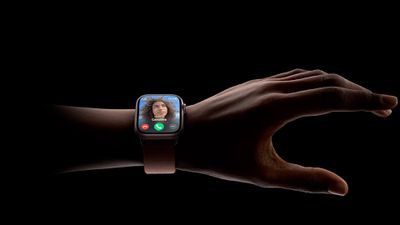
double tap
Double Tap is a gesture-based feature for Apple Watch models that lets you control watch functions by tapping your thumb and index finger together twice. The feature aims to make it easier to navigate the Apple Watch when you have only one hand free, like when you're walking a dog, carrying groceries, or holding a cup of coffee.

What Double Tap Can Do

Double Tap's functionality is pretty simple. You raise your watch to wake, and then you double tap your thumb and index finger together to control what's happening on the screen of your watch.

By default, Double Tap selects the primary button in whatever app you're in. So for example, if you get a call, you can double tap to answer, and use it to hang up when you're done. Likewise, if you're watching/listening to media, you can pause it and resume it (or skip). You can also use the gesture from your Apple Watch face to navigate through your Smart Stack, widget by widget.

Some other use cases: If you've set a timer, double-tapping will pause it. Performing the gesture again will resume the countdown, and when the timer goes off, a double-tap will stop it. Similarly, you can use it to do other everyday things like snooze alarms, trigger the Camera Remote app's shutter button, and dismiss notifications.

In watchOS 11, Double Tap can also be used to scroll through navigable content in any Apple app, including the Weather and Messages. You can even use a double tap to dismiss a timer that has ended.
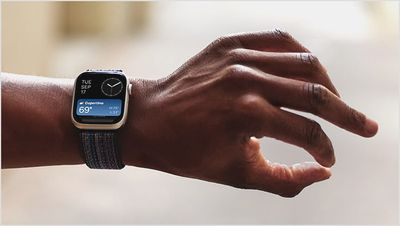
apple watchos 11 double tap
As you might expect, the gesture is also set up to assume your other hand is preoccupied. If you receive a text, for instance, a double tap lets you reply with a voice message, while another double tap sends the message.

Here's a rundown of everything you can do with Double Tap:

  • Open the Smart Stack from the watch face, and then Double Tap again to scroll through widgets one by one.
  • Answer phone or FaceTime calls.
  • Hang up phone or FaceTime calls.
  • When you get an iMessage, Double Tap to view it, and then Double Tap again if you need to scroll.
  • Reply to a Message using dictation and then send it with Double Tap.
  • Act on notifications - Apple says a Double Tap on an incoming notification will activate the primary action, such as snoozing a reminder or replying to a message.
  • Pause, resume, and end a timer.
  • Stop and resume the stopwatch.
  • Snooze an alarm.
  • Play and pause music, podcasts, or audiobooks (or skip a track, depending on settings).
  • Change to the Elevation view in the Compass app.
  • Start or stop automatic Workout reminders when a workout is detected.
  • Take a photo with the Camera Remote.
  • Record a voice memo in the Voice Memo app.
  • Change Flashlight modes.

In the Apple Watch Settings app, under Gestures, you can opt to change the playback option from play/pause to skip, and the Smart Stack option from Advance (swaps through the widgets) to Select (opens a widget's associated app). If you have Apple Vision Pro, you'll also find an option to ignore double tap gestures when you're wearing the headset.

How to Set Up Double Tap

If Double Tap is disabled on your watch, you will need to enable it manually for it to work. This can be done from your wrist or in the Watch app on iPhone, and both menus include options to customize Media Playback and Smart Stack functionality.

Note that to enable Double Tap, setup involves giving watchOS permission to disable some Accessibility options, including Assistive Touch, Zoom with Hand Gestures, VoiceOver with Hand Gestures, and Quick Actions. If Double Tap is enabled but is not working for you, disabling it and then turning it back on can help in some circumstances.

On Apple Watch:

  1. Open the Settings app.
  2. Tap Gestures.
  3. Tap Double Tap, then toggle on the switch next to Double Tap on the next screen.
  4. If prompted, tap Turn off Accessibility Features at the bottom of the on-screen alert.
  5. Choose your preferred setting for "Playback" (Play/Pause or Skip) and "Smart Stack" (Advance or Select).
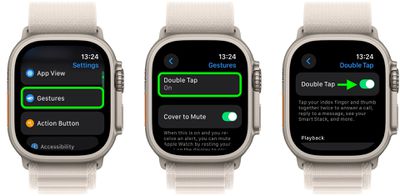
settings

On iPhone:

  1. Open the Watch app.
  2. With the "My Watch" tab selected, tap Gestures.
  3. Tap Double Tap, then toggle on the switch next to Double Tap on the next screen.
  4. If prompted, tap Turn off Accessibility Features in the on-screen alert.
  5. Choose your preferred setting for "Playback" (Play/Pause or Skip) and "Smart Stack" (Advance or Select).
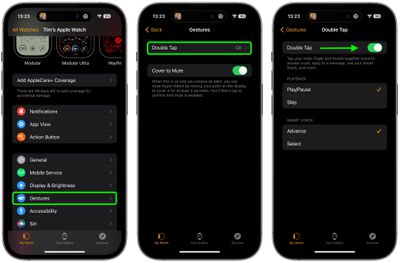
settings

Apple says Double Tap is enabled by the S9 chip's faster Neural Engine, which is why the feature is only available on the Series 9 and later and the Ultra 2. Apple said it developed an algorithm that detects the "unique signature" of tiny wrist movements and changes in blood flow when the index finger and thumb are tapped together.

If you own an earlier Apple Watch model that doesn't support Double Tap, you can always try a similar but more limited accessibility feature called AssistiveTouch, which is available on the Apple Watch Series 4 and newer.


Popular Stories

apple design award 2025

Apple Announces 2025 Design Award Winners Ahead of WWDC 2025

Tuesday June 3, 2025 10:14 am PDT by
As we wait for WWDC to kick off next Monday, Apple today announced the winners of its annual Apple Design Awards, recognizing apps and games for their innovation, ingenuity, and technical achievement. The 2025 Apple Design Award winners are listed below, with one app and one game selected per category: Delight and Fun - CapWords (App) and Balatro (Game) Innovation - Play (App) and PBJ -...
1password deal blue

1Password Security Breach: What Was Accessed and What Wasn't

Wednesday November 25, 2026 1:09 pm PST by
Popular password management app 1Password today said it experienced a security breach earlier this month. 1Password says some customer names and email addresses were accessed, but no customer vault contents were compromised. On November 19, 1Password saw indications that an employee's GitHub account had been breached and began investigating. The company says the breached GitHub account was...
apple store down feature

Here's Why the Apple Store is Going Down

Thursday November 26, 2026 5:49 am PST by
Apple's online store is going down for a few hours on a rolling country-by-country basis right now, but do not get your hopes up for new products. Apple takes its online store down for a few hours ahead of Black Friday every year to tease its annual gift card offer with the purchase of select products. The store is down in Australia, New Zealand, and Thailand, right now, and it will...
Latest Stories
The 50+ Best Apple Black Friday Deals Still Available on AirPods, iPads, and More
1 hour ago
Apple's M6 and PROLED MacBook Pro Reach New Low Prices for Black Friday
9 hours ago
The MacRumors Show: iPhone Air 2 and iPhone 18 Are Coming
9 hours ago
Apple Store in Brisbane Reopening Next Month With New Design
9 hours ago
The 60+ Best Black Friday Accessory Deals on iPhone Chargers, TVs, Headphones, and More
10 hours ago
GTA VI Now (Barely) Running on Apple Silicon Macs
10 hours ago
The Best Black Friday Streaming Deals on Apple TV, Disney+, and More
11 hours ago
Apple TV's 'Carême' Wins International Emmy for Best Drama
12 hours ago
iPhone 18 Production Delay Leaves Apple Little Time Before Launch
12 hours ago
The Best Black Friday AirPods Deals Still Available
4 hours ago
The Best Black Friday Deals on Apple Home Products
13 hours ago
The Best Black Friday iPhone Deals Still Available
4 hours ago
The Best Black Friday iPad Deals Still Available
4 hours ago
The Best Black Friday Apple Watch Deals Still Available
4 hours ago
The Best Black Friday AirTag Deals Still Available
4 hours ago
The Best Black Friday Mac Deals Still Available
4 hours ago
iPhone Share of US Smartphone Market Hits 57% as Rivals Slip
14 hours ago
iPhone 20 Pro Rumored to Feature 3D-Printed Titanium Frame
16 hours ago
Apple's Official 2026 Black Friday Offer Starts Rolling Out
1 day ago
Halide Adds Fill Light Feature for iPhone Duo
1 day ago
MacBook Air Black Friday Deals Now Live With Massive $399 Savings
1 day ago
Amazon Discounts All MacBook Neo Models by $99 for Black Friday
1 day ago
Kodak Launches Unique AirTag Rival With E-Ink Display
2 days ago
Here's Why the Apple Store is Going Down
2 days ago
Apple Still Working on Giant Foldable iPad That Could Cost $5,000
2 days ago
iPhones Dominate China's Weak Singles' Day Smartphone Sales
2 days ago
iPhone 20 Pro Could Feature Ceramic in Limited-Edition Model
2 days ago
Apple Faces Korean Regulator Review Over iPhone 16 AI Advertising
2 days ago
Apple Watch Ultra 4 Hits New Best-Ever Price of $649.99 for Black Friday
2 days ago
New Apple Store Opening in India, Download the Special Wallpaper Now
2 days ago
Related Apple News: Sport | Ipad | Mac | Politics | World News






























