Skip to Content

How to Use Your iPad as a Second Screen for Your Mac

by

Duet Display is an app made by former Apple engineers that allows you to use your iPad as a second screen for your Mac. In this article, we'll explain how it works and the steps you need to follow to get things up and running.
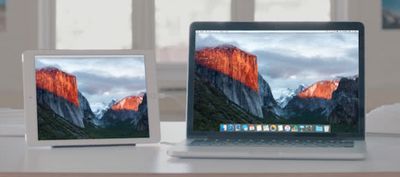
duet display 1
Duet Display is a great way to extend your Mac's desktop and can come in especially handy when you're working away from home and want to broaden your productivity space, but don't have the luxury of a dedicated external monitor.

In earlier versions of macOS, the app was hampered by changes to Apple's operating system that caused its developers no end of problems, but the latest Duet update (v2.0.3.8+) released on December 5 appears to have resolved those issues thanks to the introduction of full hardware acceleration support.


Duet Display is actually one of two apps best known for letting users leverage their iPad as a second screen for their Mac. The other is Luna Display ($79.99), but that app uses another implementation that requires two small dongles to ensure a consistent low-latency connection.

Duet Display on the other hand is a pure software solution and a lot more affordable at $9.99, which is why we've chosen to cover it here.

How to Use Your iPad as a Second Screen for Your Mac

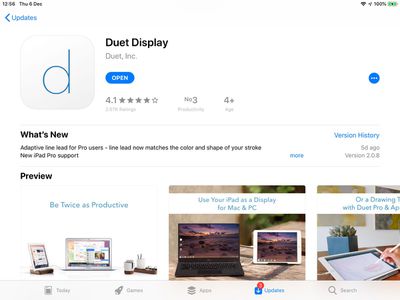
  1. Launch the App Store on your iPhone or iPad and download Duet Display ($9.99).
    duet display app store

  2. Open a browser on your Mac, navigate to www.duetdisplay.com and click the Download Mac button at the top of the webpage to download the free Mac client.
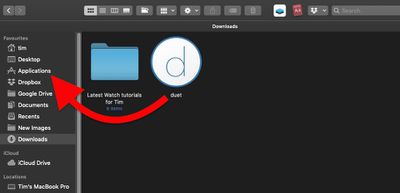
  3. Once the Duet client app is downloaded to your Mac, drag it from the Downloads folder to the Applications folder.
    drag Duet client to applications folder

  4. Double-click the Duet Mac client to launch it.
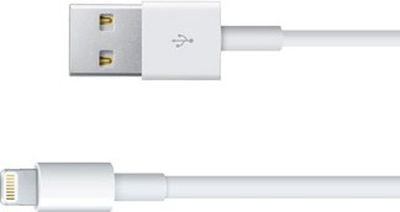
  5. Connect your iPhone or iPad to a free USB-A port on your Mac using a Lightning cable. (If you're using a Mac that has the newer USB-C ports, you'll need to use a Lightning to USB-C cable, which Apple sells in 1-meter and 2-meter lengths.)
    lightning cable e1347476331309

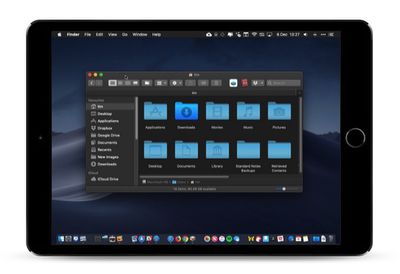
  6. Launch the Duet app on your iPhone or iPad and wait a moment while it communicates with the Duet Mac client. You should see your Mac's desktop mirrored or extended on your iPad screen once a successful connection is made.
    duet display ipad mini

Once you've got things working, it's worth checking out Duet's display options: click the Duet applet in your Mac's menu bar and if you have an iPad connected you'll see a button to enable a touch-sensitive MacBook Pro-style Touch Bar along the bottom of your iPad's screen.
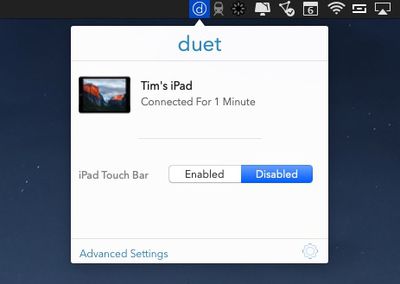
Duet display menu bar applet 1
If you click Advanced Settings, you can choose from a number of Display options to scale the output to your iOS device. The pre-defined resolutions allow you to see either larger text or more desktop space, and Duet helpfully recommends which scale to pick based on device model.
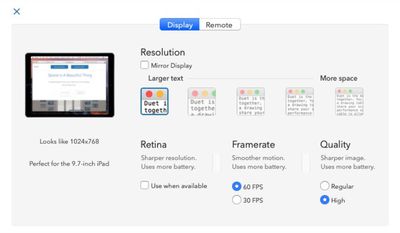
Duet Display advanced options
Check the box next to Mirror Display if you want to duplicate your Mac's desktop on your iPad rather than extend it. There are also options to enable Retina display mode, increase the framerate from 30 to 60fps, and switch the image quality from Regular to High, all of which require more device energy.

If you click the cog wheel in the Duet menu bar applet, you'll also find some additional settings worth attending to. If your Mac has a dedicated graphics card then you can set Duet to use it exclusively for faster performance, alternatively you can limit it to the integrated graphics for energy efficiency.

There are also menus to enable or reduce transparency on your iOS device display, an option to start Duet at login, and a link to change the Display Arrangement of your screens in System Preferences.
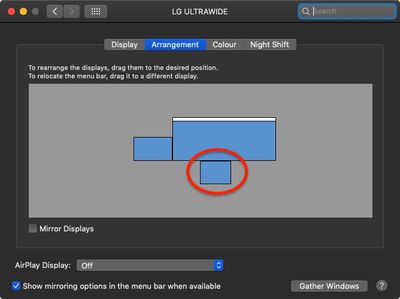
duet display arrangement

iPad showing as external display in System Preferences

If you get on with Duet Display, there are Air ($19.99 annually) and Pro ($24.99) versions that offer additional features like wireless connectivity and Apple Pencil support, respectively. For more information and support, check out the Duet Display website.


Top Rated Comments

104 months ago
i have this app, but never use it.
does actually anyone really use it?
Every time I telecommute or work outside of my office. Used it yesterday, all day, in fact. For a dual-monitor addict like me, it's a godsend.
Score: 4 Votes (Like | Disagree)
104 months ago
I use an Asus USB-C 15" mobile screen.... it was like $250.

I wouldn't want to run a monitor on something that uses a remote software hack, i'd rather have the OS natively recognize it, use the USB C / DisplayPort protocol, and a screen that can natively display it.

I've said for a while, I wish the new iPad Pro's supported it natively, would have given me a reason to buy one. With all that custom silicon you would think they could have done it.
Score: 3 Votes (Like | Disagree)
ZMacintosh Avatar
104 months ago
honestly with the USB-C iPad Pros, this should be a built-in function. Plug in with USB-C and option to use an external display with touch or pencil support.

Still trying to find a good alternative to Wacom, which their drivers are hit or miss and most of their products are clunky in the Cintiq line-up.
Score: 1 Votes (Like | Disagree)
104 months ago
I bought duet display a while back, tried again a couple of weeks ago. It's slow, it crashes and has to be reconnected all the time. Wasted money.

Tested on Macbook Pro 15 from 2017 and iPad pro from 2017 as well
went thru the update process today; including a restart; and works terrific. First time I've really liked it! However I made sure to upgrade my MacBookPro OSX Mojave (new update yesterday); IOS for the iPad Pro and only then did I attempt to update DUET, which was tough until I actually followed the instructions in this article; and downloaded from duet.com website; and then came the restart. Anyway all good.

PS.. thank you MCRumors.. this was a very useful article and update; as I struggled with Duet on a recent European trip and now I feel better-prepared for the next journey.
[doublepost=1544144094][/doublepost]
When was the last time you tried it? The app has been broken for a while now and required a workaround that made it pretty much unusable. After this update those issues have been fixed and it works like it used to. I'd suggest giving it another try. Also, that subscription is only for the version that supports wireless and remote desktop capabilities. If you just want to hook an iPad up and use it as an external display hooked up with a cable it's just the one time cost of the app.
Exactly right. Works great. And although I use AirPlay for some purposes; the direct connection (iPad Pro to MacBook Pro) is really great for (as an example) using on a cruise ship or sharing a hotspot creating 2 screens for my stock market work and it is really helpful. (I think I meant to reply to a different post; not my own lol.. however the point is as long as you update IOS 'and' MAC first; then do the DUET update, it works great.)
Score: 1 Votes (Like | Disagree)
brdeveloper Avatar
104 months ago
You're all blaming the app basing your judgement on previous versions, but does actually anyone tested the update from December, 5, that is, yesterday?
Score: 1 Votes (Like | Disagree)
104 months ago
WARNING: Duet display is actually a terrible app. They give you sub-par resolution and latency, only to ask you for an annual fee for an actually acceptable mirroring/extension experience.

If the fact that they STILL haven’t updated their app for the new iPad Pro isn’t a sign that they suck, then I don’t know what is. I’m so mad that I wasted $10 and I hope their theft bites them in the future.
When was the last time you tried it? The app has been broken for a while now and required a workaround that made it pretty much unusable. After this update those issues have been fixed and it works like it used to. I'd suggest giving it another try. Also, that subscription is only for the version that supports wireless and remote desktop capabilities. If you just want to hook an iPad up and use it as an external display hooked up with a cable it's just the one time cost of the app.
Score: 1 Votes (Like | Disagree)

Popular Stories

apple design award 2025

Apple Announces 2025 Design Award Winners Ahead of WWDC 2025

Tuesday June 3, 2025 10:14 am PDT by
As we wait for WWDC to kick off next Monday, Apple today announced the winners of its annual Apple Design Awards, recognizing apps and games for their innovation, ingenuity, and technical achievement. The 2025 Apple Design Award winners are listed below, with one app and one game selected per category: Delight and Fun - CapWords (App) and Balatro (Game) Innovation - Play (App) and PBJ -...
Apple 2026 Black Friday Event Hero

Apple's Official 2026 Black Friday Offer Starts Rolling Out

Thursday November 26, 2026 8:37 am PST by
Apple's annual four-day Black Friday through Cyber Monday shopping event is now live in Australia, New Zealand, and Thailand, and it will continue to roll out across Europe, the U.S., and Canada as the calendar turns to Friday, November 27 around the world. In the U.S., Apple's terms and conditions say the promotion begins on November 27 at 12 a.m. Pacific Time and ends on November 30 at...
1password deal blue

1Password Security Breach: What Was Accessed and What Wasn't

Wednesday November 25, 2026 1:09 pm PST by
Popular password management app 1Password today said it experienced a security breach earlier this month. 1Password says some customer names and email addresses were accessed, but no customer vault contents were compromised. On November 19, 1Password saw indications that an employee's GitHub account had been breached and began investigating. The company says the breached GitHub account was...
Latest Stories
The 50+ Best Apple Black Friday Deals Still Available on AirPods, iPads, and More
5 hours ago
Here Are the Best Apple Black Friday Leftover Deals You Can Get Today
4 hours ago
HomePod Mini 2 in (RED) Seemingly Spotted Ahead of Announcement
15 hours ago
Apple's M6 and PROLED MacBook Pro Reach New Low Prices for Black Friday
1 day ago
The MacRumors Show: iPhone Air 2 and iPhone 18 Are Coming
1 day ago
Apple Store in Brisbane Reopening Next Month With New Design
1 day ago
The 60+ Best Black Friday Accessory Deals on iPhone Chargers, TVs, Headphones, and More
4 hours ago
GTA VI Now (Barely) Running on Apple Silicon Macs
1 day ago
The Best Black Friday Streaming Deals on Apple TV, Disney+, and More
1 day ago
Apple TV's 'Carême' Wins International Emmy for Best Drama
1 day ago
iPhone 18 Production Delay Leaves Apple Little Time Before Launch
1 day ago
The Best Black Friday AirPods Deals Still Available
22 hours ago
The Best Black Friday Deals on Apple Home Products
1 day ago
The Best Black Friday iPhone Deals Still Available
22 hours ago
The Best Black Friday iPad Deals Still Available
22 hours ago
The Best Black Friday Apple Watch Deals Still Available
21 hours ago
The Best Black Friday AirTag Deals Still Available
21 hours ago
The Best Black Friday Mac Deals Still Available
21 hours ago
iPhone Share of US Smartphone Market Hits 57% as Rivals Slip
1 day ago
iPhone 20 Pro Rumored to Feature 3D-Printed Titanium Frame
1 day ago
Apple's Official 2026 Black Friday Offer Starts Rolling Out
2 days ago
Halide Adds Fill Light Feature for iPhone Duo
2 days ago
MacBook Air Black Friday Deals Now Live With Massive $399 Savings
2 days ago
Amazon Discounts All MacBook Neo Models by $99 for Black Friday
2 days ago
Kodak Launches Unique AirTag Rival With E-Ink Display
2 days ago
Here's Why the Apple Store is Going Down
2 days ago
Apple Still Working on Giant Foldable iPad That Could Cost $5,000
2 days ago
iPhones Dominate China's Weak Singles' Day Smartphone Sales
2 days ago
iPhone 20 Pro Could Feature Ceramic in Limited-Edition Model
2 days ago
Apple Faces Korean Regulator Review Over iPhone 16 AI Advertising
2 days ago
Related Apple News: Ipados | Best Apple Deals | Aqara W200 Thermostat | Ipad Deals | Motoring