Skip to Content

How to Use WhatsApp on Your Mac

by

Despite strong competition from the likes of Telegram and Signal, WhatsApp remains the most popular messaging platform by a mile. At the last count in 2020, the Facebook-owned service had more than 2 billion WhatsApp users around the globe and rising.

whatsapp mac
If you consider that it had 1.5 billion users in 2018 and 1 billion in 2016, then the number of active WhatsApp accounts has been increasing at half a billion every two years.

In 2018, the service said it was host to 64 billion encrypted messages on its most successful day. While the vast majority of these messages will have been exchanged over smartphones, it is possible to use WhatsApp on a Mac. Keep reading to learn how.

How WhatsApp Works on Mac

There are two principle ways that you can access your WhatsApp account from your Mac. You can use the WhatsApp website for a web-based experience, or if you don't like the sound of that, you can use a separate chat client instead.

Mac app store
WhatsApp offers its own free WhatsApp Desktop app available on the Mac App Store, where you'll find other third-party WhatsApp clients also available, such as FreeChat and ChatMate. Which one you choose is a matter of preference, because they all basically do the same thing – let you access and participate in your WhatsApp conversations on your Mac.

How to Use WhatsApp on Your Mac

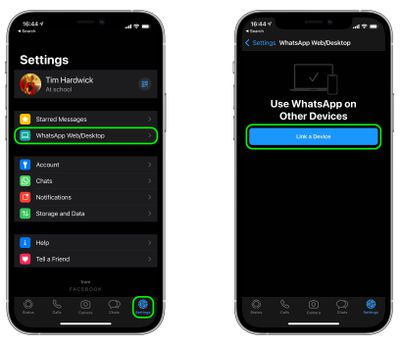
  1. Open a browser on your Mac and navigate to the WhatsApp Web website. Alternately, launch WhatsApp Desktop for macOS or a third-party WhatsApp-supporting app.
  2. Launch WhatsApp on your iPhone.
  3. Tap Settings.
  4. Select WhatsApp Web/Desktop.
  5. Tap the big blue Link a Device button.
    whatsapp

  6. Point your iPhone's camera at your Mac's screen to capture the QR code shown on the WhatsApp Web website or within the desktop app you're using.
    qr-code

Once the QR code is scanned and the sync is complete, you'll be able to see all the conversations that you've had on your iPhone right there on your Mac. You'll also have the ability to send and receive text and voice-based messages, get involved in group chats, and have access to all of the other things that you're used to doing on your iPhone, just now on your Mac's desktop as well.

How to Unlink WhatsApp on Your Mac

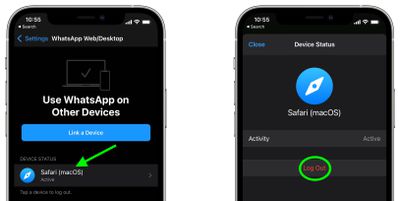
You can unlink your WhatsApp account from the computer you're using anytime by following these steps.

  1. Launch WhatsApp on your iPhone.
  2. Tap Settings.
  3. Select WhatsApp Web/Desktop.
  4. Under "Device Status," select the browser or app that you previously linked your account to.
  5. Tap Log Out.whatsapp

Now that you've unlinked your account from the computer, nobody else who later uses it will have access to your WhatsApp conversations.

Popular Stories

Whatsapp Feature

WhatsApp's iCloud Backup Alternative Rolls Out to Beta Users on iPhone

Wednesday November 18, 2026 5:14 am PST by
WhatsApp is rolling out its first-party cloud backup service to some users on the beta version of the app for iOS, reports WABetaInfo. WhatsApp cloud backup options in iOS beta (image: WABetaInfo) The option is said to be appearing to some users on WhatsApp beta version 26.45.10.71, currently in TestFlight, providing users with an alternative to iCloud chat backup for the first time. Code...
Whatsapp Feature

WhatsApp Raises Group Chat Limit to 1,500 Members

Friday November 20, 2026 4:43 am PST by
WhatsApp is allowing group chats to have up to 1,500 members on iPhone and Android, up from the previous limit of 1,024 participants, according to WABetaInfo. The increase means group chat admins have room for another 476 people in a single conversation. The jump should make it easier for schools, clubs, and other large organizations to communicate with their members, rather than having to...
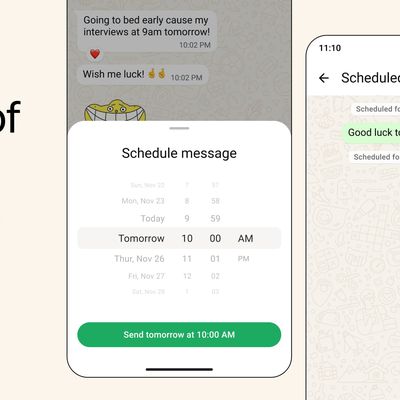
whatsapp scheduled messages

WhatsApp Finally Adds Scheduled Messages

Wednesday November 25, 2026 12:38 pm PST by
Popular messaging app WhatsApp was today updated with an option to schedule messages, which the company says was one of its most requested features. WhatsApp users can create a message and schedule it to arrive from 10 minutes to 14 days later in one-to-one chats and group chats. Scheduling a message can be done by pressing and holding the send button after composing and then choosing a date ...
Latest Stories
The 50+ Best Apple Black Friday Deals Still Available on AirPods, iPads, and More
2 hours ago
Here Are the Best Apple Black Friday Leftover Deals You Can Get Today
41 minutes ago
HomePod Mini 2 in (RED) Seemingly Spotted Ahead of Announcement
12 hours ago
Apple's M6 and PROLED MacBook Pro Reach New Low Prices for Black Friday
22 hours ago
The MacRumors Show: iPhone Air 2 and iPhone 18 Are Coming
22 hours ago
Apple Store in Brisbane Reopening Next Month With New Design
23 hours ago
The 60+ Best Black Friday Accessory Deals on iPhone Chargers, TVs, Headphones, and More
33 minutes ago
GTA VI Now (Barely) Running on Apple Silicon Macs
1 day ago
The Best Black Friday Streaming Deals on Apple TV, Disney+, and More
1 day ago
Apple TV's 'Carême' Wins International Emmy for Best Drama
1 day ago
iPhone 18 Production Delay Leaves Apple Little Time Before Launch
1 day ago
The Best Black Friday AirPods Deals Still Available
18 hours ago
The Best Black Friday Deals on Apple Home Products
1 day ago
The Best Black Friday iPhone Deals Still Available
18 hours ago
The Best Black Friday iPad Deals Still Available
18 hours ago
The Best Black Friday Apple Watch Deals Still Available
18 hours ago
The Best Black Friday AirTag Deals Still Available
18 hours ago
The Best Black Friday Mac Deals Still Available
18 hours ago
iPhone Share of US Smartphone Market Hits 57% as Rivals Slip
1 day ago
iPhone 20 Pro Rumored to Feature 3D-Printed Titanium Frame
1 day ago
Apple's Official 2026 Black Friday Offer Starts Rolling Out
2 days ago
Halide Adds Fill Light Feature for iPhone Duo
2 days ago
MacBook Air Black Friday Deals Now Live With Massive $399 Savings
2 days ago
Amazon Discounts All MacBook Neo Models by $99 for Black Friday
2 days ago
Kodak Launches Unique AirTag Rival With E-Ink Display
2 days ago
Here's Why the Apple Store is Going Down
2 days ago
Apple Still Working on Giant Foldable iPad That Could Cost $5,000
2 days ago
iPhones Dominate China's Weak Singles' Day Smartphone Sales
2 days ago
iPhone 20 Pro Could Feature Ceramic in Limited-Edition Model
2 days ago
Apple Faces Korean Regulator Review Over iPhone 16 AI Advertising
2 days ago
Related Apple News: Lifestyle | News | Sport | Opinion | Iphone