Skip to Content

How to Use Walkie-Talkie in watchOS 5

by

Apple's watchOS 5 update, out now for all Apple Watch models with the exception of the original Apple Watch, introduces a fun new feature that mimics old school walkie talkies. With Walkie-Talkie, you can connect to your friends and family and have push-to-talk conversations right on your wrist.

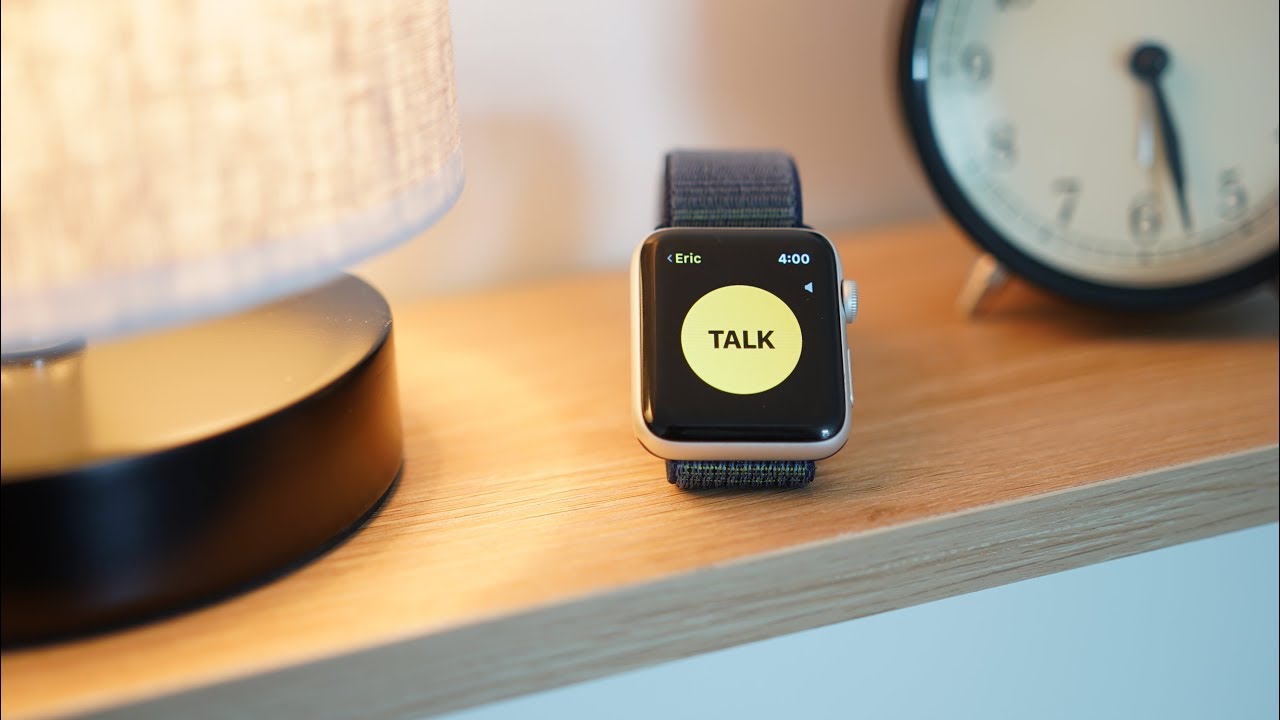
The video below demonstrates Walkie-Talkie in action, while the post explains the steps to set it up and use it.
Turning on Walkie-Talkie and Adding Friends

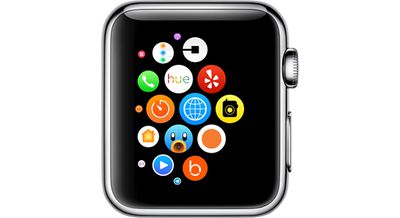
Walkie-Talkie is an app on the Apple Watch with an icon that looks like a little walkie talkie on a field of yellow. Whenever you want to use Walkie-Talkie to communicate with someone, you'll need to open up the Walkie-Talkie app. The first step, though, is adding a friend to chat with.
walkietalkieicon 1

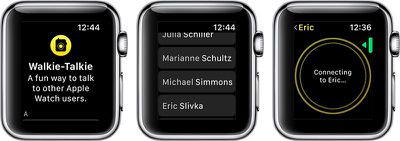
  1. Open the Walkie-Talkie app.
  2. Turn the Digital Crown to scroll through your contacts.
  3. Choose a friend who has an Apple Watch and watchOS 5.
  4. Tap on the person's name in the contacts list. walkietalkieconnection
  5. When a yellow card with their name appears on your Apple Watch in the Walkie-Talkie app, tap on the card.
  6. Press on the "Talk" button to initiate a connection.
  7. You'll need to wait for your friend to receive your message and approve the Walkie-Talkie connection. It will say "Connecting to [Your Friend's Name].
  8. When a connection is established, it will go back to the Talk button and you will be able to have a Walkie-Talkie conversation with your friend.
If a connection cannot be established, you'll see a popup that says "[Your Friend] is not available." If this happens, it means the person on the other end did not answer the incoming Walkie-Talkie notification.

walkietalkieunavailable
If the Walkie-Talkie connection screen hangs indefinitely on the connecting screen, it means the person does not have an Apple Watch or does not have watchOS 5 installed.

When a friend adds you to Walkie-Talkie, you'll see an incoming notification that your friend wants to establish a connection with you. To chat, you will need to tap on "Always Allow."
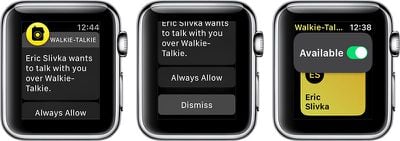
walkietalkieallow

Talking With a Friend Using Walkie Talkie

Once a connection has been approved between you and your friend, you do not need to get approval for each and every message. You can just push to talk and whatever you say will be beamed to your friend's Apple Watch.

  1. Open up the Walkie-Talkie app.
  2. Tap on the card for the friend you want to talk to.
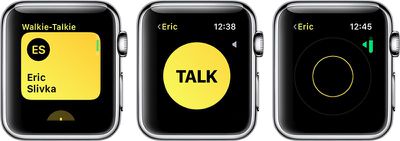
  3. Hold down the "Talk" button for the entire time that you're speaking. You will see little concentric circles flashing, which means your message is being relayed to your friend. walkietalkieinuse
  4. When you're done speaking, stop pressing on the Talk button. This will allow your friend to press the Talk button on their end to send a response to you.
You can have multiple Walkie-Talkie connections with your friends, but you can only communicate with one friend at a time because Walkie-Talkie is a one-on-one feature. Group chats between multiple people are not supported.

Accessing Walkie-Talkie Quickly

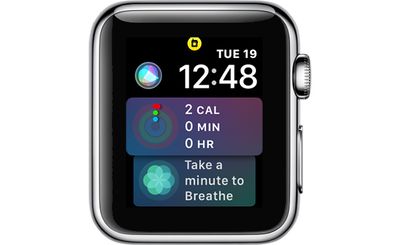
Once you have a Walkie-Talkie connection established with at least one person, a little Walkie-Talkie icon will be displayed at the top of the Apple Watch's main screen. If you tap it, it will take you right into the Walkie-Talkie app.
walkietalkieicon
This icon also serves as an indicator that you're available for Walkie-Talkie conversations and that any friends you've established a connection with can message you at any time.

Adjusting Walkie-Talkie Volume

  1. Open the Walkie-Talkie app.
  2. Choose a Walkie-Talkie contact card.
  3. At the talk interface, turn the Digital Crown.
  4. A downward turn lowers the Walkie-Talkie volume, while an upward turn makes it louder. Turning it all the way down effectively mutes the conversation.

Using Walkie-Talkie With AirPods or Bluetooth Headphones

If you have AirPods or other Bluetooth headphones connected to your Apple Watch, you will hear incoming Walkie-Talkie messages through the accessory rather than directly through the Apple Watch. You will also be able to speak into the microphone of the AirPods, keeping your conversations more private.

Turning Off Walkie-Talkie and Removing Contacts

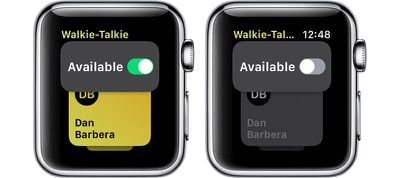
If you want to shut off Walkie-Talkie conversations and refuse incoming messages, you can do so by setting yourself to unavailable.

  1. Open up the Walkie-Talkie app.
  2. Scroll all the way to the top to see the "Available" toggle. walkiewalkieavailable
  3. Toggle "Available" to off.

When your Walkie-Talkie availability is disabled in the Walkie-Talkie app, people who attempt to connect to you will see the message "[Your Name] is Not Available" and you will get a notification that someone attempted to reach you but you were unavailable with an option to go to the Walkie-Talkie app to resume the conversation.

To remove a contact from Walkie-Talkie, at the main contact card interface, swipe to the left on a name in the list to bring up a red "X" button. Press on the X to remove the contact.
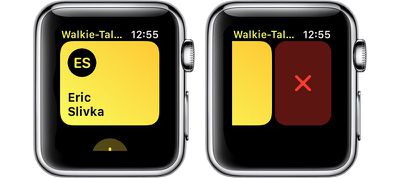
walkietalkiedelete

Walkie-Talkie Warnings

Walkie-Talkie takes precedence over other settings on your Apple Watch. You will hear your friend speaking even if your Apple Watch is set to silent, but it does not ignore Do Not Disturb settings.


Related Roundup: Apple Watch 12
Buyer's Guide: Apple Watch (Buy Now)
Related Forum: Apple Watch

Top Rated Comments

110 months ago
Looks amazing!

Here are my steps to using the Walkie Talkie feature on Apple Watch:

1) Call Apple

2) Ask them to go back to creating amazing society-changing paradigm shifts, rather than churning out streams of gimmicky consumer electronics and marketing copy.
Score: 10 Votes (Like | Disagree)
jclo Avatar
110 months ago
What am I missing here? Why not just text or call the person? How is talkie faster?
It's probably ideal for use for things like amusement park trips or other outings where you might be with people but separated and want to be able to communicate without having to initiate a full phone call every time with the dialing, the waiting for an answer, the hanging up, etc.
Score: 5 Votes (Like | Disagree)
tigertazz Avatar
110 months ago
It’s a feature I’m unlikely to use (limited friends with Apple Watch ) but I can see the benefits for a quick back and forth
Score: 5 Votes (Like | Disagree)
Apple_Robert Avatar
110 months ago
What am I missing here? Why not just text or call the person? How is talkie faster?
Score: 5 Votes (Like | Disagree)
ArtOfWarfare Avatar
110 months ago
Not as seamless as I was promised by the Star Trek communicators.
Score: 5 Votes (Like | Disagree)
110 months ago
I like the idea of this, but why isn't it also on other iOS devices? That would increase the pool of people you could talk to...
[doublepost=1530059917][/doublepost]
What am I missing here? Why not just text or call the person? How is talkie faster?
In some ways this is Apple admitting that it's painful to text using just the Watch (i.e., via Siri). The Walkie Talkie interface is better and it's more immediate.
Score: 4 Votes (Like | Disagree)

Popular Stories

apple watch series 3 design

Apple Offers Steps to Fix Daylight Saving Time Bug on Apple Watch

Sunday November 1, 2026 3:34 am PST by
Apple has published a support document describing what to do if your Apple Watch continues to show time that's off by one hour after daylight savings time changes. "This incorrect time appears only on the Always On display when your wrist is down," says Apple. "When you activate the display by tapping it or raising your wrist, the time changes to the correct hour." To fix the issue, Apple says ...
muse apple watch app

Meta's Muse AI Agent Comes to Apple Watch

Monday November 9, 2026 1:55 pm PST by
Meta today updated the Muse app for iOS to add Apple Watch support, which means Muse users can access the proactive AI agent from the watch. The app adds the Muse character to the watch with an option to text it, dictate text to it, or call it. There's also a Muse complication for quick access. Muse is Meta's personal AI agent that can complete tasks for users. It is available as a...
siri recap live rewind

watchOS 27.3 Brings Live Rewind and Siri Recap to Apple Watch

Tuesday November 3, 2026 10:35 am PST by
With the first beta of watchOS 27.3, Apple is introducing new Audio Intelligence features it previewed for the Apple Watch Series 12 and Ultra 4 earlier this year. Powered by the S11 chip, Audio Intelligence includes Live Rewind, Siri Recap, Sound Recognition, and Shazam Music Recognition. Sound Recognition and Shazam are already on the watch, but Live Rewind and Siri Recap are now available ...
Latest Stories
Here Are the Best Apple Black Friday Leftover Deals You Can Get Today
7 hours ago
HomePod Mini 2 in (RED) Seemingly Spotted Ahead of Announcement
19 hours ago
Apple's M6 and PROLED MacBook Pro Reach New Low Prices for Black Friday
1 day ago
The MacRumors Show: iPhone Air 2 and iPhone 18 Are Coming
1 day ago
Apple Store in Brisbane Reopening Next Month With New Design
1 day ago
The 60+ Best Black Friday Accessory Deals on iPhone Chargers, TVs, Headphones, and More
7 hours ago
GTA VI Now (Barely) Running on Apple Silicon Macs
1 day ago
The Best Black Friday Streaming Deals on Apple TV, Disney+, and More
1 day ago
Apple TV's 'Carême' Wins International Emmy for Best Drama
1 day ago
iPhone 18 Production Delay Leaves Apple Little Time Before Launch
1 day ago
The Best Black Friday AirPods Deals Still Available
1 day ago
The Best Black Friday Deals on Apple Home Products
1 day ago
The Best Black Friday iPhone Deals Still Available
1 day ago
The Best Black Friday iPad Deals Still Available
1 day ago
The Best Black Friday Apple Watch Deals Still Available
1 day ago
The Best Black Friday AirTag Deals Still Available
1 day ago
The Best Black Friday Mac Deals Still Available
1 day ago
iPhone Share of US Smartphone Market Hits 57% as Rivals Slip
1 day ago
iPhone 20 Pro Rumored to Feature 3D-Printed Titanium Frame
2 days ago
The 50+ Best Apple Black Friday Deals Still Available on AirPods, iPads, and More
9 hours ago
Apple's Official 2026 Black Friday Offer Starts Rolling Out
2 days ago
Halide Adds Fill Light Feature for iPhone Duo
2 days ago
MacBook Air Black Friday Deals Now Live With Massive $399 Savings
2 days ago
Amazon Discounts All MacBook Neo Models by $99 for Black Friday
2 days ago
Kodak Launches Unique AirTag Rival With E-Ink Display
2 days ago
Here's Why the Apple Store is Going Down
2 days ago
Apple Still Working on Giant Foldable iPad That Could Cost $5,000
2 days ago
iPhones Dominate China's Weak Singles' Day Smartphone Sales
2 days ago
iPhone 20 Pro Could Feature Ceramic in Limited-Edition Model
2 days ago
Apple Faces Korean Regulator Review Over iPhone 16 AI Advertising
2 days ago
Related Apple News: Lifestyle | Motoring | South Africa | Mac | Entertainment