Skip to Content

iOS 26: Use Visual Intelligence With iPhone Screen Content

by

In iOS 26, Apple has extended Visual Intelligence to work with content that's on your iPhone, allowing you to ask questions about what you're seeing, look up products, and more.
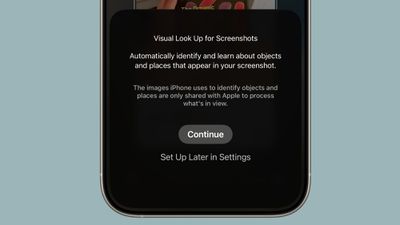
visual lookup ios 26
Visual Intelligence started out in iOS 18.2 as a Camera Control button function that can describe what you are looking at, get details about a restaurant or business, translate text, and the like.

But in iOS 26, Visual Intelligence is no longer just for learning more about your physical surroundings. You can also use the feature to analyze content on your iPhone screen, simply by pressing the same buttons you use to take a screenshot.

You can search across apps, go straight to relevant websites, add an event to your calendar, and more. Keep reading to learn what you can do with it. Note that Visual Intelligence is an Apple Intelligence feature of iOS 26 that's exclusive to the iPhone 15 Pro, iPhone 16 series, and iPhone 17 series (including iPhone Air).

Use Visual Intelligence With Screen Content

Start by taking a screenshot: Quickly press and release the iPhone's Side button and the Volume Up button at the same time.
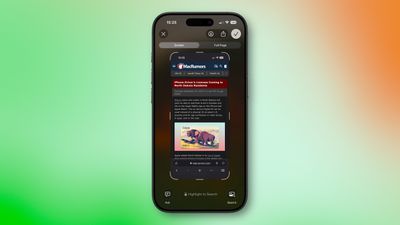
screenshot ios 26
Once the screenshot interface appears, you'll see Visual Intelligence options along the bottom. The options offered up will depend on the content, but they let you interact with what you've just captured in several ways.

  • Search for Similar Items: Tap Search to look up the selected item on the web. This is useful when you want to find matching products, related images, or more information about what's in the screenshot.
  • Highlight and Search a Specific Item: If only part of the screenshot interests you, swipe your finger over that area to highlight it, then tap Search. The search will focus on the highlighted object rather than the whole image.
  • Ask a Question About What's Onscreen: Tap Ask to open a text box where you can pose a question to ChatGPT about the screenshot's contents. For example, you can ask for an explanation of a term or details about an object.
  • Add an Event to Your Calendar: If the screenshot includes a date or event information, tap Add to Calendar to create a new calendar entry without leaving the screenshot view.
  • Open a Website: When the screenshot contains a web link, you'll see tappable links at the bottom that will take you straight to the relevant site.
  • Summarize Text: Tap Summarize to generate a concise summary of the visible text.
  • Listen to Text: Tap Read Aloud to have the text in the screenshot spoken to you.
  • Identify Plants or Animals: If the screenshot contains a plant or animal, tapping its tag will reveal its name and further information about it.

When you're done with the screenshot, you can either tap ✖ to discard it or ✔ to keep it in your Photos library.

Top Rated Comments

cbaca51 Avatar
15 months ago
Wish there was a dedicated app to access this and having to screenshot a screenshot if I wanna search a screenshot. Very annoying
Score: 3 Votes (Like | Disagree)
Fraserpatty Avatar
15 months ago
I know this is a dumb question please bear with me. Is this an iPad feature also?
Score: 2 Votes (Like | Disagree)
nikhsub1 Avatar
15 months ago
Wow, just made a discovery! If your language in Siri is Britain, You can NOT turn apple intelligence on - the toggle disappears! Once I set the language to US English, the toggle slider appeared. Wild.
Score: 1 Votes (Like | Disagree)
nikhsub1 Avatar
15 months ago

settings > camera > camera control .. scroll down and toggle off launch visual intelligence and anything else you don't want
Hmm seems I don’t have that option.


Attachment Image
Score: 1 Votes (Like | Disagree)
15 months ago
Very poor implementation of “Apple Intelligence”. This is literally google reverse image search that has been around for AGES, or you can upload it to a competent AI (ChatGPT) and get an actual response.

I’ve tried it probably a dozen times already and every single time it has either been completely inaccurate, or completely irrelevant. This is just another Apple Intelligence gimmick, locking basic computing behind AI. For those of you that don’t have Apple Intelligence, I promise, you aren’t missing out on anything.
Score: 1 Votes (Like | Disagree)
15 months ago
Will be useful. Have not tried it out. But for this full screen previews have to be turned on. Don't know whether I prefer to have this. Will try soon after updating.
Score: 1 Votes (Like | Disagree)

Popular Stories

Siri in Camera Feature

iPadOS 27.3 Expands Siri Mode to Camera App

Tuesday November 3, 2026 12:56 pm PST by
iOS 27 added a Siri tab to the Camera app on the iPhone 15 Pro and newer for convenient access to Visual Intelligence. Starting with iPadOS 27.3, which is in beta starting today, that feature has expanded to iPad Pro and iPad Air models with the M1 chip and newer, as well as the iPad mini models with the A17 Pro and A20 Pro chips. When you switch to Siri mode in the Camera app on supported...
apple design award 2025

Apple Announces 2025 Design Award Winners Ahead of WWDC 2025

Tuesday June 3, 2025 10:14 am PDT by
As we wait for WWDC to kick off next Monday, Apple today announced the winners of its annual Apple Design Awards, recognizing apps and games for their innovation, ingenuity, and technical achievement. The 2025 Apple Design Award winners are listed below, with one app and one game selected per category: Delight and Fun - CapWords (App) and Balatro (Game) Innovation - Play (App) and PBJ -...
1password deal blue

1Password Security Breach: What Was Accessed and What Wasn't

Wednesday November 25, 2026 1:09 pm PST by
Popular password management app 1Password today said it experienced a security breach earlier this month. 1Password says some customer names and email addresses were accessed, but no customer vault contents were compromised. On November 19, 1Password saw indications that an employee's GitHub account had been breached and began investigating. The company says the breached GitHub account was...
Latest Stories
The 50+ Best Apple Black Friday Deals Still Available on AirPods, iPads, and More
11 hours ago
HomePod Mini 2 in (RED) Seemingly Spotted Ahead of Announcement
9 hours ago
Apple's M6 and PROLED MacBook Pro Reach New Low Prices for Black Friday
19 hours ago
The MacRumors Show: iPhone Air 2 and iPhone 18 Are Coming
19 hours ago
Apple Store in Brisbane Reopening Next Month With New Design
19 hours ago
The 60+ Best Black Friday Accessory Deals on iPhone Chargers, TVs, Headphones, and More
20 hours ago
GTA VI Now (Barely) Running on Apple Silicon Macs
21 hours ago
The Best Black Friday Streaming Deals on Apple TV, Disney+, and More
21 hours ago
Apple TV's 'Carême' Wins International Emmy for Best Drama
22 hours ago
iPhone 18 Production Delay Leaves Apple Little Time Before Launch
23 hours ago
The Best Black Friday AirPods Deals Still Available
15 hours ago
The Best Black Friday Deals on Apple Home Products
23 hours ago
The Best Black Friday iPhone Deals Still Available
15 hours ago
The Best Black Friday iPad Deals Still Available
15 hours ago
The Best Black Friday Apple Watch Deals Still Available
15 hours ago
The Best Black Friday AirTag Deals Still Available
15 hours ago
The Best Black Friday Mac Deals Still Available
15 hours ago
iPhone Share of US Smartphone Market Hits 57% as Rivals Slip
1 day ago
iPhone 20 Pro Rumored to Feature 3D-Printed Titanium Frame
1 day ago
Apple's Official 2026 Black Friday Offer Starts Rolling Out
2 days ago
Halide Adds Fill Light Feature for iPhone Duo
2 days ago
MacBook Air Black Friday Deals Now Live With Massive $399 Savings
2 days ago
Amazon Discounts All MacBook Neo Models by $99 for Black Friday
2 days ago
Kodak Launches Unique AirTag Rival With E-Ink Display
2 days ago
Here's Why the Apple Store is Going Down
2 days ago
Apple Still Working on Giant Foldable iPad That Could Cost $5,000
2 days ago
iPhones Dominate China's Weak Singles' Day Smartphone Sales
2 days ago
iPhone 20 Pro Could Feature Ceramic in Limited-Edition Model
2 days ago
Apple Faces Korean Regulator Review Over iPhone 16 AI Advertising
2 days ago
Apple Watch Ultra 4 Hits New Best-Ever Price of $649.99 for Black Friday
2 days ago
Related Apple News: Education | Lifestyle | News | World News | Sport






























