Skip to Content

How to Use the macOS Help Menu

by

The ever-present Help menu in your Mac's menu bar is an easily overlooked aspect of macOS, but it's home to some surprising and extremely handy features that every user can benefit from.

how to use macos help menu
Apart from being a useful first port of call for any queries you may have about the application in use or your Mac in general, it also serves as a menu navigator. Let's take a closer look.

How to Use the Mac Help Menu

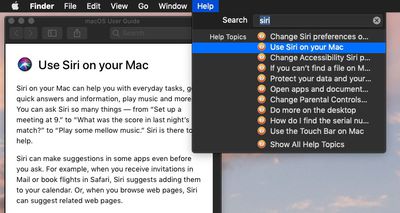
You can use the keyboard shortcut Command-Shift-/ to quickly access the macOS Help Menu. At the top of the Help menu is a Search field for typing in the subject you need help with. Below this, you'll also see a direct link to the help documentation for the currently active application, which is useful for looking up topics manually.
how to use macos help menu 2
If it's an Apple app you're using, search results come from the official macOS User Guide, while the direct help link below the search field takes you straight to the relevant section of the guide, or in the case of Finder, the main contents page.
how to use macos help 3
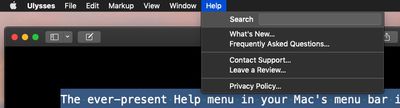
It's important to remember that if the active app is a third-party one, the contents of the Help menu can differ depending on how much effort the developer has put into it. For example, some apps may include FAQs, manuals, or links to online help, while others may offer very little.

How to Use Help's Action Search Feature

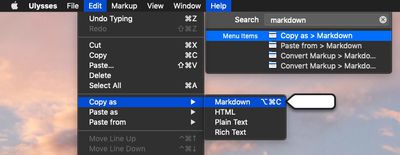
Another neat built-in feature of the Help menu is its ability to point to available actions in other menus for the currently active app.
how to use macos help menu 4
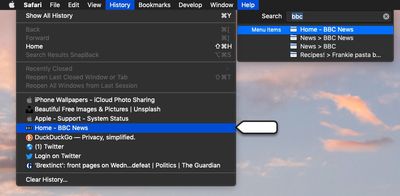
Next time you type into the Help menu's Search field, check to see if the results include any Menu Items. Hover over one of these with your mouse, and macOS will locate the action for you by pointing an arrow at it in the corresponding menu. Hit Enter, and the action will be performed for you.
how to use macos help menu 5

Depending on the app, this feature can even extend to contextual menu functions. For instance, you can use Safari's Help field to search your bookmarks and recent browsing history for keywords to quickly navigate back to web pages. Next time you're in your favorite app, try out its Help menu functions to see how deeply they've been implemented.


Top Rated Comments

103 months ago
How to call Apple Support.
How to read MacRumors help articles.
How to read English.
Don't bash. When I first got a Mac In 07, after graduating hs, I had no one to show me how to do the simplest of tasks. And I know my way around a computer.

Tips like these are valuable to almost anyone. If they're not to you, there's no reason to be rude.
Score: 6 Votes (Like | Disagree)
MacHiavelli Avatar
103 months ago

You can use the keyboard shortcut Command-Shift-/ to quickly access the macOS Help Menu. At the top of the Help menu is a Search field for typing in the subject you need help with. Below this, you'll also see a direct link to the help documentation for the currently active application, which is useful for looking up topics manually.
According to Apple, you're inadvertently giving key commands incorrectly. For Help, it should be COMMAD QUESTION MARK, not COMMAND SHIFT SLASH. This (1) makes sense as the user wants to ask a question in looking for help, and (2) the slash and the question mark aren't always positioned together on all keyboards, so telling people to type COMMAND SHIFT SLASH might well lead them up a blind alley.

https://developer.apple.com/design/human-interface-guidelines/macos/user-interaction/keyboard/


Attachment Image
Score: 3 Votes (Like | Disagree)
sailmac Avatar
103 months ago
These articles may seem trivial to users who already know the commands, tips, and tricks being explained. In my case, I've been using Macs regularly since 1990 and appreciate learning things I didn't know, along with reminders about things I've forgotten. Thanks, MR.
Score: 3 Votes (Like | Disagree)
ArtOfWarfare Avatar
103 months ago
How to call Apple Support.
How to read MacRumors help articles.
How to read English.
Score: 3 Votes (Like | Disagree)
szw-mapple fan Avatar
103 months ago
The help menu search is one of my favorite things about macOS. You can just hit the keyboard shortcut and start typing what you want. Really handy when you want something quickly without knowing which menu it’s under.
Score: 2 Votes (Like | Disagree)
103 months ago
I know how to use a search box.
I didn't know the keyboard shortcut.
I didn't know about showing menu items.

It sounded like a lame article, but it was worth the read for me.
Score: 1 Votes (Like | Disagree)

Popular Stories

1password deal blue

1Password Security Breach: What Was Accessed and What Wasn't

Wednesday November 25, 2026 1:09 pm PST by
Popular password management app 1Password today said it experienced a security breach earlier this month. 1Password says some customer names and email addresses were accessed, but no customer vault contents were compromised. On November 19, 1Password saw indications that an employee's GitHub account had been breached and began investigating. The company says the breached GitHub account was...
apple design award 2025

Apple Announces 2025 Design Award Winners Ahead of WWDC 2025

Tuesday June 3, 2025 10:14 am PDT by
As we wait for WWDC to kick off next Monday, Apple today announced the winners of its annual Apple Design Awards, recognizing apps and games for their innovation, ingenuity, and technical achievement. The 2025 Apple Design Award winners are listed below, with one app and one game selected per category: Delight and Fun - CapWords (App) and Balatro (Game) Innovation - Play (App) and PBJ -...
ipad pro prime

Apple Has iPads Running macOS Internally, Says Gurman

Wednesday November 25, 2026 4:55 am PST by
Apple has iPads running macOS internally and has had them "for some time," according to Bloomberg's Mark Gurman, although he says no work is currently being done to bring the Mac operating system to iPads. Speaking on his latest Power On podcast, Gurman said there is "no work being done to consumerize macOS on the iPad." Rather, Apple will continue to bring Mac features and apps like Final Cut ...
Latest Stories
The 50+ Best Apple Black Friday Deals on AirPods, iPads, MacBooks, and More
23 minutes ago
Apple's M6 and PROLED MacBook Pro Reach New Low Prices for Black Friday
27 minutes ago
The MacRumors Show: iPhone Air 2 and iPhone 18 Are Coming
33 minutes ago
Apple Store in Brisbane Reopening Next Month With New Design
1 hour ago
The 60+ Best Black Friday Accessory Deals on iPhone Chargers, TVs, Headphones, and More
2 hours ago
GTA VI Now (Barely) Running on Apple Silicon Macs
2 hours ago
The Best Black Friday Streaming Deals on Apple TV, Disney+, and More
3 hours ago
Apple TV's 'Carême' Wins International Emmy for Best Drama
3 hours ago
iPhone 18 Production Delay Leaves Apple Little Time Before Launch
4 hours ago
The Best Black Friday AirPods Deals
5 hours ago
The Best Black Friday Deals on Apple Home Products
5 hours ago
The Best Black Friday iPhone Deals
5 hours ago
The Best Black Friday iPad Deals
5 hours ago
The Best Black Friday Apple Watch Deals
5 hours ago
The Best Black Friday AirTag Deals
5 hours ago
The Best Black Friday Mac Deals
5 hours ago
iPhone Share of US Smartphone Market Hits 57% as Rivals Slip
6 hours ago
iPhone 20 Pro Rumored to Feature 3D-Printed Titanium Frame
8 hours ago
Apple's Official 2026 Black Friday Offer Starts Rolling Out
1 day ago
Halide Adds Fill Light Feature for iPhone Duo
1 day ago
MacBook Air Black Friday Deals Now Live With Massive $399 Savings
1 day ago
Amazon Discounts All MacBook Neo Models by $99 for Black Friday
1 day ago
Kodak Launches Unique AirTag Rival With E-Ink Display
1 day ago
Here's Why the Apple Store is Going Down
1 day ago
Apple Still Working on Giant Foldable iPad That Could Cost $5,000
1 day ago
iPhones Dominate China's Weak Singles' Day Smartphone Sales
1 day ago
iPhone 20 Pro Could Feature Ceramic in Limited-Edition Model
1 day ago
Apple Faces Korean Regulator Review Over iPhone 16 AI Advertising
1 day ago
Apple Watch Ultra 4 Hits New Best-Ever Price of $649.99 for Black Friday
1 day ago
New Apple Store Opening in India, Download the Special Wallpaper Now
2 days ago
Related Apple News: Sport | Business | Technology | Ipad | Buyers Guide






























