Skip to Content

How to Use the New Augmented Reality Measure App in iOS 12

by

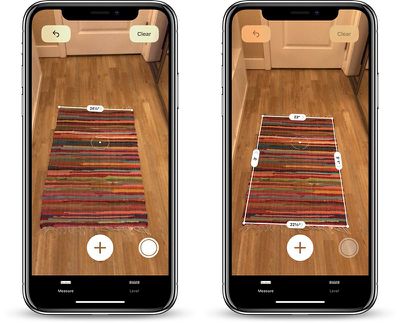
One of the new features in iOS 12 is an augmented reality app called Measure, which Apple has designed to make it easier for you to measure various real-world objects using 3D spatial detection techniques.
measureappinaction

  1. Open up the Measure app.
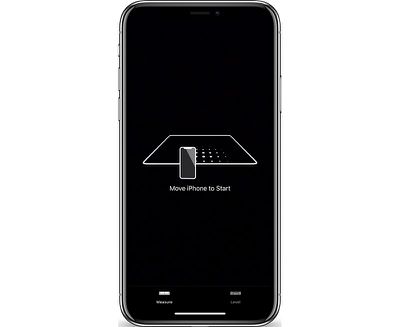
  2. Follow the on-screen instructions and move your iPhone around the room so that it can get the dimensions of various objects. measureappsetup
  3. Once it's calibrated, denoted by a white dot in a circle, you're ready to start measuring.
  4. To take a measurement, line the white dot up with the corner of an object and then press the "+ button to create an anchor point.
  5. From the anchor point, pan the iPhone over to the other edge of the object. measureappmanual
  6. Press the "+" button again to get the final measurement of the line.
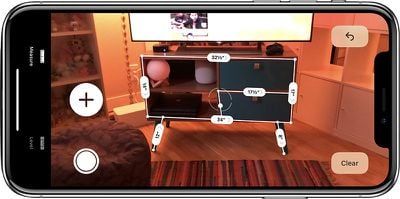
You can continue using this method to get the full dimensions of different objects in your room, with the ability to set multiple anchor points if desired.

Haptic feedback is included in the Measure app, so you'll feel little haptic taps whenever you set an anchor point, for physical feedback. Haptic taps are also included whenever the app detects an obvious stopping point for a measurement, such as the end of a wall.

To clear your anchor points and start over at any time, tap the "Clear" button.
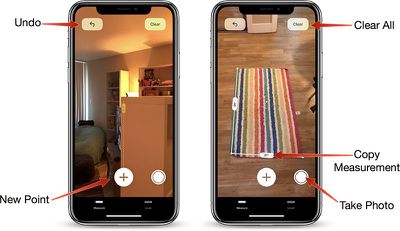
measurementappicons
Once all of your measurements are in place, tap the white camera button to take a photo that displays all of the measurements overlaid on the object you're measuring.
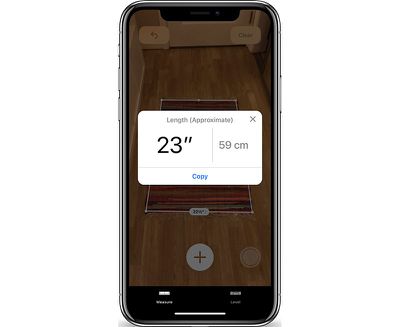
measureappsharebutton
You can also tap on the arrow of one of the measurements to get a pop up with the current readings that you can copy and paste into another app like Messages or Notes.

Measurement Automatic Detection

For certain square-shaped objects that the Measure app detects, the detection of the dimensions will be automatic. To get an automatic measurement, choose a square or rectangular object and hold the iPhone in front of it.
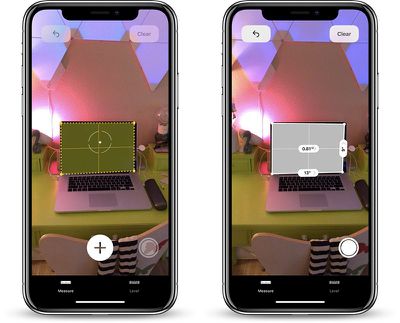
measureappautomaticdetection
If it's going to take an automatic measurement, you'll see a yellow square appear, which you can then tap to get dimensions. If it's not going to do automatic detection, you're going to need to use the tap method to draw individual lines.

Accuracy

The accuracy of the Measure app depends heavily on the precision of where the end points are placed, so there's room for error.

It's great for quick measurements to get an idea of size, but where precise measurements are required, it's probably best to double check with a physical measuring method.

Level Feature

In iOS 12, the Measure app is also home to the Level feature that lets you use the iPhone to detect whether a surface is level. Prior to iOS 12, the Level feature was in the Compass app, so it's not new, just relocated.
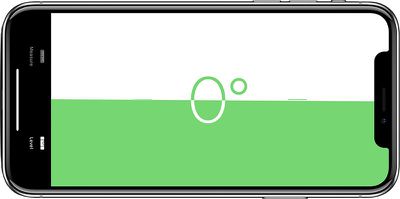
measureapplevel
To use it, tap over to the level portion of the app, which is located at the bottom. Hold the iPhone in either portrait or landscape orientation with no case and balance it on an object such as a picture frame to get a reading.

If you tap the screen when using the level app, you can set a 0 degree reference angle to make measurements from, and laying the iPhone flat allows it to be used as a bubble level.


Related Forum: iOS 12

Top Rated Comments

110 months ago
It keeps saying 4.5 inches, but I swear it’s 8.
Score: 27 Votes (Like | Disagree)
110 months ago
Apparently someone at Macrumors really loves to make tutorials :D
Score: 12 Votes (Like | Disagree)
happygodavid Avatar
110 months ago
This is one of those features that won’t work perfectly at first. We will complain. Then, in 10 to 20 years when it’s the only scientifically accurate way to measure things, we will take it for granted and wonder how we ever knew the size of anything. This is huge. (No pun intended.)
Score: 5 Votes (Like | Disagree)
110 months ago
The ability to modify your anchor points is very snazzy. Just hold and drag a point and while you’re doing that your device will zoom in a little to give you a little more precision.
Score: 5 Votes (Like | Disagree)
Swampthing Avatar
110 months ago
I realize MacRumors is trying to stay relevant and talk about everything Mac. But I have a problem with constantly explaining how to use beta features.

New features need to be intuitive. That’s part of Apple’s whole philosophy. But if we have a website constantly jumping in to say look look this is how you use it, that defeats the purpose. Testers will be less likely to notify Apple that they couldn’t figure out a feature on their own.

This needs to be part of the beta testing process. When it’s deployed, that will ensure the feature is much more intuitive for the user. There is a reason why Apple never includes instruction manuals.

Apart from that, constant detailed articles about things that aren’t even released yet and which might change significantly before release seem pointless.

Yes, people want to know about beta features. But there’s a line between being informational and providing fully detailed instructional tutorials, and I think it’s crossed waaaay too often here. How about waiting until we have a released product to provide that information?
Score: 4 Votes (Like | Disagree)
110 months ago
Measurements seem very off, like ~20-30% off (running iPhone SE)
I have been quite impressed with the measurements I get on my iPhone X. I haven't used it a lot but I have probably tested it with about 10 or so things. Seems accurate enough to be useful for general measurements.
Score: 4 Votes (Like | Disagree)

Popular Stories

apple design award 2025

Apple Announces 2025 Design Award Winners Ahead of WWDC 2025

Tuesday June 3, 2025 10:14 am PDT by
As we wait for WWDC to kick off next Monday, Apple today announced the winners of its annual Apple Design Awards, recognizing apps and games for their innovation, ingenuity, and technical achievement. The 2025 Apple Design Award winners are listed below, with one app and one game selected per category: Delight and Fun - CapWords (App) and Balatro (Game) Innovation - Play (App) and PBJ -...
Apple 2026 Black Friday Event Hero

Apple's Official 2026 Black Friday Offer Starts Rolling Out

Thursday November 26, 2026 8:37 am PST by
Apple's annual four-day Black Friday through Cyber Monday shopping event is now live in Australia, New Zealand, and Thailand, and it will continue to roll out across Europe, the U.S., and Canada as the calendar turns to Friday, November 27 around the world. In the U.S., Apple's terms and conditions say the promotion begins on November 27 at 12 a.m. Pacific Time and ends on November 30 at...
1password deal blue

1Password Security Breach: What Was Accessed and What Wasn't

Wednesday November 25, 2026 1:09 pm PST by
Popular password management app 1Password today said it experienced a security breach earlier this month. 1Password says some customer names and email addresses were accessed, but no customer vault contents were compromised. On November 19, 1Password saw indications that an employee's GitHub account had been breached and began investigating. The company says the breached GitHub account was...
Latest Stories
The 50+ Best Apple Black Friday Deals Still Available on AirPods, iPads, and More
2 hours ago
Here Are the Best Apple Black Friday Leftover Deals You Can Get Today
14 minutes ago
HomePod Mini 2 in (RED) Seemingly Spotted Ahead of Announcement
12 hours ago
Apple's M6 and PROLED MacBook Pro Reach New Low Prices for Black Friday
22 hours ago
The MacRumors Show: iPhone Air 2 and iPhone 18 Are Coming
22 hours ago
Apple Store in Brisbane Reopening Next Month With New Design
22 hours ago
The 60+ Best Black Friday Accessory Deals on iPhone Chargers, TVs, Headphones, and More
6 minutes ago
GTA VI Now (Barely) Running on Apple Silicon Macs
1 day ago
The Best Black Friday Streaming Deals on Apple TV, Disney+, and More
1 day ago
Apple TV's 'Carême' Wins International Emmy for Best Drama
1 day ago
iPhone 18 Production Delay Leaves Apple Little Time Before Launch
1 day ago
The Best Black Friday AirPods Deals Still Available
18 hours ago
The Best Black Friday Deals on Apple Home Products
1 day ago
The Best Black Friday iPhone Deals Still Available
18 hours ago
The Best Black Friday iPad Deals Still Available
18 hours ago
The Best Black Friday Apple Watch Deals Still Available
18 hours ago
The Best Black Friday AirTag Deals Still Available
18 hours ago
The Best Black Friday Mac Deals Still Available
18 hours ago
iPhone Share of US Smartphone Market Hits 57% as Rivals Slip
1 day ago
iPhone 20 Pro Rumored to Feature 3D-Printed Titanium Frame
1 day ago
Apple's Official 2026 Black Friday Offer Starts Rolling Out
2 days ago
Halide Adds Fill Light Feature for iPhone Duo
2 days ago
MacBook Air Black Friday Deals Now Live With Massive $399 Savings
2 days ago
Amazon Discounts All MacBook Neo Models by $99 for Black Friday
2 days ago
Kodak Launches Unique AirTag Rival With E-Ink Display
2 days ago
Here's Why the Apple Store is Going Down
2 days ago
Apple Still Working on Giant Foldable iPad That Could Cost $5,000
2 days ago
iPhones Dominate China's Weak Singles' Day Smartphone Sales
2 days ago
iPhone 20 Pro Could Feature Ceramic in Limited-Edition Model
2 days ago
Apple Faces Korean Regulator Review Over iPhone 16 AI Advertising
2 days ago
Related Apple News: Local News | Entertainment | Technology | Iphone | Travel