Skip to Content

How to Use iOS 13's Text Editing Gestures on iPhone and iPad

by

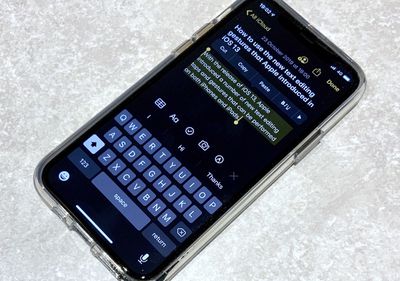
With the release of iOS 13 and iPadOS 13, Apple introduced a number of new text editing taps and gestures that can be performed on both iPhones and iPads. These taps and gestures make it quicker and easier to do things like select text, copy and paste, undo and redo edits, and move the cursor around the screen.
iphone
They do take some getting used to though, especially if you're a veteran of the text editing taps and gestures that have been available in iOS for a while. That's why we've compiled the following list to help you get to grips with them until they become second nature. Keep reading for the full rundown.

How to Move the Cursor Around the Editing Window

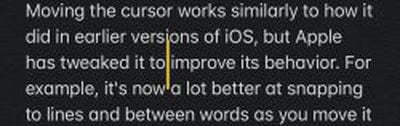
Moving the cursor works similarly to how it did in earlier versions of iOS, but Apple has tweaked it to improve its behavior. For example, it's now a lot better at snapping to lines and between words as you move it around. You can also now tap and hold the cursor and it will get bigger on the screen so you can see it more easily. Here's how it works.
text

  1. Start typing some text in an app that supports it.
  2. Touch and hold the cursor until it gets bigger.
  3. Drag the cursor to the desired location.
  4. Remove your finger from the screen.

How to Move the Cursor With the Virtual Trackpad

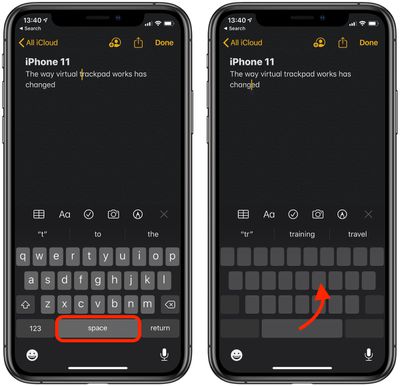
You can turn the onscreen keyboard into a virtual trackpad that allows you to quickly move the cursor through the text without taking your finger off the display. Note that the way this works on your device depends on whether it has 3D Touch (iPhone 6s and later) Haptic Touch (iPhone XR, iPhone 11, iPhone 11 Pro, and iPhone 11 Pro Max) or a long press (all iPad models).
virtual trackpad on iphone 11

  1. On an ‌iPad‌ or ‌Haptic Touch‌ device, press and hold on the spacebar. On a device with ‌3D Touch‌, press and hold anywhere on the keyboard.
  2. Drag your finger over the blanked-out keyboard to move the cursor through the text to the desired location.

Note that on an ‌iPad‌, you can also touch the keyboard with two fingers and move your fingers around to relocate the cursor.

How to Select Text

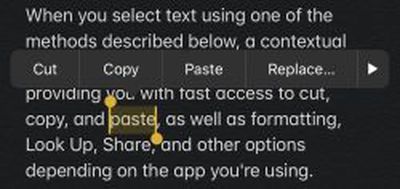
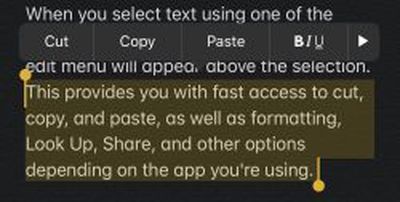
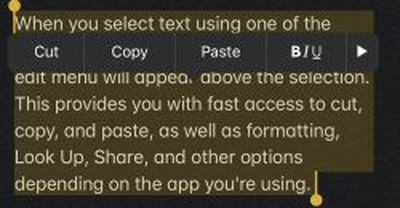
When you select text using one of the methods described below, a contextual edit menu will appear above the selection, providing you with fast access to cut, copy, and paste, as well as formatting, Look Up, Share, and other options depending on the app you're using.
text

  • To select a word, double tap it. Alternatively, tap and hold it until you feel the haptic feedback.
text

  • Triple tap any word within a sentence and the whole sentence will be selected.
text

  • Quadruple tap a word to select the paragraph in which it appears.

How to Use Intelligent Selection

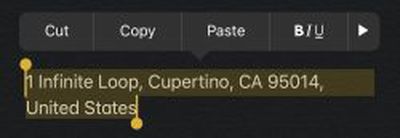
Intelligent selection is a new feature that lets you quickly select phone numbers, addresses, or email addresses while editing text. Bear in mind that the feature doesn't work when you're simply viewing text – you must be in an editing app for intelligent selection to be available.
text
Simply double tap anywhere on the contact information to select it all in one go. Note that intelligent selection is limited to a single line, so if an address uses hard returns to go over two or more lines, it will only select the line that you tapped on. (Note: The address in the example is a single line that runs on.)

How to Adjust a Text Selection

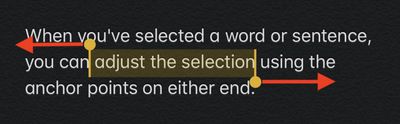
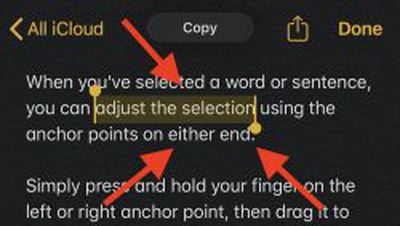
When you've selected a word or sentence, you can adjust the selection using the anchor points on either end.
text
Simply press and hold your finger on the left or right anchor point, then drag it to make the selection larger or smaller.

How to Cut, Copy, and Paste Using Gestures

In iOS 12 and earlier, you had to select text and then use the contextual editing menu bar to cut, copy or paste it. In iOS 13, you can use gestures instead. First, select some text, then do one of the following:

  1. To copy, pinch with three fingers.
    text

  2. To cut, perform the copy gesture twice until the text disappears, ready to be pasted from the clipboard.
  3. To paste some text that you've just copied or cut, pinch out with three fingers until the text appears again.
    text

How to Display the Clipboard Bar

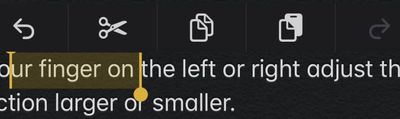
Have you noticed the menu bar that appears briefly whenever you perform one of the cut, copy or paste gestures described above? That's the clipboard bar, which offers you an alternative way to cut, copy, and paste text as well as undo and redo edits.
text
You can reveal the clipboard bar anytime you like when editing text. Simply select some text, then tap and hold the screen using three fingers.

How to Undo and Redo Edits Using Gestures

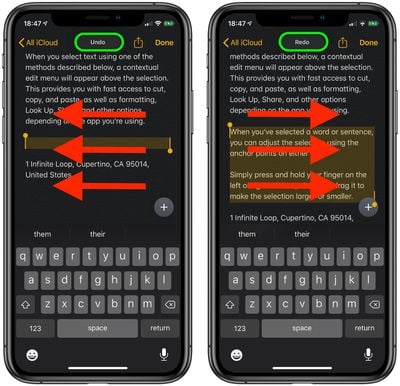
  1. Make sure you're in text editing mode (unless you have a physical keyboard connected, the onscreen keyboard will be showing).
    text

  2. To undo an edit, perform a three finger swipe leftwards across the editing area.
  3. To redo an edit, perform a three finger swipe rightwards across the editing area.
How to Scroll Through Text Faster

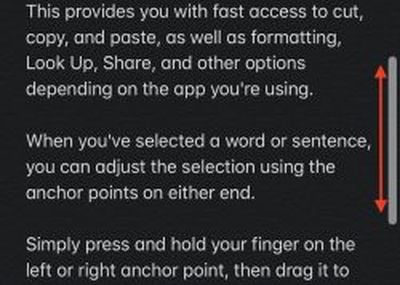
If you're editing a particularly long piece of text like a document or a threaded email, you can scroll a lot faster by grabbing the scroll bar directly.
text
When the scroll bar is visible, press and hold it with your finger and move it up and down the edge of the screen to move rapidly through the text.


Related Forum: iOS 13

Top Rated Comments

93 months ago
Due to the growing number and sometime complexity of some iOS interactions -that go unnoticed for the common man- Apple should make a game with each new version, where you get points for, say, perform this gestures correctly a number of times and in different order. Seems if you don’t consciously practice them you don’t interiorize them and they go unused.
Score: 9 Votes (Like | Disagree)
93 months ago
This new cursor behavior is not an “improved tweak” but a frustrating new experience that makes me want to throw the phone out the window.
Score: 6 Votes (Like | Disagree)
Soba Avatar
93 months ago

I’m having so much trouble putting my cursor in front of a specific letter without selecting the entire word.

It’s very frustrating, I don’t know why they had to change this to.

This new cursor behavior is not an “improved tweak” but a frustrating new experience that makes me want to throw the phone out the window.
I’m glad I’m not the only one who is frustrated. I’ve been wrestling with these changes for weeks and I still feel like this is a major UX regression.
Score: 5 Votes (Like | Disagree)
m0sher Avatar
93 months ago
I’m having so much trouble putting my cursor in front of a specific letter without selecting the entire word.

It’s very frustrating, I don’t know why they had to change this to.

I end up having to backspace the entire word to correct that one letter..

Also what’s up with words not getting capitalized if you tab down more than once to start new sentence?
Score: 5 Votes (Like | Disagree)
Kabeyun Avatar
93 months ago

How to Select Text
There’s a better, more general way to explain selection behavior. In selecting text, think of 4 steps: none, word, sentence, paragraph. Double-tapping takes you one step up from whatever is currently selected. Triple tapping takes you two steps. Quadruple-tapping takes you three steps.


How to Use Intelligent Selection
How I wish there were intelligent pasting too, specifically for contacts. How nice would it be to copy a whole address, the clipboard would parse and separate the fields, and then just paste once into a new contact to fill in everything?
Score: 3 Votes (Like | Disagree)
93 months ago
Agreeing with you above, iOS 13 made typing MORE DIFFICULT than iOS 12. Unfortunate.
Score: 3 Votes (Like | Disagree)

Popular Stories

apple design award 2025

Apple Announces 2025 Design Award Winners Ahead of WWDC 2025

Tuesday June 3, 2025 10:14 am PDT by
As we wait for WWDC to kick off next Monday, Apple today announced the winners of its annual Apple Design Awards, recognizing apps and games for their innovation, ingenuity, and technical achievement. The 2025 Apple Design Award winners are listed below, with one app and one game selected per category: Delight and Fun - CapWords (App) and Balatro (Game) Innovation - Play (App) and PBJ -...
1password deal blue

1Password Security Breach: What Was Accessed and What Wasn't

Wednesday November 25, 2026 1:09 pm PST by
Popular password management app 1Password today said it experienced a security breach earlier this month. 1Password says some customer names and email addresses were accessed, but no customer vault contents were compromised. On November 19, 1Password saw indications that an employee's GitHub account had been breached and began investigating. The company says the breached GitHub account was...
Apple 2026 Black Friday Event Hero

Apple's Official 2026 Black Friday Offer Starts Rolling Out

Thursday November 26, 2026 8:37 am PST by
Apple's annual four-day Black Friday through Cyber Monday shopping event is now live in Australia, New Zealand, and Thailand, and it will continue to roll out across Europe, the U.S., and Canada as the calendar turns to Friday, November 27 around the world. In the U.S., Apple's terms and conditions say the promotion begins on November 27 at 12 a.m. Pacific Time and ends on November 30 at...
Latest Stories
The 50+ Best Apple Black Friday Deals Still Available on AirPods, iPads, and More
11 hours ago
HomePod Mini 2 in (RED) Seemingly Spotted Ahead of Announcement
8 hours ago
Apple's M6 and PROLED MacBook Pro Reach New Low Prices for Black Friday
19 hours ago
The MacRumors Show: iPhone Air 2 and iPhone 18 Are Coming
19 hours ago
Apple Store in Brisbane Reopening Next Month With New Design
19 hours ago
The 60+ Best Black Friday Accessory Deals on iPhone Chargers, TVs, Headphones, and More
20 hours ago
GTA VI Now (Barely) Running on Apple Silicon Macs
21 hours ago
The Best Black Friday Streaming Deals on Apple TV, Disney+, and More
21 hours ago
Apple TV's 'Carême' Wins International Emmy for Best Drama
22 hours ago
iPhone 18 Production Delay Leaves Apple Little Time Before Launch
23 hours ago
The Best Black Friday AirPods Deals Still Available
15 hours ago
The Best Black Friday Deals on Apple Home Products
23 hours ago
The Best Black Friday iPhone Deals Still Available
15 hours ago
The Best Black Friday iPad Deals Still Available
15 hours ago
The Best Black Friday Apple Watch Deals Still Available
15 hours ago
The Best Black Friday AirTag Deals Still Available
15 hours ago
The Best Black Friday Mac Deals Still Available
15 hours ago
iPhone Share of US Smartphone Market Hits 57% as Rivals Slip
1 day ago
iPhone 20 Pro Rumored to Feature 3D-Printed Titanium Frame
1 day ago
Apple's Official 2026 Black Friday Offer Starts Rolling Out
2 days ago
Halide Adds Fill Light Feature for iPhone Duo
2 days ago
MacBook Air Black Friday Deals Now Live With Massive $399 Savings
2 days ago
Amazon Discounts All MacBook Neo Models by $99 for Black Friday
2 days ago
Kodak Launches Unique AirTag Rival With E-Ink Display
2 days ago
Here's Why the Apple Store is Going Down
2 days ago
Apple Still Working on Giant Foldable iPad That Could Cost $5,000
2 days ago
iPhones Dominate China's Weak Singles' Day Smartphone Sales
2 days ago
iPhone 20 Pro Could Feature Ceramic in Limited-Edition Model
2 days ago
Apple Faces Korean Regulator Review Over iPhone 16 AI Advertising
2 days ago
Apple Watch Ultra 4 Hits New Best-Ever Price of $649.99 for Black Friday
2 days ago
Related Apple News: Roundup | Ios 27 3 Beta Features | News | Aqara W200 Thermostat | Ipados