Skip to Content

How to Organize Your Mac's Desktop With Stacks in macOS Mojave

by

If you're someone that has a lot of files on your desktop, you're going to love the new Stacks feature in macOS Mojave, which is designed to organize all of your files into neat little piles on your desktop, getting rid of clutter.

Unfortunately, Stacks is an option that's limited to the desktop and not available within individual file folders.

Enabling and Disabling Stacks

Toggling Stacks on and off is done with just a couple of clicks on the desktop. When at the desktop, right click to bring up the desktop options menu, and then choose the "Stacks" option.
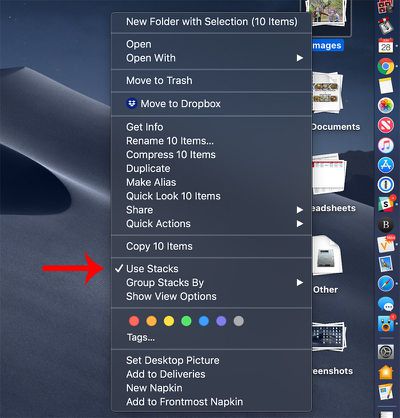
macosmojavenablingstacks1
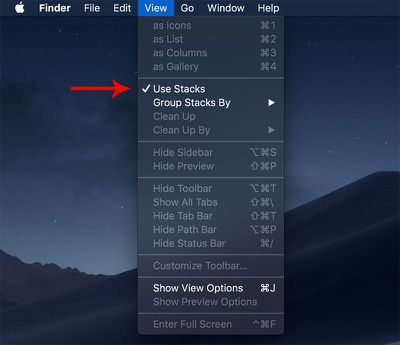
You can also use the Finder to enable Stacks.

  1. Open a Finder window.
  2. In the menu bar at the top of the Mac, go to View.
  3. Check the "Use Stacks" option. macosmojaveenablingstacks2

Turning on Stacks will automatically organize your files by file type. Some of the available Stacks include documents, images, PDF documents, spreadsheets, other, and screenshots.
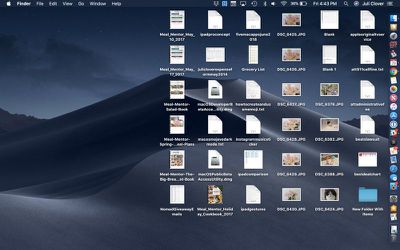
beforestacks

Files on the desktop before enabling Stacks.

If you want to turn Stacks off and go back to a full view of all the files on the desktop, right click again and uncheck the Stacks option. Alternatively, reverse the Finder steps.

afterstacks

Files on the desktop after enabling Stacks.

Viewing Files in a Stack

If you want to view all of the files that are contained within a Stack, just click, and it will expand the Stack and put a little arrow on the Stack's name so that you know which Stack you're viewing.

With the Stack expanded, if you click on a file, it will open up in whatever app is set to be the default app for that file type.
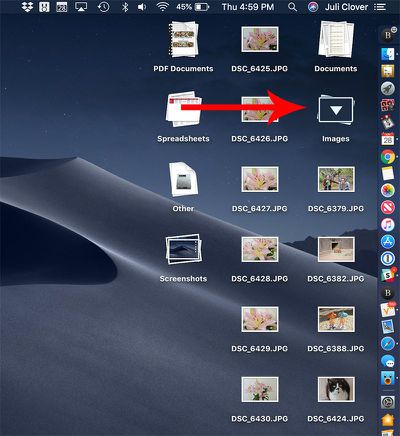
expandstacksmacosmojave

Click on a stack to expand it to see the files inside.

When done, click the Stack again to collapse it back down into an organized pile.

To open up all of your Stacks at once, option click on the any Stack, which will expand all of the desktop Stacks at once. Option click again on any of the open Stacks to close them all.
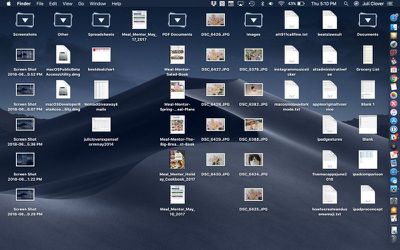
allstacksexpanded

Option click on any Stack to expand all Stacks.

Tip: If for some reason you want to open up or close all of your Stacks with a slower expanding/collapsing animation, shift click instead of just clicking regularly.

Customizing Stacks

Stacks are organized by file type by default, but you can change the Stack organizational system, grouping your files by Date Last Opened, Date Added, Date Modified, Date Created, and Tags.

  1. Open Finder.
  2. In the menu bar, click on the View option.
  3. Select the "Group Stacks By" option. groupstacksmojave
  4. Choose one of the available options to change the way your Stacks are sorted.
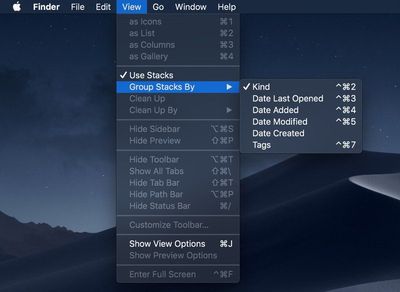
The most powerful sorting option in Stacks is of course Tags, which are user set and can be used to identify certain types of files, such as all documents relating to a specific topic.

When grouped by one of the date options, Stacks will be listed in increments of Today, Yesterday, Previous 7 Days, Previous 30 Days, and then after that, by year.
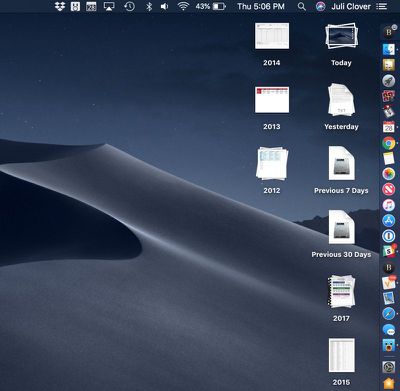
stacksortedbycreationdate

Stacks when sorted by creation date.

Further Stacks Options

If you want to stick one of your Stacks into a folder, you can do so by right clicking on one of the Stacks and selecting the "New Folder With Selection" option.
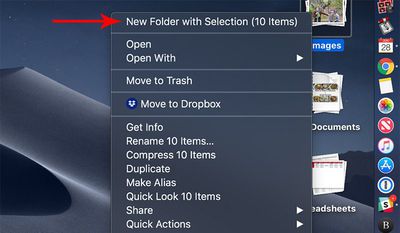
stacksnewfolder
Using the same right click options that are available when a Stack is selected, you can open the files, open them in a specified app, rename files, share files, compress files, send files to trash, and more. You basically have all of the same organizational options that you would have selecting any group of files on your desktop, but without the need to select them manually.


Related Forum: macOS Mojave

Top Rated Comments

MysteriousStain Avatar
110 months ago
Makes no difference. My girlfriend will still keep ALL her files on the desktop
Score: 6 Votes (Like | Disagree)
110 months ago
I rarely use Stacks in the Dock, but this is something I can see myself using a lot.
Score: 5 Votes (Like | Disagree)
roland.g Avatar
110 months ago
Many years ago a preview at WWDC had dock stacks for Apps and other items. App stacks went away before the release and has never come out though they can be simulated. However this desktop stacks is a clutter cleanup. Instead of this solution, don’t put anything on your desktop!
Score: 3 Votes (Like | Disagree)
107 months ago
Been using this feature all summer and as much as I wanted to love this feature, as much as I've tried to do things like this myself with scripting...I really, really hate it.

I hate the way the Stacks look when expanded. It looks confusing and ridiculous. Everything moves, even if its revealing a mere 1 or 2 files. Visually it is just bad. I have no idea how they approved this.
Score: 2 Votes (Like | Disagree)
powerboy123 Avatar
107 months ago
HYPERCARD IS ALIVE!!!!

STACKS??????? we have seen this before... with HYPERCARD! Waaaaaay ahead of its time..1987

https://en.wikipedia.org/wiki/HyperCard
Score: 2 Votes (Like | Disagree)
110 months ago
I don’t understand this obsession to group files by type. First with those horrible app specific folders in iCloud, now this.

I prefer to group files per project. Getting all of your project files out of these stacks to archive them seems like a hassle.
Score: 2 Votes (Like | Disagree)

Popular Stories

apple design award 2025

Apple Announces 2025 Design Award Winners Ahead of WWDC 2025

Tuesday June 3, 2025 10:14 am PDT by
As we wait for WWDC to kick off next Monday, Apple today announced the winners of its annual Apple Design Awards, recognizing apps and games for their innovation, ingenuity, and technical achievement. The 2025 Apple Design Award winners are listed below, with one app and one game selected per category: Delight and Fun - CapWords (App) and Balatro (Game) Innovation - Play (App) and PBJ -...
1password deal blue

1Password Security Breach: What Was Accessed and What Wasn't

Wednesday November 25, 2026 1:09 pm PST by
Popular password management app 1Password today said it experienced a security breach earlier this month. 1Password says some customer names and email addresses were accessed, but no customer vault contents were compromised. On November 19, 1Password saw indications that an employee's GitHub account had been breached and began investigating. The company says the breached GitHub account was...
apple store down feature

Here's Why the Apple Store is Going Down

Thursday November 26, 2026 5:49 am PST by
Apple's online store is going down for a few hours on a rolling country-by-country basis right now, but do not get your hopes up for new products. Apple takes its online store down for a few hours ahead of Black Friday every year to tease its annual gift card offer with the purchase of select products. The store is down in Australia, New Zealand, and Thailand, right now, and it will...
Latest Stories
The 50+ Best Apple Black Friday Deals Still Available on AirPods, iPads, and More
2 hours ago
Apple's M6 and PROLED MacBook Pro Reach New Low Prices for Black Friday
10 hours ago
The MacRumors Show: iPhone Air 2 and iPhone 18 Are Coming
10 hours ago
Apple Store in Brisbane Reopening Next Month With New Design
10 hours ago
The 60+ Best Black Friday Accessory Deals on iPhone Chargers, TVs, Headphones, and More
11 hours ago
GTA VI Now (Barely) Running on Apple Silicon Macs
12 hours ago
The Best Black Friday Streaming Deals on Apple TV, Disney+, and More
12 hours ago
Apple TV's 'Carême' Wins International Emmy for Best Drama
13 hours ago
iPhone 18 Production Delay Leaves Apple Little Time Before Launch
13 hours ago
The Best Black Friday AirPods Deals Still Available
6 hours ago
The Best Black Friday Deals on Apple Home Products
14 hours ago
The Best Black Friday iPhone Deals Still Available
6 hours ago
The Best Black Friday iPad Deals Still Available
6 hours ago
The Best Black Friday Apple Watch Deals Still Available
6 hours ago
The Best Black Friday AirTag Deals Still Available
6 hours ago
The Best Black Friday Mac Deals Still Available
6 hours ago
iPhone Share of US Smartphone Market Hits 57% as Rivals Slip
15 hours ago
iPhone 20 Pro Rumored to Feature 3D-Printed Titanium Frame
17 hours ago
Apple's Official 2026 Black Friday Offer Starts Rolling Out
1 day ago
Halide Adds Fill Light Feature for iPhone Duo
1 day ago
MacBook Air Black Friday Deals Now Live With Massive $399 Savings
2 days ago
Amazon Discounts All MacBook Neo Models by $99 for Black Friday
2 days ago
Kodak Launches Unique AirTag Rival With E-Ink Display
2 days ago
Here's Why the Apple Store is Going Down
2 days ago
Apple Still Working on Giant Foldable iPad That Could Cost $5,000
2 days ago
iPhones Dominate China's Weak Singles' Day Smartphone Sales
2 days ago
iPhone 20 Pro Could Feature Ceramic in Limited-Edition Model
2 days ago
Apple Faces Korean Regulator Review Over iPhone 16 AI Advertising
2 days ago
Apple Watch Ultra 4 Hits New Best-Ever Price of $649.99 for Black Friday
2 days ago
New Apple Store Opening in India, Download the Special Wallpaper Now
2 days ago
Related Apple News: Travel | World News | Mac | Health | Opinion