Skip to Content

How to Use Spatial Audio on AirPods Pro and AirPods Max

by

Spatial audio is a sonic feature exclusive to AirPods Pro and AirPods Max that adds surround sound to Apple's premium audio wearables. By utilizing dynamic head tracking, it brings a theater-like audio experience to the movie or video you're watching, so that it seems as if the sound is coming from all around you.
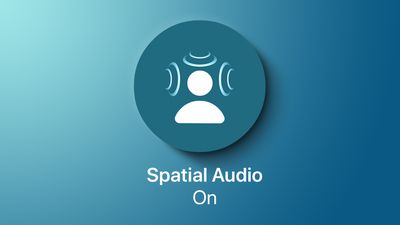
spatialaudiofeature
Spatial audio uses the gyroscope and accelerometer in your ‌AirPods Pro or AirPods Max‌ and iOS device to track the motion of your head and the position of your ‌iPhone/iPad‌, compares the motion data, and then maps the sound field to what's happening on the screen even as you move your head or your device.

What You Need

To take advantage of spatial audio on AirPods Pro or AirPods Max, you'll need an iPhone 7 or later or one of the ‌iPad‌ models listed below.

  • iPad Pro 12.9‑inch (3rd generation) and later
  • ‌iPad Pro‌ 11‑inch
  • iPad Air (3rd generation)

  • ‌iPad‌ (6th generation) and later
  • iPad mini (5th generation)

You'll also need iOS 14 or iPadOS 14 or later installed on your device, as well as the latest firmware on your AirPods Pro or AirPods Max.
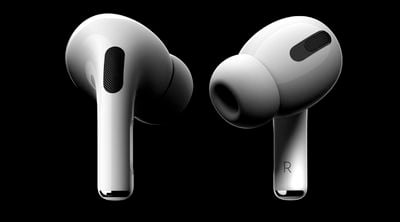
AirPods Pro

Make Sure Your AirPods Pro Firmware is Up to Date

While there's no clear cut way to upgrade the firmware of the AirPods Pro and AirPods Max, with new firmware installed over-the-air when the AirPods are connected to an iOS device, putting your ‌‌AirPods‌‌ in the case, connecting them‌‌ to a power source, and then pairing the ‌‌headphones to an iPhone or an ‌iPad‌ should force the update after a short period of time.

Apple in September 2020 released the 3A283 firmware for AirPods Pro that introduced spatial audio. Apple may have released newer firmware by the time you read this, but you can check your ‌AirPods Pro‌ firmware by following these steps:

  1. Make sure the ‌‌AirPods‌‌ or AirPods Max are connected to your iOS device.
  2. Open the Settings app.
  3. Tap General.
  4. Tap About.
  5. Tap AirPods or AirPods Max.
  6. Look at the number next to "Firmware version."

How to Turn on Spatial Audio

  1. Make sure the ‌‌AirPods‌‌ or AirPods Max are connected to your iOS device.
  2. Launch the Settings app on your iPhone or ‌iPad‌.
  3. Find your AirPods Pro/Max in the list (Tim's AirPods Pro, for example).
  4. Tap the info (i) button next to your AirPods.
  5. Toggle the switch next to Spatial Audio to the green ON position.
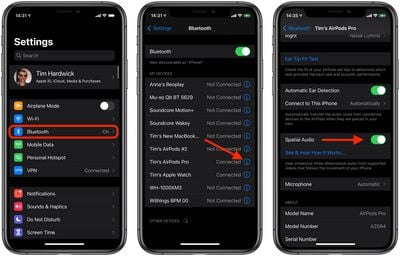
settings
You can listen to a demonstration of spatial audio by tapping See & Hear How It Works. You can then switch from stereo audio to spatial audio to hear the difference between them.

How to Turn Off Spatial Audio

  1. Make sure the ‌‌AirPods Pro/Max‌‌ are connected to your iOS device.
  2. Launch the Settings app on your iPhone or ‌iPad‌.
  3. Find your AirPods Pro/Max in the list (Tim's AirPods Pro, for example).
  4. Tap the info (i) button next to your AirPods Pro/Max.
  5. Toggle the switch next to Spatial Audio to the grey OFF position.
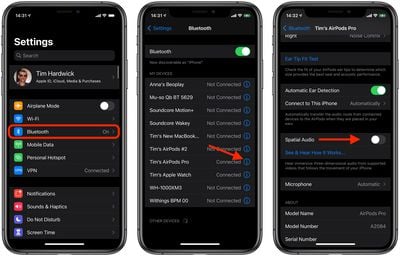
settings

How to Turn Spatial Audio On and Off in Control Center

  1. Make sure the ‌‌AirPods‌‌ Pro/Max are connected to your iOS device.
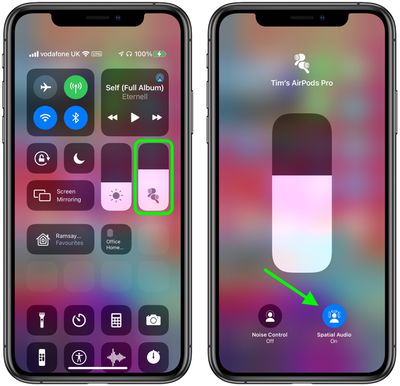
  2. Launch the Control Center: On an ‌iPad‌ with a Home button, double-tap the Home button; on iPhone 8 or earlier, swipe up from the bottom of the screen; and on a 2018 ‌iPad Pro‌, 2020 ‌iPad Air‌, or iPhone X and later, swipe down from the upper right of the screen.
  3. Touch and hold the volume control bar.
  4. Tap the Spatial Audio button to turn it on or off.
control center
If spatial audio is enabled and active, the spatial audio button will be blue and animated with audio waves around the listener's head. If spatial audio is enabled but not active for the audio content that you're listening to, the spatial audio button will be blue but static.

Related Roundup: AirPods Pro 3
Buyer's Guide: AirPods Pro (Neutral)
Related Forum: AirPods

Popular Stories

airpods 5 new blue

Apple Releases New AirPods Firmware

Tuesday November 10, 2026 12:11 pm PST by
Apple today released new firmware for the AirPods Pro 2, AirPods Pro 3, AirPods 4, AirPods 5, and AirPods Max 2. The firmware has a build number of 9B47, up from 9A348/9A350. Apple has been beta testing the new firmware for the last several weeks. In a support document, Apple merely mentioned the new firmware contains "bug fixes and other improvements." Firmware updates can be downloaded...
Apple Glasses Blue Feature

Apple's Smart Glasses Strategy Hinges on Siri and iPhone Apps

Sunday November 15, 2026 9:55 am PST by
Apple plans to unveil its first smart glasses at WWDC in June 2027 and begin shipping them before the end of the year, according to Bloomberg's Mark Gurman. In the latest edition of his "Power On" newsletter, Gurman shared new details about the glasses' design, charging system, and Siri features. Current prototypes of the glasses, internally code-named "N50," are reportedly slightly...
apple design award 2025

Apple Announces 2025 Design Award Winners Ahead of WWDC 2025

Tuesday June 3, 2025 10:14 am PDT by
As we wait for WWDC to kick off next Monday, Apple today announced the winners of its annual Apple Design Awards, recognizing apps and games for their innovation, ingenuity, and technical achievement. The 2025 Apple Design Award winners are listed below, with one app and one game selected per category: Delight and Fun - CapWords (App) and Balatro (Game) Innovation - Play (App) and PBJ -...
Latest Stories
The 50+ Best Apple Black Friday Deals Still Available on AirPods, iPads, and More
10 hours ago
HomePod Mini 2 in (RED) Seemingly Spotted Ahead of Announcement
7 hours ago
Apple's M6 and PROLED MacBook Pro Reach New Low Prices for Black Friday
17 hours ago
The MacRumors Show: iPhone Air 2 and iPhone 18 Are Coming
18 hours ago
Apple Store in Brisbane Reopening Next Month With New Design
18 hours ago
The 60+ Best Black Friday Accessory Deals on iPhone Chargers, TVs, Headphones, and More
19 hours ago
GTA VI Now (Barely) Running on Apple Silicon Macs
19 hours ago
The Best Black Friday Streaming Deals on Apple TV, Disney+, and More
20 hours ago
Apple TV's 'Carême' Wins International Emmy for Best Drama
20 hours ago
iPhone 18 Production Delay Leaves Apple Little Time Before Launch
21 hours ago
The Best Black Friday AirPods Deals Still Available
13 hours ago
The Best Black Friday Deals on Apple Home Products
22 hours ago
The Best Black Friday iPhone Deals Still Available
13 hours ago
The Best Black Friday iPad Deals Still Available
13 hours ago
The Best Black Friday Apple Watch Deals Still Available
13 hours ago
The Best Black Friday AirTag Deals Still Available
13 hours ago
The Best Black Friday Mac Deals Still Available
13 hours ago
iPhone Share of US Smartphone Market Hits 57% as Rivals Slip
23 hours ago
iPhone 20 Pro Rumored to Feature 3D-Printed Titanium Frame
1 day ago
Apple's Official 2026 Black Friday Offer Starts Rolling Out
2 days ago
Halide Adds Fill Light Feature for iPhone Duo
2 days ago
MacBook Air Black Friday Deals Now Live With Massive $399 Savings
2 days ago
Amazon Discounts All MacBook Neo Models by $99 for Black Friday
2 days ago
Kodak Launches Unique AirTag Rival With E-Ink Display
2 days ago
Here's Why the Apple Store is Going Down
2 days ago
Apple Still Working on Giant Foldable iPad That Could Cost $5,000
2 days ago
iPhones Dominate China's Weak Singles' Day Smartphone Sales
2 days ago
iPhone 20 Pro Could Feature Ceramic in Limited-Edition Model
2 days ago
Apple Faces Korean Regulator Review Over iPhone 16 AI Advertising
2 days ago
Apple Watch Ultra 4 Hits New Best-Ever Price of $649.99 for Black Friday
2 days ago
Related Apple News: Buyers Guide | Culture | Ipad | Motoring | Reviews






























