Skip to Content

How to Use Precision Finding to Locate AirPods Pro With Your iPhone

by

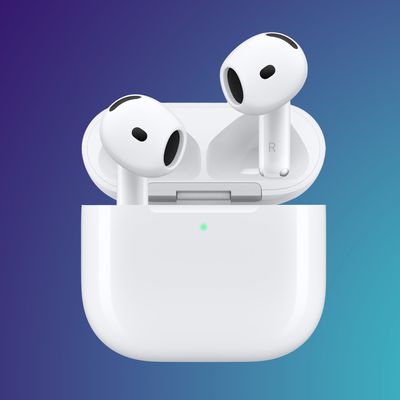
With AirPods Pro 2, Apple improved the Charging Case by adding a U1 chip for Precision Finding with Find My. With AirPods Pro 3, Apple added a U2 chip to improve the feature. This article explains how to use Precision Finding to locate your AirPods Pro if you've misplaced or lost them.
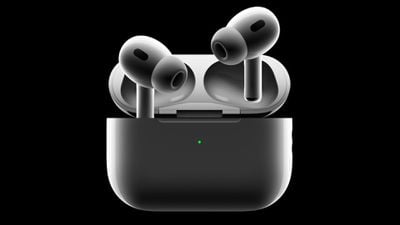
airpods pro 2
‌Find My‌‌ uses Bluetooth signals from lost AirPods to relay their location back to you. Apart from Bluetooth, however, the second-generation AirPods Pro Charging Case is also equipped with a U1 Ultra Wideband chip, and on iPhones that also have U1 chips, there's a Precision Finding feature that enables you to more accurately determine the distance and direction of your AirPods when they're in range, when compared to Bluetooth alone.

If you want to find lost AirPods Pro 2 and you have an ‌iPhone 11‌ or later model, Precision Finding will direct you to the exact location of your AirPods using input from the camera, accelerometer, and gyroscope, with guidance provided through sound, haptics, and visual feedback. Here's how to use it.

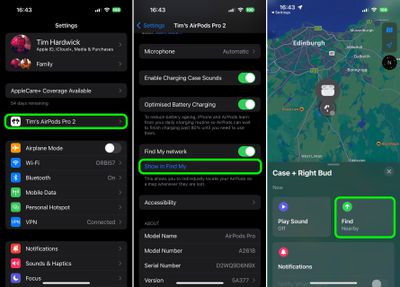
  1. If your AirPods are connected, open Settings and tap the AirPods tab just below your Apple ID, scroll down, then tap Show in Find My. If you've misplaced your AirPods earbuds along with the case, launch the Find My app and select your AirPods in the "Devices" list.
  2. Tap Find. It should say "Nearby" underneath if the Precision Finding feature is available.
    settings

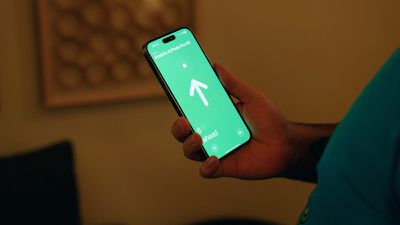
  3. Now start moving around to locate your AirPods and follow the onscreen instructions. You should see an arrow pointing in the direction of the AirPods, an approximate distance telling you how far away they are, and a note if they're located on a different floor.
As you approach the AirPods, you'll feel haptic feedback from your phone and there will be audio cues to let you know that you're approaching an item. The AirPods graphic on the ‌iPhone‌ will also shift as you get nearer to it. Precision Finding exits when you've successfully located your AirPods and your ‌iPhone‌ is in very close proximity.
airpods pro 2 precision finding
Note that Ultra Wideband isn't universally supported worldwide, therefore Precision Finding won't work in some countries. But bear in mind that the AirPods Pro 2 Charging Case comes with a built-in speaker, so you can also make it play a sound using ‌Find My‌ to more easily locate it.

Related Roundup: AirPods Pro 3
Tag: U1 Chip
Buyer's Guide: AirPods Pro (Neutral)
Related Forum: AirPods

Top Rated Comments

adamlbiscuit Avatar
55 months ago
My AirPods Pro (2nd Gen) don't show in FindMy, and that's even after resetting / unpairing them and updating the firmware to the newest version. I've tried restarting the iPhone, and also logging in on iCloud.com but there's nothing there either. Turning off the FindMy network and turning it back on doesn't work, so I'm at a loss. I'm running iOS 16.0.1 so I assume that can't be an issue either.

I think others on the forum are also having this issue though it's not happening to everyone. I just hope I don't lose them in the meantime.
Score: 9 Votes (Like | Disagree)
55 months ago

Are these cases compatible with 1st gen pros?
No.
New case + old headphones: orange led stays blinking in a loop.
Old case + new headphones: same “Mismatched AirPods” information

Attachment Image
Score: 5 Votes (Like | Disagree)
55 months ago

Urrrgh - I have the same issue. Got my AirPods Pro 2s today. Set them up in the normal way, and they sound great. Everything looks good apart from the fact that they don’t appear in Find My. Tried restarting the phone, unpairing and repairing the AirPods, but no luck.

I have my keys, wallet, and my car all visible in Find My (yup - I have an AirTag hidden in my car lol). But the AirPods are a no-show. Pah!

My AirPods Pro (2nd Gen) don't show in FindMy, and that's even after resetting / unpairing them and updating the firmware to the newest version. I've tried restarting the iPhone, and also logging in on iCloud.com but there's nothing there either. Turning off the FindMy network and turning it back on doesn't work, so I'm at a loss. I'm running iOS 16.0.1 so I assume that can't be an issue either.

I think others on the forum are also having this issue though it's not happening to everyone. I just hope I don't lose them in the meantime.
Hi all, I had the same issue, AirPods Pro 2 was not showing in Find My app no matter what I did, but I think found a fix. At least it worked for me.
[LIST=1]
* Remove AirPods Pro 2 from your device. Settings -> Bluetooth -> Forget this device.
* Disable and then enable Find My on your iPhone. Settings -> Apple ID -> Find My -> Find My iPhone.
* Reset your AirPods Pro 2 to factory settings. With the lid open, press and hold the setup button on the back of the case for about 30 seconds, until the status light on the front of the case flashes amber, then white.*
* Connect to your AirPods Pro 2 from Bluetooth settings.
* Your AirPods Pro 2 should now be visible in Find My app.
Score: 3 Votes (Like | Disagree)
RodThePlod Avatar
55 months ago

My AirPods Pro (2nd Gen) don't show in FindMy, and that's even after resetting / unpairing them and updating the firmware to the newest version. I've tried restarting the iPhone, and also logging in on iCloud.com but there's nothing there either.
Urrrgh - I have the same issue. Got my AirPods Pro 2s today. Set them up in the normal way, and they sound great. Everything looks good apart from the fact that they don’t appear in Find My. Tried restarting the phone, unpairing and repairing the AirPods, but no luck.

I have my keys, wallet, and my car all visible in Find My (yup - I have an AirTag hidden in my car lol). But the AirPods are a no-show. Pah!
Score: 2 Votes (Like | Disagree)
doggypiggy Avatar
55 months ago

Weird. Mine worked perfectly fine without doing anything at all. I just remembered it had the feature, went into the Find My app and it was right there.
I wish I were as lucky as you o_O
Score: 2 Votes (Like | Disagree)
54 months ago

FWIW - I decided to be too lazy to forget/reset/re-add and just tried doing step 2 and it worked. To recap, I only had to do step 2... disable and re-enable Find My on my iPhone. After doing that, my Airpods Pro 2 magically appeared correctly in the Find My app.
Hey apparently this worked but I did something else. So the method you posted of all the steps I did multiple times with no luck and it got frustrating. After debating, I finally decided to upgrade my iPhone to IOS 16 which I of course knew of some issues especially battery usage. Obviously they'll fix it down the line but upgrading and then turning off and on Find My, the airpods were able to show. Now I think its clear IOS 16 was probably what did it because for the newer airpods, they had certain features like the sound of the case beeping which was a new IOS 16 feature.
Score: 1 Votes (Like | Disagree)

Popular Stories

airpods 5 new blue

Apple Releases New AirPods Firmware

Tuesday November 10, 2026 12:11 pm PST by
Apple today released new firmware for the AirPods Pro 2, AirPods Pro 3, AirPods 4, AirPods 5, and AirPods Max 2. The firmware has a build number of 9B47, up from 9A348/9A350. Apple has been beta testing the new firmware for the last several weeks. In a support document, Apple merely mentioned the new firmware contains "bug fixes and other improvements." Firmware updates can be downloaded...
Apple Glasses Blue Feature

Apple's Smart Glasses Strategy Hinges on Siri and iPhone Apps

Sunday November 15, 2026 9:55 am PST by
Apple plans to unveil its first smart glasses at WWDC in June 2027 and begin shipping them before the end of the year, according to Bloomberg's Mark Gurman. In the latest edition of his "Power On" newsletter, Gurman shared new details about the glasses' design, charging system, and Siri features. Current prototypes of the glasses, internally code-named "N50," are reportedly slightly...
apple design award 2025

Apple Announces 2025 Design Award Winners Ahead of WWDC 2025

Tuesday June 3, 2025 10:14 am PDT by
As we wait for WWDC to kick off next Monday, Apple today announced the winners of its annual Apple Design Awards, recognizing apps and games for their innovation, ingenuity, and technical achievement. The 2025 Apple Design Award winners are listed below, with one app and one game selected per category: Delight and Fun - CapWords (App) and Balatro (Game) Innovation - Play (App) and PBJ -...
Latest Stories
The 50+ Best Apple Black Friday Deals Still Available on AirPods, iPads, and More
10 hours ago
HomePod Mini 2 in (RED) Seemingly Spotted Ahead of Announcement
7 hours ago
Apple's M6 and PROLED MacBook Pro Reach New Low Prices for Black Friday
17 hours ago
The MacRumors Show: iPhone Air 2 and iPhone 18 Are Coming
17 hours ago
Apple Store in Brisbane Reopening Next Month With New Design
18 hours ago
The 60+ Best Black Friday Accessory Deals on iPhone Chargers, TVs, Headphones, and More
19 hours ago
GTA VI Now (Barely) Running on Apple Silicon Macs
19 hours ago
The Best Black Friday Streaming Deals on Apple TV, Disney+, and More
20 hours ago
Apple TV's 'Carême' Wins International Emmy for Best Drama
20 hours ago
iPhone 18 Production Delay Leaves Apple Little Time Before Launch
21 hours ago
The Best Black Friday AirPods Deals Still Available
13 hours ago
The Best Black Friday Deals on Apple Home Products
22 hours ago
The Best Black Friday iPhone Deals Still Available
13 hours ago
The Best Black Friday iPad Deals Still Available
13 hours ago
The Best Black Friday Apple Watch Deals Still Available
13 hours ago
The Best Black Friday AirTag Deals Still Available
13 hours ago
The Best Black Friday Mac Deals Still Available
13 hours ago
iPhone Share of US Smartphone Market Hits 57% as Rivals Slip
23 hours ago
iPhone 20 Pro Rumored to Feature 3D-Printed Titanium Frame
1 day ago
Apple's Official 2026 Black Friday Offer Starts Rolling Out
2 days ago
Halide Adds Fill Light Feature for iPhone Duo
2 days ago
MacBook Air Black Friday Deals Now Live With Massive $399 Savings
2 days ago
Amazon Discounts All MacBook Neo Models by $99 for Black Friday
2 days ago
Kodak Launches Unique AirTag Rival With E-Ink Display
2 days ago
Here's Why the Apple Store is Going Down
2 days ago
Apple Still Working on Giant Foldable iPad That Could Cost $5,000
2 days ago
iPhones Dominate China's Weak Singles' Day Smartphone Sales
2 days ago
iPhone 20 Pro Could Feature Ceramic in Limited-Edition Model
2 days ago
Apple Faces Korean Regulator Review Over iPhone 16 AI Advertising
2 days ago
Apple Watch Ultra 4 Hits New Best-Ever Price of $649.99 for Black Friday
2 days ago
Related Apple News: Mac Gaming | Fixed Focus Digital | Ivanky Fusiondock Ultra | Eve Matter Homekit Accessories | Iphone