Skip to Content

How to Use the Magnifier Feature on iPhone and iPad

by

Apple includes an accessibility feature in iOS that's useful if you have a visual impairment, but can even come in handy if your eyes are simply tired or you're struggling to read something like small print, especially in poor light.


It's called the Magnifier, and has several advantages over just opening up the camera app and zooming in to get a better look at something.
magnifier ios save image
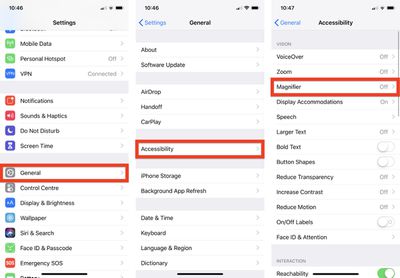
Enabling it is easy: Launch the Settings app on your iPhone or iPad, navigate to General -> Accessibility -> Magnifier, and toggle on the Magnifier switch.
magnifier ios accessibility
After that, all you need to do to use it is triple-click the Side button (or Home button, depending on your device). You can also add it to the Control Center by going to Settings -> Control Center -> Customize Controls, and tapping the green plus button next to Magnifier.

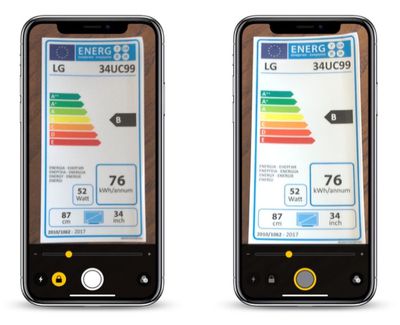
When you launch Magnifier, you'll see a camera-like interface at the bottom of the screen, but with some unique features. The slider controls the magnification of the scene in the lens frame, while the button at the bottom left turns on the flashlight so you can illuminate it. The padlock button next to that locks the focus.
magnifier ios
Tapping the big button in the center freezes the image (a frozen image is indicated by a yellow ring around the button), allowing you to move your phone around freely and still look at the image. You can also use the magnification slider to zoom in and out of the frozen image.

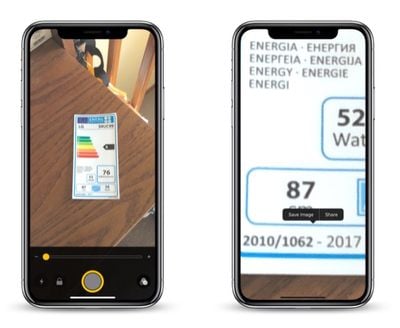
Note that when you freeze an image in the Magnifier, it isn't saved to your photo album. But if you want to save the entire image, you can.

Simply tap and hold on the frozen picture and select Save Image from the contextual popup menu. You'll find a Share option in there, too.
magnifier ios color schemes
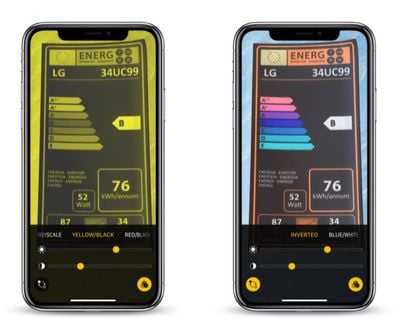
Over on the far right of the Magnifier interface is a button made up of three circles that provides access to additional sliders for adjusting brightness and contrast.

If you suffer from color blindness or another visual impairment, you can swipe through several color schemes in this extended menu and even invert the colors to find which combination works for you.


Top Rated Comments

ScooterComputer Avatar
105 months ago
This is one of the best, least-known-about features in iOS. I work with a LOT of older folks who are buying into the Apple ecosystem in DROVES… and this feature, ALONE, gets me more "happiness" from the folks that I show it to, configure it for, than any other. Just completely unable to put into words how much small accessibility features like this can really fundamentally change how users use their iPhones. You –KNOW– a feature is awesome when you see 70+ year olds you've enabled Magnifier for showing other 70+ year olds how to enable it months later; that's a success. I wish Apple wouldn't bury it so deeply, and I wish Apple would create an app for older users to walk them through some of the accessibility features that may be helpful to them; what I find, especially, is that older users tend not to like to think they need help, don't like the word "accessibility"—call it excessive pride, I dunno—but if you reframe the features as just "configuring your environment for you, for what you need and do", they're fine with it, acccept it. Perhaps the Tips app might be the place for Apple to showcase these kinds of features, but I find most users are not discovering them on their own. Which is a shame. Thanks, MacRumors, for putting it front and center!

EDIT: Oh, and perhaps I should also mention, I'm nowhere near 70 and I use Magnifier ALL THE TIME! It is great for reading serial numbers and MAC addresses off hard to reach devices, as I find the auto-focus system to be an improvement for such things over the standard Camera auto-focus. Reading fine print in ads. Etc. Just a handy handy feature.
Score: 8 Votes (Like | Disagree)
Analog Kid Avatar
105 months ago

(b) My experience has been that the triple-click launch method is EXTREMELY dodgy, very likely (30% or so) to lock the phone in some sort of strange state where it's not at all obvious how to get out of magnification mode. Maybe Apple has FINALLY fixed this with iOS 12.1?
For this reason, my preferred launch method is to put a launcher on the Control Center page.
As an accessibility function that could be very useful to the elderly, it would be nice to have this available from the lock screen alongside, or instead of, the flashlight or camera buttons...
Score: 1 Votes (Like | Disagree)
105 months ago
This is one of the best, least-known-about features in iOS. I work with a LOT of older folks who are buying into the Apple ecosystem in DROVES… and this feature, ALONE, gets me more "happiness" from the folks that I show it to, configure it for, than any other. Just completely unable to put into words how much small accessibility features like this can really fundamentally change how users use their iPhones. You –KNOW– a feature is awesome when you see 70+ year olds you've enabled Magnifier for showing other 70+ year olds how to enable it months later; that's a success. I wish Apple wouldn't bury it so deeply, and I wish Apple would create an app for older users to walk them through some of the accessibility features that may be helpful to them; what I find, especially, is that older users tend not to like to think they need help, don't like the word "accessibility"—call it excessive pride, I dunno—but if you reframe the features as just "configuring your environment for you, for what you need and do", they're fine with it, acccept it. Perhaps the Tips app might be the place for Apple to showcase these kinds of features, but I find most users are not discovering them on their own. Which is a shame. Thanks, MacRumors, for putting it front and center!

EDIT: Oh, and perhaps I should also mention, I'm nowhere near 70 and I use Magnifier ALL THE TIME! It is great for reading serial numbers and MAC addresses off hard to reach devices, as I find the auto-focus system to be an improvement for such things over the standard Camera auto-focus. Reading fine print in ads. Etc. Just a handy handy feature.
Absolutely! Let me add two comments.
(a) There are alternative magnification apps available. However the Apple solution seems to do a better job of locking onto focus fast, and then stabilizing the text against jitters. And this seems to have improved in more recent hardware. My iPhone XS seems to be quite a bit more visually stable than my iPhone 7 (OIS? or better processing?). So if this is something you care about and use a lot, it might be worth seeing how well it performs in a newer iPhone compared to what you have, and might make it worth the upgrade.

(b) My experience has been that the triple-click launch method is EXTREMELY dodgy, very likely (30% or so) to lock the phone in some sort of strange state where it's not at all obvious how to get out of magnification mode. Maybe Apple has FINALLY fixed this with iOS 12.1?
For this reason, my preferred launch method is to put a launcher on the Control Center page.
Score: 1 Votes (Like | Disagree)
105 months ago
This is well done. Bravo Apple!
Score: 1 Votes (Like | Disagree)

Popular Stories

Apple TV Sign Language Interpretation

New Apple TV Sign Language Feature Announced

Tuesday November 10, 2026 8:54 am PST by
Apple today announced a new accessibility feature for the Apple TV app that gives viewers the option to watch supported movies and shows with on-screen sign language interpretation. An interpreter will appear in the bottom-right corner of the screen, with the experience said to have been designed and tested by Deaf and native signers. The feature is available in the Apple TV app on devices...
apple design award 2025

Apple Announces 2025 Design Award Winners Ahead of WWDC 2025

Tuesday June 3, 2025 10:14 am PDT by
As we wait for WWDC to kick off next Monday, Apple today announced the winners of its annual Apple Design Awards, recognizing apps and games for their innovation, ingenuity, and technical achievement. The 2025 Apple Design Award winners are listed below, with one app and one game selected per category: Delight and Fun - CapWords (App) and Balatro (Game) Innovation - Play (App) and PBJ -...
1password deal blue

1Password Security Breach: What Was Accessed and What Wasn't

Wednesday November 25, 2026 1:09 pm PST by
Popular password management app 1Password today said it experienced a security breach earlier this month. 1Password says some customer names and email addresses were accessed, but no customer vault contents were compromised. On November 19, 1Password saw indications that an employee's GitHub account had been breached and began investigating. The company says the breached GitHub account was...
Latest Stories
The 50+ Best Apple Black Friday Deals Still Available on AirPods, iPads, and More
9 hours ago
HomePod Mini 2 in (RED) Seemingly Spotted Ahead of Announcement
6 hours ago
Apple's M6 and PROLED MacBook Pro Reach New Low Prices for Black Friday
17 hours ago
The MacRumors Show: iPhone Air 2 and iPhone 18 Are Coming
17 hours ago
Apple Store in Brisbane Reopening Next Month With New Design
17 hours ago
The 60+ Best Black Friday Accessory Deals on iPhone Chargers, TVs, Headphones, and More
18 hours ago
GTA VI Now (Barely) Running on Apple Silicon Macs
18 hours ago
The Best Black Friday Streaming Deals on Apple TV, Disney+, and More
19 hours ago
Apple TV's 'Carême' Wins International Emmy for Best Drama
20 hours ago
iPhone 18 Production Delay Leaves Apple Little Time Before Launch
20 hours ago
The Best Black Friday AirPods Deals Still Available
12 hours ago
The Best Black Friday Deals on Apple Home Products
21 hours ago
The Best Black Friday iPhone Deals Still Available
12 hours ago
The Best Black Friday iPad Deals Still Available
12 hours ago
The Best Black Friday Apple Watch Deals Still Available
12 hours ago
The Best Black Friday AirTag Deals Still Available
12 hours ago
The Best Black Friday Mac Deals Still Available
12 hours ago
iPhone Share of US Smartphone Market Hits 57% as Rivals Slip
22 hours ago
iPhone 20 Pro Rumored to Feature 3D-Printed Titanium Frame
1 day ago
Apple's Official 2026 Black Friday Offer Starts Rolling Out
2 days ago
Halide Adds Fill Light Feature for iPhone Duo
2 days ago
MacBook Air Black Friday Deals Now Live With Massive $399 Savings
2 days ago
Amazon Discounts All MacBook Neo Models by $99 for Black Friday
2 days ago
Kodak Launches Unique AirTag Rival With E-Ink Display
2 days ago
Here's Why the Apple Store is Going Down
2 days ago
Apple Still Working on Giant Foldable iPad That Could Cost $5,000
2 days ago
iPhones Dominate China's Weak Singles' Day Smartphone Sales
2 days ago
iPhone 20 Pro Could Feature Ceramic in Limited-Edition Model
2 days ago
Apple Faces Korean Regulator Review Over iPhone 16 AI Advertising
2 days ago
Apple Watch Ultra 4 Hits New Best-Ever Price of $649.99 for Black Friday
2 days ago
Related Apple News: South Africa | Culture | Buyers Guide | News | Entertainment






























