Skip to Content

How to Use Apple's Live Listen Feature With AirPods

by

Since 2014, Apple has included a feature in iOS called Live Listen that allows an iPhone or iPad to serve as a remote microphone for an MFI-compatible hearing aid.

When Apple released iOS 12, it added Live Listen support for AirPods and AirPods 2, making it possible to use your iOS device as a directional mic and have the audio relayed to Apple's wireless earphones.
iphone xs and airpods
As an accessibility feature, the idea behind Live Listen is for it to be used by people who are hard of hearing or need extra help separating voices in a loud environment, but it can be useful in other ways, too.

If you're on a family vacation, for instance, you could use your iPhone or ‌iPad‌ as a makeshift baby monitor for when the baby's napping and you're in another room with the TV on. All you'd need to do is put the iOS device near the baby's crib and wear a single AirPod, which should have a strong enough Bluetooth range to allow you to listen in from afar.

Live Listen will work even when other audio is being played on your iPhone or ‌iPad‌ – so you could listen to a podcast, say, and still be keeping tabs on the baby. Just note that whatever it is that you're listening to will switch to mono output to match the Live Listen stream, and the AirPods' tap gestures will be disabled for as long as the feature is active.

Live Listen is easy to set up and use once you know how. The following steps show you how it's done on an iPhone or ‌iPad‌ running iOS 12 or later.

How to Set Up Live Listen on iPhone and iPad

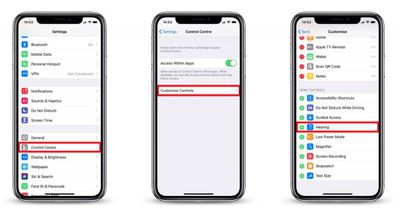
  1. Launch the Settings app on your iPhone or ‌iPad‌.
  2. Tap Control Center.
    how to set up live listen with airpods

  3. Tap Customize Controls.
  4. Scroll down and tap the green plus (+) button next to Hearing.
How to Use Live Listen on iPhone and iPad

  1. Put your AirPods in and connect them to your iPhone or ‌iPad‌ in the usual way.
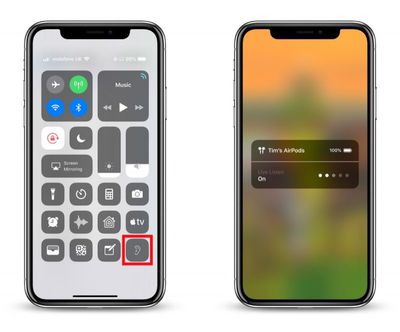
  2. Launch Control Center on your iOS device: On an ‌iPad‌ with a Home button, double-tap the Home button; on iPhone 8 or earlier, swipe up from the bottom of the screen; and on a 2018 iPad Pro or iPhone R/X/XS/XS Max, swipe down from the upper right of the screen.
    how to use live listen with airpods

  3. Tap the Hearing icon.
  4. Tap Live Listen.
  5. Place your iPhone or ‌iPad‌ close to the person you want to hear, preferably in front of them.
If the output to your AirPods is too quiet or too loud, use the volume buttons on your iPhone or ‌iPad‌ to adjust the volume level.

live listen not working airpods
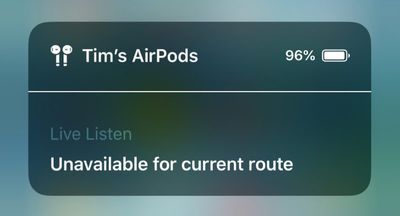
If you see the message "Unavailable for current route" when you try to turn on Live Listen, restarting your iOS device and then forgetting and re-connecting your AirPods in the Settings app's Bluetooth menu should fix the issue.
Related Roundup: AirPods 5
Buyer's Guide: AirPods (Buy Now)
Related Forum: AirPods

Top Rated Comments

105 months ago
Wow I knew nothing of this. Is it just me or do apple do a terrible job these days of actually telling users about features? I remember when the iPhone / iPod came out, for years almost every feature was explained and used in marketing on the website, i have literally found features on my phone by accident since getting a new iPhone8 that I didn’t even knew it had or how they worked. And I used to be a developer for 3 years, I can’t image how older users like my parents would even know how to use some thing or if they were even there in the first place. Apple is really doing a lousy job especially in the last 2-3 years in this regard (yes sales are through the roof but I’m specifically talking about informing users about great little features, and that silly tips app is a joke). It’s now more of an ‘object’, who cares what it does just look how pretty it is. A far cry from the jobs days.
Score: 7 Votes (Like | Disagree)
FloatingBones Avatar
105 months ago
Wow I knew nothing of this. Is it just me or do apple do a terrible job these days of actually telling users about features?
The Apple Store's Today at Apple ('https://www.apple.com/today/') sessions are an excellent way to find out about how to do things. I recently attended four of these sessions with a friend for learning iPad skills. This was an excellent way for my non-techie friend to get up to speed on iOS/iPad, but the bonus was how much I learned during the process.

I couldn’t agree more. Perhaps Apple has gotten “too big for its britches.”
Have either of you attended any TaA sessions? Apple's instructors will cover the material for a particular session, plus questions/issues that students have. It kept some of the best features of the old One to One ('https://en.wikipedia.org/wiki/One_to_One_(Apple)') product: anyone can ask anything in the sessions, and the instructors will work hard to address those questions with the student -- either during the session or in a few minutes afterwards.
Score: 1 Votes (Like | Disagree)
105 months ago
Wow I knew nothing of this. Is it just me or do apple do a terrible job these days of actually telling users about features? I remember when the iPhone / iPod came out, for years almost every feature was explained and used in marketing on the website, i have literally found features on my phone by accident since getting a new iPhone8 that I didn’t even knew it had or how they worked. And I used to be a developer for 3 years, I can’t image how older users like my parents would even know how to use some thing or if they were even there in the first place. Apple is really doing a lousy job especially in the last 2-3 years in this regard (yes sales are through the roof but I’m specifically talking about informing users about great little features, and that silly tips app is a joke). It’s now more of an ‘object’, who cares what it does just look how pretty it is. A far cry from the jobs days.
I couldn’t agree more. Perhaps Apple has gotten “too big for its britches.”
[doublepost=1541422111][/doublepost
Score: 1 Votes (Like | Disagree)
sunapple Avatar
105 months ago
Wow I knew nothing of this. Is it just me or do apple do a terrible job these days of actually telling users about features? I remember when the iPhone / iPod came out, for years almost every feature was explained and used in marketing on the website, i have literally found features on my phone by accident since getting a new iPhone8 that I didn’t even knew it had or how they worked. And I used to be a developer for 3 years, I can’t image how older users like my parents would even know how to use some thing or if they were even there in the first place. Apple is really doing a lousy job especially in the last 2-3 years in this regard (yes sales are through the roof but I’m specifically talking about informing users about great little features, and that silly tips app is a joke). It’s now more of an ‘object’, who cares what it does just look how pretty it is. A far cry from the jobs days.
I'm sorry, but nowadays there're just a lot more features than five years ago and finding those features, the important ones, is still very easy. This has zero to do with Jobs.

https://www.apple.com/accessibility/
Score: 1 Votes (Like | Disagree)

Popular Stories

airpods 5 new blue

Apple Releases New AirPods Firmware

Tuesday November 10, 2026 12:11 pm PST by
Apple today released new firmware for the AirPods Pro 2, AirPods Pro 3, AirPods 4, AirPods 5, and AirPods Max 2. The firmware has a build number of 9B47, up from 9A348/9A350. Apple has been beta testing the new firmware for the last several weeks. In a support document, Apple merely mentioned the new firmware contains "bug fixes and other improvements." Firmware updates can be downloaded...
AirPods Pro Beta Firmware 2

Apple Releases New AirPods Beta Firmware

Tuesday November 3, 2026 11:29 am PST by
Apple today released new beta firmware for the AirPods Pro 2, AirPods Pro 3, AirPods 4, AirPods 5, and AirPods Max 2. The firmware has a build number of 9B5045a and is rolling out for developers and public beta testers. There's no word on what's included in the firmware update because Apple doesn't offer notes for AirPods beta releases. When the AirPods are connected to an iPhone, iPad,...
apple design award 2025

Apple Announces 2025 Design Award Winners Ahead of WWDC 2025

Tuesday June 3, 2025 10:14 am PDT by
As we wait for WWDC to kick off next Monday, Apple today announced the winners of its annual Apple Design Awards, recognizing apps and games for their innovation, ingenuity, and technical achievement. The 2025 Apple Design Award winners are listed below, with one app and one game selected per category: Delight and Fun - CapWords (App) and Balatro (Game) Innovation - Play (App) and PBJ -...
Latest Stories
The 50+ Best Apple Black Friday Deals Still Available on AirPods, iPads, and More
5 hours ago
Here Are the Best Apple Black Friday Leftover Deals You Can Get Today
4 hours ago
HomePod Mini 2 in (RED) Seemingly Spotted Ahead of Announcement
15 hours ago
Apple's M6 and PROLED MacBook Pro Reach New Low Prices for Black Friday
1 day ago
The MacRumors Show: iPhone Air 2 and iPhone 18 Are Coming
1 day ago
Apple Store in Brisbane Reopening Next Month With New Design
1 day ago
The 60+ Best Black Friday Accessory Deals on iPhone Chargers, TVs, Headphones, and More
4 hours ago
GTA VI Now (Barely) Running on Apple Silicon Macs
1 day ago
The Best Black Friday Streaming Deals on Apple TV, Disney+, and More
1 day ago
Apple TV's 'Carême' Wins International Emmy for Best Drama
1 day ago
iPhone 18 Production Delay Leaves Apple Little Time Before Launch
1 day ago
The Best Black Friday AirPods Deals Still Available
21 hours ago
The Best Black Friday Deals on Apple Home Products
1 day ago
The Best Black Friday iPhone Deals Still Available
21 hours ago
The Best Black Friday iPad Deals Still Available
21 hours ago
The Best Black Friday Apple Watch Deals Still Available
21 hours ago
The Best Black Friday AirTag Deals Still Available
21 hours ago
The Best Black Friday Mac Deals Still Available
21 hours ago
iPhone Share of US Smartphone Market Hits 57% as Rivals Slip
1 day ago
iPhone 20 Pro Rumored to Feature 3D-Printed Titanium Frame
1 day ago
Apple's Official 2026 Black Friday Offer Starts Rolling Out
2 days ago
Halide Adds Fill Light Feature for iPhone Duo
2 days ago
MacBook Air Black Friday Deals Now Live With Massive $399 Savings
2 days ago
Amazon Discounts All MacBook Neo Models by $99 for Black Friday
2 days ago
Kodak Launches Unique AirTag Rival With E-Ink Display
2 days ago
Here's Why the Apple Store is Going Down
2 days ago
Apple Still Working on Giant Foldable iPad That Could Cost $5,000
2 days ago
iPhones Dominate China's Weak Singles' Day Smartphone Sales
2 days ago
iPhone 20 Pro Could Feature Ceramic in Limited-Edition Model
2 days ago
Apple Faces Korean Regulator Review Over iPhone 16 AI Advertising
2 days ago
Related Apple News: Sport | South Africa | Culture | Local News | Mac