Skip to Content

How to Access Control Center and Home Screen in iOS 12 With the iPad's New Gestures

by

Apple in iOS 11 revamped the iPad's interface and changed the way we interact with the tablet through a new Dock, a revamped App Switcher, and Drag and Drop, and with iOS 12, further iPad changes have been implemented.

There are new gestures to learn for accessing the Home screen, App Switcher, and the Control Center, along with a new status bar.
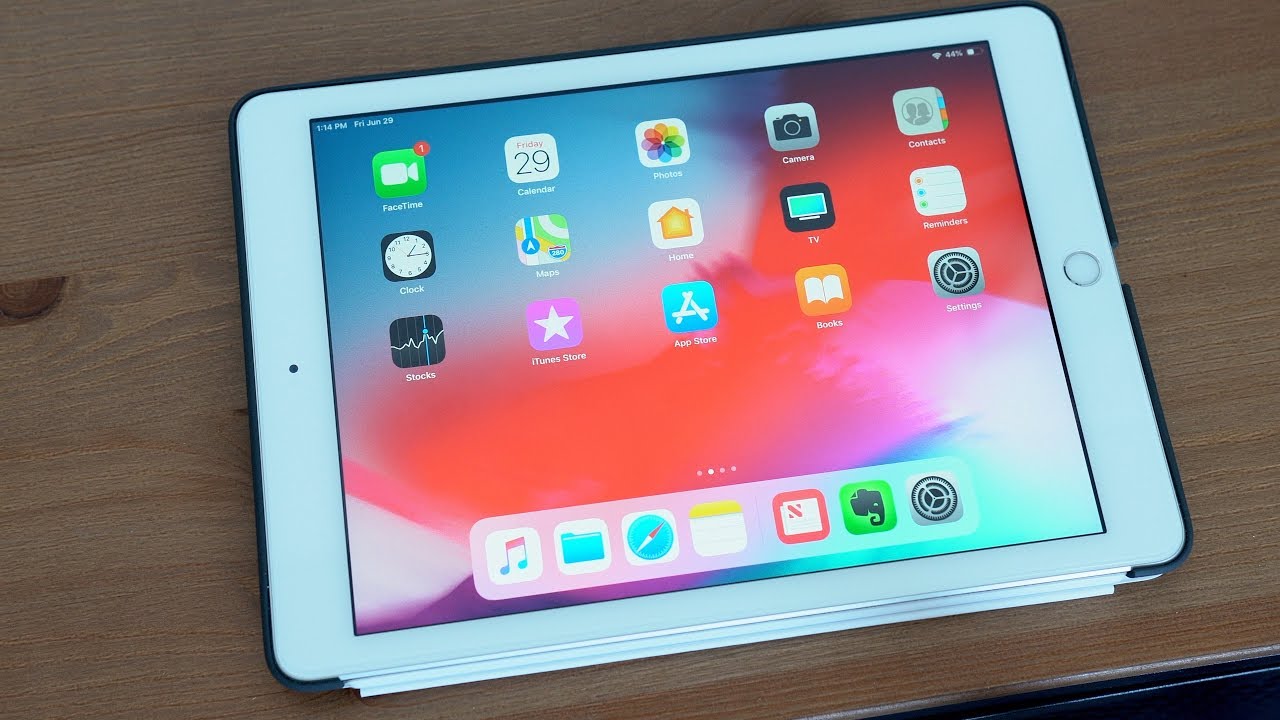

The new iPad gestures are identical to the gestures on the iPhone XS, with Apple preparing us for the elimination of the Home button in future iPad models. Rumors suggest upcoming iPad Pro models will feature a TrueDepth camera system and Face ID rather than a traditional Touch ID Home button.

If you use an iPhone X, XS, or XR, the new iPad gestures will be familiar to you, but if you don't, it could take a bit of time to get used to.

Dock Changes: Getting to the Home Screen and App Switcher

In iOS 11, when you wanted to access the Home screen from within an app, you would press the Touch ID Home button. That's still true, but you can also now get to the Home screen when you swipe up from the bottom of the display, as demoed in the video above.

When in an app, swiping up from the bottom of the screen takes you right to the Home screen rather than just bringing up the iPad Dock within an app.
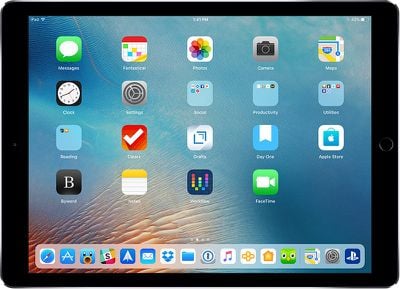
ios11dock

The iPad's Home screen. Get here with one quick swipe on the Dock.

To get to the Dock to open more than one app for multitasking purposes, you need to do a swipe and a slight hold hold rather than just a swipe at the bottom inch of the screen while you have an app open already.
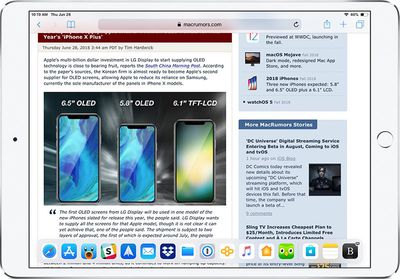
ipadprodockios12inapp

The iPad Dock in an app. A quick swipe brings you to the Home screen, but a swipe and a hold brings up the Dock in an app.

If you swipe and hold a bit higher on the screen, you can access the App Switcher on the iPad for quickly swapping between apps or closing apps, which is done with a swipe upwards on an app card. This gesture works both within apps and at the Home screen.
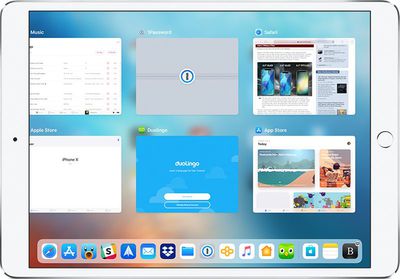
ipadproappswitcherios12

The iOS 12 iPad App Switcher, accessible with a longer swipe and hold on the Dock, either at the Home screen or within an app.

Getting to Control Center

Control Center in iOS 11 was paired with the App Switcher and was accessible by swiping up on the Dock, but that gesture now opens the App Switcher alone without providing access to Control Center.

Getting to Control Center is now done by swiping downwards from the right portion of the status bar, where it displays your battery life and Wi-Fi/Cellular connection.
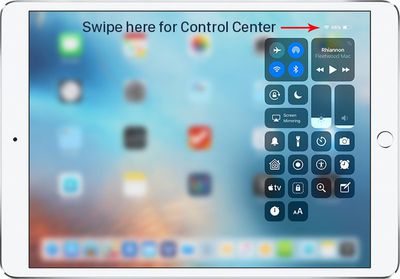
ipadprocontrolcenterios12
All other gestures on the iPad remain the same, such as a swipe downwards from the top middle of the display to bring up your notifications and a swipe to the right to get to the Today section for widget access, but there are other iPad improvements worth noting in iOS 12.

iPad Status Bar

The iPad's status bar has been redesigned in iOS 12, and it now resembles the status bar of the iPhone XS. The date and time are listed on the left hand side of the status bar, while battery life and Wi-Fi/Cellular signal and connection are displayed on the right hand side.

ipadmenubar
The middle of the display, where the date was previously shown, is left open, perhaps for a future notch. Prior to iOS 12, the iPad's status bar did not show the date, so that's also a new addition.

Spacebar Trackpad

When typing on the iPad, if you press and hold with one finger on the space bar, it turns the keyboard into a trackpad to make it easier to navigate through a document and move the cursor.

ipadios12spacebartrackpad
This is a feature that has been available on iPhones with 3D Touch and on the iPad with two fingers, but in iOS 12, it's simpler to use. A two finger touch also continues to work.


Related Forum: iOS 12

Top Rated Comments

Janichsan Avatar
110 months ago
All of these gestures are actually pretty intuitive…
You guys keep using that word, but it does not mean what you think it does.

"Intuitive" is something when you can grasp it without having to actually put in any thought about it. You get it simply by intuition, without the need for an explanation.

Tapping an icon on a screen with the finger is intuitive. Scrolling the screen content by pushing it in the direction you want it move is intuitive. Enlarging or shrinking something on screen by dragging its corners outwards or pinching them together is intuitive. Even using the home button to get back to the home screen is somewhat intuitive as you can understand it with a single exploratory press on the single large, conspicuous button on the front of the device.

Having to swipe down from one specific unmarked corner to pull down one overlay, while having to swipe down from the unmarked other corner to get another overlay, or making a weird swipe-partway-up-but-not-too-far gesture to get the app switcher is not intuitive.

These things might be easy to learn, but nothing of this is anything you would automatically do out of a purely intuition based expectation about how things work.
[doublepost=1530347008][/doublepost]
I’m so glad the gestures have changed to match iPhone X. Going back and forth from my iPhone X to iPad Pro is always a bit annoying. No more!
So now it's annoying for anyone going back and forth between an iPad and any other iPhone. But hey, good for you.
Score: 15 Votes (Like | Disagree)
JosephAW Avatar
110 months ago
My friend with Parkinson's really struggles with all these swipe and press swipe gestutures. Fortunately he can still operate the home button most of the time. I feel sorry for those who will not have a home button on future devices.
Score: 5 Votes (Like | Disagree)
Detektiv-Pinky Avatar
110 months ago
<snip>
Edit: All of these gestures are actually pretty intuitive and simple, so if anything it's an improvement. But it is a bit of an adjustment to swipe to exit out of an app.
Maybe these gestures feel intuitive if you frequently use the darn thing. For casual users or actual newbies it becomes horrible very quickly. :(

Try to hand an iPad to somebody who has never used one and the person will be utterly lost. Things will feel pretty random to them. I have an original iPad with IOS 5 somewhere in the house. You could give this to a toddler and it would be able to make sense of it.
Score: 5 Votes (Like | Disagree)
pat500000 Avatar
110 months ago
These days ios are cluttery mess with complexity.
Score: 5 Votes (Like | Disagree)
quietstormSD Avatar
110 months ago
I don't think they should have the same gestures on all iPads. For iPads with a home button, they should keep the iOS 11 gestures, and for the upcoming iPad with no home button use the iPhone X gestures.
Score: 4 Votes (Like | Disagree)
jclo Avatar
110 months ago
So how do I easily get to the control center from any app, so I can change the brightness, then return to the app?

I used to be able to just double click on the home button, change the brightness, then click the app.

Now it looks like I need to click the home button, swipe down from the top right, change the brightness, click on the home button, then click on the app.
You can swipe from the right in an app, so you don't need to go to the Home screen first. Then you just swipe back up to close it. Same as iPhone X.

Edit: All of these gestures are actually pretty intuitive and simple, so if anything it's an improvement. But it is a bit of an adjustment to swipe to exit out of an app.
Score: 4 Votes (Like | Disagree)

Popular Stories

apple design award 2025

Apple Announces 2025 Design Award Winners Ahead of WWDC 2025

Tuesday June 3, 2025 10:14 am PDT by
As we wait for WWDC to kick off next Monday, Apple today announced the winners of its annual Apple Design Awards, recognizing apps and games for their innovation, ingenuity, and technical achievement. The 2025 Apple Design Award winners are listed below, with one app and one game selected per category: Delight and Fun - CapWords (App) and Balatro (Game) Innovation - Play (App) and PBJ -...
1password deal blue

1Password Security Breach: What Was Accessed and What Wasn't

Wednesday November 25, 2026 1:09 pm PST by
Popular password management app 1Password today said it experienced a security breach earlier this month. 1Password says some customer names and email addresses were accessed, but no customer vault contents were compromised. On November 19, 1Password saw indications that an employee's GitHub account had been breached and began investigating. The company says the breached GitHub account was...
apple store down feature

Here's Why the Apple Store is Going Down

Thursday November 26, 2026 5:49 am PST by
Apple's online store is going down for a few hours on a rolling country-by-country basis right now, but do not get your hopes up for new products. Apple takes its online store down for a few hours ahead of Black Friday every year to tease its annual gift card offer with the purchase of select products. The store is down in Australia, New Zealand, and Thailand, right now, and it will...
Latest Stories
The 50+ Best Apple Black Friday Deals Still Available on AirPods, iPads, and More
4 hours ago
HomePod Mini 2 in (RED) Seemingly Spotted Ahead of Announcement
1 hour ago
Apple's M6 and PROLED MacBook Pro Reach New Low Prices for Black Friday
12 hours ago
The MacRumors Show: iPhone Air 2 and iPhone 18 Are Coming
12 hours ago
Apple Store in Brisbane Reopening Next Month With New Design
12 hours ago
The 60+ Best Black Friday Accessory Deals on iPhone Chargers, TVs, Headphones, and More
13 hours ago
GTA VI Now (Barely) Running on Apple Silicon Macs
14 hours ago
The Best Black Friday Streaming Deals on Apple TV, Disney+, and More
14 hours ago
Apple TV's 'Carême' Wins International Emmy for Best Drama
15 hours ago
iPhone 18 Production Delay Leaves Apple Little Time Before Launch
16 hours ago
The Best Black Friday AirPods Deals Still Available
8 hours ago
The Best Black Friday Deals on Apple Home Products
16 hours ago
The Best Black Friday iPhone Deals Still Available
8 hours ago
The Best Black Friday iPad Deals Still Available
8 hours ago
The Best Black Friday Apple Watch Deals Still Available
8 hours ago
The Best Black Friday AirTag Deals Still Available
8 hours ago
The Best Black Friday Mac Deals Still Available
8 hours ago
iPhone Share of US Smartphone Market Hits 57% as Rivals Slip
17 hours ago
iPhone 20 Pro Rumored to Feature 3D-Printed Titanium Frame
19 hours ago
Apple's Official 2026 Black Friday Offer Starts Rolling Out
2 days ago
Halide Adds Fill Light Feature for iPhone Duo
2 days ago
MacBook Air Black Friday Deals Now Live With Massive $399 Savings
2 days ago
Amazon Discounts All MacBook Neo Models by $99 for Black Friday
2 days ago
Kodak Launches Unique AirTag Rival With E-Ink Display
2 days ago
Here's Why the Apple Store is Going Down
2 days ago
Apple Still Working on Giant Foldable iPad That Could Cost $5,000
2 days ago
iPhones Dominate China's Weak Singles' Day Smartphone Sales
2 days ago
iPhone 20 Pro Could Feature Ceramic in Limited-Edition Model
2 days ago
Apple Faces Korean Regulator Review Over iPhone 16 AI Advertising
2 days ago
Apple Watch Ultra 4 Hits New Best-Ever Price of $649.99 for Black Friday
2 days ago
Related Apple News: News | Business | Mac | South Africa | Sport






























