Skip to Content

How to Use iOS 12's New Do Not Disturb Options

by

In iOS 12, Apple has given users the tools to cut down on disturbances to get more time away from their devices if desired, and one of these new tools is an expanded set of Do Not Disturb options.

Thanks to these changes, there are more convenient options for using Do Not Disturb in iOS 12, and it's also a lot smarter.

How to Get to the New Do Not Disturb Options

Your Do Not Disturb options in the Settings app are largely the same, with the new Do Not Disturb features housed in Control Center.
donotdisturb3

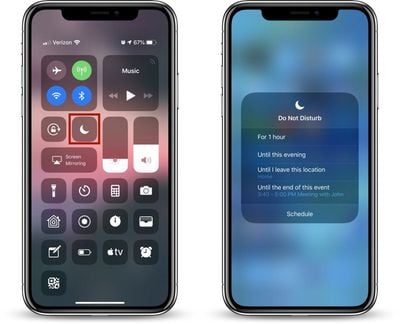
  1. Open Control Center, through a right-side swipe downwards on the screen of an iPhone X or iPad or by swiping upwards from the Home button on other devices.
  2. 3D Touch or long press on the Control Center icon that looks like a moon, which is the icon for Do Not Disturb.
  3. A 3D Touch or a long press brings up all of the Do Not Disturb options, which can be selected with a tap.

Do Not Disturb is a default widget within the Control Center and it's always available, so it's not an option that needs to be enabled through the Control Center customization options.

All of the Ways You Can Use Do Not Disturb in iOS 12

There are multiple new limited-time settings for Do Not Disturb in the Control Center, which automatically turn off after the specified time elapses.

  • For one hour
  • Until this evening (or afternoon/morning depending on the time - it's generally a few hours)
  • Until I leave this location
  • Until this event ends (if you have a timed event set in your calendar)
  • A single tap on the icon without selecting an option turns on Do Not Disturb until you tap it again.

Not all of these options will be visible at all times. If you're not in a set location or you don't have any events scheduled, these two options won't appear. The first two, allowing you to set Do Not Disturb for an hour or until the evening/afternoon/morning are always available.

Underneath these options, there's a "Schedule" button (see screenshot at top) that will open up the Settings app so you can set a specific time period for when you want Do Not Disturb to turn on. This is also where you can turn on Do Not Disturb at Bedtime, a feature that prevents notifications from displaying on the iPhone's display at night.

Check out our Do Not Disturb at Bedtime how to for more details on this feature.

Managing Do Not Disturb Settings

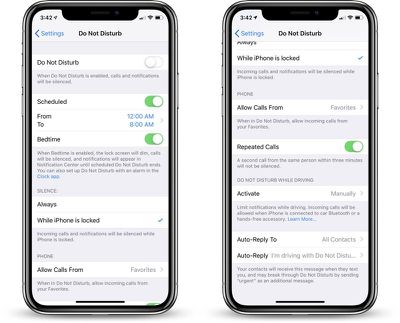
Your general Do Not Disturb settings are available in the Settings app, which can be accessed by going to Settings > Do Not Disturb or through the above mentioned "Schedule" section of the No Not Disturb Control Center widget.

Most of these settings aren't new, but we thought it would be useful to offer a quick primer on Do Not Disturb's other settings alongside what's new in iOS 12.
donotdisturb2
In the Settings app, you can enable or disable Do Not Disturb, set a specific time for Do Not Disturb to turn on and off, or enable Bedtime Mode.

You can also choose whether Do Not Disturb should mute calls and notifications only while the iPhone is locked or at all times, and there are options to select whether calls from certain people should bypass your Do Not Disturb settings. This section is also where you'll find your Do Not Disturb While Driving options.


Related Forum: iOS 12

Top Rated Comments

109 months ago
I wish they would allow a more customizable schedule for “Do not disturb,” such as:

I work 5pm - 3am Tuesday through Friday, (so I schedule DND for 3am - 11am), but Saturday, Sunday, and Monday, I sleep normal people’s hours (during the night), so my scheduled DND does not apply, and I have to remember to turn the schedule off.
Score: 16 Votes (Like | Disagree)
CMDXtreme Avatar
107 months ago
I use DND daily. Is there any way to get rid of the “calls and notifications will be silenced...” on the lock screen? I swipe and remove it and it comes back after awhile.
Score: 9 Votes (Like | Disagree)
Gameboy70 Avatar
107 months ago
I use DND daily. Is there any way to get rid of the “calls and notifications will be silenced...” on the lock screen? I swipe and remove it and it comes back after awhile.
This. I thought I was the only one annoyed by the persistent lock screen banner.
Score: 6 Votes (Like | Disagree)
109 months ago
I need FULL mute for individual group texts.
Score: 5 Votes (Like | Disagree)
109 months ago
About 8 years ago, there was an app on Cydia that allowed the iPhone’s ring to be put in silent mode (with vibrate enabled) for every Calendar event marked as “busy”. This was a great solution, as the phone would never ring during a scheduled meeting, but would go back to the ringing mode as soon as the scheduled event ended. For those who are in meetings on and off during the day, that’s an invaluable feature. In fact , I jailbroke my iPhone back then just to get this functionality.

Why can’t Apple implement this in iOS? Isn’t it a basic function that is required for anyone using the iPhone in a business environment? That and being able to see the status of the “mute” during the call so that if you have to step into a noisy environment, you can make sure that your iPhone is muted with a single glance at the lock screen.

Why is it taking Apple over a decade to implement these two basic features?
Score: 4 Votes (Like | Disagree)
PlainviewX Avatar
107 months ago
I use DND daily. Is there any way to get rid of the “calls and notifications will be silenced...” on the lock screen? I swipe and remove it and it comes back after awhile.
It’s annoying and stupid.
Score: 3 Votes (Like | Disagree)

Popular Stories

apple design award 2025

Apple Announces 2025 Design Award Winners Ahead of WWDC 2025

Tuesday June 3, 2025 10:14 am PDT by
As we wait for WWDC to kick off next Monday, Apple today announced the winners of its annual Apple Design Awards, recognizing apps and games for their innovation, ingenuity, and technical achievement. The 2025 Apple Design Award winners are listed below, with one app and one game selected per category: Delight and Fun - CapWords (App) and Balatro (Game) Innovation - Play (App) and PBJ -...
1password deal blue

1Password Security Breach: What Was Accessed and What Wasn't

Wednesday November 25, 2026 1:09 pm PST by
Popular password management app 1Password today said it experienced a security breach earlier this month. 1Password says some customer names and email addresses were accessed, but no customer vault contents were compromised. On November 19, 1Password saw indications that an employee's GitHub account had been breached and began investigating. The company says the breached GitHub account was...
Apple 2026 Black Friday Event Hero

Apple's Official 2026 Black Friday Offer Starts Rolling Out

Thursday November 26, 2026 8:37 am PST by
Apple's annual four-day Black Friday through Cyber Monday shopping event is now live in Australia, New Zealand, and Thailand, and it will continue to roll out across Europe, the U.S., and Canada as the calendar turns to Friday, November 27 around the world. In the U.S., Apple's terms and conditions say the promotion begins on November 27 at 12 a.m. Pacific Time and ends on November 30 at...
Latest Stories
The 50+ Best Apple Black Friday Deals Still Available on AirPods, iPads, and More
10 hours ago
HomePod Mini 2 in (RED) Seemingly Spotted Ahead of Announcement
7 hours ago
Apple's M6 and PROLED MacBook Pro Reach New Low Prices for Black Friday
18 hours ago
The MacRumors Show: iPhone Air 2 and iPhone 18 Are Coming
18 hours ago
Apple Store in Brisbane Reopening Next Month With New Design
18 hours ago
The 60+ Best Black Friday Accessory Deals on iPhone Chargers, TVs, Headphones, and More
19 hours ago
GTA VI Now (Barely) Running on Apple Silicon Macs
20 hours ago
The Best Black Friday Streaming Deals on Apple TV, Disney+, and More
20 hours ago
Apple TV's 'Carême' Wins International Emmy for Best Drama
21 hours ago
iPhone 18 Production Delay Leaves Apple Little Time Before Launch
22 hours ago
The Best Black Friday AirPods Deals Still Available
14 hours ago
The Best Black Friday Deals on Apple Home Products
22 hours ago
The Best Black Friday iPhone Deals Still Available
14 hours ago
The Best Black Friday iPad Deals Still Available
14 hours ago
The Best Black Friday Apple Watch Deals Still Available
14 hours ago
The Best Black Friday AirTag Deals Still Available
14 hours ago
The Best Black Friday Mac Deals Still Available
14 hours ago
iPhone Share of US Smartphone Market Hits 57% as Rivals Slip
23 hours ago
iPhone 20 Pro Rumored to Feature 3D-Printed Titanium Frame
1 day ago
Apple's Official 2026 Black Friday Offer Starts Rolling Out
2 days ago
Halide Adds Fill Light Feature for iPhone Duo
2 days ago
MacBook Air Black Friday Deals Now Live With Massive $399 Savings
2 days ago
Amazon Discounts All MacBook Neo Models by $99 for Black Friday
2 days ago
Kodak Launches Unique AirTag Rival With E-Ink Display
2 days ago
Here's Why the Apple Store is Going Down
2 days ago
Apple Still Working on Giant Foldable iPad That Could Cost $5,000
2 days ago
iPhones Dominate China's Weak Singles' Day Smartphone Sales
2 days ago
iPhone 20 Pro Could Feature Ceramic in Limited-Edition Model
2 days ago
Apple Faces Korean Regulator Review Over iPhone 16 AI Advertising
2 days ago
Apple Watch Ultra 4 Hits New Best-Ever Price of $649.99 for Black Friday
2 days ago
Related Apple News: Travel | South Africa | Culture | Politics | Lifestyle






























