Skip to Content

What iPhone's Dynamic Island Does and How to Use It

by

When the iPhone 14 Pro models were announced in 2022, Apple surprised many with its innovative integration of software functions with the pill-shaped cutout at the top of the screen. Apple calls this area of the display the "Dynamic Island," and has since extended the feature to all iPhone 15 and newer models – including the iPhone 18 Pro. This article explains what ‌Dynamic Island‌ does, how it works, and how you can interact with it to perform actions.
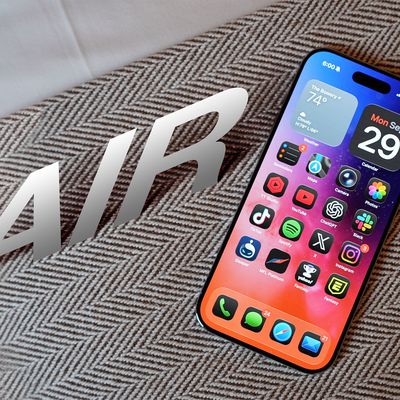
iphone 18 pro dynamic island live activity

What Is Dynamic Island and How Does It Work?

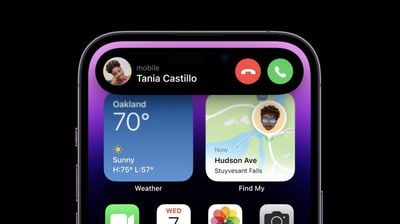
Apple's ‌Dynamic Island‌ is an alternative to the old notch first introduced on the iPhone X. The ‌Dynamic Island‌ incorporates a pill-shaped cutout and a hole punch cutout to house the TrueDepth camera hardware. These cutouts appear as one contiguous, longer pill shape when the iPhone is in use, and Apple integrates software functions around the pill.
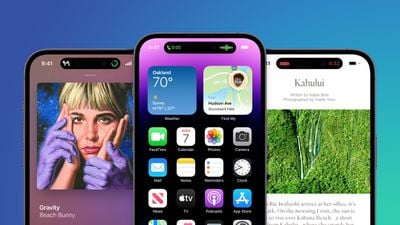
iphone 14 pro blue image
On newer iPhone models like the iPhone 17, iPhone Air, and ‌iPhone 18 Pro‌, display pixels around the ‌Dynamic Island‌ merge it into one pill-shaped area that changes size and shape to accommodate various types of alerts, notifications, and interactions, turning it into a kind of front-and-center information hub.

Which iPhone Models Feature Dynamic Island?

All of Apple's flagship models beginning with the iPhone 15 series have a ‌Dynamic Island‌, with the only exception being its entry-level iPhone 17e, which retains a notch.

What Can Dynamic Island Do?

Here's a breakdown of the many functions ‌Dynamic Island‌ can fulfill.
iPhone 14 Pro Dynamic Island 3

Dynamic Island: Display Outputs and Alerts

  • Apple Pay transaction confirmations
  • Privacy indicators when microphone or camera is in use
  • AirDrop file transfers
  • AirPods connection status and battery life
  • iPhone charging status and battery life
  • Low battery alerts
  • Silent mode turned on or off
  • Face ID unlocking
  • Carkey locking/unlocking
  • Apple Watch unlocking
  • NFC interactions
  • AirPlay connections
  • Focus mode changes
  • Shortcut actions
  • Airplane mode/no data alerts
  • SIM card alerts
  • Accessories connect
  • Find My alerts
  • Flashlight on indicator

Dynamic Island: Background Activities

  • Upcoming and turn-by-turn Maps directions
  • Incoming phone call and duration of call
  • Time remaining of playing song
  • Active timers
  • Live Activity sports scores
  • SharePlay sessions
  • Screen Recording
  • Voice memo recordings
  • Personal Hotspot connection

New Dynamic Island on iPhone 18 Pro
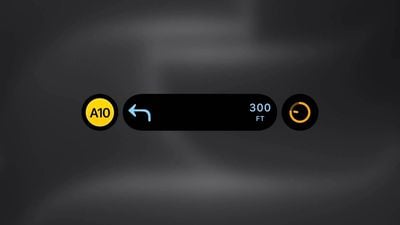
three live activities
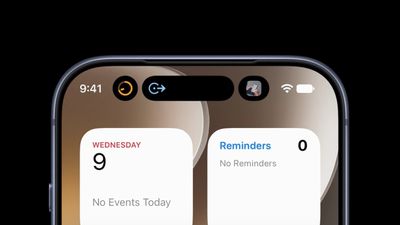
The ‌iPhone 18 Pro‌ and ‌iPhone 18 Pro‌ Max have a new, narrower ‌Dynamic Island‌ that allows for more information to be displayed around the pill-shaped cutout. This means ‌iPhone 18 Pro‌ users can see up to three Live Activities simultaneously. Until now, the ‌‌Dynamic Island‌‌ has only supported a maximum of two simultaneous Live Activities.

Can I Interact With Dynamic Island?

It's possible to interact with certain types of content displayed in the ‌Dynamic Island‌. For example, if it's showing something related to an app's background activity, you can tap the ‌Dynamic Island‌ to switch straight into the associated app.

In certain circumstances, such as when media is playing, you can also long press the ‌Dynamic Island‌ to bring up a widget containing playback controls.
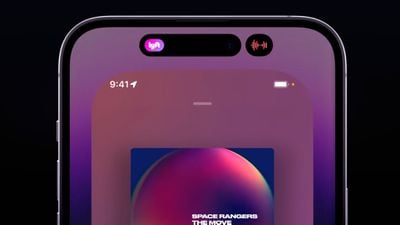
dynamic island split
The ‌Dynamic Island‌ is also capable of displaying multiple background activities at once, such as when a timer is counting down and when you're listening to music. When that happens, the island splits into a larger pill-shaped area and a smaller circular area, so you can see and interact with both activities. You can swap between them and tap into them, just like you can with the standard ‌Dynamic Island‌ interface.

Can I Disable Dynamic Island Animations?

There's currently no way to outright disable ‌Dynamic Island‌ content, however if you're distracted by its animations you can dismiss them by swiping left or right across the ‌Dynamic Island‌, without affecting any related background activity. This will return the pill-shape to its previous inert status.

Final Thoughts

Overall, the ‌Dynamic Island‌ on iPhone models is the type of impressive integration of software and hardware that Apple is known for, and the ability of third-party developers to tap into its potential means it is now more interactive than ever.
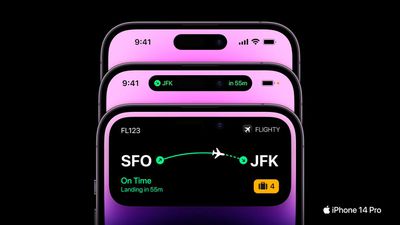
flighty iphone 14 digital island
Note that ‌Dynamic Island‌ also works with Live Activities in third-party apps.
Top Rated Comments

DMG35 Avatar
55 months ago
I think the Dynamic Island is awesome. I love it!!
Score: 10 Votes (Like | Disagree)
TheYayAreaLiving 🎗️ Avatar
55 months ago
Still trying to get used to Dynamic Island. I have to say it continues to surprise me daily now.
Score: 9 Votes (Like | Disagree)
dogstar Avatar
55 months ago
You don't use Dynamic Island, Dynamic Island uses you!
Score: 8 Votes (Like | Disagree)
adammusic Avatar
55 months ago
So much potential. Terrible initial implementation.
Most notifications dont need to expand to a fat dynamic notification. Ex: Shortcuts.
Fat dynamic notifications block time.
When you receive a phone call, sometimes you want to glance at the time, but its blocked.
Tap status bar to scroll back to the top is now a wonky mess.
Island now makes notification center and control center access even smaller and more difficult.
Face id doesnt need to be a popped out square, just give us a small animation inside dynamic island.

Island cuts in to youtube videos in portrait and landscape.
The status bar is just too big now.
If it going to be big and fat, let us add other stuff to status bar and customize.

Tap for widget, long press for app would be better.

Let us make something permanently stay in the island, like apple music player or podcast, for quick access to an app. Or some permanent info in there, day & date maybe. Anything really.

I get it’s early its implementation, but lets not eait 4 years until it’s fixed like everything else apple does.

We want day 1 full baked products, not half.
Score: 7 Votes (Like | Disagree)
55 months ago
Yes, but how do you turn it off?
Score: 6 Votes (Like | Disagree)
SteveJUAE Avatar
55 months ago
I still do not understand why these reviews fail to show how DI behaves in landscape and looks in bright sunlight :(
Score: 6 Votes (Like | Disagree)

Popular Stories

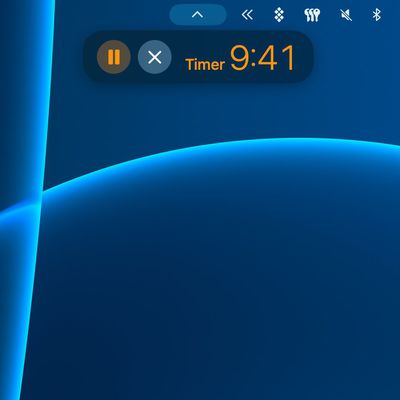
macOS 27 3 Live Activities Timer

macOS 27.3 Brings Live Activities to Macs Without Dynamic Island

Wednesday November 4, 2026 9:40 am PST by
The new MacBook Pro models with touch-enabled OLED displays feature the Dynamic Island instead of a notch, and it includes support for Live Activities. Fortunately, other Apple silicon Macs will not entirely miss out, as the macOS 27.3 update enables Live Activities for apps like Apple Music, Clock, and Voice Memos in the macOS menu bar. The first macOS 27.3 developer beta released this week ...
Living With the iPhone Air Thumb 3

iPhone Air 2 May Not Feature Smaller Dynamic Island

Monday November 23, 2026 5:22 am PST by
The iPhone Air 2 could retain the original model's Dynamic Island despite gaining a second rear camera, according to observations about recently shared dummy models. In a post on Weibo, the blogger known as "Experience More" highlighted the apparently unchanged display cutout in images of the iPhone Air 2 and iPhone 18 dummy models shared by Sonny Dickson last week. The user questioned why...
apple design award 2025

Apple Announces 2025 Design Award Winners Ahead of WWDC 2025

Tuesday June 3, 2025 10:14 am PDT by
As we wait for WWDC to kick off next Monday, Apple today announced the winners of its annual Apple Design Awards, recognizing apps and games for their innovation, ingenuity, and technical achievement. The 2025 Apple Design Award winners are listed below, with one app and one game selected per category: Delight and Fun - CapWords (App) and Balatro (Game) Innovation - Play (App) and PBJ -...
Latest Stories
The 50+ Best Apple Black Friday Deals Still Available on AirPods, iPads, and More
9 hours ago
HomePod Mini 2 in (RED) Seemingly Spotted Ahead of Announcement
6 hours ago
Apple's M6 and PROLED MacBook Pro Reach New Low Prices for Black Friday
17 hours ago
The MacRumors Show: iPhone Air 2 and iPhone 18 Are Coming
17 hours ago
Apple Store in Brisbane Reopening Next Month With New Design
17 hours ago
The 60+ Best Black Friday Accessory Deals on iPhone Chargers, TVs, Headphones, and More
18 hours ago
GTA VI Now (Barely) Running on Apple Silicon Macs
18 hours ago
The Best Black Friday Streaming Deals on Apple TV, Disney+, and More
19 hours ago
Apple TV's 'Carême' Wins International Emmy for Best Drama
20 hours ago
iPhone 18 Production Delay Leaves Apple Little Time Before Launch
20 hours ago
The Best Black Friday AirPods Deals Still Available
12 hours ago
The Best Black Friday Deals on Apple Home Products
21 hours ago
The Best Black Friday iPhone Deals Still Available
12 hours ago
The Best Black Friday iPad Deals Still Available
12 hours ago
The Best Black Friday Apple Watch Deals Still Available
12 hours ago
The Best Black Friday AirTag Deals Still Available
12 hours ago
The Best Black Friday Mac Deals Still Available
12 hours ago
iPhone Share of US Smartphone Market Hits 57% as Rivals Slip
22 hours ago
iPhone 20 Pro Rumored to Feature 3D-Printed Titanium Frame
1 day ago
Apple's Official 2026 Black Friday Offer Starts Rolling Out
2 days ago
Halide Adds Fill Light Feature for iPhone Duo
2 days ago
MacBook Air Black Friday Deals Now Live With Massive $399 Savings
2 days ago
Amazon Discounts All MacBook Neo Models by $99 for Black Friday
2 days ago
Kodak Launches Unique AirTag Rival With E-Ink Display
2 days ago
Here's Why the Apple Store is Going Down
2 days ago
Apple Still Working on Giant Foldable iPad That Could Cost $5,000
2 days ago
iPhones Dominate China's Weak Singles' Day Smartphone Sales
2 days ago
iPhone 20 Pro Could Feature Ceramic in Limited-Edition Model
2 days ago
Apple Faces Korean Regulator Review Over iPhone 16 AI Advertising
2 days ago
Apple Watch Ultra 4 Hits New Best-Ever Price of $649.99 for Black Friday
2 days ago
Related Apple News: Sport | Politics | Ipad | Entertainment | Technology