Skip to Content

iOS 17.3: How to Use Collaborative Apple Music Playlists

by

In iOS 17.3, Apple introduced collaborative Apple Music Playlists. Keep reading to learn how they work and how to make the most of them.
apple music collaborative playlists
With collaborative playlists, Apple now lets you take any of your existing playlists or create a new one and then invite others to join in to add songs and listen to it.

Perhaps you want to prepare a playlist for a night around the campfire, or a house party you're hosting. Well, now everyone can help you set the perfect atmosphere. So far there does not appear to be a limit on how many people can contribute to a shared playlist, so you'll be free to invite friends, family members, and anyone else who wants to get in on the action.

How to Collaborate on a Playlist

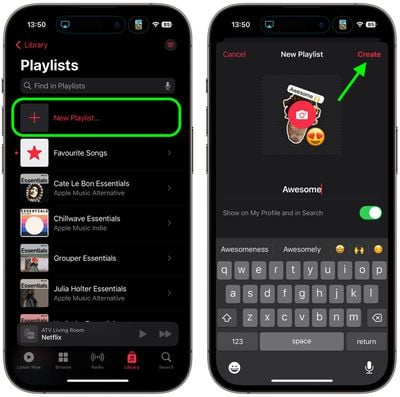
  1. Open the Music app on your iPhone, and in the Library tab, select Playlists.
  2. Tap New Playlist. Give your playlist a name and add a photo if desired, then tap Create.
    playlist

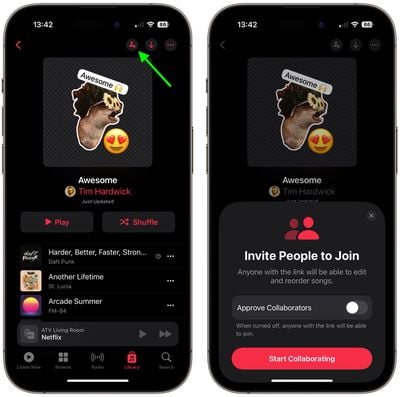
  3. From here, you can either begin adding music to the playlist, or start inviting other users to it. Tap the round icon that looks like a person in the top-right corner of the screen.
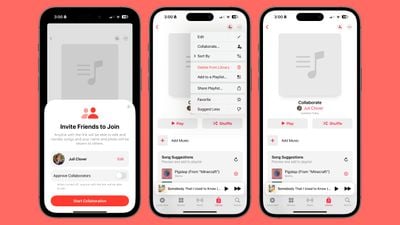
  4. If you want to approve collaborators tap the switch, otherwise anyone with the link will be able to join. Then tap Start Collaborating.
  5. Share the link using one of the options in the Share sheet. Note that links are valid for seven days.
    collaborative playlists

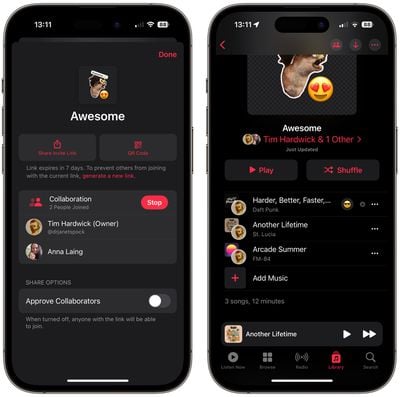
Once someone has joined the playlist, they can begin contributing to it. If at any time you want to view participants, remove someone, or copy the playlist link again, simply tap the icon now made up of two people silhouettes. You can also use this menu to generate a QR code to let people access the playlist.

As participants start collaborating, each track will include a picture of the person who added it. When you play a song, you'll also see who contributed the track to the playlist.
playlist

How To React to Playlist Tracks

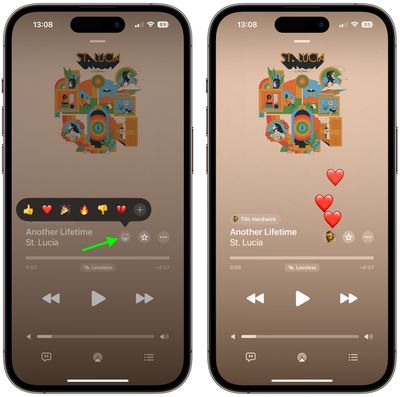
One of the fun things about sharing a collaborative playlist in ‌Apple Music‌ is that you can react to songs added by other people with an emoji. There are six emoji in the reaction bubble by default, but you can also use any emoji you like. Here's how it works.

  1. Play a song in the collaborative playlist that was added by someone else.
  2. Tap the emoji face icon in the playback screen.
  3. Select an emoji to react with, or tap the + button to bring up the emoji keyboard and select a different one.
music

That's all there is to it. Note that while collaborative playlists in ‌Apple Music‌ require iOS 17.3, people on devices running older versions of iOS can still join a shared playlist. They just won't be able to add or remove songs from it.

Popular Stories

ios 27 3 selfie sing

Apple Music's New Selfie Sing Feature Lets You Record Karaoke Videos

Tuesday November 3, 2026 4:05 pm PST by
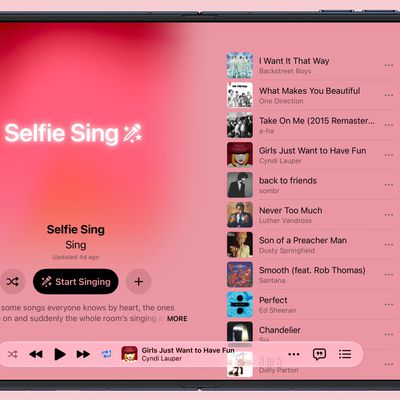
iOS 27.3 adds a new "Selfie Sing" feature in Apple Music that lets users record themselves while singing a song. There's a dedicated Selfie Sing playlist and a selfie camera view that shows lyrics on the screen while also recording a video. Apple has a description of the feature: There are some songs everyone knows by heart, the ones that come on and suddenly the whole room's singing along. ...
tidal logo

Tidal Bans AI Music, While Apple Music Sticks to Labels

Tuesday November 24, 2026 3:44 pm PST by
Streaming music service Tidal today said it plans to start blocking AI music on December 9. Any track generated entirely with AI will be removed from the platform, with Tidal rejecting AI songs in the future. Tidal lead Robert Andersen said 43 percent of tracks uploaded in the last 90 days have been flagged as AI-generated. Approximately 29 million songs will be deleted and Tidal expects...
apple music instagram

Instagram Now Lets You Save Songs to Apple Music

Wednesday November 18, 2026 5:19 pm PST by
Sometime in the last week or two, Instagram added a new Apple Music feature. You can now connect an Apple Music account to the social network and save songs you come across to an Apple Music playlist. If you tap a song link on a post or a story on Instagram, you'll see a prompt to connect Instagram to Apple Music. Once your Apple Music account is linked to Instagram, you can tap a song name...
Latest Stories
The 50+ Best Apple Black Friday Deals Still Available on AirPods, iPads, and More
8 hours ago
HomePod Mini 2 in (RED) Seemingly Spotted Ahead of Announcement
5 hours ago
Apple's M6 and PROLED MacBook Pro Reach New Low Prices for Black Friday
15 hours ago
The MacRumors Show: iPhone Air 2 and iPhone 18 Are Coming
15 hours ago
Apple Store in Brisbane Reopening Next Month With New Design
16 hours ago
The 60+ Best Black Friday Accessory Deals on iPhone Chargers, TVs, Headphones, and More
16 hours ago
GTA VI Now (Barely) Running on Apple Silicon Macs
17 hours ago
The Best Black Friday Streaming Deals on Apple TV, Disney+, and More
17 hours ago
Apple TV's 'Carême' Wins International Emmy for Best Drama
18 hours ago
iPhone 18 Production Delay Leaves Apple Little Time Before Launch
19 hours ago
The Best Black Friday AirPods Deals Still Available
11 hours ago
The Best Black Friday Deals on Apple Home Products
19 hours ago
The Best Black Friday iPhone Deals Still Available
11 hours ago
The Best Black Friday iPad Deals Still Available
11 hours ago
The Best Black Friday Apple Watch Deals Still Available
11 hours ago
The Best Black Friday AirTag Deals Still Available
11 hours ago
The Best Black Friday Mac Deals Still Available
11 hours ago
iPhone Share of US Smartphone Market Hits 57% as Rivals Slip
21 hours ago
iPhone 20 Pro Rumored to Feature 3D-Printed Titanium Frame
22 hours ago
Apple's Official 2026 Black Friday Offer Starts Rolling Out
2 days ago
Halide Adds Fill Light Feature for iPhone Duo
2 days ago
MacBook Air Black Friday Deals Now Live With Massive $399 Savings
2 days ago
Amazon Discounts All MacBook Neo Models by $99 for Black Friday
2 days ago
Kodak Launches Unique AirTag Rival With E-Ink Display
2 days ago
Here's Why the Apple Store is Going Down
2 days ago
Apple Still Working on Giant Foldable iPad That Could Cost $5,000
2 days ago
iPhones Dominate China's Weak Singles' Day Smartphone Sales
2 days ago
iPhone 20 Pro Could Feature Ceramic in Limited-Edition Model
2 days ago
Apple Faces Korean Regulator Review Over iPhone 16 AI Advertising
2 days ago
Apple Watch Ultra 4 Hits New Best-Ever Price of $649.99 for Black Friday
2 days ago
Related Apple News: Travel | Motoring | Ipad | Entertainment | Sport