Skip to Content

How to Enable and Disable Automatic Workout Detection in watchOS 5

by

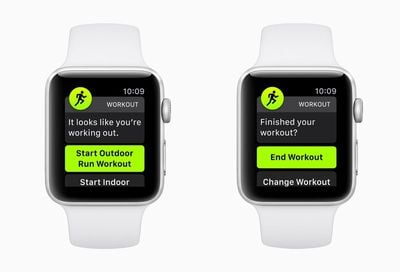
Apple's watchOS 5 update includes a new automatic workout detection feature, which is designed to make sure you never miss out on getting credit for one of your workouts.

Automatic workout detection is a setting that's enabled by default once you upgrade to watchOS 5, but if you don't want the feature, it can be turned off using the Apple Watch app on the iPhone or on the Apple Watch itself.
autodetectworkout

Enabling/Disabling Automatic Workouts on Apple Watch

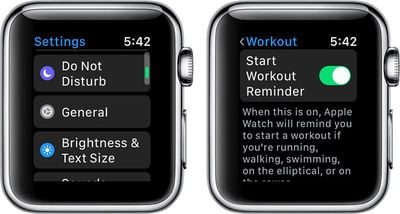
  1. Open the Settings app on Apple Watch.
  2. Choose General.
  3. Select "Workout."
  4. Scroll down to "Start Workout Reminder" and "End Workout Reminder." workoutstartreminder
  5. Set the toggles to your personal preferences.
Enabling/Disabling Automatic Workouts on iPhone

  1. Open up the Watch app on the iPhone.
  2. Choose "Workout" to access the settings for the Workout app.
  3. Scroll down to "Start Workout Reminder" and "End Workout Reminder." automaticworkoutdetection
  4. Set the toggles to your personal preferences.
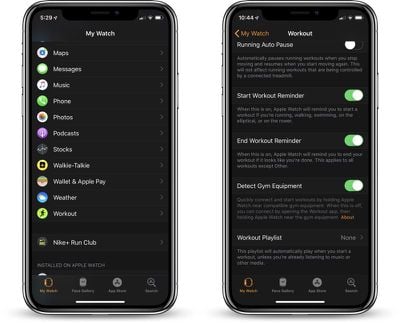
Automatic workout detection for starting a workout and ending a workout are two separate settings, so you can control them individually if so desired.

Start Workout Reminder

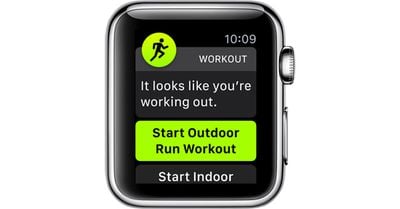
Automatic workout detection is designed to let the Apple Watch remind you to start a workout if you forget to do so, which it will do through a notification that pops up on the Apple Watch asking if you want to begin a workout.
watchos5automaticworkoutdetection
Automatic detection when your workout starts is compatible with running, walking, swimming, elliptical workouts, or rower workouts.

Even if you initially forget to start a workout in watchOS 5, this new workout detection feature will give you credit for the exercise you've already done.

End Workout Reminder

With automatic detection for when a workout ends, which is labeled as "End Workout Reminder" the Apple Watch will remind you to end a workout if it looks like you've finished up. This too works through a notification that directs you to the workout app.

Unlike automatic workout detection for starting a workout, automatic detection for ending one works with all workouts aside from those in the "Other" category.


Related Roundup: Apple Watch 12
Buyer's Guide: Apple Watch (Buy Now)
Related Forum: Apple Watch

Top Rated Comments

106 months ago
My guess? Apple is stuck on their "baby steps" implementing model and those were the only workout types the developers cared about. Next year, if the public seems to like these, they'll add another couple of workout types. Or they'll eliminate the feature completely.
FWIW, I turned this off. I found it turning itself on while I was walking to work, which would be OK, but I generally have at least one hand full of stuff and responding to the alert has an annoyance value that exceeds my interest in recording a walking workout.

Maybe a good feature add would be enabling workouts on a single type basis. For example, yes to running, no for walking.
Score: 3 Votes (Like | Disagree)
106 months ago
I’m so disappointed with this feature. It was probably my most anticipated feature in watchOS 5 but it just doesn’t work well enough. It’s baffeling considering Fitbit has been able to do this with ease for years. Come on, Apple
Score: 2 Votes (Like | Disagree)
inkhorn Avatar
109 months ago
What would be great would be a stop workout on pairing with car Bluetooth / CarPlay, so I don't forget and log vehicle miles onto the route of my workout if I'm driving home.

Especially as there's no way to easily trim the start or end of workouts. :(
Score: 2 Votes (Like | Disagree)
JRobinsonJr Avatar
106 months ago
I wonder why automatic workout startup is limited to these modes...
My guess? Apple is stuck on their "baby steps" implementing model and those were the only workout types the developers cared about. Next year, if the public seems to like these, they'll add another couple of workout types. Or they'll eliminate the feature completely.
Score: 1 Votes (Like | Disagree)
daflowerz Avatar
109 months ago
PLUS... auto-pause/resume should apply to virtually all exercise types. Right now - best I can figure out - it only applies to running. My knees can't handle running so I walk... a lot. IMO it just makes sense to pause a workout when you stop the associated movement regardless of the type.
I totally agree. Just works for running now. I really need it for bicycling when stopped at lights, etc..
Score: 1 Votes (Like | Disagree)
pat500000 Avatar
109 months ago
We need a new update that erases everything on the watch except a clock mode.
Score: 1 Votes (Like | Disagree)

Popular Stories

apple watch series 3 design

Apple Offers Steps to Fix Daylight Saving Time Bug on Apple Watch

Sunday November 1, 2026 3:34 am PST by
Apple has published a support document describing what to do if your Apple Watch continues to show time that's off by one hour after daylight savings time changes. "This incorrect time appears only on the Always On display when your wrist is down," says Apple. "When you activate the display by tapping it or raising your wrist, the time changes to the correct hour." To fix the issue, Apple says ...
muse apple watch app

Meta's Muse AI Agent Comes to Apple Watch

Monday November 9, 2026 1:55 pm PST by
Meta today updated the Muse app for iOS to add Apple Watch support, which means Muse users can access the proactive AI agent from the watch. The app adds the Muse character to the watch with an option to text it, dictate text to it, or call it. There's also a Muse complication for quick access. Muse is Meta's personal AI agent that can complete tasks for users. It is available as a...
siri recap live rewind

watchOS 27.3 Brings Live Rewind and Siri Recap to Apple Watch

Tuesday November 3, 2026 10:35 am PST by
With the first beta of watchOS 27.3, Apple is introducing new Audio Intelligence features it previewed for the Apple Watch Series 12 and Ultra 4 earlier this year. Powered by the S11 chip, Audio Intelligence includes Live Rewind, Siri Recap, Sound Recognition, and Shazam Music Recognition. Sound Recognition and Shazam are already on the watch, but Live Rewind and Siri Recap are now available ...
Latest Stories
The 50+ Best Apple Black Friday Deals on AirPods, iPads, MacBooks, and More
30 minutes ago
Apple's M6 and PROLED MacBook Pro Reach New Low Prices for Black Friday
34 minutes ago
The MacRumors Show: iPhone Air 2 and iPhone 18 Are Coming
40 minutes ago
Apple Store in Brisbane Reopening Next Month With New Design
1 hour ago
The 60+ Best Black Friday Accessory Deals on iPhone Chargers, TVs, Headphones, and More
2 hours ago
GTA VI Now (Barely) Running on Apple Silicon Macs
2 hours ago
The Best Black Friday Streaming Deals on Apple TV, Disney+, and More
3 hours ago
Apple TV's 'Carême' Wins International Emmy for Best Drama
4 hours ago
iPhone 18 Production Delay Leaves Apple Little Time Before Launch
4 hours ago
The Best Black Friday AirPods Deals
5 hours ago
The Best Black Friday Deals on Apple Home Products
5 hours ago
The Best Black Friday iPhone Deals
5 hours ago
The Best Black Friday iPad Deals
5 hours ago
The Best Black Friday Apple Watch Deals
5 hours ago
The Best Black Friday AirTag Deals
5 hours ago
The Best Black Friday Mac Deals
5 hours ago
iPhone Share of US Smartphone Market Hits 57% as Rivals Slip
6 hours ago
iPhone 20 Pro Rumored to Feature 3D-Printed Titanium Frame
8 hours ago
Apple's Official 2026 Black Friday Offer Starts Rolling Out
1 day ago
Halide Adds Fill Light Feature for iPhone Duo
1 day ago
MacBook Air Black Friday Deals Now Live With Massive $399 Savings
1 day ago
Amazon Discounts All MacBook Neo Models by $99 for Black Friday
1 day ago
Kodak Launches Unique AirTag Rival With E-Ink Display
1 day ago
Here's Why the Apple Store is Going Down
1 day ago
Apple Still Working on Giant Foldable iPad That Could Cost $5,000
1 day ago
iPhones Dominate China's Weak Singles' Day Smartphone Sales
1 day ago
iPhone 20 Pro Could Feature Ceramic in Limited-Edition Model
1 day ago
Apple Faces Korean Regulator Review Over iPhone 16 AI Advertising
1 day ago
Apple Watch Ultra 4 Hits New Best-Ever Price of $649.99 for Black Friday
1 day ago
New Apple Store Opening in India, Download the Special Wallpaper Now
2 days ago
Related Apple News: South Africa | Politics | Culture | Ipad | Mac






























