Skip to Content

iOS 17.2: How to Use Apple's New Journal App

by

Apple introduced its long-awaited Journal app for iPhone in iOS 17.2. Here is everything you need to know about using Journal.
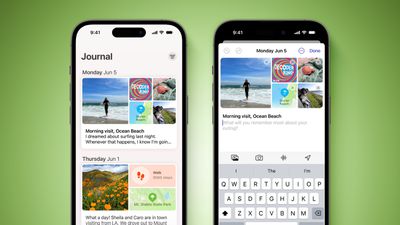
Journal App iOS 17 Feature Green
Apple in June 2023 announced it was bringing its own journaling app to iOS 17, and it is finally here as part of Apple's December software update, iOS 17.2.

Apple's Journal app lets you record your daily thoughts and activities, incorporating data like photos, music listened to, workouts, and more, plus it suggests topics to write about.

Creating Your First Journal Entry

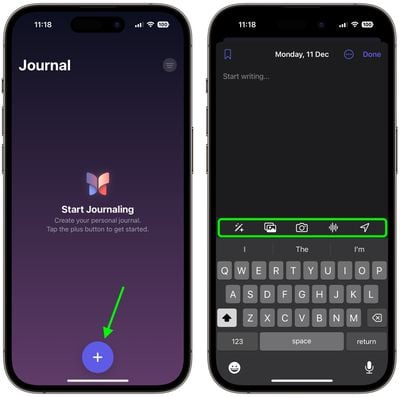
The Journal app has a simple, straightforward interface. When you open it up, you're presented with a "+" button, and tapping on it lets you start a new entry. When you have added a few entries, the button at the top-right lets you filter them based on photos and activities.
create first journal entry
The writing interface includes several buttons along the top of the keyboard that you can use to access the aforementioned "moments," as well as add photos, take pictures, add voice recordings, and add location tags, respectively. Before you can use them, you will be prompted to allow the app to access your pictures, camera, microphone, and location. Journal entries are automatically dated, and you can bookmark your favorite ones.
journal suggestions
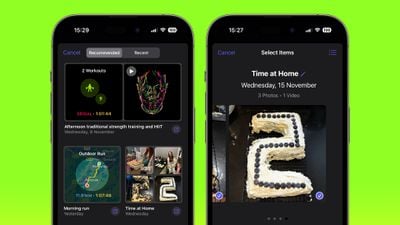
By default, the Journal app will suggest recent and recommended "moments" from your week that include photos, workouts, or places you visited, and you can use these as writing prompts or you can tap New Entry and start writing. (To write new entries without viewing suggestions first toggle on the switch in Settings ➝ Journal ➝ Skip Journaling Suggestions.)

Using Journaling Reflections

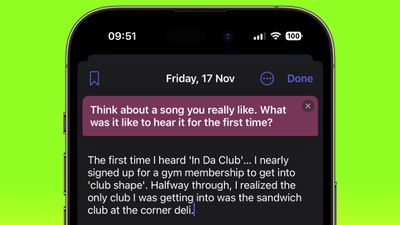
If you have a serious case of writer's block, the Journal app can offer you entry prompts in the form of "reflections." When starting a new entry, these reflections appear in between your recommended and recent "moments," are designed to inspire and guide you, providing ideas and topics to explore in each entry.
journal
The reflections can vary from thought-provoking questions to creative writing cues, and if the one you're offered doesn't get your gears turning, you can generate a new one by tapping the two arrows that form a circle.

Setting a Journaling Schedule

Staying consistent with journaling can be difficult, but your iPhone can make it a lot easier with the new Journal app's scheduling feature. Here's how to set it up.

  1. Open the Settings app on your iPhone.
  2. Scroll down and tap Journal.
  3. Tap Journaling Schedule, then toggle on the switch next to Schedule.
  4. Choose the days of the week that you want to be reminded to write, and select a time of day to receive the prompt.
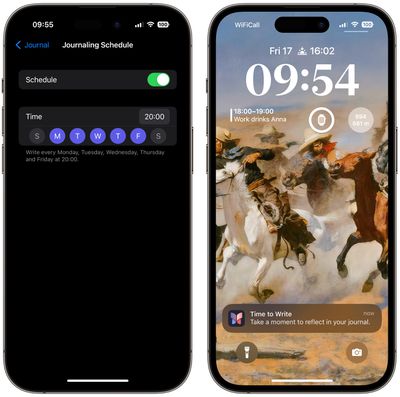
journal

The scheduling option isn't just a reminder – it's about building a habit. So whether it's a gentle reminder notification that you need in the morning or a prompt before bed, you can adapt the feature to your personal routine.

Lock Your Journal

Privacy and security are paramount when it comes to personal journaling. That's why Apple's Journal app introduces enhanced security features, including encryption and password protection, to safeguard your journal from unauthorized access.

To lock your journal using your device's passcode, Face ID, or Touch ID, follow these steps.

  1. Open the Settings app on your iPhone.
  2. Scroll down and tap Journal.
  3. Tap Lock Journal and enter your passcode when prompted.
  4. Toggle on the switch next to Lock.
  5. Tap Require Passcode, then select from the options: Immediately, After 1 minute, After 5 minutes, After 15 minutes.
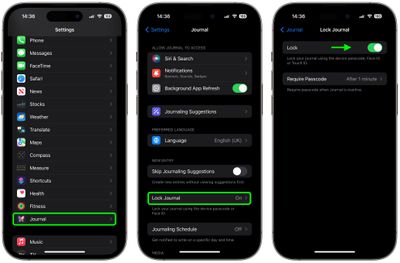
lock journal

That's all there is to it. Your journal is now inaccessible without entering your device passcode, or using Face ID or Touch ID, providing you with peace of mind every time you record sensitive or personal information.


Top Rated Comments

39 months ago
If it is not also on macOS, then I wouldn't bother with it at all.
Score: 24 Votes (Like | Disagree)
Kylo83 Avatar
39 months ago
its just notes, deleted as soon as I installed 17.2 dont need more clutter apps
Score: 15 Votes (Like | Disagree)
Pangalactic Avatar
39 months ago
So it's essentially Apple Notes with a slightly different UI
Score: 11 Votes (Like | Disagree)
39 months ago
I understand journal apps.
I use Day One.

What I don’t understand is who uses a journal app only on the phone?
I would use Apple Journal App only when I am sitting on the toilet. :rolleyes:

I am not saying there shouldn’t be, but primary on actual keyboards…at least iPad…


Meh….. anyway….
Score: 9 Votes (Like | Disagree)
azentropy Avatar
39 months ago
Super disappointing that it is iOS only. I missed that until it started to be included in the iOS betas and not the Mac or iPad betas.
Score: 9 Votes (Like | Disagree)
39 months ago
It's a decent start. I would like to be able to separate out categories/#tags or multiple journals for work versus personal thoughts, as I'd like to journal professional growth and ideas separately from personal journaling.
Score: 7 Votes (Like | Disagree)

Popular Stories

1password deal blue

1Password Security Breach: What Was Accessed and What Wasn't

Wednesday November 25, 2026 1:09 pm PST by
Popular password management app 1Password today said it experienced a security breach earlier this month. 1Password says some customer names and email addresses were accessed, but no customer vault contents were compromised. On November 19, 1Password saw indications that an employee's GitHub account had been breached and began investigating. The company says the breached GitHub account was...
apple design award 2025

Apple Announces 2025 Design Award Winners Ahead of WWDC 2025

Tuesday June 3, 2025 10:14 am PDT by
As we wait for WWDC to kick off next Monday, Apple today announced the winners of its annual Apple Design Awards, recognizing apps and games for their innovation, ingenuity, and technical achievement. The 2025 Apple Design Award winners are listed below, with one app and one game selected per category: Delight and Fun - CapWords (App) and Balatro (Game) Innovation - Play (App) and PBJ -...
ipad pro prime

Apple Has iPads Running macOS Internally, Says Gurman

Wednesday November 25, 2026 4:55 am PST by
Apple has iPads running macOS internally and has had them "for some time," according to Bloomberg's Mark Gurman, although he says no work is currently being done to bring the Mac operating system to iPads. Speaking on his latest Power On podcast, Gurman said there is "no work being done to consumerize macOS on the iPad." Rather, Apple will continue to bring Mac features and apps like Final Cut ...
Latest Stories
The 50+ Best Apple Black Friday Deals on AirPods, iPads, MacBooks, and More
4 hours ago
The 60+ Best Black Friday Accessory Deals on iPhone Chargers, TVs, Headphones, and More
6 minutes ago
GTA VI Now (Barely) Running on Apple Silicon Macs
26 minutes ago
The Best Black Friday Streaming Deals on Apple TV, Disney+, and More
1 hour ago
Apple TV's 'Carême' Wins International Emmy for Best Drama
2 hours ago
iPhone 18 Production Delay Leaves Apple Little Time Before Launch
2 hours ago
The Best Black Friday AirPods Deals
3 hours ago
The Best Black Friday Deals on Apple Home Products
3 hours ago
The Best Black Friday iPhone Deals
3 hours ago
The Best Black Friday iPad Deals
3 hours ago
The Best Black Friday Apple Watch Deals
3 hours ago
The Best Black Friday AirTag Deals
3 hours ago
The Best Black Friday Mac Deals
4 hours ago
iPhone Share of US Smartphone Market Hits 57% as Rivals Slip
4 hours ago
iPhone 20 Pro Rumored to Feature 3D-Printed Titanium Frame
6 hours ago
Apple's Official 2026 Black Friday Offer Starts Rolling Out
1 day ago
Halide Adds Fill Light Feature for iPhone Duo
1 day ago
MacBook Air Black Friday Deals Now Live With Massive $399 Savings
1 day ago
Amazon Discounts All MacBook Neo Models by $99 for Black Friday
1 day ago
Kodak Launches Unique AirTag Rival With E-Ink Display
1 day ago
Here's Why the Apple Store is Going Down
1 day ago
Apple Still Working on Giant Foldable iPad That Could Cost $5,000
1 day ago
iPhones Dominate China's Weak Singles' Day Smartphone Sales
1 day ago
iPhone 20 Pro Could Feature Ceramic in Limited-Edition Model
1 day ago
Apple Faces Korean Regulator Review Over iPhone 16 AI Advertising
1 day ago
Apple Watch Ultra 4 Hits New Best-Ever Price of $649.99 for Black Friday
1 day ago
New Apple Store Opening in India, Download the Special Wallpaper Now
2 days ago
Redesigned OLED MacBook Air Could Launch in 2027 or 2028
2 days ago
AirPods Pro 3 for $149 is One of The Best Black Friday Deals This Year
2 days ago
1Password Security Breach: What Was Accessed and What Wasn't
2 days ago
Related Apple News: Mac | South Africa | Reviews | Education | Iphone






























