
Skip to Content

How to Update macOS Using a Simple Terminal Command

by

The Mac App Store Is a Free Download through Software Update Apple Confims 2If you're sick of waiting for the progress bar to complete every time you reboot after a macOS software update, then you'll be pleased to learn there's another way to update your Mac that could potentially reduce your downtime.

The process involves a simple Terminal command, and allows you to continue using your Mac as the update downloads and the initial software installation takes place in the background. In our tests, we found that this method was capable of shaving off several minutes of idle time during installation restarts, but that the time-saving depends on the machine and the update in question.

Users with older Macs in particular will likely appreciate this tip, as it saves having to fire up the Mac App Store altogether, which can be slow-going and sometimes even downright unresponsive. Read on to find out how it's done.

How to Update macOS From the Command Line

Before following these steps, ensure you have a full backup of your system, which should be par for the course when performing any update. Note that the following procedure only lists stock Apple system updates (iTunes, Photos, printer drivers the like), but not updates for other Apple apps that aren't installed with macOS (Xcode, for instance), and not third-party updates from the Mac App Store.

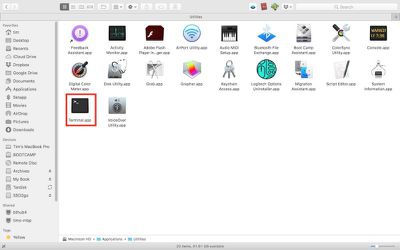
  1. To update macOS from the command line, first launch Terminal, which can be found in the Applications/Utilities folder. This will open a Terminal window and a command prompt for you to begin typing.
    Terminal

  2. Input the following command and press Enter: softwareupdate -l
    software update terminal

  3. Wait as your Mac searches Apple's servers for any macOS software updates currently available for your system. If no updates are available, you'll be returned to the command prompt.
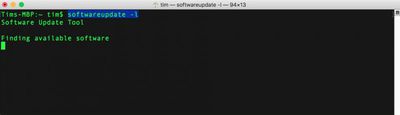
Now let's take a look at the command's output. Available updates always appear as items in a list. In our example, only one update is available at this time, but every item follows the same format, as shown:
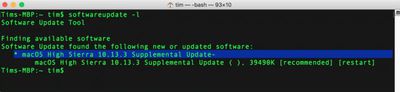
update identifier
The asterisked line denotes the individual software update package that's available for your Mac to download. This line is also known as the identifier.
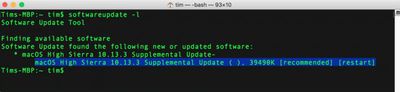
update details
The second line offers a more detailed description of the update, including the version number (usually in brackets) and the download file size in kilobytes. [Recommended] means the update is recommended for all users, and [restart] indicates that your Mac needs to reboot for installation to complete.

To download and install a specific update in the list, use the following format, but replacing NAME with the update's identifier:

softwareupdate -i NAME

Or:

softwareupdate --install NAME

Note that if the package name you’re trying to install has spaces in it, you'll need to enclose the whole thing in single quotes. So for example:

softwareupdate --install 'macOS High Sierra 10.13.3 Supplemental Update-'

Also, be alert for spaces at the end of the package names. If present, they also need to be included within the quotes.

Moving on, to download a specific update for your system without also installing it then and there, you can use:

softwareupdate -d NAME

Updates downloaded in this way can be subsequently installed with the same -i or --install command above, or even through the Mac App Store. These updates are downloaded to a folder located in /Library/Updates, but they aren't designed to be installed by double-clicking the packages in that directory. You'll need to use the --install command or visit the Mac App Store to actually initiate the install.

Lastly, to download and install all available updates for your system, type the command:

softwareupdate -i -a

Using these commands, you'll be able to leave the update to download and continue to install in the background while you get on with other things. All being well, Terminal will eventually prompt you to restart your machine manually so that the full installation procedure can complete. (Note that the softwareupdate utility requires admin authentication for all commands except the -l or -list command. If you run softwareupdate as a normal admin user, you will be prompted for a password where required.)
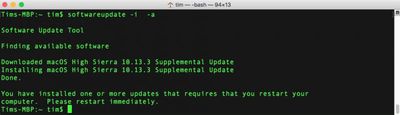
restart prompt
As some users will no doubt be aware, there are several additional options that can be used in conjunction with the softwareupdate utility. For example, -schedule on/off enables/disables your Mac's scheduled background check for updates. More adventurous readers can use man softwareupdate and softwareupdate -h for a summary list of commands.


Top Rated Comments

114 months ago
My point, a good OS, no need for terminal. Apple makes a good OS, for most terminal rarely if ever needed. The reason I stay with MacOS.
As a software engineer I'm always amazed that there are people who are so CLI-phobic. The GUI has little or nothing to do with the OS. Neither does the terminal for that matter. They are both human user interfaces to communicate with the machine OS.

The difference is the CLI typically provides more options and is more concise in how you do things.

Given the time and resources to create a GUI there are often compromises made to get the basic functionality without providing all of the options.

macOS is a Unix based OS at it's core, just like Solaris, Linux or FreeBSD. Lots of money allowed Apple to create better than average GUI apps and interfaces. There is little magic in the Darwin OS itself.

Praising the CLI over the GUI is a matter of preference and what you need to get done.
Score: 14 Votes (Like | Disagree)
114 months ago
Buy Apple Products so I do not need the terminal commands. When I feel like I am missing the good old days, fire up my RaspberryPi. :D

I used to think like this also. But these days the Apple UI is getting so bad, that I have started using the command line more and more. I have to agree with the article, the App Store app sucks. When it was just the software update app it seemed to work just fine.

But the App Store app UI is usually out of sync with what is actually happening. If you are like me, when its time to install updates, I want them installed now, not sometime in the future when the App Store app feels like. Usually, I have made extra backups and cleaned everything up, before installing. After the update I check a number of things to make sure they are not hosed.

5 years ago I installed Apple update without any additional work, the day they were released. Not any more. Apple has, by its actions, lost my trust. Today I won't install any update until after its been out for weeks, if not longer. IMO Apple's main thrust these days is publicity, not performance and reliability and I am not willing to let their lack of ability effect my income.
Score: 8 Votes (Like | Disagree)
Kaibelf Avatar
114 months ago
I just stick with "sudo softwareupdate -ia" for all my updates these days. That has never caught me up in any errors, and always works.
Score: 8 Votes (Like | Disagree)
ArtOfWarfare Avatar
114 months ago
Apple has a pretty comprehensive set of commmand line tools that it seems like nobody ever talks about.

I found this one useful several years ago when the Mac App Store just wasn’t working for me.
Score: 8 Votes (Like | Disagree)
KazKam Avatar
114 months ago
I know I've posted this in other threads related to software updates in macOS, but man, I REALLY miss the old Software Update. It was concise but still had all the information I needed to make an informed decision about an update (each update its own line item, terse description and change log, restart requirement, FILE SIZE, and it seemed much faster at scanning your system and refreshing available updates.

The App Store "Updates" tab OTOH is slooooooooow, convoluted, takes up four times the space yet tells me less, buries individual updates under macOS updates, and won't tell me how large a file is before I decide to download it. It sucks.

Edit: I half wonder if Apple is being intentionally obtuse about updates. I get the impression they'd be super happy if the choice of updating anything was taken out of the hands of users entirely and they were able to foist every update instantaneously, damn the consequences.
Score: 5 Votes (Like | Disagree)
MacsRgr8 Avatar
114 months ago
NERD ALERT! ;)
Yes, and finally so!
Back to the good ol' geek UNIX fun of macOS!!
Score: 5 Votes (Like | Disagree)

Popular Stories

1password deal blue

1Password Security Breach: What Was Accessed and What Wasn't

Wednesday November 25, 2026 1:09 pm PST by
Popular password management app 1Password today said it experienced a security breach earlier this month. 1Password says some customer names and email addresses were accessed, but no customer vault contents were compromised. On November 19, 1Password saw indications that an employee's GitHub account had been breached and began investigating. The company says the breached GitHub account was...
apple design award 2025

Apple Announces 2025 Design Award Winners Ahead of WWDC 2025

Tuesday June 3, 2025 10:14 am PDT by
As we wait for WWDC to kick off next Monday, Apple today announced the winners of its annual Apple Design Awards, recognizing apps and games for their innovation, ingenuity, and technical achievement. The 2025 Apple Design Award winners are listed below, with one app and one game selected per category: Delight and Fun - CapWords (App) and Balatro (Game) Innovation - Play (App) and PBJ -...
ipad pro prime

Apple Has iPads Running macOS Internally, Says Gurman

Wednesday November 25, 2026 4:55 am PST by
Apple has iPads running macOS internally and has had them "for some time," according to Bloomberg's Mark Gurman, although he says no work is currently being done to bring the Mac operating system to iPads. Speaking on his latest Power On podcast, Gurman said there is "no work being done to consumerize macOS on the iPad." Rather, Apple will continue to bring Mac features and apps like Final Cut ...
Latest Stories
The 50+ Best Apple Black Friday Deals on AirPods, iPads, MacBooks, and More
1 hour ago
Apple's M6 and PROLED MacBook Pro Reach New Low Prices for Black Friday
2 hours ago
The MacRumors Show: iPhone Air 2 and iPhone 18 Are Coming
2 hours ago
Apple Store in Brisbane Reopening Next Month With New Design
2 hours ago
The 60+ Best Black Friday Accessory Deals on iPhone Chargers, TVs, Headphones, and More
3 hours ago
GTA VI Now (Barely) Running on Apple Silicon Macs
3 hours ago
The Best Black Friday Streaming Deals on Apple TV, Disney+, and More
4 hours ago
Apple TV's 'Carême' Wins International Emmy for Best Drama
4 hours ago
iPhone 18 Production Delay Leaves Apple Little Time Before Launch
5 hours ago
The Best Black Friday AirPods Deals
6 hours ago
The Best Black Friday Deals on Apple Home Products
6 hours ago
The Best Black Friday iPhone Deals
6 hours ago
The Best Black Friday iPad Deals
6 hours ago
The Best Black Friday Apple Watch Deals
6 hours ago
The Best Black Friday AirTag Deals
6 hours ago
The Best Black Friday Mac Deals
6 hours ago
iPhone Share of US Smartphone Market Hits 57% as Rivals Slip
7 hours ago
iPhone 20 Pro Rumored to Feature 3D-Printed Titanium Frame
9 hours ago
Apple's Official 2026 Black Friday Offer Starts Rolling Out
1 day ago
Halide Adds Fill Light Feature for iPhone Duo
1 day ago
MacBook Air Black Friday Deals Now Live With Massive $399 Savings
1 day ago
Amazon Discounts All MacBook Neo Models by $99 for Black Friday
1 day ago
Kodak Launches Unique AirTag Rival With E-Ink Display
1 day ago
Here's Why the Apple Store is Going Down
1 day ago
Apple Still Working on Giant Foldable iPad That Could Cost $5,000
1 day ago
iPhones Dominate China's Weak Singles' Day Smartphone Sales
1 day ago
iPhone 20 Pro Could Feature Ceramic in Limited-Edition Model
1 day ago
Apple Faces Korean Regulator Review Over iPhone 16 AI Advertising
1 day ago
Apple Watch Ultra 4 Hits New Best-Ever Price of $649.99 for Black Friday
1 day ago
New Apple Store Opening in India, Download the Special Wallpaper Now
2 days ago
Related Apple News: Buyers Guide | Iphone | Culture | News | Business





























