Skip to Content

How to Update Apple Watch's watchOS Software

by

watchOS is the operating system that runs on the Apple Watch, powering its fitness tracking capabilities, apps, communication features, time-keeping abilities, and more. Apple plans to push regular updates to fix watchOS bugs, refine performance, and introduce new features, and the release of watchOS 2 alongside iOS 9 later today is a major uprade for the platform. (Update: Apple has delayed the public release of watchOS 2.)
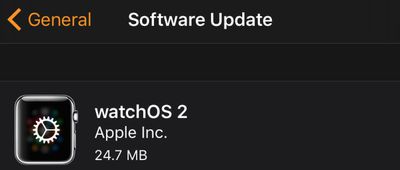
watchos_2_install
watchOS updates are installed in a unique way that differs from how we install iPhone and Mac updates, so we've crafted a quick tutorial to remind users how to get the latest version of watchOS on their Apple Watches so they're ready for watchOS 2.

Before You Start

Before you try to download and install the new version of watchOS, make sure of the following:

  1. Your iPhone has been updated to iOS 9.
  2. Your iPhone and Apple Watch are within range of each other.
  3. Your Apple Watch has at least a 50 percent charge.
  4. Your Apple Watch is connected to its charger.
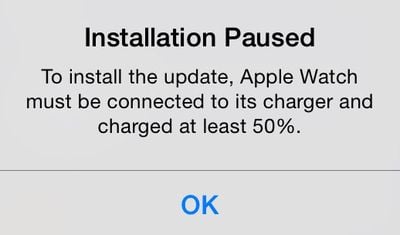
How to install software on apple watch 2
The last two requirements are important. You will be able to download the new version of watchOS without a 50 percent charge or Apple Watch resting on its charger, but you won't be able to install it. During the installation step, you will instead see a message that the installation is paused and won't continue until Apple Watch is connected to the charger with at least a 50 percent charge.

Downloading and Installing the Update

  1. Open the Apple Watch app on your iPhone and select the My Watch tab if necessary.
  2. Tap General, then tap Software Update.
  3. Tap Download and Install to begin the process.
  4. Enter your four-digit passcode on Apple Watch when prompted.
  5. The Apple logo and progress bar will appear when the software is installing. When finished, Apple Watch will restart.

If Something Goes Wrong
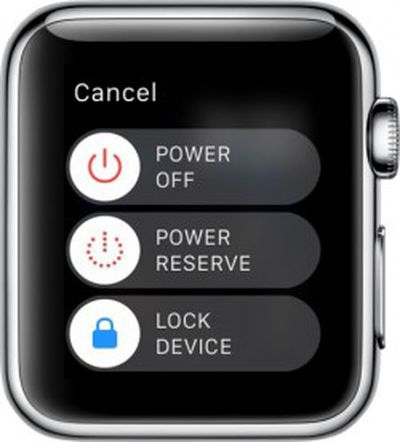
Apple Watch Power OffIf, for some reason, the download freezes up or you can't get the software to install on Apple Watch, you can try restarting the device.

Restarting

  1. Hold down the Side button until the Power Off slider appears.
  2. Slide the bar to shut off Apple Watch.
  3. Hold down the Side button until the Apple logo appears.
  4. Wait for Apple Watch to restart.
  5. Enter your passcode when prompted.

Hard Reset
If powering down Apple Watch does not work, you can also try a hard reset. This forces the device to shut off. It usually takes a bit longer to restart Apple Watch when you perform a hard reset.

  1. Hold both the Side button and Digital Crown down at the same time.
  2. The screen will go blank, and then the Apple logo will appear.
  3. Wait for Apple Watch to restart.
  4. Enter your passcode when prompted.

Apple is rapidly iterating on watchOS, so don't be surprised if we continue to see frequent updates. watchOS arrives just five months after the Apple Watch's debut and brings a host of new features including native third-party apps, so most Apple Watch owners will want to upgrade as soon as possible and begin exploring what's new.


Related Roundup: Apple Watch 12
Buyer's Guide: Apple Watch (Buy Now)
Related Forum: Apple Watch

Top Rated Comments

WarHeadz Avatar
146 months ago
Thanks for this great article. Will start charging my AW now to be ready . I've ordered pizza and Coca Cola!
You're celebrating a software update with pizza and coke? Hope you don't use Windows 10 or you'd be obese by now.

Edit: Ouch, bet you wish you didn't order that pizza so soon. No software update for the Watch today. :(
Score: 5 Votes (Like | Disagree)
drumcat Avatar
146 months ago
Thanks for this great article. Will start charging my AW now to be ready . I've ordered pizza and Coca Cola!
How's that pizza tasting with the delay? :)
Score: 1 Votes (Like | Disagree)
146 months ago
These are some nice tips.
Score: 1 Votes (Like | Disagree)

Popular Stories

apple watch series 3 design

Apple Offers Steps to Fix Daylight Saving Time Bug on Apple Watch

Sunday November 1, 2026 3:34 am PST by
Apple has published a support document describing what to do if your Apple Watch continues to show time that's off by one hour after daylight savings time changes. "This incorrect time appears only on the Always On display when your wrist is down," says Apple. "When you activate the display by tapping it or raising your wrist, the time changes to the correct hour." To fix the issue, Apple says ...
muse apple watch app

Meta's Muse AI Agent Comes to Apple Watch

Monday November 9, 2026 1:55 pm PST by
Meta today updated the Muse app for iOS to add Apple Watch support, which means Muse users can access the proactive AI agent from the watch. The app adds the Muse character to the watch with an option to text it, dictate text to it, or call it. There's also a Muse complication for quick access. Muse is Meta's personal AI agent that can complete tasks for users. It is available as a...
siri recap live rewind

watchOS 27.3 Brings Live Rewind and Siri Recap to Apple Watch

Tuesday November 3, 2026 10:35 am PST by
With the first beta of watchOS 27.3, Apple is introducing new Audio Intelligence features it previewed for the Apple Watch Series 12 and Ultra 4 earlier this year. Powered by the S11 chip, Audio Intelligence includes Live Rewind, Siri Recap, Sound Recognition, and Shazam Music Recognition. Sound Recognition and Shazam are already on the watch, but Live Rewind and Siri Recap are now available ...
Latest Stories
The 50+ Best Apple Black Friday Deals Still Available on AirPods, iPads, and More
2 hours ago
Here Are the Best Apple Black Friday Leftover Deals You Can Get Today
49 minutes ago
HomePod Mini 2 in (RED) Seemingly Spotted Ahead of Announcement
12 hours ago
Apple's M6 and PROLED MacBook Pro Reach New Low Prices for Black Friday
23 hours ago
The MacRumors Show: iPhone Air 2 and iPhone 18 Are Coming
23 hours ago
Apple Store in Brisbane Reopening Next Month With New Design
23 hours ago
The 60+ Best Black Friday Accessory Deals on iPhone Chargers, TVs, Headphones, and More
42 minutes ago
GTA VI Now (Barely) Running on Apple Silicon Macs
1 day ago
The Best Black Friday Streaming Deals on Apple TV, Disney+, and More
1 day ago
Apple TV's 'Carême' Wins International Emmy for Best Drama
1 day ago
iPhone 18 Production Delay Leaves Apple Little Time Before Launch
1 day ago
The Best Black Friday AirPods Deals Still Available
18 hours ago
The Best Black Friday Deals on Apple Home Products
1 day ago
The Best Black Friday iPhone Deals Still Available
18 hours ago
The Best Black Friday iPad Deals Still Available
18 hours ago
The Best Black Friday Apple Watch Deals Still Available
18 hours ago
The Best Black Friday AirTag Deals Still Available
18 hours ago
The Best Black Friday Mac Deals Still Available
18 hours ago
iPhone Share of US Smartphone Market Hits 57% as Rivals Slip
1 day ago
iPhone 20 Pro Rumored to Feature 3D-Printed Titanium Frame
1 day ago
Apple's Official 2026 Black Friday Offer Starts Rolling Out
2 days ago
Halide Adds Fill Light Feature for iPhone Duo
2 days ago
MacBook Air Black Friday Deals Now Live With Massive $399 Savings
2 days ago
Amazon Discounts All MacBook Neo Models by $99 for Black Friday
2 days ago
Kodak Launches Unique AirTag Rival With E-Ink Display
2 days ago
Here's Why the Apple Store is Going Down
2 days ago
Apple Still Working on Giant Foldable iPad That Could Cost $5,000
2 days ago
iPhones Dominate China's Weak Singles' Day Smartphone Sales
2 days ago
iPhone 20 Pro Could Feature Ceramic in Limited-Edition Model
2 days ago
Apple Faces Korean Regulator Review Over iPhone 16 AI Advertising
2 days ago
Related Apple News: Education | World News | Opinion | Reviews | Motoring






























