Skip to Content

How to Troubleshoot Apps Overusing Energy in OS X

by

Even though most developers work their hardest to ensure that the programs you download onto your Mac run smoothly, sometimes, things go wrong. One issue that may arise is an app using an exorbitant amount of energy or memory, causing your Mac to overheat or suffer severe battery drain.

Sometimes, simply closing an app doesn't do the trick. For example, if a program includes a helper tool, that tool may be the culprit. Closing the program may not solve the problem.

We've got a troubleshooting guide for finding out which apps are using the most percentage of processes on your computer.

Check Energy Consuming Apps

If you experience a fast drain on your MacBook's battery, it may be caused by certain programs running in the background. While you may have intended to run something like Spotify, it is possible that you have a program open that you didn't know about.
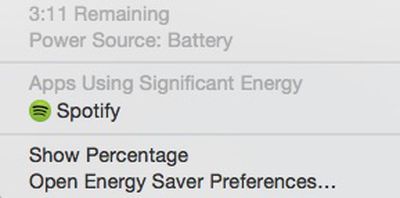
Apps using significant energy
You can quickly check to see which apps are using a significant amount of energy by left clicking on the battery icon in the upper right corner of your laptop's tool bar. From the dropdown list, wait a few seconds until your Mac finishes collecting power usage information. Any apps that are using a lot of energy will be listed.

You can then find the app by searching in Finder and quit the program. Or, you can right click on the app to open Activity Monitor.

Using Activity Monitor

Sometimes, issues causing overheating come from programs that are overusing memory and CPU. The Activity Monitor provides information on how activities are affecting your Mac based on CPU, Memory, Energy, Disk, and Network.

CPU
The CPU pane can help you identify processes that affect your Mac's performance, battery, temperature, and fan. Click the "%CPU" column to sort percentages and see which apps are using the highest percentage.
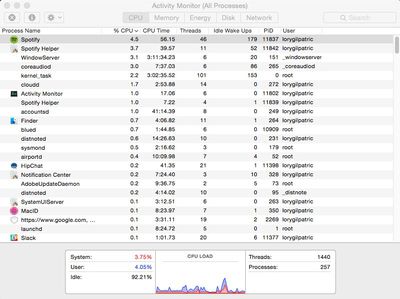
CPU
Individual CPU usage should not be very high. Processes should use less than one percent when not actively in use. Most apps that are in use should not be using more than 10 percent, and that is for such programs as content streaming (like Spotify or Plex). If a program is using a large percentage of your CPU (above 50 or 60 percent) it is probably the culprit.

Memory
The memory pane shows how memory is being used on your Mac. Apps using a lot of memory will affect your startup drive. Click the "Memory" column to sort memory usage. If a process is using an excessive amount of memory, it might affect the performance of your Mac.
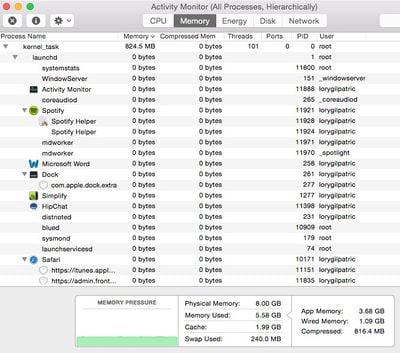
Memory
Energy
The energy pane shows how much energy is being used altogether, and by individual processes. Click the "Energy Impact" column to sort energy consumption. Processes at the top of the list are using the most energy. If a process seems to be gobbling up more energy than you think they should, even when it is closed, there may be a problem with the program.
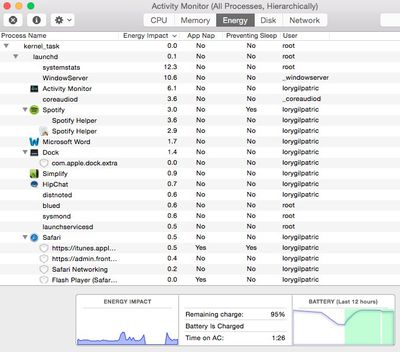
Energy
Disk
The disk pan shows the amount of data being written to and read by your disk. It also provides information on the amount of times your Mac accesses the disk to read and write data.
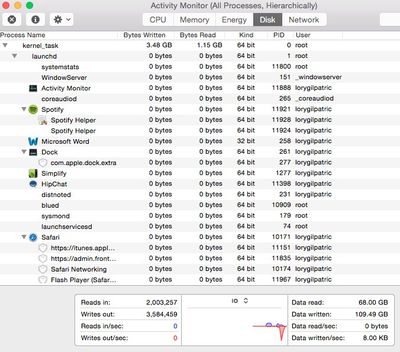
Disk
Network
The network pane shows how much data your Mac is sending or receiving over your network. You can check which processes are sending or receiving the most data from this view.
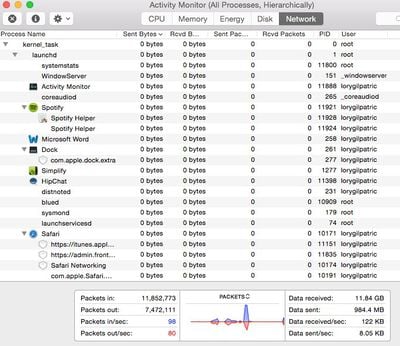
Network

Quitting a Process

If you've discovered the process that is overworking your Mac, you can quit it from Activity Monitor. Highlight the item by selecting it. Then, click on the X in the upper left corner of the screen.
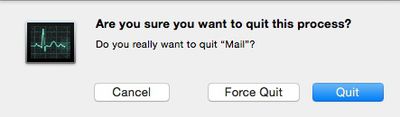
Activity Monitor
You will be provided with the option to quit the process, force quit, or cancel the action. If you quit a process that that could cause data loss or is being used by another process, it won't quit. Nothing will happen.
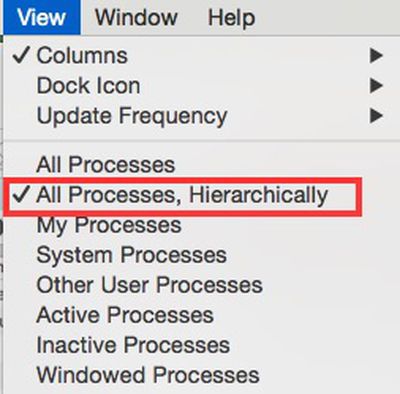
Switch Views in Activity Monitor
If you force quit a process that is being used by another application, it may cause a problem with its performance. You can check to see if a process is being used by another program by changing the window view. Select View from the tool bar. Then select "All Processes, Hierarchically" from the dropdown menu. This will repopulate the processes by their main program.

If there's a process that's overusing your Mac's CPU, memory, or energy and you can't quit it without possibly affecting the performance of the main program it is being used with, the best option is to contact the app's developer.

If you experience an unusual amount of overheating and your Mac's fan starts running continuously, or if your battery is suffering an unusual amount of drainage, troubleshoot the problem by checking the Activity Monitor and shutting down processes that are not in use.


Top Rated Comments

AlecZ Avatar
149 months ago
"sudo killall Chrome" is a good way.
Score: 8 Votes (Like | Disagree)

Popular Stories

apple design award 2025

Apple Announces 2025 Design Award Winners Ahead of WWDC 2025

Tuesday June 3, 2025 10:14 am PDT by
As we wait for WWDC to kick off next Monday, Apple today announced the winners of its annual Apple Design Awards, recognizing apps and games for their innovation, ingenuity, and technical achievement. The 2025 Apple Design Award winners are listed below, with one app and one game selected per category: Delight and Fun - CapWords (App) and Balatro (Game) Innovation - Play (App) and PBJ -...
Apple 2026 Black Friday Event Hero

Apple's Official 2026 Black Friday Offer Starts Rolling Out

Thursday November 26, 2026 8:37 am PST by
Apple's annual four-day Black Friday through Cyber Monday shopping event is now live in Australia, New Zealand, and Thailand, and it will continue to roll out across Europe, the U.S., and Canada as the calendar turns to Friday, November 27 around the world. In the U.S., Apple's terms and conditions say the promotion begins on November 27 at 12 a.m. Pacific Time and ends on November 30 at...
Black Friday Deals 26 1

The 50+ Best Apple Black Friday Deals Still Available on AirPods, iPads, and More

Thursday November 26, 2026 1:19 pm PST by
Black Friday is over, but there are still plenty of great leftover discounts to grab right now. This year we're tracking big sales on popular Apple products like AirPods, iPad, Apple Watch, and much more. Note: MacRumors is an affiliate partner with some of these vendors. When you click a link and make a purchase, we may receive a small payment, which helps us keep the site running....
Latest Stories
Apple Now Aims to Repair Rather Than Replace iPhone Duos With Cracked Screens
5 hours ago
Here Are the Best Apple Black Friday Leftover Deals You Can Get Today
13 hours ago
HomePod Mini 2 in (RED) Seemingly Spotted Ahead of Announcement
1 day ago
Apple's M6 and PROLED MacBook Pro Reach New Low Prices for Black Friday
1 day ago
The MacRumors Show: iPhone Air 2 and iPhone 18 Are Coming
1 day ago
Apple Store in Brisbane Reopening Next Month With New Design
2 days ago
The 60+ Best Black Friday Accessory Deals on iPhone Chargers, TVs, Headphones, and More
13 hours ago
GTA VI Now (Barely) Running on Apple Silicon Macs
2 days ago
The Best Black Friday Streaming Deals on Apple TV, Disney+, and More
2 days ago
Apple TV's 'Carême' Wins International Emmy for Best Drama
2 days ago
iPhone 18 Production Delay Leaves Apple Little Time Before Launch
2 days ago
The Best Black Friday AirPods Deals Still Available
1 day ago
The Best Black Friday Deals on Apple Home Products
2 days ago
The Best Black Friday iPhone Deals Still Available
1 day ago
The Best Black Friday iPad Deals Still Available
1 day ago
The Best Black Friday Apple Watch Deals Still Available
1 day ago
The Best Black Friday AirTag Deals Still Available
1 day ago
The Best Black Friday Mac Deals Still Available
1 day ago
iPhone Share of US Smartphone Market Hits 57% as Rivals Slip
2 days ago
iPhone 20 Pro Rumored to Feature 3D-Printed Titanium Frame
2 days ago
The 50+ Best Apple Black Friday Deals Still Available on AirPods, iPads, and More
5 hours ago
Apple's Official 2026 Black Friday Offer Starts Rolling Out
3 days ago
Halide Adds Fill Light Feature for iPhone Duo
3 days ago
MacBook Air Black Friday Deals Now Live With Massive $399 Savings
3 days ago
Amazon Discounts All MacBook Neo Models by $99 for Black Friday
3 days ago
Kodak Launches Unique AirTag Rival With E-Ink Display
3 days ago
Here's Why the Apple Store is Going Down
3 days ago
Apple Still Working on Giant Foldable iPad That Could Cost $5,000
3 days ago
iPhones Dominate China's Weak Singles' Day Smartphone Sales
3 days ago
iPhone 20 Pro Could Feature Ceramic in Limited-Edition Model
3 days ago
Related Apple News: Travel | Entertainment | Ipad | Motoring | South Africa