Skip to Content

Translate Speech With iPhone's Action Button

by

Overcome communication barriers with the new custom Translation option for the iPhone's Action button. Keep reading to learn how to use it.
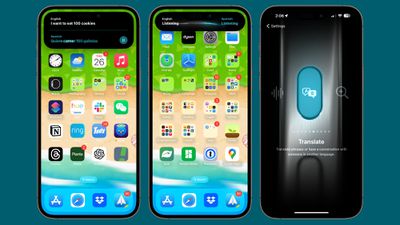
ios 17 translate
If you have an iPhone with an Action button (iPhone 15 Pro, iPhone 16 series, iPhone 17 series) Apple has a translation option for the button that allows you to translate live conversations into multiple languages.

According to Apple, the translation is not just accurate but also context-aware, ensuring that nuances and colloquialisms are captured effectively. The feature should be a boon for travelers, students, and anyone learning a language.

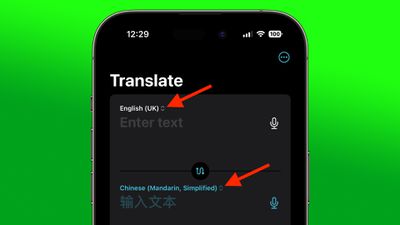
Before you use the Translate function, it's important to choose which language you want to translate. You can do this via Apple's built-in Translate app. On the app's main screen, use the chevrons next to the languages to make your selection.
translate choose language

Assign Translate to Action Button

Once you have chosen your languages, you are ready to select the Translate option for the Action button.

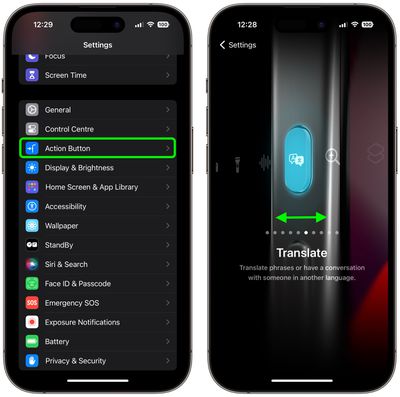
  1. Open the Settings app on your iPhone.
  2. Tap Action Button.
  3. Swipe to the Translate option to enable it.
settings

Using the Translate Function

To Translate your speech to your chosen language, simply press and hold the Action button on your iPhone and begin speaking. Keep holding down the button for as long as you want to capture speech.
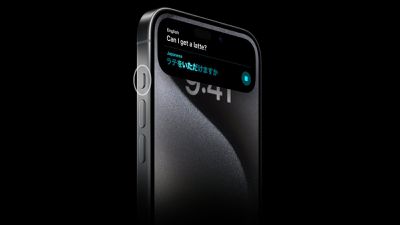
iPhone 15 Pro Action Button Translate
Your iPhone will transcribe what you said and display it in the Dynamic Island, and it will also provide a translation in the chosen language just beneath the transcription. Your iPhone will automatically read aloud the translation, and you can replay it by pressing the play button to the right of it.

Top Rated Comments

Attirex Avatar
39 months ago
Ah, yes, now obnoxious US tourists can shove their phones in locals' faces the world over!

"I SAID DO YOU HAVE COFFEE??? MY PHONE JUST SAID IT IN YOUR LANGUAGE. ARE YOU DEAF AND ALSO STUPID???"
Score: 6 Votes (Like | Disagree)
CausticSoda Avatar
39 months ago
This is woefully inadequate. As an expat and a frequent traveller, I was really looking forward to it. However:
[LIST=1]
* It only translates one way and does not listen for a reply.
* You cannot even press it again to reverse the translation direction. You have to enter the app.
* About 1/3 of the time it simply fails to work (it "listens" but does not respond). That is not due to the internet because I have the languages downloaded as well.
* The autoplay of the translation to sound never works the first time. After it "plays" it automatically, you then have to press repeat play manually, and only then you can hear it.
* There is no locked screen override, so if you press it on a locked screen it turns itself off after a few seconds, so you have to unlock the screen before use which is ridiculous.
* If you want to speak again after the first translation you have to enter the app or long press it off and then long press it back on again.

I am astounded this is the best they can do... If you devote an actual button to it, it should have more functionality and simply work better. I cannot believe whoever was responsible for this thinks it is good enough. Was it actually tested by people who have experience of needing/using translation aids in real life rather than a quick test be someone clueless in Cupertino? If they could make it work properly it would be great and an example of a really good use of the button. If you are in a stressful situation with live conversation, you don't want to be finding and opening the app. You want to be "on it" immediately. Doing it all from one button would be superb. Come on Apple - sort it out please!
Score: 4 Votes (Like | Disagree)
Dirty Mac Avatar
39 months ago

Ah, yes, now obnoxious US tourists can shove their phones in locals' faces the world over!

"I SAID DO YOU HAVE COFFEE??? MY PHONE JUST SAID IT IN YOUR LANGUAGE. ARE YOU DEAF AND ALSO STUPID???"
Maybe Apple will also add a "shouting mode" to the speech output for Americans? ;-)
Score: 3 Votes (Like | Disagree)
AppleFan91 Avatar
39 months ago
But most importantly…. Can I get that wallpaper lol
Score: 2 Votes (Like | Disagree)
CausticSoda Avatar
39 months ago

I was a bit confused by this when I first started playing with it too. However, it’s linked to whether you’re in silent mode or not: with silent mode turned off it’ll speak the translation the first time, without you needing to hit the play button.
I actually tried that and it didn't seem to make any difference, but I'll try again. Thanks for the reply.
Score: 1 Votes (Like | Disagree)
ric22 Avatar
39 months ago

This is woefully inadequate. As an expat and a frequent traveller, I was really looking forward to it. However:
[LIST=1]
* It only translates one way and does not listen for a reply.
* You cannot even press it again to reverse the translation direction. You have to enter the app.
* About 1/3 of the time it simply fails to work (it "listens" but does not respond). That is not due to the internet because I have the languages downloaded as well.
* The autoplay of the translation to sound never works the first time. After it "plays" it automatically, you then have to press repeat play manually, and only then you can hear it.
* There is no locked screen override, so if you press it on a locked screen it turns itself off after a few seconds, so you have to unlock the screen before use which is ridiculous.
* If you want to speak again after the first translation you have to enter the app or long press it off and then long press it back on again.

I am astounded this is the best they can do... If you devote an actual button to it, it should have more functionality and simply work better. I cannot believe whoever was responsible for this thinks it is good enough. Was it actually tested by people who have experience of needing/using translation aids in real life rather than a quick test be someone clueless in Cupertino? If they could make it work properly it would be great and an example of a really good use of the button. If you are in a stressful situation with live conversation, you don't want to be finding and opening the app. You want to be "on it" immediately. Doing it all from one button would be superb. Come on Apple - sort it out please!
Wow. Apple translate was poor in comparison to Google translate when I tried that, but recent updates have made Google translator on iOS more of a pain to use too...
Score: 1 Votes (Like | Disagree)

Popular Stories

silver iphone 18 pro

Apple Rumored to Drop the iPhone's Action Button Next Year

Friday November 6, 2026 6:07 am PST by
Apple plans to merge the iPhone's Action button with the Camera Control starting next year, according to the leaker known as "Instant Digital." In a new post on Weibo, the leaker claimed that a single press of the combined button would open the camera, while a long press would trigger the function assigned to the Action button. They explicitly clarified that the dedicated Action button would ...
apple design award 2025

Apple Announces 2025 Design Award Winners Ahead of WWDC 2025

Tuesday June 3, 2025 10:14 am PDT by
As we wait for WWDC to kick off next Monday, Apple today announced the winners of its annual Apple Design Awards, recognizing apps and games for their innovation, ingenuity, and technical achievement. The 2025 Apple Design Award winners are listed below, with one app and one game selected per category: Delight and Fun - CapWords (App) and Balatro (Game) Innovation - Play (App) and PBJ -...
Apple 2026 Black Friday Event Hero

Apple's Official 2026 Black Friday Offer Starts Rolling Out

Thursday November 26, 2026 8:37 am PST by
Apple's annual four-day Black Friday through Cyber Monday shopping event is now live in Australia, New Zealand, and Thailand, and it will continue to roll out across Europe, the U.S., and Canada as the calendar turns to Friday, November 27 around the world. In the U.S., Apple's terms and conditions say the promotion begins on November 27 at 12 a.m. Pacific Time and ends on November 30 at...
Latest Stories
The 50+ Best Apple Black Friday Deals Still Available on AirPods, iPads, and More
28 minutes ago
HomePod Mini 2 in (RED) Seemingly Spotted Ahead of Announcement
10 hours ago
Apple's M6 and PROLED MacBook Pro Reach New Low Prices for Black Friday
21 hours ago
The MacRumors Show: iPhone Air 2 and iPhone 18 Are Coming
21 hours ago
Apple Store in Brisbane Reopening Next Month With New Design
21 hours ago
The 60+ Best Black Friday Accessory Deals on iPhone Chargers, TVs, Headphones, and More
22 hours ago
GTA VI Now (Barely) Running on Apple Silicon Macs
22 hours ago
The Best Black Friday Streaming Deals on Apple TV, Disney+, and More
23 hours ago
Apple TV's 'Carême' Wins International Emmy for Best Drama
1 day ago
iPhone 18 Production Delay Leaves Apple Little Time Before Launch
1 day ago
The Best Black Friday AirPods Deals Still Available
16 hours ago
The Best Black Friday Deals on Apple Home Products
1 day ago
The Best Black Friday iPhone Deals Still Available
16 hours ago
The Best Black Friday iPad Deals Still Available
16 hours ago
The Best Black Friday Apple Watch Deals Still Available
16 hours ago
The Best Black Friday AirTag Deals Still Available
16 hours ago
The Best Black Friday Mac Deals Still Available
16 hours ago
iPhone Share of US Smartphone Market Hits 57% as Rivals Slip
1 day ago
iPhone 20 Pro Rumored to Feature 3D-Printed Titanium Frame
1 day ago
Apple's Official 2026 Black Friday Offer Starts Rolling Out
2 days ago
Halide Adds Fill Light Feature for iPhone Duo
2 days ago
MacBook Air Black Friday Deals Now Live With Massive $399 Savings
2 days ago
Amazon Discounts All MacBook Neo Models by $99 for Black Friday
2 days ago
Kodak Launches Unique AirTag Rival With E-Ink Display
2 days ago
Here's Why the Apple Store is Going Down
2 days ago
Apple Still Working on Giant Foldable iPad That Could Cost $5,000
2 days ago
iPhones Dominate China's Weak Singles' Day Smartphone Sales
2 days ago
iPhone 20 Pro Could Feature Ceramic in Limited-Edition Model
2 days ago
Apple Faces Korean Regulator Review Over iPhone 16 AI Advertising
2 days ago
Apple Watch Ultra 4 Hits New Best-Ever Price of $649.99 for Black Friday
2 days ago
Related Apple News: Ipad | Health | Motoring | South Africa | Mac






























